
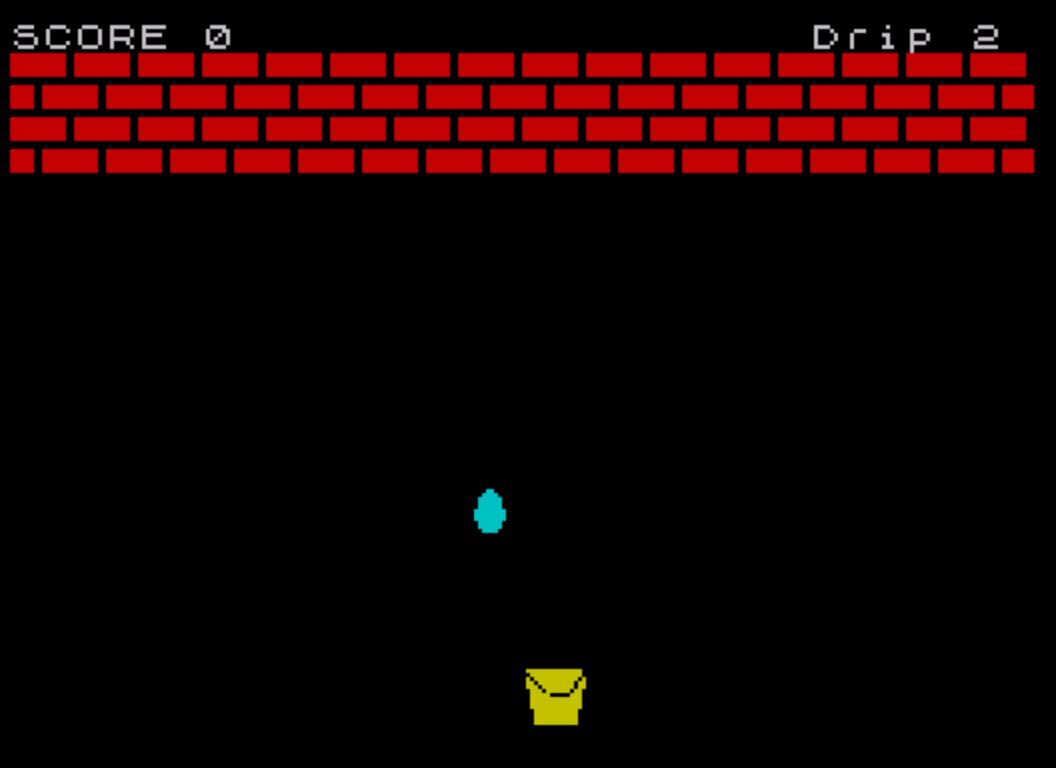
“Call The Plummer” is a catching/dodging arcade game in which the player controls a bucket (drawn with UDGs) at the bottom of the screen to catch drips that fall from random horizontal positions. The game runs for exactly 30 drips, then displays a score and the session high score before restarting. Ten UDG characters (a–j) are loaded from DATA at startup to render the bucket, floor tiles, and falling drip sprite. Player movement is handled in real time inside a FOR loop using INKEY$ checks for keys 5 and 8, giving left/right bucket control as the drip descends row by row.
Program Analysis
Program Structure
The program is organized into a main loop with three supporting subroutines and a UDG initialization block:
- Lines 10–20: REM title and initialization — calls UDG loader (line 310), sets
hi=0. - Lines 30–150: Main game loop — calls screen setup (line 280), draws playfield (line 210), then iterates 30 drips.
- Lines 160–200: Game-over screen — prints score, updates high score, prompts for replay.
- Lines 210–270: Subroutine — clears screen and draws a checkerboard floor using UDGs
\aand\bin INK 2. - Lines 280–300: Subroutine — sets BORDER/PAPER/INK/BRIGHT, resets
sc,v, andd. - Lines 310–330: Subroutine — loads 80 bytes from DATA into UDGs
\athrough\j. - Lines 340–430: DATA — 80 bytes defining 10 UDG bitmaps.
- Line 440: REM comment mapping UDG letters to their escape sequences.
- Line 450: SAVE with autostart.
UDG Sprite Design
Ten UDGs are defined: \a–\b form the alternating checkerboard floor tiles; \c–\f form a 2×2 drip sprite (top-left, top-right, bottom-left, bottom-right); \g–\j form a 2×2 bucket sprite. The DATA is read sequentially starting at USR "\a" (the address of UDG ‘a’), POKEd 8 bytes per character for 10 characters = 80 bytes total.
The DATA at lines 340–430 contains the identifier u used as a stand-in for 0 (since u is an uninitialized variable, it evaluates to 0 at runtime), and also contains PI which evaluates to approximately 3.14159… — when used in a POKE this truncates to the integer 3. The uppercase U at line 420 is anomalous; it is a separate variable from lowercase u and also defaults to 0, so it produces the same result.
Gameplay Mechanics
Each drip is assigned a random column p = INT(RND*30)+1, keeping it within the 32-column display. The drip falls by iterating l from row 6 to 18 in a FOR loop (line 60–110). Player movement is updated at line 100 on every iteration of this loop, meaning the bucket moves once per row the drip descends — a natural speed-balancing approach without any explicit timing.
The bucket position v is clamped between 0 and 28 using Boolean arithmetic: adding the result of (INKEY$="8" AND v<28) and subtracting (INKEY$="5" AND v>0), which evaluate to 1 or 0 respectively.
Collision Detection
Collision is checked at line 90 when the drip reaches row 20 (l+2=20). Three separate OR conditions cover the cases where the drip’s column p overlaps with either of the two bucket columns v+1 or v+2:
v+1=p+1— left bucket column aligns with dripv+2=p+1— right bucket column aligns with dripv+2=p— right bucket column aligns with drip at p directly
This is a purely numeric comparison rather than a sprite-overlap or ATTR check, which is fast but slightly inconsistent in coverage — notably v+1=p is absent, leaving a potential one-column gap on the left side of the bucket.
Screen Layout
| Row(s) | Content |
|---|---|
| 0 | Score display (col 0) and drip counter (col 25) |
| 1–3 | Checkerboard floor (4 rows of UDG tiles, lines 230–260) |
| 6–20 | Drip fall area |
| 20–21 | Bucket position (2×2 UDG sprite) |
Notable Techniques and Anomalies
- The variable
d(drip counter) is initialized asLET d=scat line 290 rather thanLET d=0, relying onschaving just been set to 0 — a space-saving idiom. - Line 200 uses
INPUT ... LINE a$to capture the Enter keypress without requiring the user to type anything, a common Sinclair BASIC “press Enter to continue” pattern. - The drip sprite cleanup at line 120 (
PRINT AT l,p;" ";AT l+1,p;" ") uses spaces to erase the two-cell drip after the loop ends, but since the loop exits withl=19(one past the last iteration at 18), the erase position may be slightly off from the final drawn position at rowsl+1/l+2. - The use of
PIanduas numeric values in DATA is unusual — whileu=0 is intentional, usingPIto represent 3 is an unconventional shorthand; direct use of the integer 3 would be clearer. - The game title in the REM at line 10 spells “Plummer” (typically “Plumber”), which may be an intentional pun or a typo.
Content
Image Gallery
Source Code
   10 REM *** Call The Plummer
   20 GO SUB 310: LET hi=0
   30 GO SUB 280
   40 GO SUB 210
   50 LET p=INT (RND*30)+1: LET d=d+1: PRINT AT 0,25;"Drip ";d
   60 FOR l=6 TO 18
   70 PRINT AT 20,v; INK 6;" \g\h   ";AT 21,v;" \i\j "
   80 PRINT AT l,p; INK 5;"  ";AT l+1,p;"\c\d";AT l+2,p;"\e\f"
   90 IF l+2=20 AND v+1=p+1 OR l+2=20 AND v+2=p+1 OR l+2=20 AND v+2=p THEN LET sc=sc+1: PRINT AT 0,0;"SCORE ";sc
  100 LET v=v+(INKEY$="8" AND v<28)-(INKEY$="5" AND v>0)
  110 NEXT l
  120 PRINT AT l,p;"  ";AT l+1,p;"  "
  130 IF d=30 THEN GO TO 160
  140 BEEP .01,INT (RND*10)+30
  150 GO TO 50
  160 PRINT AT 5,11;"GAME OVER"
  170 PRINT ''''"            You Scored ";sc
  180 IF sc>hi THEN LET hi=sc
  190 PRINT '''"     Highest Score Today ";hi
  200 INPUT "Press ENTER To Play Again."; LINE a$: GO TO 30
  210 CLS
  220 PRINT "SCORE ";sc
  230 PRINT INK 2;"\a\b\a\b\a\b\a\b\a\b\a\b\a\b\a\b\a\b\a\b\a\b\a\b\a\b\a\b\a\b\a\b"
  240 PRINT INK 2;"\b\a\b\a\b\a\b\a\b\a\b\a\b\a\b\a\b\a\b\a\b\a\b\a\b\a\b\a\b\a\b\a"
  250 PRINT INK 2;"\a\b\a\b\a\b\a\b\a\b\a\b\a\b\a\b\a\b\a\b\a\b\a\b\a\b\a\b\a\b\a\b"
  260 PRINT INK 2;"\b\a\b\a\b\a\b\a\b\a\b\a\b\a\b\a\b\a\b\a\b\a\b\a\b\a\b\a\b\a\b\a"
  270 RETURN
  280 BORDER 0: PAPER 0: INK 7: CLS : BRIGHT 0
  290 LET sc=0: LET v=15: LET d=sc
  300 RETURN
  310 FOR a=0 TO 79
  320 READ u: POKE USR "\a"+a,u
  330 NEXT a: RETURN
  340 DATA 255,u,u,u,u,u,0,u
  350 DATA 252,u,u,u,u,u,0,u
  360 DATA 0,u,u,u,u,1,PI,7
  370 DATA 0,u,u,u,u,128,192,224
  380 DATA 7,u,15,u,u,7,u,PI
  390 DATA 224,u,240,u,u,224,u,192
  400 DATA 0,u,127,63,95,111,119,59
  410 DATA 0,u,254,u,253,251,u,246
  420 DATA 62,63,U,u,31,u,u,u
  430 DATA 14,254,u,u,252,u,u,u
  440 REM a=\a b=\b c=\c d=\d e=\e f=\f g=\g h=\h i=\i j=\j
  450 SAVE "LEAKING" LINE 10
Note: Type-in program listings on this website use ZMAKEBAS notation for graphics characters.