
This program generates printed cassette tape case labels by outputting formatted text to both the screen and a printer via paired PRINT and LPRINT statements. It prompts the user for Side A and Side B titles, then lays out a label with dashed and solid dividing lines, spacing loops, and fold guides intended to fit inside a cassette case’s clear window. The instruction subroutine at line 1000 explains how to cut, trim, fold, and optionally cement the printed label to the cassette. String widths in the instruction text are manually wrapped to fit the printer’s line width by breaking words across lines within the string literals.
Program Analysis
Program Structure
The program is divided into three logical sections:
- Title banner (lines 5–39): Displays an on-screen title card, calls the instruction subroutine, and prints separator lines.
- Label body (lines 40–200): Collects Side A and Side B titles via
INPUT, then prints and LPRINTs the formatted cassette label with spacing, dividers, and fold markers. - Instruction subroutine (lines 1000–1090): Outputs usage instructions both to screen and printer, then returns. Line 1100 is a redundant
STOPafter theRETURN.
Parallel PRINT / LPRINT Pattern
Nearly every output statement appears in pairs: a PRINT to the screen immediately followed by an LPRINT to the printer. This keeps the screen display and the hard-copy output synchronized. The same pattern is applied inside the subroutine. A minor exception is line 1040, which sends two lines only to the printer (LPRINT), not to the screen — the “BETTER THAN TYPING…” message is printer-only.
Spacing and Layout
Vertical spacing is controlled by FOR loops that emit blank lines, e.g., FOR I=1 TO 20: PRINT : LPRINT : NEXT I at line 60 to advance paper before the label content begins. Horizontal alignment uses TAB at lines 165–166 to center “END OF PROGRAM” between border asterisks. Dividing lines alternate between dashes (---…) and asterisks (***…) to visually distinguish cut/fold boundaries.
Manual Word Wrap in String Literals
The instruction text in lines 1010–1031 is manually broken to fit the printer’s column width. Words are split across string boundaries mid-word (e.g., "con-tents", "perm- anently") rather than at natural word boundaries. This is a deliberate layout technique to keep each string segment exactly the right width for the output device, avoiding unwanted line wrapping on narrow printers.
Subroutine and Flow Control
The subroutine at line 1000 is called via GO SUB 1000 at line 36 and terminates with RETURN at line 1090. Line 1100 contains a STOP that is unreachable — the RETURN at 1090 always transfers control back to the caller before 1100 is reached. The main program ends with STOP at line 200. Line 9999 contains a SAVE with LINE 1 for auto-run on load.
Variables
| Variable | Purpose |
|---|---|
A$ | User-entered title for Side A |
B$ | User-entered title for Side B |
I | Loop counter for blank-line spacing |
Anomalies and Notes
- Line 1100 (
STOP) is dead code; it follows aRETURNand can never execute. - The
PAUSE 100: CLSat line 39 gives the user a moment to read the on-screen banner before clearing, a common interactive UX idiom. - Line 60 advances 20 blank lines before the label — likely to skip over any printer header area and position the label correctly on the paper relative to the cassette case window.
- The instruction text hyphenates words across string literals (
"con-tents","perm- anently") to hit exact column counts for the printer, which is a pragmatic but unusual formatting approach.
Image Gallery
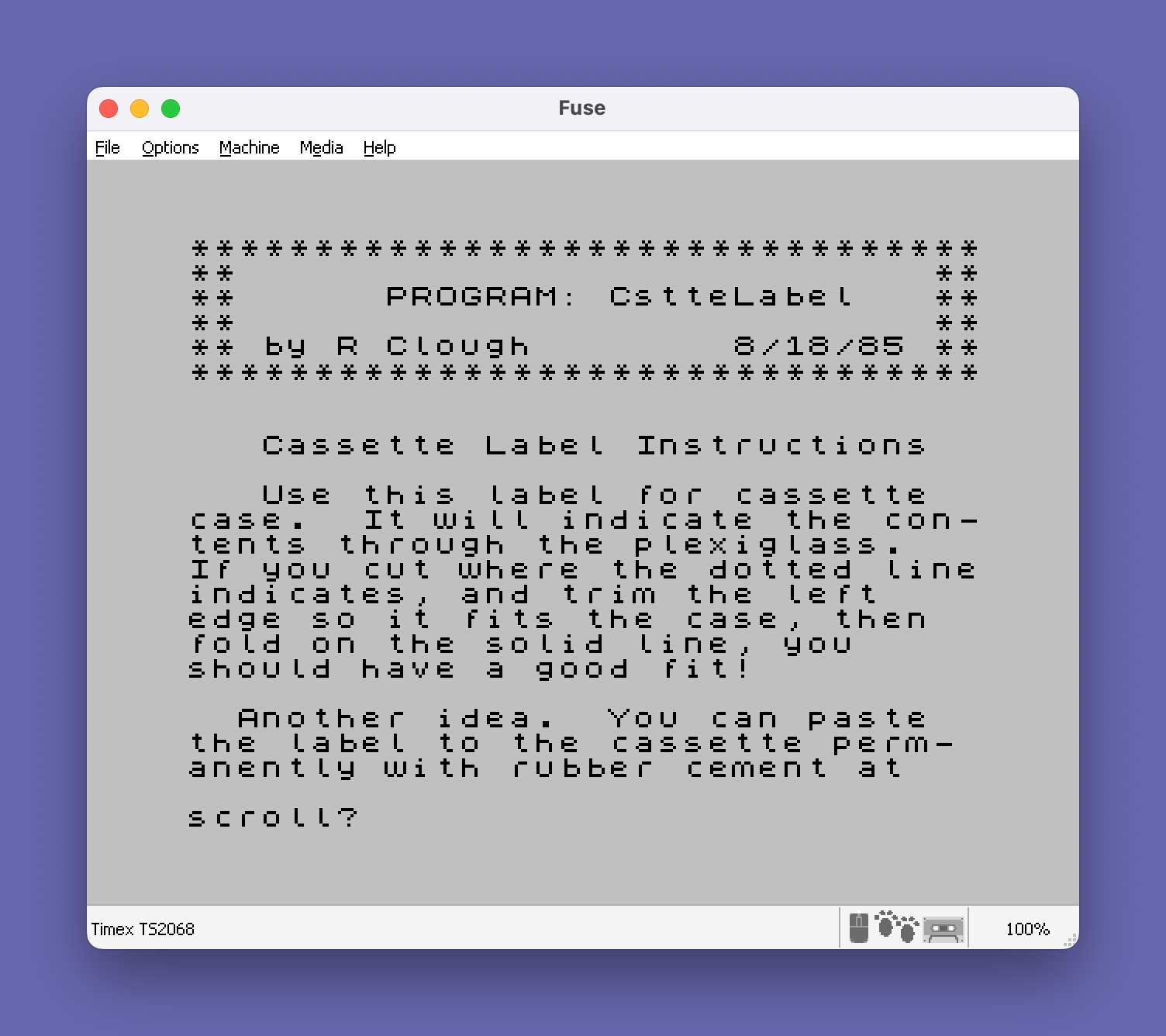
Source Code
    5 REM ** Titles for top of cassette case.
   10 PRINT "********************************"
   15 PRINT "**                            **"
   20 PRINT "**      PROGRAM: CstteLabel   **"
   25 PRINT "**                            **"
   30 PRINT "** by R Clough        8/18/85 **"
   35 PRINT "********************************": PRINT : PRINT
   36 GO SUB 1000
   37 PRINT "--------------------------------"
   38 LPRINT "--------------------------------"
   39 PAUSE 100: CLS : PRINT "*": LPRINT "*"
   40 REM * Titles for end window of cassette case.
   41 PRINT "Title SIDE A"
   45 INPUT A$
   50 PRINT "Title SIDE B"
   55 INPUT B$
   60 CLS : FOR I=1 TO 20:  PRINT : LPRINT : NEXT I
   61 LPRINT "________________________________"
   65 PRINT "SIDE A- ";A$: LPRINT "SIDE A- ";A$
   70 PRINT "SIDE B- ";B$: LPRINT "SIDE B- ";B$
   85 FOR I=1 TO 7:  PRINT : LPRINT : NEXT I
  110 PRINT "--------------------------------"
  111 LPRINT "--------------------------------"
  115 PRINT "SIDE A- ";A$: LPRINT "SIDE A- ";A$
  120 FOR I=1 TO 4:  PRINT : LPRINT : NEXT I
  125 PRINT "--------------------------------"
  126 LPRINT "--------------------------------"
  130 PRINT "SIDE B- ";B$: LPRINT "SIDE B- ";B$
  135 FOR I=1 TO 4: PRINT : LPRINT : NEXT I
  140 PRINT "--------------------------------"
  141 LPRINT "--------------------------------"
  145 FOR I=1 TO 4: PRINT : LPRINT : NEXT I
  160 PRINT "********************************"
  161 LPRINT "********************************"
  165 PRINT "*";TAB 9;"END OF PROGRAM";TAB 31;"*"
  166 LPRINT "*";TAB 9;"END OF PROGRAM";TAB 31;"*"
  170 PRINT "********************************"
  171 LPRINT "********************************"
  175 FOR I=1 TO 3: PRINT : LPRINT : NEXT I
  200 STOP
 1000 PRINT "   Cassette Label Instructions": PRINT
 1001 LPRINT : LPRINT : LPRINT "   Cassette Label Instructions": LPRINT
 1010 PRINT "   Use this label for cassette  case.  It will indicate the con-tents through the plexiglass."
 1011 LPRINT "   Use this label for cassette  case.  It will indicate the con-tents through the plexiglass."
 1020 PRINT "If you cut where the dotted lineindicates, and trim the left    edge so it fits the case, then  fold on the solid line, you     should have a good fit!"
 1021 LPRINT "If you cut where the dotted lineindicates, and trim the left    edge so it fits the case, then  fold on the solid line, you     should have a good fit!"
 1030 PRINT : PRINT "  Another idea.  You can paste  the label to the cassette perm- anently with rubber cement at   the same time you punch out the tabs."
 1031 LPRINT : LPRINT "  Another idea.  You can paste  the label to the cassette perm- anently with rubber cement at   the same time you punch out the tabs."
 1040 LPRINT : LPRINT "BETTER THAN TYPING OR WRITING   IT BY HAND, EH?"
 1045 FOR I=1 TO 5:  PRINT : LPRINT : NEXT I
 1090 RETURN
 1100 STOP
 9999 SAVE "cssetlabel" LINE 1
Note: Type-in program listings on this website use ZMAKEBAS notation for graphics characters.