
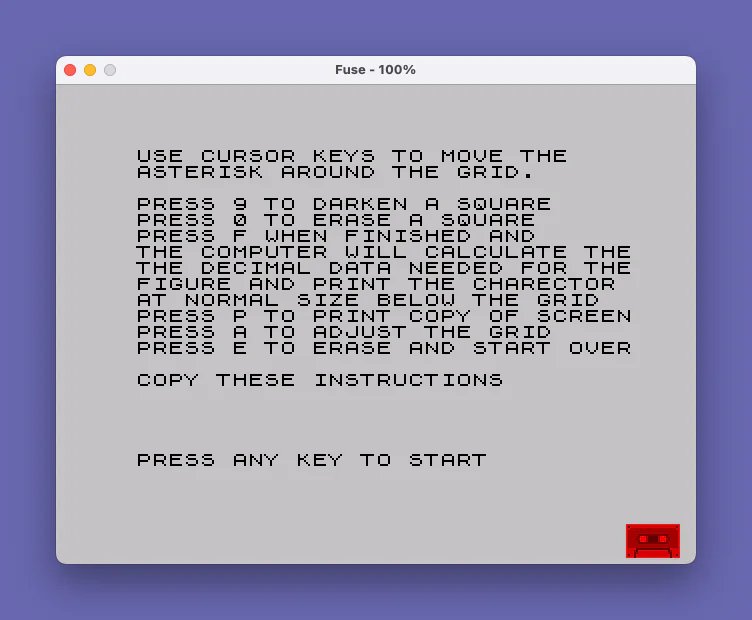
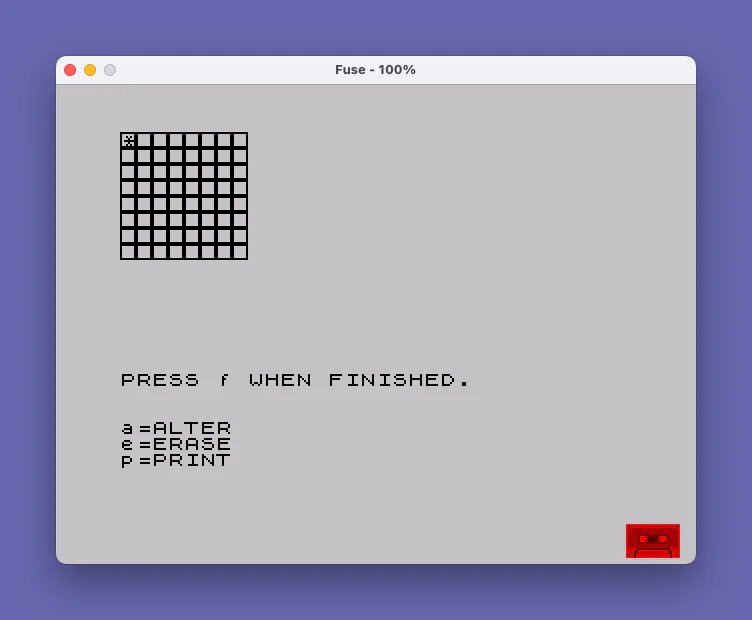
This program is a custom character designer that lets users draw an 8×8 pixel pattern on a grid and then calculates the decimal byte values needed to define a user-defined graphic (UDG). The grid is displayed using a UDG character (initially POKEd with a border pattern of 255,129,129,129,129,129,129,255), and the user moves an asterisk cursor around it using keys 5, 6, 7, and 8. Pressing 9 fills a cell with a solid block graphic and pressing 0 clears it back to the UDG background tile. When finished, the program uses POINT to scan each cell at fixed screen coordinates, reconstructing the 8 bytes of pixel data by testing individual pixel positions and accumulating powers of two, then POKEs the result into the UDG memory area starting at address 65376.
Program Analysis
Program Structure
The program is divided into four logical phases: an instruction screen (lines 1–16), grid initialization (lines 18–25), the interactive drawing loop (lines 30–155), and the pixel-scanning and output phase (lines 160–240). Line 16 uses PAUSE 6000 to display instructions for up to about one minute before automatically proceeding. Control returns to line 18 on restart via RUN 18, skipping the instruction screen.
Grid Initialization
Lines 18–25 set up the drawing canvas. A UDG (user-defined graphic referenced as \a) is first defined via POKE to addresses 65368–65375 with the byte pattern 255,129,129,129,129,129,129,255, creating a hollow square border tile. Eight rows of eight of these characters are then PRINTed to fill an 8×8 grid on screen. A second UDG slot beginning at 65376 (referenced as \b in line 215) is the target for the designed character’s computed bytes.
Cursor Movement and Drawing
The cursor is an asterisk displayed with PRINT OVER 1, which uses XOR-mode printing so it does not destroy the underlying grid cell. Keys 5, 6, 7, and 8 move the cursor using arithmetic on the direction booleans (lines 135–140), a compact Sinclair BASIC idiom. Boundary clamping at lines 145–150 saves the previous row/column in pr and pc and restores them if out of range. Pressing 9 prints a solid block graphic (\::, the full block character) and pressing 0 restores the cell to the border-tile UDG (\a).
Pixel Scanning and Byte Calculation
The most technically interesting section is lines 170–210. After the user presses F, the program scans the 8×8 grid using the POINT function, which returns 1 if a screen pixel is set. The outer loop (line 170) steps variable a from 171 down to 115 in steps of −8, covering the 8 pixel rows of the grid in screen Y coordinates. The inner loop (line 180) steps i from 4 to 60 in steps of 8, covering 8 pixel columns in screen X coordinates. For each lit pixel, the corresponding power of two (2^bit) is added to the current byte accumulator in array d.
| Variable | Role |
|---|---|
a | Screen Y coordinate of current grid row (171 down to 115) |
i | Screen X coordinate of current grid column (4 to 60) |
bit | Bit weight, counts down 7→0 within each row |
byte | Current row index (0–7) into array d |
d() | 8-element array holding computed byte values |
UDG Redefinition
Each computed byte is POKEd to addresses 65376–65383 (line 200), redefining the second UDG slot (\b). After all eight bytes are computed, line 215 prints this newly defined character at screen position (10,5), allowing the user to see the result at normal character size. The \b UDG is distinct from the grid-tile UDG (\a at 65368), so filling cells during drawing does not corrupt the output slot.
Post-Design Options
Lines 220–240 implement a post-completion key-wait loop. The program waits for a keypress and dispatches: a returns to the drawing loop at line 100, e restarts the whole design session via RUN 18, and p triggers COPY to send the screen to a printer. The loop at line 220 uses the INKEY$="" guard idiom three times in succession rather than storing the key, which means a very brief keypress could be missed between checks — a minor timing anomaly.
Notable Bugs and Anomalies
- Line 105 uses
IF INKEY$="" THEN GO TO 105to wait for a key, but line 110 then readsINKEY$again intom$. If the key is released between lines 105 and 110,m$will be empty and none of the action branches will fire, sending control back to line 100 harmlessly but silently dropping the input. - The word “CHARECTOR” is misspelled twice (lines 9 and the REM on line 1); this is a typo in the original listing, not a program error.
- Line 25 prints eight rows of eight
\aUDG characters, but the cursor starts atr=0, c=0(line 30) which corresponds to the top-left screen row, not necessarily aligned to the grid if the PRINT position has advanced. In practice the grid occupies rows 0–7 of the screen, so the cursor coordinates and POINT scan coordinates are consistent. - The POINT Y coordinates (171 down to 115) and X coordinates (4 to 60) assume the grid is rendered starting at the very top-left of the screen (row 0, column 0). If the screen scrolls or the grid shifts, the POINT scan will read incorrect pixels.
Image Gallery
Source Code
    1 REM "CHAR"ECTOR DESIGN: REM M .JESKIN,LI,NY: CLS
    2 PRINT AT 1,1;"USE CURSOR KEYS TO MOVE THE"
    3 PRINT AT 2,1;"ASTERISK AROUND THE GRID."
    4 PRINT AT 4,1;"PRESS 9 TO DARKEN A SQUARE"
    5 PRINT AT 5,1;"PRESS 0 TO ERASE A SQUARE"
    6 PRINT AT 6,1;"PRESS F WHEN FINISHED AND"
    7 PRINT AT 7,1;"THE COMPUTER WILL CALCULATE THE"
    8 PRINT AT 8,1;"THE DECIMAL DATA NEEDED FOR THE"
    9 PRINT AT 9,1;"FIGURE AND PRINT THE CHARECTOR"
   10 PRINT AT 10,1;"AT NORMAL SIZE BELOW THE GRID"
   11 PRINT AT 11,1;"PRESS P TO PRINT COPY OF SCREEN"
   12 PRINT AT 12,1;"PRESS A TO ADJUST THE GRID"
   13 PRINT AT 13,1;"PRESS E TO ERASE AND START OVER"
   14 PRINT AT 15,1;"COPY THESE INSTRUCTIONS "
   15 PRINT AT 20,1;"PRESS ANY KEY TO START"
   16 PAUSE 6000: RUN 18
   18 FOR n=0 TO 7: READ d
   19 POKE 65368+n,d: NEXT n
   20 DATA 255,129,129,129,129,129,129,255
   25 FOR i=1 TO 8: PRINT "\a\a\a\a\a\a\a\a": NEXT i
   30 LET r=0: LET c=0
   35 PRINT AT 15,0;"PRESS f WHEN FINISHED."
   45 PRINT : PRINT
   50 PRINT "a=ALTER"'"e=ERASE"'"p=PRINT"
  100 PRINT OVER 1;AT r,c;"*"
  105 IF INKEY$="" THEN GO TO 105
  110 LET m$=INKEY$: BEEP .01,20
  115 IF m$="f" THEN GO TO 160
  120 IF m$="9" THEN PRINT AT r,c;"\::": BEEP .05,-10: GO TO 100
  125 IF m$="0" THEN PRINT AT r,c;"\a": BEEP .05,50: GO TO 100
  130 LET pr=r: LET pc=c
  135 LET r=r+(m$="6")-(m$="7")
  140 LET c=c+(m$="8")-(m$="5")
  145 IF c<0 OR c>7 THEN LET c=pc
  150 IF r<0 OR r>7 THEN LET r=pr
  155 PAUSE 3: PRINT OVER 1;AT pr,pc;"*": GO TO 100
  160 LET byte=0: DIM d(8)
  165 PRINT OVER 1;AT r,c;"*"
  170 FOR a=171 TO 115 STEP -8
  175 LET bit=8
  180 FOR i=4 TO 60 STEP 8
  185 LET bit=bit-1
  190 IF POINT (i,a) THEN LET d(byte+1)=d(byte +1)+2^bit
  195 PRINT AT byte,10;"  ";AT byte,10;d(byte+1): NEXT i
  200 POKE 65376+byte, d(byte+1)
  205 LET byte=byte+1
  210 NEXT a
  215 PRINT AT 10,5;"\b"
  220 IF INKEY$="" THEN GO TO 220
  225 IF INKEY$="a" THEN GO TO 100
  230 IF INKEY$="e" THEN RUN 18
  235 IF INKEY$="p" THEN COPY
  240 GO TO 220
Note: Type-in program listings on this website use ZMAKEBAS notation for graphics characters.