
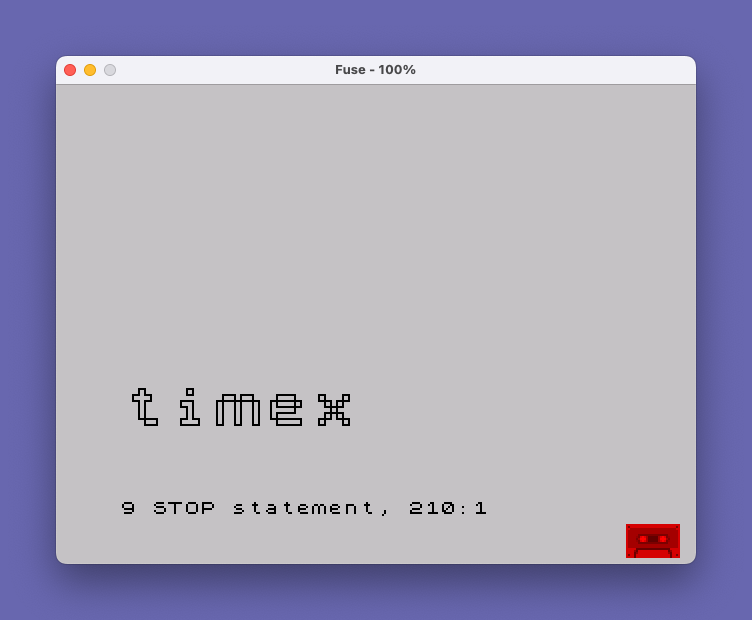
This program reads a word of up to 10 characters from the user and then redraws it enlarged in a pixel-by-pixel style using PLOT and DRAW commands. It scans the top portion of the display (pixel rows 168–175) where the word is printed using INK 7, then uses POINT to detect each set pixel. For every lit pixel found, a subroutine at line 220 draws a small 3×3 square outline at a scaled position lower on the screen. The horizontal and vertical positions of the enlarged output are tracked with variables `l` and `h`, which increment by 3 for each pixel column and row respectively.
Program Analysis
Program Structure
The program is organised into three logical phases:
- Input and validation (lines 100–140): Initialises position counters
landh, accepts a word viaLINEinput, and rejects entries longer than 10 characters with a flashing warning. - Scanning loop (lines 150–200): Prints the word at the top of the screen, then iterates over each pixel column and row in the region where the text was rendered, using
POINTto detect set pixels. - Square-drawing subroutine (lines 220–260): For each detected pixel, draws a 3×3 outline square at a scaled position on the lower half of the screen, but only draws each side if the neighbouring pixel is not set (creating a merged/connected appearance).
Pixel Scanning Technique
The word is printed at AT 0,0 with INK 7. The outer loop (FOR a=0 TO LEN a$*8) iterates pixel columns — each character cell is 8 pixels wide, so this covers exactly the rendered text width. The inner loop (FOR b=175 TO 168 STEP -1) scans 8 pixel rows (one character row’s height) from bottom to top. POINT (a,b) checks whether each pixel is lit.
The variable h tracks the vertical offset within a column (reset to 0 after each column), incrementing by 3 per pixel row. The variable l tracks the horizontal offset, incrementing by 3 per pixel column. This gives a 3× magnification of the original character bitmaps.
Subroutine at Line 220 — Conditional Edge Drawing
Rather than filling each magnified pixel as a solid square, the subroutine draws only the edges of each 3×3 square that border a non-set neighbour pixel. This creates an outline effect that merges adjacent filled pixels, similar to an isoline or connected-component boundary. Each of the four sides is tested:
- Left edge:
IF POINT (a-1,b)=0 THEN DRAW 0,3 - Bottom edge:
IF POINT (a,b+1)=0 THEN DRAW 3,0 - Right edge:
IF POINT (a+1,b)=0 THEN DRAW 0,-3 - Top edge:
IF POINT (a,b-1)=0 THEN DRAW -3,0
Note that after each conditional DRAW, the graphics cursor position has moved only if the draw was executed. This means the PLOT calls at the start of lines 230–250 are essential to reposition the cursor to the correct corner of the square before testing the next edge.
Key BASIC Idioms
INPUT "" ; LINE a$— TheLINEkeyword captures the whole input line including spaces without requiring quotes, a standard idiom for free-form string entry.PRINT AT 10,0;,,— Using bare commas after aPRINT ATto overprint and clear the flash warning message with spaces.FLASH 1; BRIGHT 1;— Combined attribute effects used for the error message at line 140.
Bugs and Anomalies
There is a notable positioning issue: the counters l and h are initialised at line 100 but are not reset if the user enters a word longer than 10 characters and is sent back to line 130 via GO TO 130. If the user triggers the error message after the first input, l and h remain at 0 (since no scan has occurred), so in practice this is harmless on the first attempt. However, the program stops with STOP at line 210 rather than looping back to allow another word, so it is a single-use program per run.
The scan at line 160 uses FOR a=0 TO LEN a$*8, which includes one extra column beyond the text (the loop runs LEN a$*8 + 1 iterations). This is a minor off-by-one that is functionally harmless since the extra column will always read as blank pixels.
Variable Summary
| Variable | Role |
|---|---|
l | Horizontal plot position for enlarged output (increments by 3 per pixel column) |
h | Vertical offset within a column for enlarged output (increments by 3 per pixel row, reset per column) |
a$ | The input word (up to 10 characters) |
a | Pixel column index (also reused as the outer FOR loop variable) |
b | Pixel row index (inner FOR loop variable, scans rows 175 down to 168) |
Image Gallery
Source Code
    1 REM "CHARACTERS"
    2 REM By Jasper Visser
    3 REM ZX Computing Monthly
  100 LET l=0: LET h=0
  130 INPUT "A word please.."; LINE a$
  140 IF LEN a$>10 THEN PRINT AT 10,0; FLASH 1; BRIGHT 1;"1  -  10 CHARACTERS !!": PAUSE 50: PRINT AT 10,0;,,: GO TO 130
  150 PRINT AT 0,0; INK 7;a$
  160 FOR a=0 TO LEN a$*8
  170 FOR b=175 TO 168 STEP -1
  180 IF POINT (a,b)=1 THEN GO SUB 220
  190 LET h=h+3: NEXT b: LET h=0: LET l=l+3: NEXT a
  200 PRINT AT 0,0;,,
  210 STOP
  220 PLOT l,50-(h+3): IF POINT (a-1,b)=0 THEN DRAW 0,3
  230 PLOT l,50-h: IF POINT (a,b+1)=0 THEN DRAW 3,0
  240 PLOT l+3,50-h: IF POINT (a+1,b)=0 THEN DRAW 0,-3
  250 PLOT l+3,50-(h+3): IF POINT (a,b-1)=0 THEN DRAW -3,0
  260 RETURN
Note: Type-in program listings on this website use ZMAKEBAS notation for graphics characters.