
This program helps users reconcile a bank statement with their checkbook by calculating an adjusted balance and correction figure. It accepts a starting bank balance, then collects outstanding check numbers and amounts in a loop (terminated by entering zero as the check number), followed by outstanding deposit amounts (terminated by entering zero). The program computes a new balance by subtracting total checks and adding total deposits, then compares it against the user’s recorded checkbook balance to produce a correction value. All inputs and results are echoed to both the screen via PRINT and a printer via LPRINT, producing a permanent paper record of the reconciliation.
Program Analysis
Program Structure
The program is divided into five logical phases, all written in straightforward sequential BASIC with two input loops:
- Header & setup (lines 100–180): Prints titles to screen and printer, then prompts for the statement date and opening bank balance.
- Check entry loop (lines 190–240): Repeatedly inputs a check number and amount, accumulating a running total in
CTOTAL. A zero check number exits the loop viaIF CHECK=0 THEN GO TO 250. - Deposit entry loop (lines 310–350): Similarly accumulates deposit amounts in
DTOTAL, exiting when a zero amount is entered. - Balance calculation (lines 360–395): Computes
NBAL = BALANCE - CTOTAL + DTOTAL, prompts for the user’s own checkbook balance (CBAL), and prints the discrepancy. - Termination (line 400): Prints “END”.
Dual Output Strategy
Every significant data item is sent to both the screen with PRINT and the printer with LPRINT. Each INPUT statement is immediately followed by a PRINT of the variable to make the entered value visible on screen, since INPUT on this platform does not automatically leave the value displayed after the prompt line is cleared. The LPRINT lines create a permanent paper ledger of the reconciliation session.
Key Variables
| Variable | Purpose |
|---|---|
D$ | Statement date string |
BALANCE | Opening bank balance from statement |
CHECK | Current check number (0 to terminate loop) |
AMT | Amount of current outstanding check |
CTOTAL | Running total of all outstanding checks |
DAMT | Amount of current outstanding deposit |
DTOTAL | Running total of all outstanding deposits |
NBAL | Computed adjusted new balance |
CBAL | User’s own checkbook register balance |
Notable Techniques and Idioms
- The sentinel-value loop pattern (enter 0 to stop) is used for both the check and deposit entry phases, a common technique when the number of entries is unknown in advance.
- The check loop (lines 200–240) requests the check number first; if it is zero the amount prompt is skipped entirely, avoiding an extraneous
LPRINTof a dummy amount. - The deposit loop (lines 320–350) uses the deposit amount itself as the sentinel, meaning a zero deposit terminates the loop without being added to
DTOTAL. This is slightly asymmetric with the check loop but functionally correct. - Inline
PRINTof entered values afterINPUT(e.g., line 200:INPUT CHECK: PRINT CHECK) is a necessary workaround to keep entered data visible on screen.
Potential Anomalies
- The check loop prints the check number to the printer (line 205) before checking whether it is zero (line 210). This means when the user enters 0 to terminate, the value “0” is still sent to the printer as a spurious “CHECK NUMBER. 0” line before the program moves on.
- There is no input validation; entering a negative amount for a check or deposit would silently corrupt the totals.
- The program has no mechanism to correct a mis-entered value; an error requires restarting from the beginning.
- Floating-point arithmetic may produce small rounding errors in the correction figure when amounts involve cents, a common limitation of BASIC numeric storage on this platform.
Image Gallery
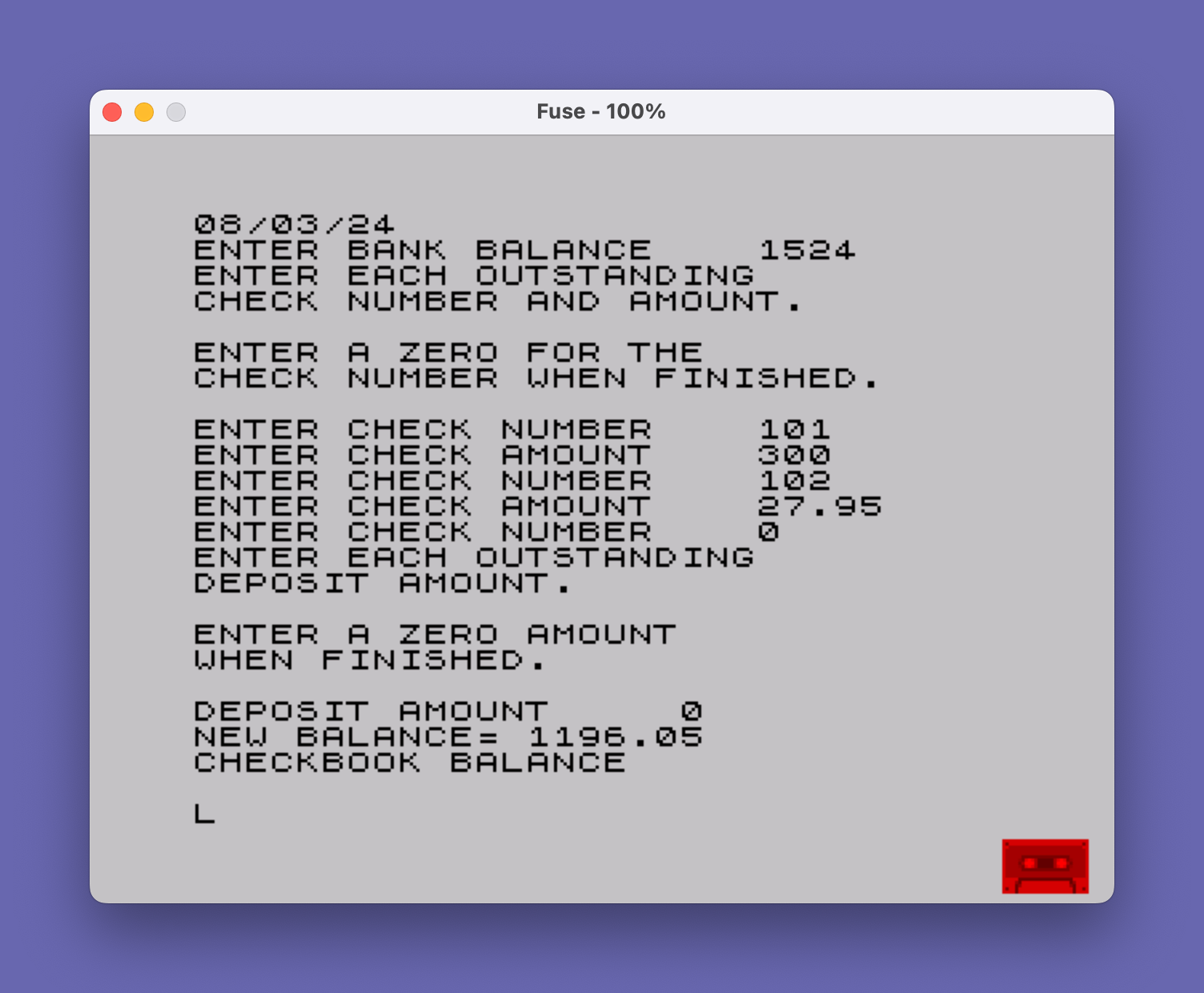
Source Code
  100 REM PROGRAM *"CHECKBOOK"*
  101 PRINT "       *STATEMENT OF ACCOUNT*"
  102 LPRINT "STATEMENT OF ACCOUNT"
  105 PRINT "STATEMENT DATE   ": INPUT D$: PRINT D$
  110 LPRINT "STATEMENT DATE    ";D$
  120 PRINT "ENTER BANK BALANCE    ";: INPUT BALANCE: PRINT BALANCE
  125 LPRINT "BANK BALANCE    ";BALANCE
  130 PRINT "ENTER EACH OUTSTANDING"
  140 PRINT "CHECK NUMBER AND AMOUNT."
  150 PRINT
  160 PRINT "ENTER A ZERO FOR THE"
  170 PRINT "CHECK NUMBER WHEN FINISHED."
  180 PRINT
  190 LET CTOTAL=0
  200 PRINT "ENTER CHECK NUMBER    ";: INPUT CHECK: PRINT CHECK
  205 LPRINT "CHECK NUMBER.  ";CHECK
  210 IF CHECK=0 THEN GO TO 250
  220 PRINT "ENTER CHECK AMOUNT    ";: INPUT AMT: PRINT AMT
  225 LPRINT "CHECK AMOUNT ";AMT
  230 LET CTOTAL=CTOTAL+AMT
  240 GO TO 200
  250 PRINT "ENTER EACH OUTSTANDING"
  260 PRINT "DEPOSIT AMOUNT."
  270 PRINT
  280 PRINT "ENTER A ZERO AMOUNT"
  290 PRINT "WHEN FINISHED."
  300 PRINT
  310 LET DTOTAL=0
  320 PRINT "DEPOSIT AMOUNT     ";: INPUT DAMT: PRINT DAMT
  325 LPRINT "DEPOSIT AMOUNT   ";DAMT
  330 IF DAMT=0 THEN GO TO 360
  340 LET DTOTAL=DTOTAL+DAMT
  350 GO TO 320
  360 LET NBAL=BALANCE-CTOTAL+DTOTAL
  365 LPRINT "NEW BALANCE    ";NBAL
  370 PRINT "NEW BALANCE= ";NBAL
  380 PRINT "CHECKBOOK BALANCE   ";: INPUT CBAL: PRINT CBAL
  385 LPRINT "CHECKBOOK BALANCE    ";CBAL
  390 PRINT "CORRECTION= ";NBAL-CBAL
  395 LPRINT "CORRECTION=    ";NBAL-CBAL
  400 PRINT "END"
Note: Type-in program listings on this website use ZMAKEBAS notation for graphics characters.