
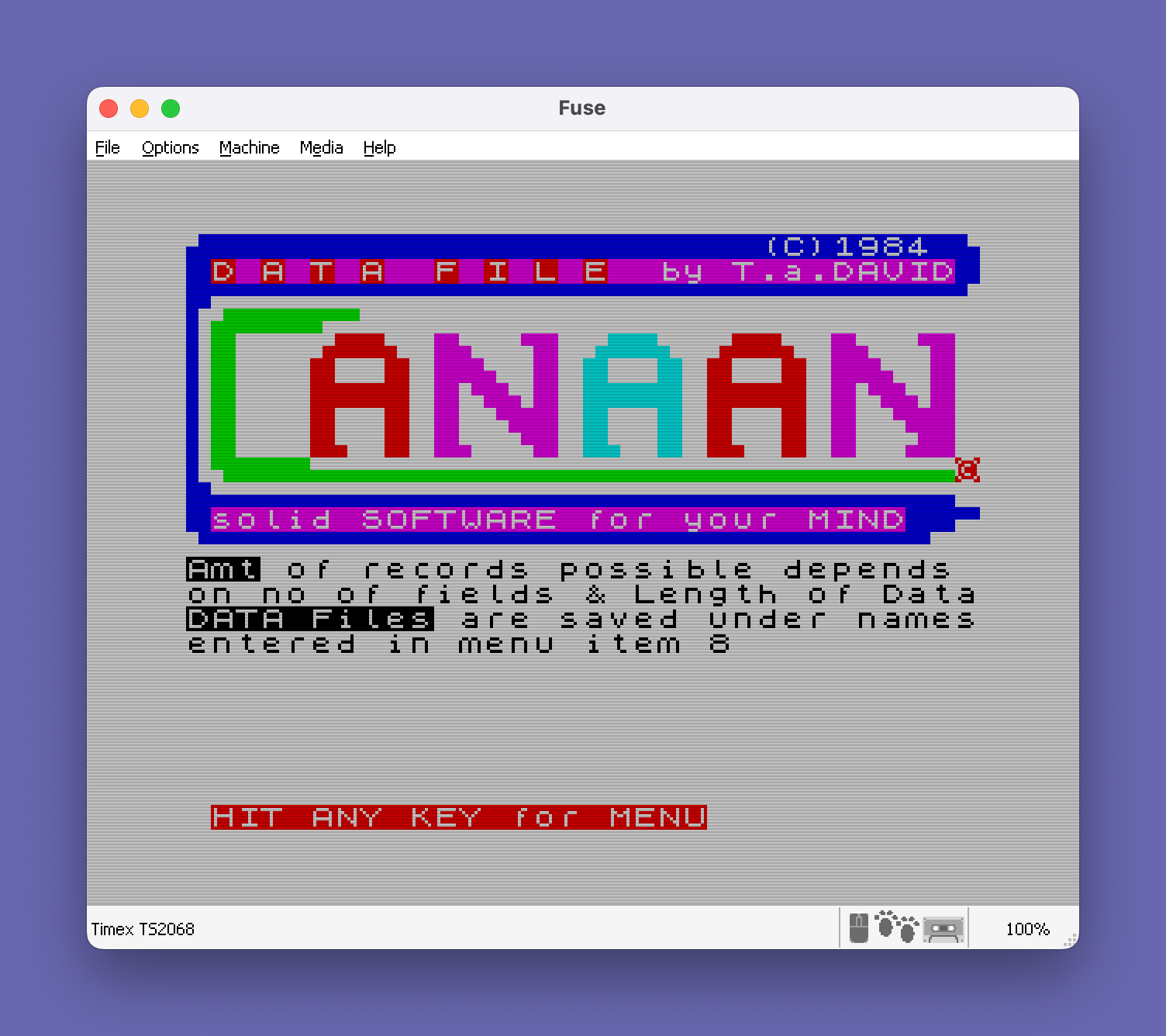
This program is a general-purpose flat-file database manager that supports configurable record fields, allowing users to define field names and lengths, then add, change, delete, print, search, and sort records. All records are stored in a single large string array dimensioned at runtime based on user-specified field widths and record count, with field boundaries tracked in a two-dimensional array `d(f,2)`. The save/load routine uses BASIC’s `SAVE … LINE` to create an auto-loading file and a separate `SAVE … CODE` block at address 63999 for the data. A printer setup routine supports both a Timex and a Centronics interface, configuring column width and driver addresses via direct POKE statements to known system addresses. The splash screen at line 14090 uses block graphics characters to render a decorative border and credits the program to “T.a.DAVID” with a 1984 copyright.
Program Analysis
Program Structure
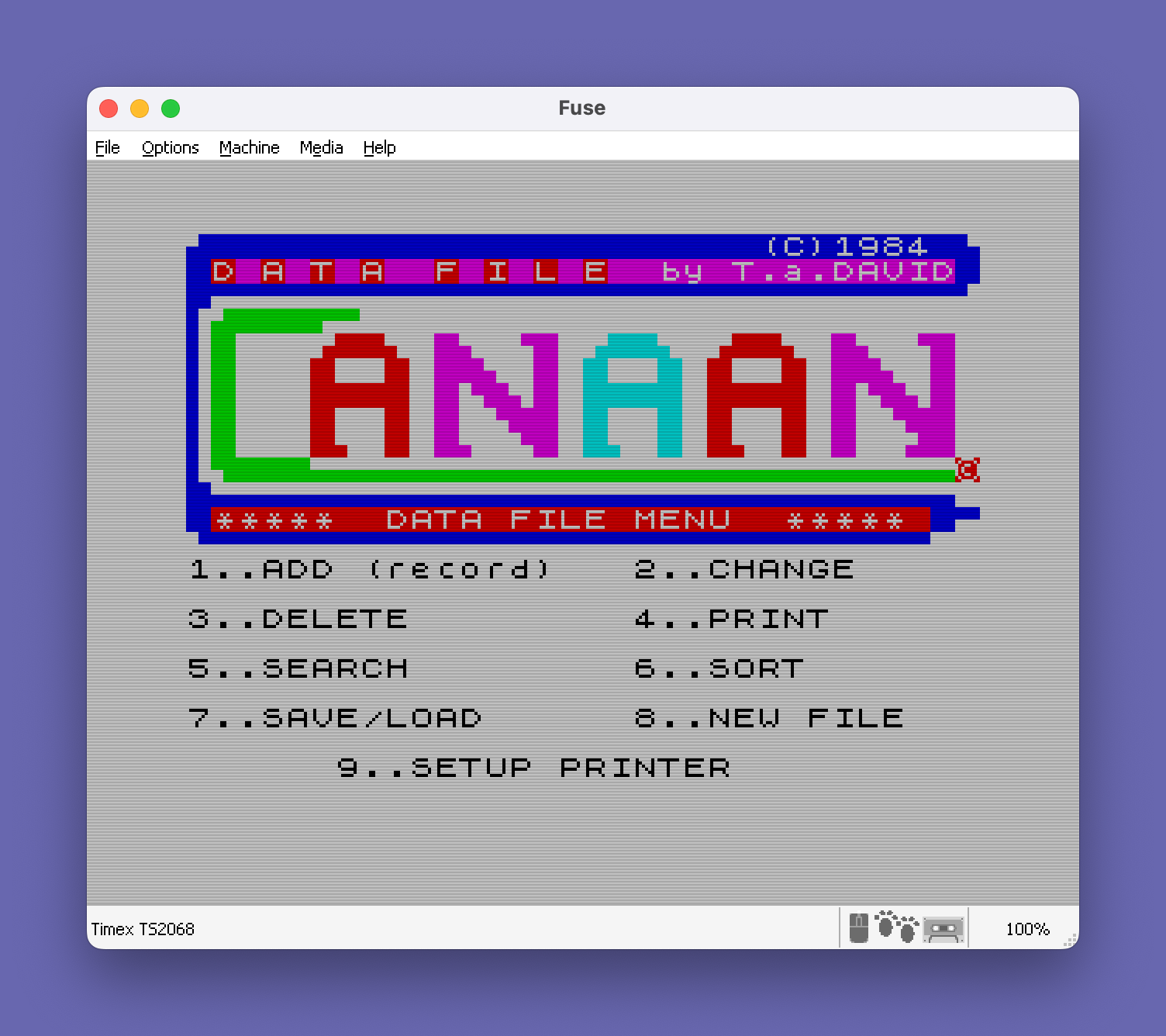
The program is organized as a menu-driven dispatcher. After initialization and a splash screen, control flows to line 200 where the main menu is displayed. Menu selection is decoded at line 251 and dispatched via GO SUB (v1*1000) at line 260, routing to subroutines at lines 1000–7999 for each of the nine menu options.
| Line Range | Function |
|---|---|
| 0–20 | Initialization, splash screen, error trap |
| 200–275 | Main menu display and dispatch |
| 1010–1950 | Option 1: Add records |
| 2020–2950 | Option 2: Change records |
| 3010–3950 | Option 3: Delete records |
| 4010–4945 | Option 4: Print records (screen or printer) |
| 5020–5950 | Option 5: Search records |
| 6050–6950 | Option 6: Sort records |
| 7010–7900 | Option 7: Save/Load data |
| 8000–8500 | Option 8: New file setup |
| 9810–9990 | Option 9: Printer setup |
| 14090–20 | Splash screen (out-of-order line numbers) |
Note that the splash screen lines (14090, 12, 13, 15, 16, 17, 20) have low line numbers like 12, 13, 15, 16 that are interleaved with the early initialization block — this is intentional; GO SUB 9999 falls through to line 14090 (as there is no line 9999) and the splash executes before returning via GO TO 5 / RETURN.
Data Storage Design
The database schema is defined at runtime in option 8 (New File). The user specifies the number of fields f, a description width k, and per-field data lengths. Three arrays are allocated dynamically:
DIM n$(f,k)— field names/labelsDIM d(f,2)— start and end column offsets for each field within the record stringDIM i$(m,j)— the record data, wheremis the number of records andjis the total record width
All record data is packed into a single fixed-width string array i$. Field access anywhere in the program uses the expression i$(row, d(field,1) TO d(field,2)), which slices the appropriate substring. This is an efficient approach for Sinclair BASIC, avoiding the need for multiple arrays or parsing delimiters.
The maximum record count m is estimated at line 8370 using:
LET m=INT ((28000-f*(31-l+12))/j)
This is a heuristic memory calculation assuming roughly 28 KB of available RAM for data.
Menu Dispatch Technique
The computed GO SUB (v1*1000) at line 260 is a compact dispatch idiom. Since menu choices are digits 1–9, multiplying by 1000 routes directly to subroutines at lines 1000, 2000, …, 9000 without a chain of IF statements. The printer setup subroutine is at line 9810, not exactly 9000, but the GO SUB 9000 dispatch falls through to the nearest following line, which is 9810 — a deliberate use of the “non-existent line” GO SUB behavior.
Save and Load Mechanism
Option 7 uses a two-part tape save strategy at line 7100:
SAVE l$ LINE 7900— saves the BASIC program with auto-run at line 7900SAVE l$ CODE 63999,1500— saves a 1500-byte block at address 63999 as a separate code file
On auto-run, line 7900 executes LOAD l$ CODE to reload the data block, then GO TO 0 restarts the program from the beginning. This is a common technique for persisting BASIC variable data beyond what the program file alone can carry, since the string array i$ lives in RAM above the BASIC area.
Printer Setup and POKEs
The printer setup routine at lines 9810–9990 configures either a Timex or Centronics interface using direct memory POKEs to system addresses:
| Address | Purpose |
|---|---|
| 26703, 26704 | Printer driver vector (low/high byte) |
| 26720 | Print column width |
| 64256 | Centronics interface flag |
| 64259 | Centronics column width register |
| 64260 | Centronics initialization byte |
The Centronics column width is computed as (VAL INKEY$*16)-1, mapping digit choices 2–5 to values 31, 47, 63, and 79 respectively.
Sort Implementation
The sort at lines 6170–6260 is a simple O(n²) selection/exchange sort comparing substrings of i$ for the chosen field. Whole-row swaps use full-row string assignment: LET b$=i$(j): LET i$(j)=i$(k): LET i$(k)=b$, which exchanges entire fixed-width record strings efficiently.
Search Routine
The search at lines 5020–5950 prompts for a field and a prefix string, then scans all records comparing the stored field data from its start position up to the length of the search string (d(i,1) TO a where a is adjusted to the end of the prefix). A flag variable q allows the user to abort the search mid-scan, and z tracks whether any match was found.
Notable Bugs and Anomalies
- Line 1000 is never defined; the
GO TO 1000at line 1930 dispatches to the nearest following line, which is 1010. This skips the record counter increment at line 1010 on re-entry, causingnto not advance when looping to add more records — a potential off-by-one bug. - The
ON ERR GO TO 7error handler at line 2 catches all errors and prints a flashing error message, but does not distinguish error types, which could mask legitimate runtime errors during normal operation. - Line 2270 (
PRINT n$(i)) is unreachable — execution flows from line 2251 directly to 2271, bypassing 2270 entirely. It appears to be a leftover from an earlier draft. - The “description” field is consistently spelled “discription” in user-facing prompts (lines 8090, 8200), which is a typo but does not affect functionality.
- At line 4639,
IF x=VAL "50"checks whether the user chose option “2” for fields-and-data printout format (ASCII code 50 = character2). UsingVAL "50"rather than the literal50is a memory-saving idiom common in space-constrained BASIC programs.
Image Gallery
Source Code
    0 REM      O
    1 CLS : GO SUB 9999: INK 0: PRINT "Amt of records possible depends on no of fields & Length of DataDATA Files are saved under namesentered in menu item 8   "
    2 ON ERR GO TO 7
    3 GO TO 10
    5 RETURN
    7 PRINT FLASH 1;AT 10,8;"*** ERROR ***"
   10 PRINT #1;" HIT ANY KEY for MENU ": PAUSE 0
  200 GO SUB 9999: PRINT AT 11,1;"*****  DATA FILE MENU  ***** ";AT 13,0;"1..ADD (record)","  2..CHANGE",,,"3..DELETE","  4..PRINT",,,"5..SEARCH","  6..SORT",,,"7..SAVE/LOAD","  8..NEW FILE",,,"      9..SETUP PRINTER"
  210 FOR q=1 TO 24 STEP 3: BEEP .05,q: NEXT q
  250 PAUSE 0: IF INKEY$<"1" OR INKEY$>"9" THEN GO TO 200
  251 LET v1=VAL INKEY$: BEEP .05,v1
  260 CLS : GO SUB (v1*1000)
  275 GO TO 200
 1010 LET n=n+1
 1020 PRINT INK 2;" RECORD number ";n
 1030 IF n<=m THEN GO TO 1060
 1032 LET n=m
 1040 PRINT INK 2;AT 3,5;" NO MORE ROOM"
 1041 GO TO 3
 1060 FOR i=1 TO f
 1080 PRINT n$(i)
 1090 INPUT i$(n,d(i,1) TO d(i,2))
 1095 PRINT i$(n,d(i,1) TO d(i,2))
 1096 BEEP .05,i
 1110 NEXT i
 1140 PRINT INK 4;"CHANGE ANYTHING  HIT Y/N "
 1150 PAUSE 0: IF INKEY$="y" OR INKEY$="Y" THEN GO TO 1060
 1170 PRINT " RECORD ";n;" ADDED"
 1910 PRINT "ADD MORE RECORDS ? Hit Y/N"
 1930 PAUSE 0: IF INKEY$="y" OR INKEY$="Y" THEN GO TO 1000
 1950 RETURN
 2020 PRINT "TO CHANGE A RECORD...YOU MUST   ENTER THE RECORD NUMBER         -------------------------------- SEARCH FOR RECORD NUMBER ? Y/N"
 2080 PAUSE 0: IF INKEY$="y" OR INKEY$="Y" THEN GO SUB 5000
 2100 INPUT "RECORD NUMBER TO CHANGE ?";a: IF a>0 AND a<=n THEN GO TO 2200
 2170 PRINT FLASH 1;" INVALID NUMBER"
 2180 GO TO 2900
 2200 FOR i=1 TO f
 2220 PRINT n$(i);i$(a,d(i,1) TO d(i,2))
 2250 PRINT ,,"CHANGE THIS ? Y/N": PAUSE 0
 2251 IF INKEY$="y" OR INKEY$="Y" THEN GO TO 2271
 2253 GO TO 2300
 2270 PRINT n$(i)
 2271 PRINT n$(i)
 2280 INPUT i$(a,d(i,1) TO d(i,2))
 2285 PRINT i$(a,d(i,1) TO d(i,2))
 2300 NEXT i
 2810 PRINT ,, INK 2;"RECORD ";a;" changed",,,"ANY OTHERS ? Y/N": PAUSE 0
 2940 IF INKEY$="y" OR INKEY$="Y" THEN GO TO 2000
 2950 RETURN
 3010 IF n>0 THEN GO TO 3060
 3030 PRINT INK 2;" NO RECORDS IN FILE"
 3040 GO TO 3330
 3070 PRINT INK 2,,"Records are deleted by numbers  Those can change after deletion -------------------------------"
 3130 PRINT INK 2;"SEARCH for RECORD? Y/N"
 3150 PAUSE 0: IF INKEY$="y" OR INKEY$="Y" THEN GO SUB 5000
 3190 INPUT ;"ENTER:RECORD number TO DELETE";a: CLS
 3200 IF a>0 AND a<=n THEN GO TO 3250
 3220 PRINT ,,,, FLASH 1; INK 2;" INVALID RECORD NUMBER"
 3230 GO TO 3900
 3250 FOR i=1 TO f
 3270 PRINT n$(i);i$(a,d(i,1) TO d(i,2))
 3280 NEXT i
 3300 PRINT "DELETE THIS RECORD ? Y/N"
 3310 PAUSE 0: IF INKEY$="y" OR INKEY$="Y" THEN GO TO 3360
 3340 PRINT ,, INK 1;" DELETE CANCELLED"
 3350 GO TO 3900
 3360 IF a=n THEN GO TO 3450
 3405 FOR i=1 TO n-1
 3410 LET i$(i)=i$(i+1)
 3420 NEXT i
 3450 LET n=n-1
 3460 CLS
 3470 PRINT "   RECORD DELETED"
 3920 INPUT ;"DELETE ANY OTHERS Y/N";a$
 3930 CLS
 3940 IF a$="y" THEN GO TO 3010
 3941 IF a$="Y" THEN GO TO 3010
 3950 RETURN
 4010 LET a=0: LET b=0
 4030 INPUT ;"PRINT ALL RECORD FIELDS?  Y/N";a$
 4040 IF a$="y" THEN LET a=1
 4041 IF a$="Y" THEN LET a=1
 4060 FOR i=1 TO f
 4070 LET a(i)=a
 4075 IF a=1 THEN LET a(i)=i
 4080 NEXT i
 4095 LET j=f
 4100 IF a=1 THEN GO TO 4220
 4110 CLS
 4120 PRINT INK 2;,,"ENTER Y FOR FIELD TO BE PRINTED"
 4125 LET j=0
 4140 FOR i=1 TO f
 4150 BEEP .2,i+12
 4160 PRINT n$(i);" ?"
 4170 INPUT a$
 4175 PRINT a$
 4180 IF a$="y" THEN GO TO 4190
 4181 IF a$="Y" THEN GO TO 4190
 4185 GO TO 4210
 4190 LET j=j+1
 4200 LET a(j)=i
 4210 NEXT i
 4230 CLS
 4240 INPUT ;"Print to Screen or Printer      ENTER S OR P";a$
 4250 IF a$="p" OR a$="P" THEN GO TO 4600
 4310 PRINT TAB 8;l$: PRINT
 4330 FOR i=1 TO n
 4332 LET b=i
 4333 IF i>60 THEN LET b=i-60
 4334 IF i>120 THEN LET b=i-180
 4335 BEEP .2,b
 4340 FOR k=1 TO j
 4350 PRINT n$(a(k));i$(i,d(a(k),1) TO d(a(k),2))
 4370 NEXT k
 4380 PRINT
 4390 NEXT i
 4400 GO TO 4900
 4600 PRINT ,,,,"PRINTOUT FORMAT..."," 1-DATA ONLY     2-FIELDS & DATA": PAUSE 0: LET x=CODE INKEY$: PRINT ,,,,"LINE SPACINGS (between RECORDS)?": INPUT sp: PRINT sp: IF sp>5 THEN LET sp=5
 4610 LPRINT l$: LPRINT
 4620 FOR i=1 TO n
 4630 FOR k=1 TO j
 4639 IF x=VAL "50" THEN LPRINT n$(a(k));
 4640 LPRINT i$(i,d(a(k),1) TO d(a(k),2))
 4670 NEXT k: FOR s=1 TO sp: LPRINT : NEXT s: NEXT i
 4920 INPUT "ANOTHER LIST? ENTER Y/N";a$
 4930 IF a$="y" THEN GO TO 4000
 4931 IF a$="Y" THEN GO TO 4000
 4945 CLS : RETURN
 5020 PRINT ,," WHICH FIELD TO SEARCH ON ?"
 5030 FOR i=1 TO f
 5050 PRINT n$(i);" ? Y/N"
 5060 INPUT a$
 5070 IF a$="y" THEN GO TO 5100
 5071 IF a$="Y" THEN GO TO 5100
 5080 NEXT i
 5090 PRINT INK 2; FLASH 1;"  SELECTION CANCELLED"
 5095 GO TO 5900
 5110 INPUT " ENTER THE SEARCH STRING           (first letter(s))";a$: LET a=LEN a$
 5125 IF a<1 THEN GO TO 5110
 5126 IF a<=(d(i,2)-d(i,1)+1) THEN GO TO 5129
 5127 LET a=(d(i,2)-d(i,1)+1)
 5128 LET a$=a$(1 TO a)
 5129 LET a=a-1+d(i,1)
 5130 LET z=0: LET q=0
 5160 FOR j=1 TO n
 5170 IF a$=i$(j,d(i,1) TO a) THEN GO SUB 5500
 5180 IF q=1 THEN GO TO 5200
 5190 NEXT j
 5220 PRINT ; INK 1;"   SEARCH COMPLETE"
 5240 IF z=0 THEN PRINT "RECORD NOT FOUND"
 5250 GO TO 5900
 5504 CLS
 5505 PRINT "   RECORD number ";j
 5510 FOR k=1 TO f
 5530 PRINT n$(k);i$(j,d(k,1) TO d(k,2))
 5540 NEXT k
 5545 PRINT ,,"DO you want a PRINTOUT Y/N": PAUSE 0: IF INKEY$="y" OR INKEY$="Y" THEN GO TO 5550
 5546 GO TO 5570
 5550 FOR k=1 TO f
 5555 LPRINT i$(j,d(k,1) TO d(k,2))
 5560 NEXT k
 5570 INPUT ;"CONTINUE SEARCH? ENTER Y/N";b$
 5580 IF b$="n" THEN LET q=1
 5590 LET z=1
 5600 RETURN
 5900 INPUT ;"ANOTHER SEARCH? Y/N";a$
 5930 IF a$="y" THEN GO TO 5000
 5931 IF a$="Y" THEN GO TO 5000
 5950 RETURN
 6050 PRINT INK 1;" SORTING TIME,DEPENDS ON THE     NUMBER OF RECORDS",,, INK 2;"  WHICH FIELD TO SORT BY..."
 6060 FOR i=1 TO f
 6080 PRINT n$(i);" ? Y/N"
 6090 INPUT a$
 6100 IF a$="y" THEN GO TO 6150
 6101 IF a$="Y" THEN GO TO 6150
 6110 NEXT i
 6130 PRINT "    SORT CANCELLED": GO TO 6900
 6170 FOR j=1 TO n-1: FOR k=j TO n
 6190 IF i$(j,d(i,1) TO d(i,2))<=i$(k,d(i,1) TO d(i,2)) THEN GO TO 6250
 6200 LET b$=i$(j): LET i$(j)=i$(k): LET i$(k)=b$
 6260 NEXT k: NEXT j
 6290 PRINT INK 2;"     SORT COMPLETE"
 6920 INPUT ;"SORT ON ANOTHER FIELD? Y/N";a$
 6930 IF a$="y" THEN GO TO 6000
 6931 IF a$="Y" THEN GO TO 6000
 6950 RETURN
 7010 GO SUB 9999: PRINT : PRINT "HIT     1.. SAVE PROGRAM & DATA                                         2...LOAD other file"
 7020 PAUSE 0
 7030 LET z=CODE INKEY$
 7035 IF z<49 OR z>51 THEN GO TO 7020
 7040 IF z>49 THEN GO TO 7102
 7100 CLS : GO SUB 9999: PRINT FLASH 1;AT 13,0;"SAVING PROGRAM & DATA": SAVE l$ LINE 7900: SAVE l$CODE 63999,1500
 7101 PRINT AT 13,0;"REWIND TAPE/PLAY TO VERIFY ": VERIFY l$: VERIFY l$CODE : GO TO 0
 7102 PRINT " ENTER NAME OF FILE ON TAPE": INPUT l$: PRINT : PRINT INK 2;"HIT a KEY TO lOAD ";l$
 7105 PAUSE 0: PRINT AT 21,10; FLASH 1;"LOADING PROGRAM & DATA": LOAD l$: GO TO 0
 7500 RETURN
 7900 LOAD l$CODE : GO TO 0
 8000 CLEAR 63999
 8010 INPUT "WHAT LIST NAME TO USE ?";l$: PRINT l$
 8030 INPUT "HOW MANY RECORD FIELDS ?";f: PRINT f
 8042 BEEP .025,f
 8050 LET k=15
 8090 PRINT "MAXIMUM number of CHARACTERS in discription-(0 TO 15)"
 8100 INPUT ;"ENTER NUMBER of characters";k
 8130 IF k>15 THEN LET k=15
 8132 BEEP .025,k: LET l=31-k: CLS
 8160 PRINT "MAXIMUM size of DATA FIELD IS   ",;l;" characters"
 8180 DIM n$(f,k): DIM a(f): DIM d(f,2)
 8200 PRINT "ENTER THE FIELD DISCRIPTIONS    AND FIELD LENGTHS"
 8225 LET j=1
 8226 PRINT
 8230 FOR i=1 TO f
 8250 LET a$=" "
 8260 PRINT "FIELD ";i;a$: INPUT a$: PRINT a$
 8275 LET a$=a$+"         "
 8280 LET n$(i)=a$
 8300 PRINT INK 2;"FIELD LENGTH(1-";l;"):"
 8310 INPUT a: BEEP .025,a
 8312 IF a<1 THEN LET a=1
 8315 IF a>l THEN LET a=l
 8317 PRINT a
 8320 LET d(i,1)=j: LET j=j+a: LET d(i,2)=j-1
 8350 NEXT i
 8360 LET j=j-1: LET n=0
 8370 LET m=INT ((28000-f*(31-l+12))/j)
 8390 CLS : PRINT INK 2;"MAXIMUM number of RECORDS       possible is about  ";m
 8400 INPUT ;"HOW MANY RECORDS DO YOU WANT?";a
 8440 IF a>0 AND a<m THEN LET m=a
 8450 DIM i$(m,j)
 8500 PRINT : PRINT l$;" LIST SET UP": GO TO 10
 9810 CLS
 9812 PRINT "TYPE OF PRINTER?",,," T-TIMEX (32 col)"," C-CENTRONICS (32-80 col)"
 9814 LET col=32: POKE 26720,col: PAUSE 0: CLS
 9815 IF INKEY$="t" THEN POKE 26703,0: POKE 26704,5: LET z$="TIMEX ": GO TO 9850
 9820 IF INKEY$="c" THEN POKE 64260,10: POKE 26703,5: POKE 26704,251: LET z$="CENTRONICS ": PRINT z$;"PRINTER","------------------",,,
 9828 POKE 64256,1
 9840 PRINT "PRINTER width?",,,,"5.. 80 column",,"4.. 64 column",,"3.. 48 col",,"2.. 32 column": PAUSE 0: IF INKEY$>"5" OR INKEY$<"2" THEN GO TO 9840
 9842 LET col=(VAL INKEY$*16)-1: POKE 64259,col: POKE 26720,col
 9850 CLS : PRINT z$;" PRINTER SET UP ",,,"T- TEST    M- RETURN TO MENU": PAUSE 0
 9860 IF INKEY$="t" THEN INPUT FLASH 1;"ENTER YOUR TEXT";t$: LPRINT t$: RETURN
 9990 RETURN
 14090 CLS : PRINT ".:::::::::::::::::::::::::::::::::::::::::::::(C)1984   '"
   12 PRINT " D A T A  F I L E  by T.a.DAVID "
   13 PRINT " ''''''''''''''''''''''''''''''''''''''''''''''''''''''''''''' "
   15 PRINT " :.::::::::'''                         : ::    .::::.  ::.   '::  .::::.   .::::.  ::.   ':: : ::   ::  :: ::::.  :: ::  :: ::  :: ::::.  :: : ::   :::::::: :: '::. :: :::::::: :::::::: :: '::. :: : ::   ::  :: ::  ':::: ::  :: ::  :: ::  ':::: : ::   ::.  :: ::.   ':: ::.  :: ::.  :: ::  .::: : ':::::::....................................................*"
   16 PRINT "::............................................................  solid SOFTWARE for your MIND  .. '''''''''''''''''''''''''''''''''''''''''''''''''''''''''''"
   17 GO TO 5
   20 GO TO 9990
Note: Type-in program listings on this website use ZMAKEBAS notation for graphics characters.