
This program generates random screen-filling designs using a 6-character string built from a mix of printable and block-graphic characters, then offers options to record, reconstruct, or generate new designs. Characters are selected by generating random numbers between 1 and 22, mapping them to character codes in two ranges: codes 0–10 (lower block graphics) and codes 128–149 (upper block graphics), effectively producing mosaic-like patterns. The design string is printed 112 times to fill the screen, with a short delay loop at lines 110–115 before refreshing. A reconstruction mode at line 340 allows the user to re-enter the six character codes manually to replay a previously noted design. The program uses DIM A$(6) to store the design elements and CODE A$(J) to display their numeric values for recording purposes.
Program Analysis
Program Structure
The program divides into several functional phases:
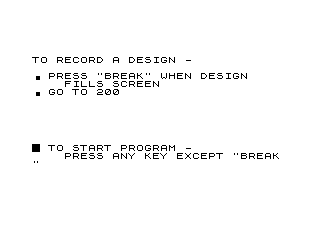
- Lines 2–9: Instruction screen explaining how to record or start, with a
PAUSE 4E4wait for any key, thenCLS. - Lines 10–170: Main design loop — builds a 6-character string
A$of random graphics characters and repeatedly prints it to fill the screen, then loops back. - Lines 200–300: “Record” mode — prints the design elements and their character codes, offers options to reconstruct (
"R") or generate new designs ("N"). - Lines 310–330: Branches on input;
"N"goes to line 10 for a new design. - Lines 340–480: Reconstruct mode — prompts for six code numbers, builds
D$, fills the screen, then returns to line 10. - Lines 490–510:
CLEAR,SAVE, andRUN— a save/autostart block not reached in normal execution.
Character Selection Algorithm
The character-picking logic at lines 30–60 is the technical heart of the program. A random integer J from 1 to 22 is generated. The mapping is:
- If
J > 11:J = J + 116, giving codes 128–138 (block graphic characters in the upper range). - If
J <= 11:J = J - 1, giving codes 0–10 (lower block graphics and space/cursor characters).
This produces a palette of 22 characters spanning two non-contiguous ranges of the character set, ensuring a mix of block graphic tiles for the mosaic effect. Note that code 0 (space equivalent or null) may occasionally appear, and codes 0–1 in the lower range could produce invisible or control characters rather than visible graphics.
Screen Filling
The 6-character string A$ is printed 112 times in a tight loop (lines 80–100). At 6 characters per print, this gives 672 character outputs. On a 32-column display, 672 characters fills exactly 21 rows (32 × 21 = 672), neatly covering the usable screen area. Line 160 resets the print position to AT 0,0 before looping back at line 170, so successive designs overwrite each other in place.
Delay Loop
Lines 110–115 implement a short busy-wait delay loop (FOR A=1 TO 10: NEXT A) between filling the screen and repositioning. This gives a brief pause before overwriting with a new design, letting the viewer appreciate the current pattern.
Reconstruction Mode
When the user chooses "R", lines 350–440 prompt for six integer code numbers, convert each to a character with CHR$, build D$(6), and fill the screen identically to the main loop. The user must have noted the codes printed by line 220 during the recording step. No validation of entered code values is performed, so out-of-range values could produce unexpected results.
Notable Techniques and Idioms
PAUSE 4E4(40000 frames ≈ several minutes) is used as a practical “wait for keypress” mechanism at lines 8 and 460.- The instruction screens use
%(inverse space) as a bullet-point visual at line 6, and\.(▖ block graphic) as bullet points in lines 4, 270, 290, and 250. - Line 250 prints a row of
\.(▖) characters as a visual separator between sections. DIM A$(6)creates a 6-element string array, with each element being a single character — a common idiom for character arrays in this BASIC dialect.- The
PRINT A$;at line 90 prints the entire 6-element string array as a concatenated string in one statement.
Potential Bugs and Anomalies
| Line | Issue |
|---|---|
| 30–60 | When J=1, J becomes 0 after subtraction, yielding CHR$ 0 — a null/space that may render invisibly, diluting the design. |
| 380 | INPUT X with no validation: entering a non-numeric or out-of-range value will cause an error or unexpected character. |
| 110–115 | The delay loop variable A conflicts with the outer array variable name implicitly — however, since A$ is a string array and A is numeric, no actual collision occurs in this BASIC. |
Image Gallery
Source Code
   2 PRINT AT 4,0;"TO RECORD A DESIGN -",,,"\ . PRESS ""BREAK"" WHEN DESIGN"
   3 PRINT AT 7,4;"FILLS SCREEN"
   4 PRINT AT 8,0;"\ . GO TO 200"
   6 PRINT AT 15,0;"%  TO START PROGRAM -"
   7 PRINT AT 16,4;"PRESS ANY KEY EXCEPT ""BREAK """
   8 PAUSE 4E4
   9 CLS
  10 DIM A$(6)
  20 FOR K=1 TO 6
  30 LET J=INT (RND*22)+1
  40 IF J>11 THEN LET J=J+116
  50 IF J<=11 THEN LET J=J-1
  60 LET A$(K)=CHR$ J
  70 NEXT K
  80 FOR L=1 TO 112
  90 PRINT A$;
 100 NEXT L
 110 FOR A=1 TO 10
 115 NEXT A
 160 PRINT AT 0,0;
 170 GOTO 20
 200 PRINT TAB 4;"THE DESIGN ELEMENTS ARE:",,,
 210 FOR J=1 TO 6
 220 PRINT TAB 14;A$(J);TAB 16;"(";CODE A$(J);")"
 230 PRINT
 240 NEXT J
 250 PRINT AT 14,0;"\. \. \. \. \. \. \. \. \. \. \. \. \. \. \. \. \. \. \. \. \. \. \. \. \. \. \. \. \. \. \. "
 260 PRINT AT 16,0;"TO RECONSTRUCT DESIGN -",
 270 PRINT AT 17,3;"\ . MAKE A NOTE OF CODE NUMBERS     AND TYPE ""R"""
 280 PRINT AT 20,0;"TO CREATE NEW DESIGNS -"
 290 PRINT AT 21,3;"\ . TYPE ""N"""
 300 INPUT C$
 310 IF C$="R" THEN GOTO 340
 320 CLS
 330 GOTO 10
 340 CLS
 350 DIM D$(6)
 360 FOR J=1 TO 6
 370 PRINT "CODE NO. OF ELEMENT";"(";J;") ?"
 380 INPUT X
 390 CLS
 400 LET D$(J)=CHR$ (X)
 410 NEXT J
 420 FOR J=1 TO 112
 430 PRINT D$;
 440 NEXT J
 450 PRINT AT 21,0;"TO RETURN TO PROGRAM - PRESS ""R"""
 460 PAUSE 4E4
 470 CLS
 480 GOTO 10
 490 CLEAR
 500 SAVE "1024%9"
 510 RUN
Note: Type-in program listings on this website use ZMAKEBAS notation for graphics characters.