
This program is a vector-based line-drawing designer that allows users to create, display, scale, rotate, and delete line drawings stored as a compact binary string. Lines are encoded as pairs of 16-bit signed coordinates packed into a string variable using CHR$ encoding, with each line segment occupying exactly 8 bytes. The program implements a Cohen–Sutherland-style line clipping algorithm using four DEF FN functions (B, C, D, E) to clip lines against a configurable viewport defined by LF, RT, BT, and TP boundaries. A cursor routine at line 250 uses blinking PLOT/OVER 1 to show the current position, with keyboard controls for single-pixel and 10-pixel movement in both axes. Scale and rotation transformations are applied at display time using standard 2D rotation matrix arithmetic, without modifying the stored coordinate data.
Program Structure
The program is organized into distinct subroutines separated by REM labels, entered via a menu at line 640. Control flow is summarized below:
| Lines | Label / Role |
|---|---|
| 10 | Entry point — jumps directly to the menu |
| 20–130 | LINE DRAW — clips and plots a line segment |
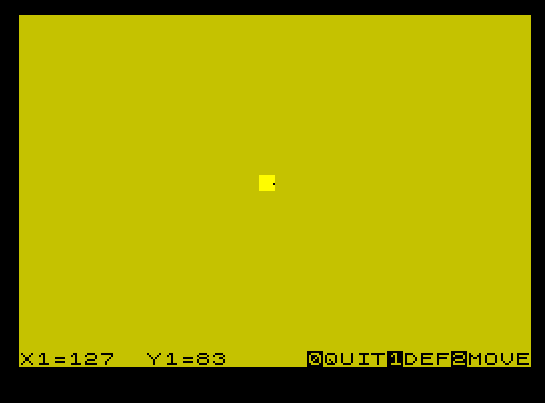
| 140–240 | CURSER — interactive point placement with keyboard |
| 250–370 | Cursor movement and key-read loop |
| 380–570 | ROTATE / SCALE — transforms and redraws all stored lines |
| 580–630 | DELETE LINE — removes a line from the data string |
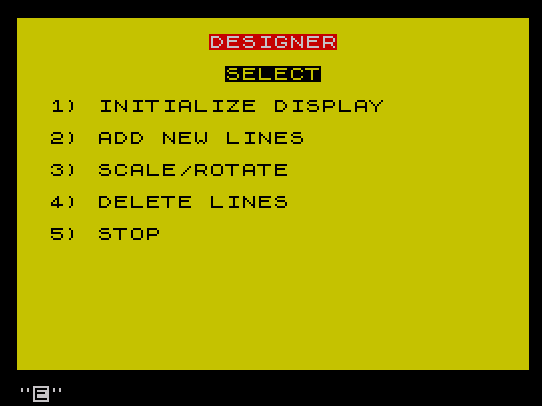
| 640–790 | MENU — top-level dispatcher and save/verify |
| 800–930 | BASIC SETUP — initialises variables and DEF FN definitions |
| 910 | DATA statement used as a decode template during redraw |
| 920 | Diagnostic loop — prints raw byte codes of A$ (not called from menu) |
Data Storage Format
Each line segment is stored as 8 bytes in the string A$. The four 16-bit coordinates (X1, Y1, X2, Y2) are each encoded as two bytes using CHR$ INT(val/256) + CHR$ (val MOD 256), assembled by DEF FN A$() and DEF FN B$() and concatenated by DEF FN C$(). Retrieval uses DEF FN A() = 256*CODE(A$(I1)) + CODE A$(I1+1), giving a simple big-endian 16-bit unsigned decode. The FOR I=2 TO LEN A$ STEP 8 loop at line 440 iterates over each stored segment.
Line Clipping Algorithm
Lines 30–110 implement a clipping algorithm roughly analogous to Cohen–Sutherland. The variable ED holds the clipping boundary value for whichever edge is being tested. Four DEF FN functions compute intersection points:
FN B()— X intercept when clipping P1 at a horizontal boundaryFN C()— X intercept when clipping P2 at a horizontal boundaryFN D()— Y intercept when clipping P1 at a vertical boundaryFN E()— Y intercept when clipping P2 at a vertical boundary
Line 30 performs the trivial reject: if both endpoints lie outside the same edge, OT=1 is set and the subroutine returns immediately. The final range check at line 120 guards against any floating-point imprecision before issuing PLOT/DRAW.
Rotation and Scaling
When option 3 (Scale/Rotate) or 4 (Delete) is chosen, the routine at line 380 prompts for an angle (converted to radians via AN*PI/180) and a scale factor S. During redraw (lines 480–510), the 2D rotation matrix is applied:
X_new = O1 + INT((x*COS AN + y*SIN AN))Y_new = O2 + INT((-x*SIN AN + y*COS AN))
The origin (O1, O2) is chosen interactively. Scaling is implicit in the DATA at line 910, where the raw stored coordinates are divided by S before being assigned to the rotation inputs ((FN A()-O1)/S). This means scaling is applied to the offset from origin, which is geometrically correct.
The DATA / RESTORE Decode Trick
Line 910 is a clever (and fragile) self-referential decode mechanism. It is both a DATA statement and contains live calls to FN A(). The RESTORE 910 / READ sequence at lines 460–470 reads the 12 items from line 910’s DATA list, which includes expressions like (FN A()-O1)/S. Because Spectrum BASIC evaluates DATA items as expressions at READ time, each call to FN A() reads successive pairs of bytes from A$ using the current value of I1, which is itself incremented by the READ I,... I1+2,... pattern. This is a highly unusual use of DATA as executable code.
Cursor Routine
The cursor at line 250 uses PLOT BRIGHT 1; OVER 1 followed by a short PAUSE 2 then PLOT BRIGHT 0; OVER 1 to create a blinking pixel cursor without permanently altering the screen. Movement keys are:
| Key | Action |
|---|---|
| 5 / 8 | X −1 / +1 |
| T / I | X −10 / +10 |
| 6 / 7 | Y −1 / +1 |
| Y / U | Y −10 / +10 |
| 1 | Set point (PLOT and return) |
| 0 | Quit / cancel |
| 2 | Move to origin |
Notable Techniques and Idioms
- Boolean arithmetic for boundary selection:
LET ED=(TP AND Y1>TP)+(BT AND Y1<BT)uses Spectrum BASIC’s boolean values (1/0) multiplied by the boundary coordinate to select which edge value to use — avoiding anIFbranch. - OVER 1 for non-destructive overlay: Used extensively for the cursor blink and for previewing a line before confirming it.
- String as binary array:
A$serves as a byte array for coordinate storage, manipulated withCODE,CHR$, and string slicing. - In-place deletion: Line 630 removes a segment with
A$(TO I-1)+A$(I+8 TO)and adjusts the loop counterI=I-8. - VAL-free GO TO: The program uses direct line numbers in
GO TO/GO SUBrather thanVAL "nnn"optimizations.
Image Gallery
Source Code
   10 GO TO 640: REM DESIGNER
   20 REM LINE DRAW
   30 IF (X1<LF AND X2<LF) OR (X1>RT AND X2>RT) OR (Y1>TP AND Y2>TP) OR (Y1<BT AND Y2<BT) THEN LET OT=1: RETURN
   40 LET ED=(TP AND Y1>TP)+(BT AND Y1<BT)
   50 IF Y1<BT OR Y1>TP THEN LET X1=FN B(): LET Y1=ED
   60 LET ED=(TP AND Y2>TP)+(BT AND Y2<BT)
   70 IF Y2<BT OR Y2>TP THEN LET X2=FN C(): LET Y2=ED
   80 LET ED=(RT AND X1>RT)+(LF AND X1<LF)
   90 IF X1<LF OR X1>RT THEN LET Y1=FN D(): LET X1=ED
  100 LET ED=(RT AND X2>RT)+(LF AND X2<LF)
  110 IF X2<LF OR X2>RT THEN LET Y2=FN E(): LET X2=ED
  120 IF X1-LF>=0 AND X2-LF>=0 AND X1-LF<=255 AND X2-LF<=255 AND Y1-BT>=0 AND Y1-BT<=167 AND Y2-BT>=0 AND Y2-BT<=167 THEN PLOT X1-LF,Y1-BT+8: DRAW INT (X2-X1),INT (Y2-Y1)
  130 RETURN
  140 REM CURSER
  150 LET AN=0: LET S=1: GO SUB 400
  160 PRINT AT 21,0;"X1=";O1;TAB 8;"Y1=";O2,R$: LET X=O1: LET Y=O2
  170 GO SUB 250: IF T$="2" THEN GO SUB 400: PRINT AT 21,16;R$: LET X=O1: LET Y=O2: GO TO 160
  180 LET X5=X: LET Y5=Y: IF T$="0" THEN RETURN
  190 PRINT AT 21,0;"X2=";X;"  ";AT 21,8;"Y2=";Y;"  ": PAUSE 50: GO SUB 250: IF T$="2" THEN GO SUB 400: PRINT AT 21,16;R$: LET X=O1: LET Y=O2: GO TO 190
  200 IF T$="0" THEN RETURN
  210 RESTORE : READ X2,X4,Y2,Y4,X1,Y1,X3,Y3: OVER 1: GO SUB 20
  220 INPUT "OK?";Q$: IF Q$="Y" OR Q$="y" THEN OVER 0: LET A$=FN C$()
  230 GO SUB 20: OVER 0: PRINT AT 21,0;"X1";AT 21,8;"Y1": IF Q$<>"Y" OR Q$<>"y" THEN PLOT OVER 1;X3-LF,Y3-BT+8: PLOT OVER 1;X4-LF,Y4-BT+8
  240 GO TO 170
  250 PLOT BRIGHT 1; OVER 1;X-LF,Y-BT+8: PAUSE 2: PLOT BRIGHT 0; OVER 1;X-LF,Y-BT+8: LET T$=INKEY$: IF T$="" THEN GO TO 250
  260 LET X=X+(T$="8")-(T$="5")
  270 LET X=X+10*(T$="I")-10*(T$="T")
  280 LET Y=Y+(T$="7")-(T$="6")
  290 LET Y=Y+10*(T$="U")-10*(T$="Y")
  300 IF X>RT THEN LET X=RT
  310 IF X<LF THEN LET X=LF
  320 IF Y>TP THEN LET Y=TP
  330 IF Y<BT THEN LET Y=BT
  340 IF T$="1" THEN PLOT OVER 1;X-LF,Y-BT+8: RETURN
  350 IF T$="0" OR T$="2" THEN RETURN
  360 PRINT AT 21,3;X;"  ";AT 21,11;Y;"  "
  370 GO TO 250
  380 REM ROTATE
  390 INPUT "ANGLE? ",AN: LET AN=AN*PI/180: INPUT "SCALE FACTOR? ",S: IF S=0 THEN LET S=1
  400 INPUT "COORDINATES OF ORIGIN? "'O1,O2: IF Z$="2" AND O1<127 THEN LET O1=127
  410 IF Z$="2" AND O2<83 THEN LET O2=83
  420 LET LF=O1-127: LET BT=O2-83: LET RT=LF+255: LET TP=BT+167
  430 CLS
  440 FOR I=2 TO LEN A$ STEP 8
  450 IF I>LEN A$ THEN LET SR=0: GO TO 640
  460 RESTORE 910
  470 READ I1,X1,I1,Y1,I1,X2,I1,Y2,X3,X4,Y3,Y4
  480 LET X1=O1+INT (X3*COS AN+Y3*SIN AN)
  490 LET X2=O1+INT (X4*COS AN+Y4*SIN AN)
  500 LET Y1=O2+INT (-X3*SIN AN+Y3*COS AN)
  510 LET Y2=O2+INT (-X4*SIN AN+Y4*COS AN)
  520 IF SR=1 THEN OVER 1
  530 GO SUB 20: IF SR=1 THEN GO SUB 580: IF T$="0" THEN LET T$="": LET SR=0: RETURN
  540 NEXT I: LET SR=0
  550 INPUT """ENTER"" = CONTINUE /""COP""= COPY  ";Q$
  560 IF Q$="COP" THEN COPY
  570 RETURN
  580 REM DELETE LINE
  590 PRINT OVER 0;AT 21,0;"YCONFIRMNDELETE0QUIT": LET OT=0: OVER 1: GO SUB 20: GO SUB 20: LET T$=INKEY$: IF OT=1 THEN GO TO 620
  600 IF T$<>"0" AND T$<>"Y" AND T$<>"y" AND T$<>"N" AND T$<>"n" THEN GO TO 580
  610 IF T$="0" THEN RETURN
  620 OVER 0: IF T$="Y" OR T$="y" OR OT=1 THEN GO SUB 20: RETURN
  630 OVER 1: GO SUB 20: PAUSE 50: OVER 0: LET A$=A$( TO I-1)+A$(I+8 TO ): LET I=I-8: RETURN
  640 REM MENU
  650 BORDER 0: INK 0: PAPER 6: CLS : PRINT PAPER 2; INK 7;AT 1,12;"DESIGNER"
  660 PRINT 'TAB 13; FLASH 1;"SELECT"; FLASH 0''"  1) INITIALIZE DISPLAY"
  670 PRINT '"  2) ADD NEW LINES"''"  3) SCALE/ROTATE"
  680 PRINT '"  4) DELETE LINES"''"  5) STOP "
  690 LET R$="  0QUIT1DEF2MOVE"
  700 INPUT Z$: CLS
  710 IF Z$="1" THEN GO SUB 800
  720 IF Z$="2" THEN GO SUB 140
  730 IF Z$="3" THEN LET SR=0: GO SUB 380
  740 IF Z$="4" THEN LET SR=1: GO SUB 380
  750 IF Z$="5" THEN GO TO 780
  760 CLS : GO TO 640
  770 DATA X,X,Y,Y,X5,Y5,X1,Y1
  780 INPUT "DO YOU WISH TO SAVE THIS DESIGN?";Q$: IF Q$="Y" OR Q$="y" THEN SAVE "DESIGNER": PRINT "REWIND THE TAPE THEN ANY KEY    WILL LET YOU VERIFY ": PAUSE 0: VERIFY "DESIGNER": PRINT " VERIFY COMPLETE"
  790 STOP
  800 REM BASIC SETUP
  810 LET LF=0: LET BT=LF: LET TP=167: LET RT=255: LET A$=""
  820 DEF FN A()=256*CODE (A$(I1))+CODE A$(I1+1)
  830 DEF FN A$()=CHR$ INT (X3/256)+CHR$ (X3-256*INT (X3/256))+CHR$ INT (Y3/256)+CHR$ (Y3-256*INT (Y3/256))
  840 DEF FN B$()=CHR$ INT (X4/256)+CHR$ (X4-256*INT (X4/256))+CHR$ INT (Y4/256)+CHR$ (Y4-256*INT (Y4/256))
  850 DEF FN B()=X1+(X2-X1)*(ED-Y1)/(Y2-Y1)
  860 DEF FN C()=X2+(X1-X2)*(ED-Y2)/(Y1-Y2)
  870 DEF FN D()=Y1+(Y2-Y1)*(ED-X1)/(X2-X1)
  880 DEF FN E()=Y2+(Y1-Y2)*(ED-X2)/(X1-X2)
  890 DEF FN C$()=A$+FN A$()+FN B$()
  900 LET A$=" ": RETURN
  910 DATA I,(FN A()-O1)/S,I1+2,(FN A()-O2)/S,I1+2,(FN A()-O1)/S,I1+2,(FN A()-O2)/S,X1,X2,Y1,Y2
  920 FOR F=1 TO LEN A$: PRINT CODE A$(F): NEXT F
  930 SAVE "DESIGNER" LINE 10
Note: Type-in program listings on this website use ZMAKEBAS notation for graphics characters.