
This program implements a digital clock on the ZX81/TS1000, accepting a 24-hour time entry in HHMM format and displaying it using a seven-segment–style font rendered from the system’s character ROM. The time is stored internally as total minutes elapsed since midnight in variable M, incrementing each loop and wrapping at 1440 (24×60). Each digit is drawn by reading six bytes of character data from ROM starting at address 7905 (the digit bitmaps), then unpacking each byte bit-by-bit using repeated doubling and a 128-threshold test to emit either a space (CHR$ 0) or a block character (CHR$ 128). The separator dots between hours and minutes are plotted directly with PLOT statements at fixed pixel coordinates. Timing relies on PAUSE 1263 (approximately one minute at 50 Hz) and a PEEK 16437 check against 245 to synchronise with the display interrupt frame counter before each update.
Program Analysis
Program Structure
The program divides into three logical sections:
- Initialisation (lines 10–60): prompts for a four-digit 24-hour time, converts it to total minutes in
M, then falls through to the timing loop. - Main clock loop (lines 70–250): renders all four digits and the colon dots, waits for the correct interrupt state, pauses approximately one minute, increments
M, wraps at 1440, and repeats. - Digit-drawing subroutine (lines 260–400): reads six bytes of ROM character data for digit
Dand unpacks each byte’s seven most-significant bits to produce a row of space or block characters.
Time Representation
The INPUT value (e.g. 2345 for 23:45) is converted to minutes past midnight at line 50:
M = INT(TIME/100)*60 + TIME - INT(TIME/100)*100
This extracts the hours portion by integer division and multiplies by 60, then adds the remainder (minutes). The clock wraps back to 0 at line 240 when M reaches 1440.
Digit Rendering via ROM
The subroutine at line 260 exploits the ZX81 character ROM. Digit glyphs begin at address 7905 (character code 28 — the digit ‘0’ — offset into ROM), with each character occupying 8 bytes of which 6 are used here. For digit value D, the base address is 7905 + D*8.
Each byte is unpacked by the inner loop (lines 300–370) using a repeated left-shift idiom: testing whether the value is ≥ 128 to detect the most-significant bit, subtracting 128 if set, then doubling (X = X*2) to shift the next bit into the MSB position. A block character (CHR$ 128, inverse space) is printed for a set bit and a plain space for a clear bit, producing a monochrome bitmap rendition of the digit.
Digit Positioning
The four digits are placed using PRINT AT 7,T with T set to columns 0, 7, 16, and 23 respectively, leaving a gap of two columns between the hour pair and the minute pair. The colon separator is rendered by two PLOT statements at pixel coordinates (31,20) and (31,27), placing dots in the gap between the digit groups.
Timing Mechanism
Timing uses two complementary techniques:
PAUSE 1263(line 220) — at 50 Hz this is approximately 25.26 seconds; because the ZX81 PAUSE counts display frames (which only occur during FAST/SLOW transitions), the actual delay approaches one minute in SLOW mode. This is an approximation and will drift over time.IF PEEK 16437 <> 245 THEN GOTO 210(line 210) — address 16437 is the system variableFRAMESlow byte; polling for the value 245 synchronises the update to a specific point in the interrupt cycle, reducing jitter at the moment of screen refresh.
Notable Techniques and Anomalies
- The variable
Nis reused: it is first assigned the ROM base address in line 260, then immediately used as theFORloop counter in line 280 (FOR N=N TO N+5), which is valid ZX81 BASIC but relies on the assignment in 260 having already set the loop start value. - The minutes units digit at line 190 uses
M - INT(M/10)*10rather than the more usualM - INT(M/60)*60; this is actually correct because by that pointMhas already been used to derive the tens-of-minutes digit, and the intent is to isolate the units of the total minutes value within the current minute’s tens group — though the expression is equivalent toM MOD 10, which gives the correct units digit of the minutes. - Line 160 adds 0.01 before taking INT to guard against floating-point rounding errors when computing the tens digit of minutes.
- The subroutine loops over only 6 of the 8 bytes per character, omitting the top and bottom rows of the 8×8 glyph, which crops the displayed digit slightly.
Variable Summary
| Variable | Purpose |
|---|---|
TIME | Raw HHMM input value |
M | Current time in minutes past midnight |
T | Column position for current digit group |
D | Digit value (0–9) to draw |
N | ROM address / FOR loop counter in subroutine |
X | Current ROM byte being unpacked |
L | Bit counter within a byte (1–7) |
C | Character code to print (0 or 128) |
Image Gallery
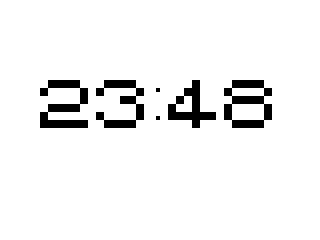
Source Code
   1 SAVE "1007%8"
  10 PRINT "**** DIGITAL CLOCK ****"
  20 PRINT "ENTER TIME IE. 2345"
  30 INPUT TIME
  40 CLS
  50 LET M=INT (TIME/100)*60+TIME-INT (TIME/100)*100
  60 GOTO 220
  70 LET T=0
  80 LET D=INT ((INT (M/60))/10)
  90 GOSUB 260
 100 LET T=7
 110 LET D=(INT (M/60))-10*D
 120 GOSUB 260
 130 PLOT 31,20
 140 PLOT 31,27
 150 LET T=16
 160 LET D=INT (60*(M/60-INT (M/60))/10+.01)
 170 GOSUB 260
 180 LET T=23
 190 LET D=M-INT (M/10)*10
 200 GOSUB 260
 210 IF PEEK 16437<>245 THEN GOTO 210
 220 PAUSE 1263
 230 LET M=M+1
 240 IF M=1440 THEN LET M=0
 250 GOTO 70
 260 LET N=7905+D*8
 270 PRINT AT 7,T;
 280 FOR N=N TO N+5
 290 LET X=PEEK N
 300 FOR L=1 TO 7
 310 LET C=0
 320 IF X<128 THEN GOTO 350
 330 LET C=128
 340 LET X=X-128
 350 LET X=X*2
 360 PRINT CHR$ C;
 370 NEXT L
 380 PRINT TAB T;
 390 NEXT N
 400 RETURN
Note: Type-in program listings on this website use ZMAKEBAS notation for graphics characters.