
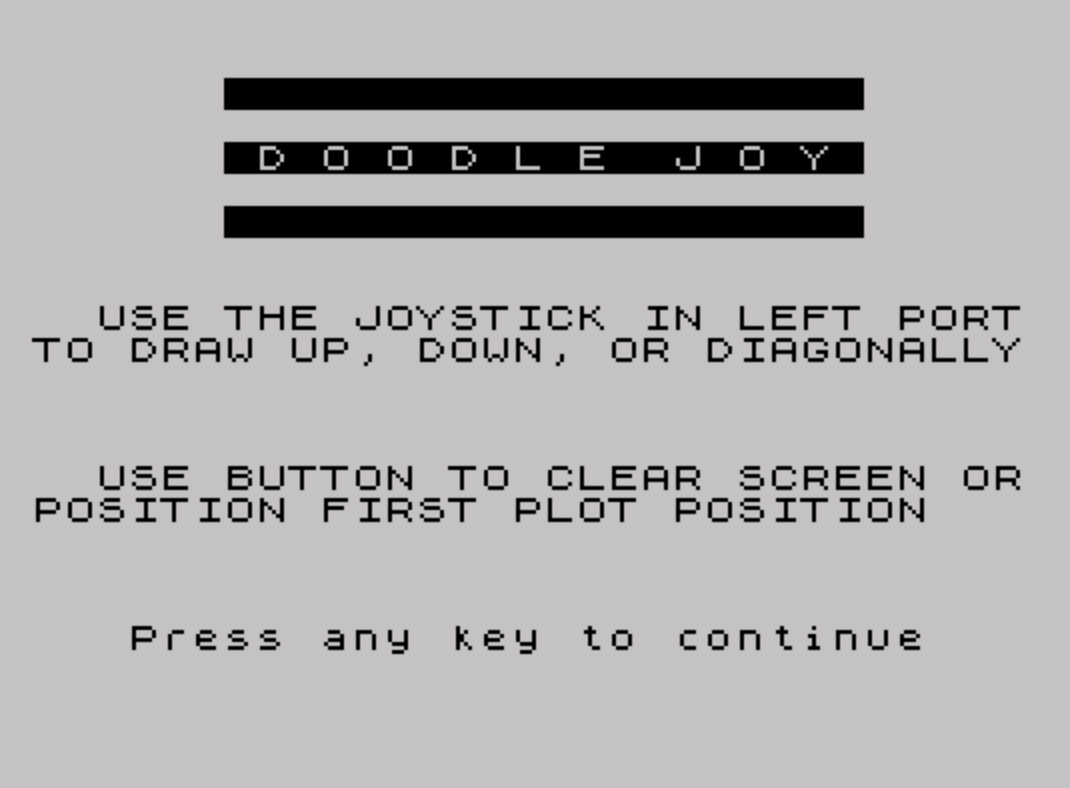
DoodleJoy is a drawing program that uses a joystick connected to the left port to move a pixel around the screen in eight directions, including diagonals. The STICK function (represented as `|`) reads joystick input: lines 80 and 90 decode the directional values by testing specific return codes (1, 2, 4, 5, 6, 8, 9, 10) using Boolean arithmetic to increment or decrement the x and y coordinates. Wraparound is handled on lines 100 and 110 using the same Boolean arithmetic trick, clamping coordinates to the valid PLOT range of 0–255 horizontally and 0–175 vertically. The fire button on port 2 (tested via `|(2,1)=1` on line 120) clears the screen, effectively erasing the current drawing. A splash screen subroutine at line 500 displays centered title text and usage instructions before the main draw loop begins.
Program Analysis
Program Structure
The program is divided into two logical sections. Lines 5–130 form the main body: initialization, user input for the starting position, and the drawing loop. Lines 500–700 constitute a subroutine that displays a title splash screen with instructions before returning to the main loop. Line 9999 handles saving.
- Lines 5–40: REM label, screen clear, splash screen call, BORDER setup, and INPUT prompts for initial x/y coordinates with range validation.
- Lines 70–130: Main drawing loop — reads joystick, updates coordinates, wraps boundaries, optionally clears screen, plots the pixel, and loops.
- Lines 500–700: Splash screen subroutine with title display, instructions, flashing keypress prompt, and PAUSE 0 wait.
STICK Function Usage
The |(port, fire) idiom invokes the STICK keyword, a TS2068 extension that reads joystick input. Line 70 reads |(1,1) — port 1 (left joystick), returning a directional bitmask value. Line 120 reads |(2,1) — port 2, testing the fire button. The directional values used are:
| STICK value | Direction |
|---|---|
| 1 | Up |
| 2 | Down |
| 4 | Left |
| 5 | Up-left |
| 6 | Down-left |
| 8 | Right |
| 9 | Up-right |
| 10 | Down-right |
Boolean Arithmetic for Movement
Lines 80 and 90 use a compact BASIC idiom where Boolean expressions evaluate to 1 (true) or 0 (false), allowing coordinate deltas to be computed without IF statements. On line 80, x is incremented by 1 for rightward directions (c=9, c=8, c=10) and decremented by 1 for leftward directions (c=5, c=4, c=6). Line 90 applies the same technique for vertical movement, incrementing y for upward directions and decrementing for downward ones.
Coordinate Wrapping
Lines 100 and 110 handle boundary wrapping using the same Boolean arithmetic technique. If x exceeds 255, it is decremented by 1 (wrapping it back); if x goes below 0, it is incremented by 1. The same logic applies to y with a maximum of 175. This prevents a PLOT error from out-of-range coordinates, though it nudges rather than fully wraps (e.g., going one step past 255 gives 255, not 0).
Notable Techniques
- The
PAUSE 0on line 690 combined with waiting for any keypress is a standard efficient keypress-wait idiom. - Title text on lines 500–530 uses spaced characters to simulate large lettering (“D O O D L E J O Y”), a common display technique.
FLASH 1on line 680 draws attention to the continue prompt without additional logic.- The fire button check on line 120 uses
|(2,1)=1, testing port 2 separately from the directional port, allowing simultaneous draw and clear operations in principle.
Potential Anomalies
The wrapping logic on lines 100–110 does not perform true modular wraparound. If the coordinate goes one step out of bounds, it is clamped back to the boundary value (255 or 175 / 0), rather than wrapping to the opposite edge. This means the cursor effectively stops at the edges for one step before the next joystick input moves it back inward. This is a minor behavioral quirk rather than a fatal bug.
The PLOT on line 40 precedes the joystick read on line 70, meaning the initial position is plotted before any movement occurs. The loop then reads input and plots again at the top of each iteration, so the pixel is always drawn at the position before movement — a one-step lag between joystick and display that is typical of simple polling loops.
Image Gallery
Source Code
    5 REM doodlejoy
    8 CLS : GO SUB 500
   10 BORDER 6
   20 INPUT "Initial x coordinate?(0 to 255) ";x
   25 IF x>255 THEN GO TO 20
   30 INPUT "Initial y coordinate?(0 to 175) ";y
   35 IF y>175 THEN GO TO 30
   40 PLOT x,y
   70 LET c=|(1,1)
   80 LET x=x+(c=9)+(c=8)+(c=10)-(c=5)-(c=4)-(c=6)
   90 LET y=y+(c=5)+(c=1)+(c=9)-(c=6)-(c=2)-(c=10)
  100 LET x=x-(x>255)+(x<0)
  110 LET y=y-(y>175)+(y<0)
  120 IF |(2,1)=1 THEN CLS
  130 GO TO 40
  500 PRINT AT 2,6;"                    "
  520 PRINT AT 4,6;" D O O D L E  J O Y "
  530 PRINT AT 6,6;"                    "
  540 PRINT AT 9,2;"USE THE JOYSTICK IN LEFT PORT TO DRAW UP, DOWN, OR DIAGONALLY"
  550 PRINT AT 14,2;"USE BUTTON TO CLEAR SCREEN OR POSITION FIRST PLOT POSITION"
  680 PRINT FLASH 1;AT 19,3;"Press any key to continue"
  690 PAUSE 0
  695 CLS
  700 RETURN
 9999 SAVE "doodlejoy" LINE 1: BEEP 1,33
Note: Type-in program listings on this website use ZMAKEBAS notation for graphics characters.