
This program implements a single-alien space shooter game where the player moves a ship left and right along the bottom row to intercept a descending alien that drifts randomly across the screen. The player uses keys 5 and 8 to move and 0 to fire a laser beam, which is drawn using PLOT and DRAW with INVERSE 1 for the erase pass and OVER 1 for cleanup. Three custom UDGs are defined at startup via POKEs into USR memory using packed sprite data read from DATA statements: UDG \a (player ship), UDG \b (alien), and UDG \c (explosion). The alien’s horizontal drift is kept in bounds with a corrective nudge using the expression 3 AND st<-30 and 3 AND st>30. A lives counter is maintained with up to five aliens displayed as icons on the status line, and a high-score is tracked across rounds within the same session.
Program Analysis
Program Structure
The program is organized into a main game loop, a laser-fire subroutine, a UDG initialization subroutine, and an end-of-round handler. Control flow is as follows:
- Line 5: Call subroutine at 1000 to define UDG sprites.
- Lines 10–80: Initialize screen, high score, star field, status bar, and lives counter.
- Lines 90–170: Main game loop — move player, drift alien downward, check collisions, handle laser firing.
- Lines 200–222: End of round (alien reached player or hit); update high score, prompt for replay.
- Lines 300–340: Laser fire subroutine — draw and erase beam, test hit.
- Lines 500–520: Alien-reaches-bottom handler — deduct score, decrement lives, return or restart.
- Lines 1003–1010: UDG definition subroutine using READ/DATA.
UDG Sprite Definitions
Three UDGs are defined at lines 1003–1004 using POKE USR "\b", POKE USR "\a", and POKE USR "\c" to set the alien, player ship, and explosion sprites respectively. Each UDG occupies 8 bytes, and all three are packed together in a single DATA statement at line 1005, read with a triple-variable READ n,m,o inside a loop from 0 to 7. This is an efficient technique that avoids separate READ statements for each UDG.
Laser Beam Rendering
The laser subroutine at line 300 uses a two-pass technique common in Spectrum BASIC graphics:
PLOT INVERSE 1followed byDRAW INK 5,0,-117draws the visible laser beam upward from the player position.- A
BEEPprovides audio feedback. PLOT INVERSE 1andDRAW OVER 1,0,-117erase the beam using XOR mode.
The player column is converted to pixel coordinates with c*8+3, placing the beam at the center of the character cell.
Alien Movement and Boundary Correction
The alien’s horizontal position st drifts each frame with INT (RND*3)-1, giving a random step of −1, 0, or +1. A soft boundary correction is applied at line 138:
LET st=st+INT (RND*3)-1+(3 AND st<-30)-(3 AND st>30)The expression 3 AND st<-30 evaluates to 3 (true=1 in numeric context, but here AND returns the left operand when the condition is true) when st drifts too far left, nudging it back. This is a classic Sinclair BASIC idiom using the numeric value of boolean AND.
Collision Detection
Two collision checks are used:
- Alien reaches player row: Line 145 checks
i=1 AND st=c— if the alien is at row 1 and the same column as the player, a hit animation triggers and the round ends. - Laser hits alien: Line 320 checks
(i<17 AND i>1) AND st=cafter the beam is fired. A successful hit awards 100 points, adds a laser charge, plays a multi-tone explosion sequence, and jumps to line 85 (which does not exist, causing an implicit fall-through to line 90 — a deliberate technique to restart the alien).
Lives Display
Lives are stored in variable co, initialized to 5. The subroutine at line 504 renders alien icons (\b UDG) on the status line for each remaining life, and blanks icons for lost lives. The flag variable l controls whether the subroutine returns (during initialization) or falls through to restart the alien loop.
Score and High Score Tracking
The score p is updated both positively (hits, +100) and negatively (alien reaches bottom, −50). The high score hp persists across rounds within the same session; it is checked and updated at line 210. Both values are displayed inline via INPUT with expression printing at line 222, a space-saving Sinclair BASIC trick that uses INPUT‘s output capability without actually reading input in the usual sense — the semicolon suppresses the question mark prompt.
Variable Summary
| Variable | Purpose |
|---|---|
hp | High score (persists across rounds) |
p | Current round score |
c | Player column (0–31) |
co | Lives remaining (0–5) |
la | Laser shots remaining |
i | Alien row (counts down from 20 to −1) |
st | Alien column (drifts randomly) |
l | Flag: 1=return from lives display subroutine |
f | Loop counter (reused for stars, UDGs, lives display) |
g | Loop counter for explosion sound |
Notable Anomalies
Line 90 is referenced by the laser hit handler (GO TO 85 jumps to a nonexistent line, which resolves to line 90 as the next existing line) and by line 520 after life loss. However, there is no line 90 in the listing — the program continues from line 92. This is intentional: GO TO a nonexistent line number between two existing lines is a recognized Spectrum BASIC technique that safely lands on the next higher line. Line 85 used as a restart target after a kill effectively maps to line 92.
Line 165 trims the laser counter display with PRINT AT 21,31;" " when la<10, preventing a stale tens digit from remaining on screen after the count drops to a single digit. This is a straightforward display-cleanup idiom.
Image Gallery
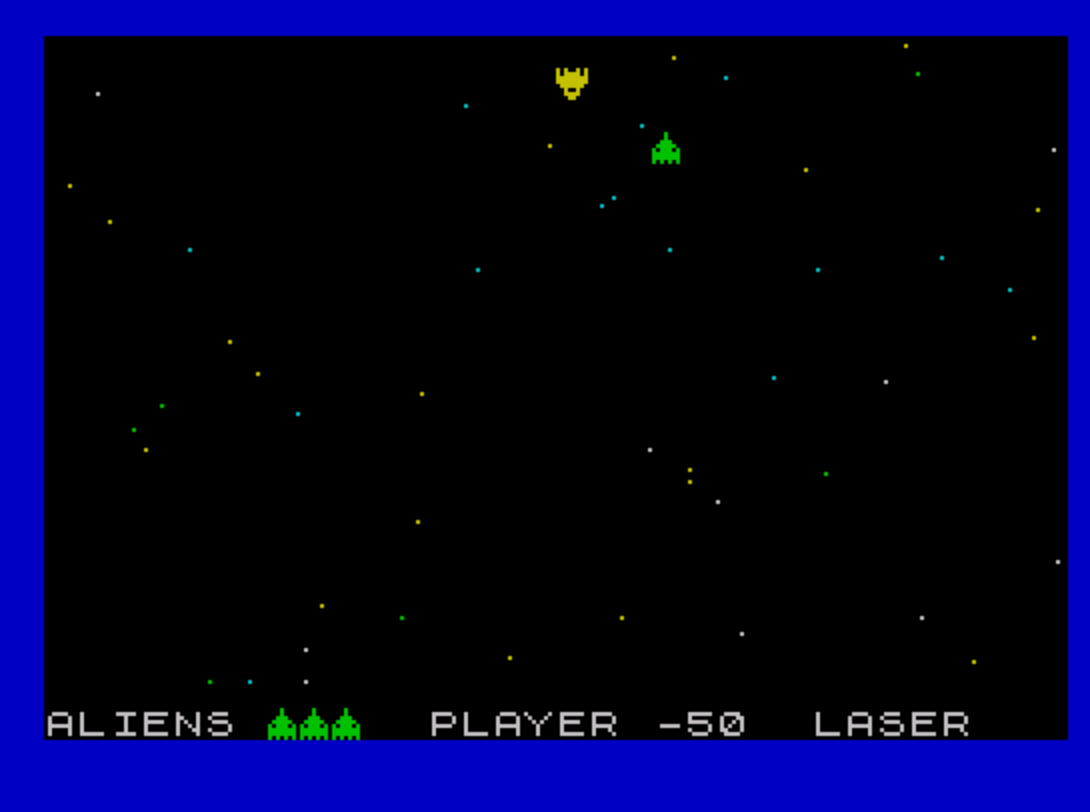
Source Code
    1 REM earth
    5 GO SUB 1000
   10 PAPER 0: INK 7: BORDER 1: CLS
   20 LET hp=0
   50 CLS : FOR f=1 TO 50: PLOT INK RND*3+4,255.5*RND,175.5*RND: NEXT f
   60 LET la=50: LET l=1: PRINT AT 21,0;"ALIENS";TAB 12;"PLAYER";TAB 24;"LASER"
   70 LET p=0: LET c=16: LET co=5
   80 GO SUB 504: LET l=0
   92 LET i=20: LET st=INT (RND*20)+5
   93 IF co=0 THEN GO TO 210
   95 PRINT AT i,st; INK 1;"\b"
  100 PRINT AT 1,c;" "
  110 LET c=c+(INKEY$="8" AND c<31)-(INKEY$="5" AND c>0)
  115 PRINT AT 1,c; INK 6;"\a"
  122 BEEP .005,c
  125 PRINT OVER 1;AT i,st; INK 5;"\b"
  131 LET i=i-1
  133 IF i=-1 THEN GO TO 500
  138 LET st=st+INT (RND*3)-1+(3 AND st<-30)-(3 AND st>30)
  140 PRINT OVER 1;AT i,st; INK 4;"\b"
  143 PRINT AT 21,19;p;" "
  145 IF i=1 AND st=c THEN PRINT AT 1,c; INK 5; FLASH 1;"\c": GO TO 200
  160 IF INKEY$="0" AND la>0 THEN LET la=la-1: PRINT AT 21,30;la: GO SUB 300
  165 IF la<10 THEN PRINT AT 21,31;" "
  170 GO TO 100
  200 FOR g=1 TO 30
  205 OUT 254,RND*255
  206 BEEP RND*.05,RND*24-12
  208 NEXT g
  210 IF p>hp THEN LET hp=p
  221 PRINT AT 21,0
  222 INPUT ;"Your Score=";(p)''"Hi'Score=";(hp): PAUSE 500: GO TO 10
  224 GO TO 10
  300 PLOT INVERSE 1,c*8+3,159
  305 DRAW INK 5,0,-117
  308 BEEP .05,12
  309 PLOT INVERSE 1,c*8+3,159
  310 DRAW OVER 1,0,-117
  320 IF (i<17 AND i>1) AND st=c THEN LET p=p+100: LET la=la+1: PRINT AT 21,30;la: BEEP .1,2: PRINT OVER 1;AT i,c; INK 2;"\c": BEEP .2,3: PRINT OVER 1;AT i,c; INK 5;"\c": BEEP .1,4: PRINT AT i,c;" ": GO TO 85
  340 RETURN
  500 LET p=p-50: LET co=co-1
  503 PRINT AT 21,19;" "
  504 FOR f=1 TO 5
  505 IF f<co THEN PRINT AT 21,6+f; INK 4;"\b"
  506 IF f>co THEN PRINT AT 21,5+f;" "
  510 NEXT f: IF l=1 THEN RETURN
  520 GO TO 90
 1003 FOR f=0 TO 7: READ n,m,o: POKE USR "\b"+f,n: POKE USR "\a"+f,m: POKE USR "\c"+f,o
 1004 NEXT f
 1005 DATA 16,165,165,16,189,24,56,255,165,124,255,90,186,126,90,254,36,165,254,60,24,170,24,165
 1010 RETURN
 9999 SAVE "earth" LINE 1: BEEP 1,32
Note: Type-in program listings on this website use ZMAKEBAS notation for graphics characters.