
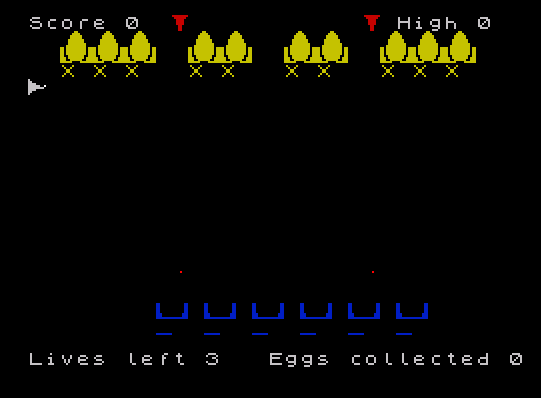
Egg Savior is an action game in which the player maneuvers a character around the screen to capture eggs guarded by laser cannons, using a joystick plugged into the left port. The player must touch an “X” marker to pick up an egg and then find an underscore “_” marker to safely deposit it into a cradle; contact with anything else costs a life. The program defines ten User Defined Graphics (UDGs “a” through “j”) via POKEs to USR addresses, loaded from DATA statements at lines 9030–9110, to draw the egg, cradle, and character sprites. Laser cannon fire is simulated by PLOT/DRAW lines that are erased with OVER 1 after a brief PAUSE, and the STICK keyword is used each frame to read joystick input from port 1. Collecting all six eggs triggers a congratulatory sequence and restarts the game board without resetting the high score.
Program Analysis
Program Structure
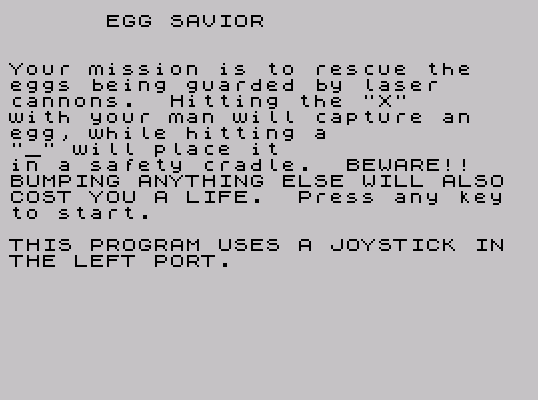
The program is organized into a set of subroutines called from a tight main loop. Initialization is split across three subroutines: GO SUB 9000 loads UDG data, GO SUB 8000 sets up game variables and screen attributes, and GO SUB 7000 draws the initial playfield. The main game loop runs from line 150 to 998, handling player movement, collision detection, laser fire, and display each iteration.
| Line Range | Purpose |
|---|---|
| 1–6 | Title screen and instructions |
| 55–80 | Top-level initialization calls |
| 150–998 | Main game loop |
| 1500–1510 | Death/game-over sequence and replay prompt |
| 2000–2020 | Egg pickup handler |
| 2500–2530 | Egg deposit handler |
| 6000–6040 | Collision dispatcher |
| 6500–6910 | Laser cannon fire routines |
| 7000–7990 | Playfield drawing |
| 8000–8100 | Per-game variable initialization |
| 9000–9120 | UDG loader and DATA |
| 9500–9540 | Level-complete celebration and restart |
User Defined Graphics
Ten UDGs (\a through \j) are defined at startup by the subroutine at line 9000, which loops from USR "a" to USR "j"-1 and POKEs each of the 80 bytes (10 characters × 8 bytes) from DATA statements at lines 9030–9110. The UDGs are used in pairs or quads to form multi-character sprites: \a\b / \c\d forms the egg cradle, \e\f is the egg top, and \g is the player character. UDGs \h and \i appear to be cannon or obstacle markers placed on the playfield at line 7150.
Joystick Input
Player movement at line 160 uses the STICK keyword (TS2068-specific) to read the joystick on port 1. All four directions are tested inline using boolean arithmetic: the result of each STICK comparison (0 or 1) is multiplied by the desired delta and added to the current position, with boundary clamping against the screen edges (rows 0–21, columns 0–31).
160 LET h=h+(STICK(1,1)=2 AND h<21)-(STICK(1,1)=1 AND h>0):
    LET v=v+(STICK(1,1)=8 AND v<31)-(STICK(1,1)=4 AND v>0)
Laser Cannon Mechanics
At line 180, a random number determines whether a laser fires on a given frame (IF RND>.5 THEN GO SUB 6500). The dispatcher at 6500 uses computed GO TO:
GO TO (INT(RND*3)+1)*100+6500 — this evaluates to 6600, 6700, or 6800, selecting one of three cannon firing routines. Each routine uses PLOT/DRAW with INK 2; BRIGHT 1 to draw a laser beam, then erases it using DRAW OVER 1. After drawing but before erasing, GO SUB 6900 checks whether the laser overlaps the player’s current cell using SCREEN$, triggering the collision handler if so.
Collision Detection
Collision is handled by reading SCREEN$(h,v) at line 170 each frame. If the cell is not a space, GO SUB 6000 is called. The dispatcher at 6000 compares the character found against "X" (egg present, go to pickup) and "_" (cradle, go to deposit); any other character decrements lives, sets eggs=0, and briefly flashes the player sprite with FLASH 1.
Playfield Layout
The DATA at line 9120 (3,2,2,3) specifies the widths of four egg clusters displayed across rows 1–3. The drawing routine at 7000 iterates over these widths, printing UDG pairs for each egg position and placing “X” markers beneath each group. Six underscore cradle slots are drawn at rows 18–19 for depositing captured eggs. The laser cannons are positioned using pixel coordinates: m1=17*8+4, m2=9*8+4, m3=21*8+4 (column positions in pixels), all firing horizontally or vertically across a 120–245 pixel span.
Game Flow and Scoring
The variable eggs acts as a carry flag (0 = no egg held, 1 = egg held). tot counts eggs successfully deposited; reaching 6 triggers the win sequence at 9500, which plays a rising/falling tone sweep and restarts the playfield via GO TO 80 without reinitializing the high score stored in hi. On death (line 200), a musical sequence is played at 1500 before prompting to replay via INPUT ... LINE a$.
Notable Techniques and Anomalies
- The
OVER 1XOR drawing mode is used correctly to erase laser beams without disturbing background content. - Line
7090setsOVER 1globally mid-subroutine; line7170resets it withOVER 0. This is a potential hazard if the subroutine exits unexpectedly, but in practice the flow is controlled. - The
STICKkeyword is called multiple times per frame (up to 8 reads in line160alone), which is slightly inefficient; storing the result in a variable would reduce repeated hardware polling. - Line
2005prints at row 1, columnv(the player’s current column) to update the egg sprite display, which could misalign if the player moves between pickup and display — a minor visual artifact. - The variable
scis used at line7000before being assigned in the main game path; it is initialized at8040as0and updated only at game-over (1501) and win (9500), meaning the displayed score during play reflects the previous game’s total until that point. - The
b$variable inGO SUB 6000is local only by convention; it is read fromSCREEN$(h,v)which was already evaluated at line170, representing a redundant screen read.
Image Gallery
Source Code
    1 REM egg savior
    2 PRINT AT 0,6;"EGG SAVIOR"
    3 PRINT : PRINT : PRINT "Your mission is to rescue the": PRINT "eggs being guarded by laser ": PRINT "cannons.  Hitting the ""X""": PRINT "with your man will capture an": PRINT "egg, while hitting a": PRINT """_"" will place it": PRINT "in a safety cradle.  BEWARE!!": PRINT "BUMPING ANYTHING ELSE WILL ALSO": PRINT "COST YOU A LIFE.  Press any key": PRINT "to start."
    4 PRINT : PRINT "THIS PROGRAM USES A JOYSTICK IN THE LEFT PORT."
    5 IF INKEY$="" THEN GO TO 5
    6 CLS
   10 REM egg savior \h\h\h\h\h\h\h\h\h\h
   55 LET hi=0
   60 GO SUB 9000
   70 GO SUB 8000
   80 GO SUB 7000
  150 PRINT AT h,v;" "
  160 LET h=h+( STICK (1,1)=2 AND h<21)-( STICK (1,1)=1 AND h>0): LET v=v+( STICK (1,1)=8 AND v<31)-( STICK (1,1)=4 AND v>0)
  170 IF SCREEN$ (h,v)<>" " THEN GO SUB 6000
  180 IF RND>.5 THEN GO SUB 6500
  190 PRINT AT h,v; INK 3+eggs;"\g"
  191 BEEP .008,0
  200 IF lives<1 THEN PRINT AT 21,0;"     You have been killed     ": GO TO 1500
  205 PRINT AT 21,0;"Lives left ";lives
  210 PRINT AT 21,15;"Eggs collected ";tot
  998 GO TO 150
  999 STOP
 1500 BEEP 1,4: BEEP 1,4: BEEP .3,4: BEEP 1.2,4: BEEP .75,7: BEEP .5,6: BEEP 1,6: BEEP .3,4: BEEP .7,4: BEEP .5,3: BEEP 1,4
 1501 LET sc=tot: IF sc>hi THEN LET hi=sc: PRINT AT 0,0;"Score ";sc;TAB 23;"High ";hi
 1510 INPUT "Press enter to play again "; LINE a$: CLS : GO TO 70
 2000 IF eggs=1 THEN RETURN
 2005 PRINT AT 1,v;"  ";AT 2,v; INK 6;"\e\f"
 2010 LET eggs=1
 2015 BEEP .1,10
 2020 RETURN
 2500 IF eggs=0 THEN PRINT AT h,v; INK 1;"_": LET h=h+1: RETURN
 2510 PRINT AT 17,v; INK 6;"\a\b";AT 18,v; OVER 1; INK 6;"\c\d"
 2515 LET eggs=0
 2516 PRINT AT 19,v;"  "
 2517 BEEP .1,20: BEEP .15,15
 2520 LET tot=tot+1: IF tot=6 THEN GO TO 9500
 2530 RETURN
 6000 LET b$=SCREEN$ (h,v)
 6010 IF b$="X" THEN GO TO 2000
 6020 IF b$="_" THEN GO TO 2500
 6030 LET lives=lives-1
 6031 LET eggs=0
 6040 PRINT AT h,v; FLASH 1; INK 3;"\g": BEEP .1,-10: FOR p=1 TO 20: NEXT p: RETURN
 6500 GO TO (INT (RND*3)+1)*100+6500
 6600 PLOT 9,m1: DRAW INK 2; BRIGHT 1;245,0
 6605 GO SUB 6900
 6606 PAUSE 2
 6610 DRAW OVER 1;-248,0: PLOT OVER 1;254,m1: RETURN
 6700 PLOT m2,167: DRAW INK 2; BRIGHT 1;0,-120
 6705 GO SUB 6900
 6706 PAUSE 2
 6710 DRAW OVER 1;0,120: RETURN
 6800 PLOT m3,167: DRAW INK 2; BRIGHT 1;0,-120
 6805 GO SUB 6900
 6806 PAUSE 2
 6810 DRAW OVER 1;0,120: RETURN
 6900 IF SCREEN$ (h,v)<>" " THEN GO TO 6000
 6910 RETURN
 7000 LET n=0: PRINT AT 0,0;"Score ";sc;TAB 23;"High ";hi
 7005 FOR a=1 TO 4
 7010 PRINT AT 1,n;"  ";
 7020 FOR b=1 TO e(a)
 7030 PRINT INK 6;"\a\b";
 7040 NEXT b
 7050 PRINT AT 2,n;"  ";
 7060 FOR b=1 TO e(a)
 7070 PRINT INK 6;"\c\d";
 7080 NEXT b
 7090 OVER 1
 7095 PRINT AT 2,n;"  ";
 7100 FOR b=1 TO e(a)
 7110 PRINT INK 6;"\e\f";
 7120 NEXT b
 7122 PRINT AT 3,n;"  ";
 7125 FOR b=1 TO e(a): PRINT INK 6;"X ";: NEXT b
 7130 LET n=n+(e(a)*2)+2
 7140 NEXT a
 7150 PRINT AT 0,9; INK 2;"\i";AT 0,21;"\i";AT 4,0;"\h"
 7160 PRINT AT 18,8; INK 1;"\e\f \e\f \e\f \e\f \e\f \e\f"
 7165 PRINT AT 19,8; INK 1;"_  _  _  _  _  _"
 7170 OVER 0
 7990 RETURN
 8000 BORDER 0: INK 7: PAPER 0: CLS
 8010 DIM e(4)
 8020 RESTORE 9120: FOR z=1 TO 4: READ e(z): NEXT z
 8030 LET h=10: LET v=15
 8040 LET sc=0: RANDOMIZE
 8060 LET m1=17*8+4: LET m2=9*8+4: LET m3=21*8+4
 8070 LET eggs=0
 8080 LET lives=3
 8090 LET tot=0
 8100 RETURN
 9000 FOR a=USR "a" TO USR "j"-1
 9010 READ user: POKE a,user
 9020 NEXT a: RETURN
 9030 DATA 1,3,7,7,15,15,15,31
 9040 DATA 128,192,224,224,240,240,248,248
 9050 DATA 31,31,31,31,15,15,7,3
 9060 DATA 248,248,248,248,240,240,224,192
 9070 DATA 192,192,192,192,192,224,224,255
 9080 DATA 3,3,3,3,3,7,7,255
 9090 DATA 56,56,16,254,16,16,40,68
 9100 DATA 128,192,240,255,255,240,192,128
 9110 DATA 255,126,60,60,60,24,24,24
 9120 DATA 3,2,2,3
 9500 LET sc=tot: IF sc>hi THEN LET hi=sc: PRINT AT 0,0;"Score ";sc;TAB 23;"High ";hi
 9505 LET h=10: LET v=15
 9520 FOR p=1 TO 31: BEEP .01,p: BEEP .006,-p: NEXT p
 9530 CLS
 9540 GO TO 80
Note: Type-in program listings on this website use ZMAKEBAS notation for graphics characters.