
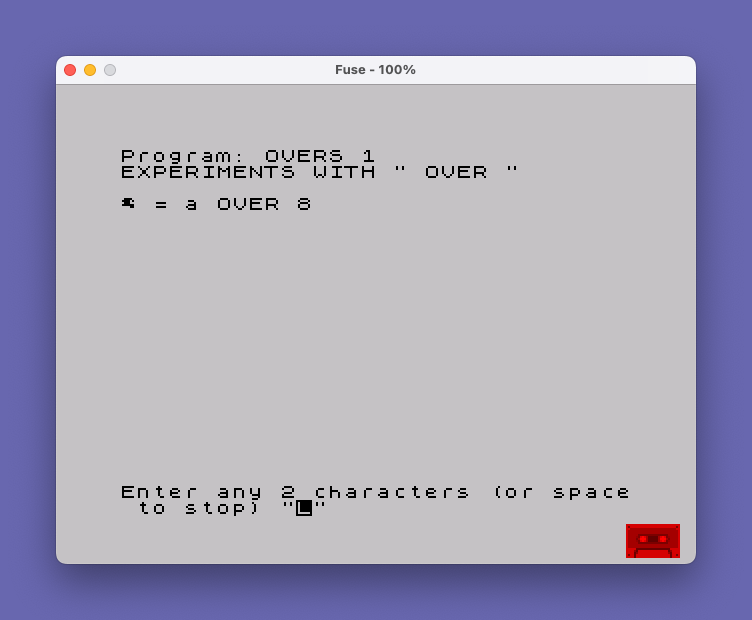
This program demonstrates the OVER 1 print attribute by overlaying two user-supplied characters on screen. The user enters any two characters, and the program prints the first character, steps back one position using CHR$ 8 (the cursor-left control code), then prints the second character with OVER 1 active, producing a combined glyph that is the bitwise OR of both character bitmaps. Input validation checks for exactly two characters and uses a space as the exit sentinel. The SAVE line stores the program with an auto-run directive targeting line 0.
Program Analysis
Program Structure
The program is a short interactive loop with straightforward flow control:
- Line
10: Print a title banner. - Line
20: Prompt the user for a two-character string. - Line
30: Exit on a space character (sentinel value). - Line
40: Validate input length; re-prompt if not exactly two characters. - Line
50: Display the overlay effect and a textual description. - Line
60: Loop back to prompt for more input.
The OVER 1 Technique
The core of the demonstration is in line 50. The sequence q$(1);CHR$ 8; OVER 1;q$(2) works as follows:
q$(1)is printed at the current cursor position.CHR$ 8moves the print cursor one position to the left, back over the character just printed.OVER 1switches on the OVER attribute, which causes subsequent pixels to be XORed (effectively ORed onto a blank cell) with whatever is already on screen.q$(2)is then printed on top, combining both characters’ bitmaps into a single cell.
The remainder of line 50 prints a plain-text description of the operation (" = ";q$(1);" OVER ";q$(2)), which also implicitly resets the OVER attribute back to 0 for normal printing, since each new PRINT item using a literal string does not carry the attribute forward across the semicolons without an explicit re-statement.
Input Validation
Two guard conditions protect the main display line. Line 30 checks whether q$ equals CHR$ 32 (space) and halts the program, providing a clean exit without requiring a keyword typed at the prompt. Line 40 uses LEN q$<>2 to reject any input that is not precisely two characters long, looping back to line 20 if the condition is true.
Notable Techniques
- CHR$ 8 cursor control: Using
CHR$ 8within aPRINTstatement to reposition the cursor is a well-established idiom for in-place character manipulation without relying onATcoordinates. - Space as sentinel: Using a single space to signal termination is a simple and intuitive exit mechanism that avoids special keyword input.
- Inline attribute reset: The OVER attribute set mid-statement is scoped to that print item, so subsequent items in the same
PRINTstatement revert to normal rendering, making explicit reset unnecessary. - Title string quoting: Line
10uses doubled quotes ("") inside the string to display literal quotation marks around the wordOVER, and the trailing'''block graphic characters form a simple visual underline/border decoration.
Potential Anomalies
If the user enters exactly one space character, line 30 triggers a STOP as intended. However, if the user simply presses Enter with no input, q$ will be an empty string (LEN q$ = 0), which is not equal to CHR$ 32, so the check on line 40 correctly catches it and re-prompts — no bug here. There is no check to ensure that both characters are printable, so control characters entered as part of a two-character string could produce unexpected screen effects, which is arguably part of the experimental spirit of the program.
Variable Summary
| Variable | Type | Purpose |
|---|---|---|
q$ | String | Holds the two-character input from the user |
Image Gallery
Source Code
   10 PRINT "EXPERIMENTS WITH "" OVER """''
   20 INPUT "Enter any 2 characters (or space to stop) ";q$
   30 IF q$=CHR$ 32 THEN STOP
   40 IF LEN q$<>2 THEN GO TO 20
   50 PRINT q$(1);CHR$ 8; OVER 1;q$(2);" = ";q$(1);" OVER ";q$(2)
   60 GO TO 20
 9998 SAVE "OVERS 1" LINE 0
Note: Type-in program listings on this website use ZMAKEBAS notation for graphics characters.