
Generates randomized geometric art by placing rings of faceted diamond and square shapes on an ellipse centered on the screen, with colors, shape density, and mode chosen randomly at startup. All drawing uses OVER 1 (XOR mode), and each cycle concludes with a four-directional screen wipe — vertical and horizontal line sweeps in sequence — that erases the image before the program restarts. The shape count increases by two on each restart, so patterns grow progressively more complex across successive cycles. Three shape modes are available: nested concentric diamonds, overlapping diamonds and squares, or single large shapes at each ring position.
An abstract geometric art generator titled “GEM PAT.” Each run draws a ring of faceted diamond/square shapes arranged on an ellipse centered on screen, pauses, then erases the image with four directional screen wipes before restarting. Each cycle adds two more shapes to the ring, building in complexity across successive runs.
Initialization (lines 10–40):
OVER 1is set once and never changed — all drawing throughout the program uses XOR mode, meaning lines toggle pixels rather than set them. This is what allows the wipe phase to erase the drawing cleanly.L=6— the shape count, incremented by 2 each cycle.A1— paper color chosen randomly from {0,1,2,6,7} (INK 9 = contrast color auto-selects for visibility against any paper).U(1–3) — shape mode selector.R(5–39) — starting radius for the size loop.F(1–6) — step size for concentric rings of shapes.G=200— pause duration in frames between wipe stages.W=0— arc parameter; all DRAWs are straight lines.
Border (line 50): A rectangle is plotted around the full screen (255×175) as a frame.
Pattern drawing (lines 60–130):
For each T from 1 to L, an angular position is computed:
A = T / (L/2) * PI   →  evenly spaced angles 0 to 2π
X = 127 + 62*COS(A)
Y = 87  + 42*SIN(A)
This places shape centers on an ellipse (semi-axes 62h, 42v) centered at pixel 127,87 — screen center.
At each center, V iterates from R up to 42 (drawing concentric shapes of increasing size), subject to U:
- U=1: Diamond only. PLOT at (X, Y+V) then four diagonal DRAWs trace a rhombus of half-diagonal V. Lines 110–120 repeat with V+1 for a doubled outline.
- U=2: Diamond plus axis-aligned square of side 2V centered at X,Y — two overlapping shapes at each size, doubled again.
- U=3: V is forced to 42 via line 80 (
FOR V=42 TO 42), drawing a single large shape at each position rather than nested rings.
Wipe sequence (lines 140–170):
Four passes sweep OVER 1 lines across the entire screen — left to right (vertical lines), top to bottom (horizontal), right to left, bottom to top — each stepping by B=2 pixels. Because OVER 1 XORs each pixel, drawing over the pattern erases it. Each pass pauses G=200 frames, producing a visible animated wipe. RUN then restarts the program with L incremented to L+2.
Image Gallery
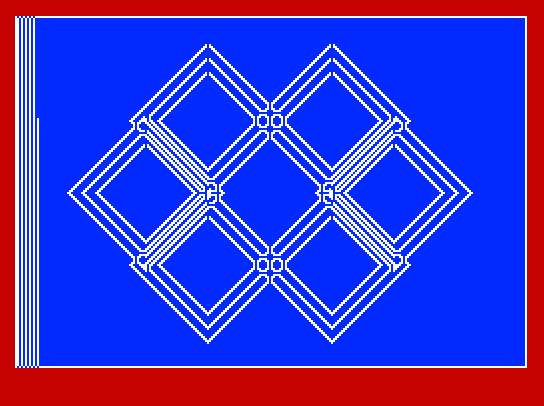
Source Code
   10 BRIGHT 1: LET L=6: OVER 1: RANDOMIZE 0
   20 LET A1=INT (RND*8): IF A1>=3 AND A1<=5 THEN GO TO 20
   30 PAPER A1: INK 9: BORDER RND*7: LET U=INT (RND*3)+1: LET R=INT (RND*35)+5
   40 CLS : LET B=2: LET G=200: LET V=42: LET W=0: LET F=INT (RND*6)+1
   50 DRAW 0,175: DRAW 255,0: DRAW 0,-175: DRAW -255,0
   60 FOR T=1 TO L: LET V=42: LET A=T/(L/2)*PI: LET X=127+62*COS A: LET Y=87+42*SIN A
   70 FOR V=R TO 42 STEP F: IF U<3 THEN GO TO 90
   80 FOR V=42 TO 42
   90 PLOT X,Y+V: DRAW V,-V,W: DRAW -V,-V,W: DRAW -V,V,W: DRAW V,V,W
  100 IF U=2 THEN PLOT X,Y+V: DRAW V,0: DRAW 0,-2*V: DRAW 2*-V,0: DRAW 0,2*V: DRAW V,0
  110 LET V=V+1: PLOT X,Y+V: DRAW V,-V,W: DRAW -V,-V,W: DRAW -V,V,W: DRAW V,V,W
  120 IF U=2 THEN PLOT X,Y+V: DRAW V,0: DRAW 0,-2*V: DRAW 2*-V,0: DRAW 0,2*V: DRAW V,0
  130 NEXT V: NEXT T: PAUSE G: LET L=L+2
  140 INK 9: FOR J=1 TO 255 STEP B: PLOT J,0: DRAW 0,175: NEXT J: PAUSE G
  150 FOR J=175 TO 1 STEP -B: PLOT 0,J: DRAW 255,0: NEXT J: PAUSE G
  160 FOR J=255 TO 1 STEP -B: PLOT J,0: DRAW 0,175: NEXT J: PAUSE G
  170 FOR J=0 TO 175 STEP B: PLOT 0,J: DRAW 255,0: NEXT J: PAUSE G: RUN
  200 SAVE "GEM PAT" LINE PI
Note: Type-in program listings on this website use ZMAKEBAS notation for graphics characters.