
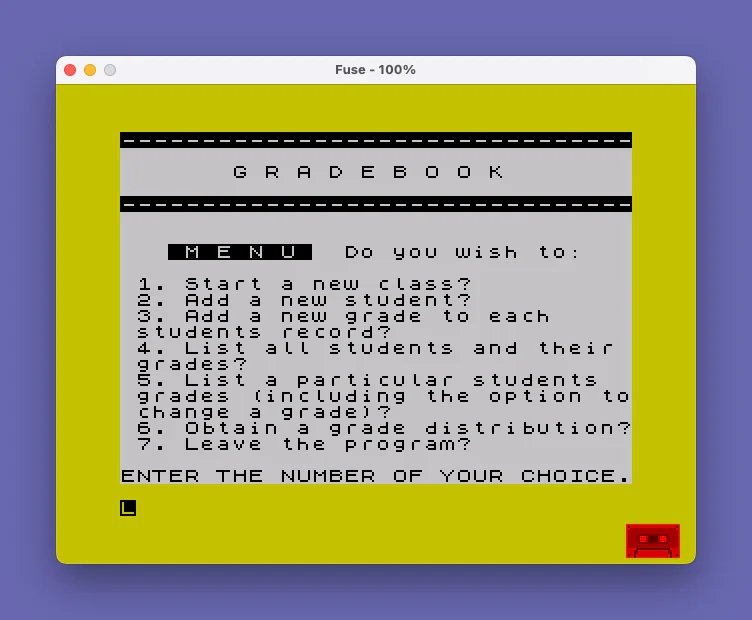
This program implements a gradebook management system for teachers, offering a menu-driven interface with seven options: creating a new class roster, adding students, entering grades, listing all students with totals and percentages, viewing and editing an individual student’s grades, generating a grade distribution, and saving the program to tape. Student names are stored in a two-dimensional string array `n$(41,15)` and grades in a numeric array `g(41,20)`, supporting up to 40 students and 20 grade entries. The first row (index 1) is reserved for a “POSSIBLE” entry that tracks the maximum possible points, enabling percentage calculation. A bubble sort routine at lines 4080–5050 sorts the totaled grades for the distribution listing, though it contains a logic bug where the swap condition is inverted, causing descending rather than ascending ordering.
Program Analysis
Program Structure
The program is organized around a central menu at lines 12–64, with each menu option dispatching to a distinct subroutine block via computed GO TO. The major functional sections are:
- Lines 12–64: Main menu display and dispatch
- Lines 65–270: New class setup — prompts for student count and names
- Lines 275–570: Grade entry loop and summary listing
- Lines 600–680: Add a new student
- Lines 1500–1530: Save-and-exit routine
- Lines 1600–1875: View and edit an individual student’s grades
- Lines 4000–6999: Grade distribution (totaling and sorting)
- Lines 7000–7020: Horizontal rule subroutine (decorative separator)
- Lines 8000–8050: “Return to menu” prompt subroutine
- Line 9999: Save/verify utility (standalone, not called from the menu)
Data Structures
Two arrays form the core data model:
n$(41,15)— a 2D string array holding up to 41 names, each up to 15 characters. Index 1 is permanently set to"POSSIBLE"to represent the maximum-points row.g(41,20)— a 2D numeric array holding up to 20 grade entries for each of 41 slots. The variablextracks the actual student count (stored as count+1 to account for the POSSIBLE row), andwtracks the number of grade columns entered so far.
Menu Dispatch Idiom
Menu selection is stored in numeric variable q and validated at line 45 before a chain of IF q=N THEN GO TO statements routes to each section. This is the standard Sinclair BASIC menu pattern since the dialect lacks ON ... GO TO. Line 64 contains a GO TO 20 targeting a non-existent line — this is a known technique that effectively falls through to the next available line (19 in this case).
Percentage Calculation
Both the full listing (lines 490–570) and the individual student view (lines 1700–1731) accumulate a running total t for each student. When n=1 (the POSSIBLE row), the total is saved as z. All subsequent students’ percentages are computed as (t/z)*100, rounded with INT(per+.5) — a standard rounding idiom.
Bubble Sort and its Bug
The grade distribution section (lines 4080–5050) implements a bubble sort over totals stored back into g(n,v). However, the swap logic is inverted: conditions at lines 5010–5030 check g(n,v) <= g(n+1,v) to decide whether to swap, which means lower values are moved upward rather than downward. The result is a descending sort instead of ascending. Additionally, the ch flag at line 5000 is set when g(n,v) < g(n+1,v), but since the swap check uses <=, equal values will also trigger a no-op swap, making the termination condition unreliable. The sort also operates only on student names via m$(41) declared at line 4003 but never actually populated or used, so names and grades become decoupled after sorting.
Subroutine Anomaly at Line 8000
The “return to menu” subroutine at lines 8000–8050 ends with a GO TO 19 at line 8030, bypassing the RETURN at line 8050 entirely. Every call to GO SUB 8000 in the program therefore never returns to the caller — instead, control jumps unconditionally back to the main menu. This is an intentional design choice (the menu is the only sensible destination), but it means the subroutine is structurally a trap rather than a conventional subroutine.
Save and Verify Routine
Line 9999 provides a standalone save/verify sequence using SAVE "gradebook" LINE 1 for auto-run, followed by a VERIFY "" to confirm the tape write. This line is not reachable from the menu and must be run manually (e.g., by GO TO 9999). The menu option 7 (lines 1500–1530) instead displays manual tape instructions and calls SAVE "GRADEBOOK" without auto-run — the two save routines are inconsistent in filename case and auto-run behavior.
Notable Issues Summary
| Location | Issue | Effect |
|---|---|---|
| Lines 490–550 | Duplicate FOR n=1 TO x loop at line 505 after line 490 opens the same loop | Line 490 loop body never executes; listing routine works only via line 505 |
| Lines 5010–5030 | Swap condition uses <= instead of > | Sort produces descending order and may loop non-terminally on equal values |
| Lines 4003, 4060 | m$(41) declared but unused; grades overwritten with totals in g(n,v) using post-loop value of v | Name ordering is not preserved during sort; grade data is corrupted |
| Line 8030 | GO TO 19 inside subroutine before RETURN | Callers never resume after GO SUB 8000 |
Image Gallery
Source Code
    5 REM gradebook SYNC M/A 83           Jim I. Brown
   12 CLS : BORDER 6: GO SUB 7000
   14 PRINT "       G R A D E B O O K"
   16 PRINT
   17 GO SUB 7000
   19 PRINT : PRINT ;"   "; INVERSE 1;" M E N U "; INVERSE 0;"  Do you wish to:": PRINT
   22 PRINT " 1. Start a new class?"
   23 PRINT " 2. Add a new student?"
   24 PRINT " 3. Add a new grade to each      students record?"
   25 PRINT " 4. List all students and their  grades?"
   26 PRINT " 5. List a particular students   grades (including the option to change a grade)?"
   27 PRINT " 6. Obtain a grade distribution?"
   28 PRINT " 7. Leave the program?"
   32 PRINT : PRINT "ENTER THE NUMBER OF YOUR CHOICE."
   35 INPUT q
   45 IF q<1 OR q>7 THEN GO TO 35
   50 IF q=1 THEN GO TO 65
   52 IF q=2 THEN GO TO 600
   54 IF q=3 THEN GO TO 275
   56 IF q=4 THEN GO TO 500
   58 IF q=5 THEN GO TO 1600
   60 IF q=6 THEN GO TO 4000
   61 IF q=7 THEN GO TO 1500
   62 CLS
   64 GO TO 20
   65 CLS
   70 PRINT : PRINT INVERSE 1;"      ARE YOU SURE (y/n)?       "
   75 PRINT : PRINT "      Remember a new roster will delete the current one along    with its stored data."
   82 PRINT : PRINT "      ENTER ""C"" TO RETURN TO THE MAIN MENU."
   83 INPUT r$
   84 CLS
   85 IF r$="y" THEN GO TO 100
   95 GO TO 19
  100 PRINT "How many students are in the    class?": INPUT x
  103 LET x=x+1
  114 CLS
  115 LET w=0
  200 DIM n$(41,15)
  210 DIM g(41,20)
  219 FOR n=1 TO x
  220 LET n$(1)="POSSIBLE"
  222 IF n=1 THEN GO TO 270
  230 PRINT "Enter name no. ";n-1
  240 INPUT n$(n)
  250 CLS
  260 PRINT n$(n)
  270 NEXT n
  271 GO SUB 8000
  275 LET w=w+1
  276 CLS
  290 FOR n=1 TO x
  295 PRINT n$(n)
  296 LET v=w
  298 PRINT "ENTER GRADE NUMBER ";v
  300 INPUT g(n,v)
  310 CLS
  320 PRINT g(n,v)
  340 NEXT n
  400 PRINT
  410 GO SUB 8000
  490 FOR n=1 TO x
  500 CLS : PRINT
  505 FOR n=1 TO x
  510 PRINT n$(n)
  515 LET t=0
  520 FOR v=1 TO w
  532 LET t=g(n,v)+t
  533 IF n=1 THEN LET z=t
  535 NEXT v
  543 PRINT "TOTAL = ";t;"  ";
  545 LET per=(t/z)*100
  546 LET per=INT (per+.5)
  547 PRINT "PERCENT = ";per
  548 PRINT
  550 NEXT n
  560 PRINT
  570 GO SUB 8000
  600 LET x=x+1
  605 FOR n=1 TO x
  610 NEXT n
  620 CLS
  630 PRINT "ENTER THE NAME OF STUDENT NUMBER ";n-2
  640 INPUT n$(n-1)
  650 CLS
  660 PRINT "The following student has been added: ";n$(n-1)
  670 PRINT
  680 GO SUB 8000
 1500 CLS : PRINT : PRINT "To save this program:"
 1501 PRINT
 1502 PRINT "A. Position the tape."
 1503 PRINT
 1505 PRINT "B. TYPE ""C"""
 1506 PRINT
 1507 PRINT "C. Start the recorder."
 1508 PRINT
 1509 PRINT "Press ENTER."
 1510 STOP
 1520 SAVE "GRADEBOOK"
 1530 GO TO 1
 1600 CLS
 1603 PRINT "Enter the name of the student."
 1605 INPUT c$
 1608 CLS
 1610 LET j=LEN c$
 1615 DIM m$(41,j)
 1620 FOR n=1 TO x
 1625 LET m$(n)=n$(n)
 1630 IF c$=m$(n) THEN GO TO 1700
 1635 NEXT n
 1640 PRINT
 1645 PRINT "     "; FLASH 1;"No such name on roster"
 1650 PRINT
 1655 GO SUB 8000
 1700 PRINT n$(n)
 1705 LET t=0
 1710 FOR v=1 TO w
 1715 PRINT v;". ";g(n,v)
 1720 LET t=g(n,v)+t
 1722 IF n=1 THEN LET z=t
 1725 NEXT v
 1726 PRINT "TOTAL = ";t
 1727 LET per=(t/z)*100
 1728 LET per=INT (per+.5)
 1729 PRINT "Possible = ";z
 1731 PRINT "Percent = ";per
 1732 PRINT
 1735 PRINT "   Do you wish to change a grade (y/n)?": INPUT r$
 1745 IF r$="y" THEN GO TO 1800
 1750 CLS
 1755 GO TO 19
 1800 PRINT
 1822 PRINT "Select the number of the grade   to be changed."
 1825 INPUT c
 1835 LET v=c
 1840 CLS
 1845 PRINT "Enter the score you wish the ";g(n,v);"    to be changed to"
 1850 INPUT l
 1852 CLS
 1855 LET g(n,v)=l
 1860 PRINT "Grade ";v;" is now ";g(n,v)
 1865 PRINT
 1875 GO SUB 8000
 4000 CLS : PRINT : PRINT "TOTALING GRADES . . ."
 4003 DIM m$(41)
 4005 FOR n=1 TO x
 4010 LET t=0
 4020 FOR v=1 TO w
 4030 LET t=g(n,v)+t
 4040 NEXT v
 4060 LET g(n,v)=t
 4070 NEXT n
 4075 PRINT
 4077 PRINT "S O R T I N G    G R A D E S . ."
 4080 LET ch=0
 4090 FOR n=1 TO x
 5000 IF g(n,v)<g(n+1,v) THEN LET ch=1
 5010 IF g(n,v)<=g(n+1,v) THEN LET mid=g(n,v)
 5020 IF g(n,v)<=g(n+1,v) THEN LET g(n,v)=g(n+1,v)
 5030 IF g(n,v)<=g(n+1,v) THEN LET g(n+1,v)=mid
 5040 NEXT n
 5050 IF ch=1 THEN GO TO 4080
 5052 PRINT : PRINT
 5060 FOR n=1 TO x
 5080 PRINT g(n,v)
 5090 NEXT n
 5095 PRINT
 6000 GO SUB 8000
 6999 STOP
 7000 FOR i=0 TO 31: PRINT INVERSE 1;"-";: NEXT i
 7010 PRINT : PRINT
 7020 RETURN
 8000 PRINT "  "; INVERSE 1;"ENTER 'C' TO RETURN TO MENU."
 8010 INPUT r$
 8020 CLS
 8030 GO TO 19
 8050 RETURN
 9999 CLEAR : CLS : SAVE "gradebook" LINE 1: BEEP 1,32: PRINT "Rewind to VERIFY.": VERIFY "": PRINT FLASH 1;" V E R I F I E D ": BEEP .2,30
Note: Type-in program listings on this website use ZMAKEBAS notation for graphics characters.