
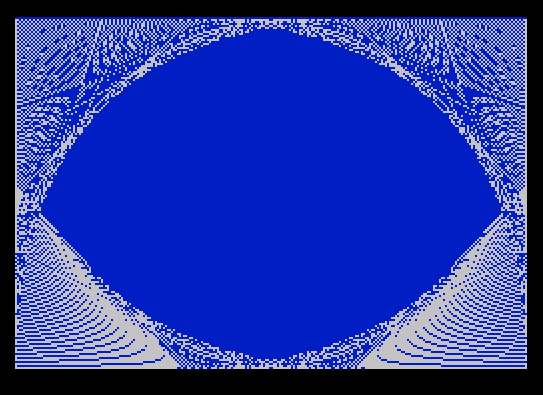
This program generates a decorative geometric pattern on screen using PLOT and DRAW commands, then saves and reloads it as a SCREEN$ file with a user-specified pause duration embedded in the filename. The drawing routine uses two nested loops (lines 20 and 25) to render crossing diagonal lines in OVER 1 (XOR) mode, creating an interference pattern across a 255×174 area. A color-banded rectangle is drawn using PRINT PAPER with an expression `f-(f=1)` to skip paper color 0 (black) on the first iteration. The filename is constructed dynamically as `”pic-PAUSE”` concatenated with the string representation of the pause value, so each save produces a distinctly named file. The double `USR USR 50000` call on lines 50 and 60 is an unusual idiom that uses the return value of one USR call as the address for a second machine code entry point.
Program Analysis
Program Structure
The program is organized into four logical phases:
- Setup (line 10): Sets border, paper, and ink colors and clears the screen.
- Drawing (lines 20–25): Two loops plot crossing diagonal lines using XOR mode.
- User input (lines 30–45): Draws a color-banded panel and prompts for a pause value 0–9.
- Save/load cycle (lines 50–70): Saves the screen to tape, optionally pauses, reloads it, then loops back to line 40.
Drawing Technique
Lines 20 and 25 each iterate f from 0 to 174 in steps of 2. Line 20 draws lines from the left and right edges upward toward center, while line 25 draws lines downward from the same edges. All four DRAW commands use OVER 1 (XOR pixel mode), meaning overlapping lines erase each other, producing a complex interference or moiré-style pattern rather than a solid fill.
The choice of 174 as the upper y-bound reflects the Spectrum’s 175-pixel vertical resolution (0–174), and using STEP 2 halves drawing time while still producing a dense visual result.
Color Panel Idiom
Line 30 uses the expression PAPER f-(f=1) to iterate paper colors 0 through 6 while skipping color 1 (blue, which matches the background). The boolean (f=1) evaluates to 1 when true in Spectrum BASIC, so when f=1 the paper attribute becomes 1-1=0 (black), effectively substituting black for blue in that stripe. This is a compact single-expression workaround for a conditional color skip.
Dynamic Filename Construction
Line 50 builds the SAVE filename at runtime: "pic-PAUSE"+STR$ p. Since p is an integer 0–9, this produces filenames like pic-PAUSE0 through pic-PAUSE9, allowing multiple screens saved with different pause durations to be stored distinctly on tape.
Double USR Call
Both lines 50 and 60 contain RANDOMIZE USR USR 50000. This is an unusual double-indirection idiom. The inner USR 50000 calls the machine code routine at address 50000 and returns a value; that return value is then used as the address for the outer USR call via RANDOMIZE (which discards the result). The actual behavior depends entirely on what machine code resides at address 50000 — likely a custom loader/saver utility. Without that code present, the program would crash at these lines.
Input Validation
Line 45 combines two statements: LET p=INT p truncates any decimal input, and IF p<0 OR p>9 THEN GO TO 40 re-prompts if out of range. This is a standard Spectrum BASIC validation pattern, handling both non-integer and out-of-bounds inputs in a single line.
Variable and Keyword Summary
| Variable/Keyword | Usage |
|---|---|
f | Loop counter for drawing and color panel loops |
p | User-entered pause duration (0–9) |
OVER 1 | XOR drawing mode for interference pattern |
SCREEN$ | SAVE/LOAD keyword for raw screen memory (6912 bytes) |
USR USR 50000 | Double machine code call; inner result used as outer address |
Potential Issues
- The program depends entirely on valid machine code at address 50000. If that memory region is unpopulated or corrupted,
USR 50000will crash. - The loop at line 70 returns to line 40 rather than line 10, meaning the decorative screen is not redrawn between iterations — the loaded SCREEN$ replaces it, then the input prompt overwrites part of that image via the color panel at line 30.
- There is no way to exit the program gracefully; the
GO TO 40loop is infinite and input validation only rejects values outside 0–9.
Image Gallery
Source Code
    1 REM "HEX2" --SPECTRUM
    3 REM HEXLOADER    LIST 2
   10 BORDER 0: PAPER 1: INK 7: CLS
   20 FOR f=0 TO 174 STEP 2: PLOT 0,f: DRAW OVER 1;f,174-f: PLOT 255,f: DRAW OVER 1;-f,174-f: NEXT f
   25 FOR f=0 TO 174 STEP 2: PLOT 0,f: DRAW OVER 1;174-f,-f: PLOT 255,f: DRAW OVER 1;-174+f,-f: NEXT f
   30 FOR f=1 TO 7: PRINT PAPER f-(f=1);AT 7+f,9;"              ": NEXT f
   40 INPUT "PAUSE (0 TO 9):";p
   45 LET p=INT p: IF p<0 OR p>9 THEN GO TO 40
   50 RANDOMIZE USR USR 50000: PAUSE p: SAVE "pic-PAUSE"+STR$ pSCREEN$
   60 CLS : RANDOMIZE USR USR 50000: LOAD ""SCREEN$
   70 GO TO 40
Note: Type-in program listings on this website use ZMAKEBAS notation for graphics characters.