
This program implements a multi-screen platform action game called “Hunchy,” in which the player guides Quasimodo over castle ramparts to rescue Esmeralda across five distinct levels. The game uses the TS2068’s STICK keyword to read joystick input from the left port and ATTR to perform collision detection by checking cell attribute values (86 for walls, 69 for safe zones). User-Defined Graphics (UDGs \a through \u) are used extensively to render the player character, enemies, environmental objects, and a rope-swinging mechanic tracked via a PLOT/DRAW-based pendulum routine. The scoring system tracks lives, rounds, and a “bonus enemy” counter, and a high-score variable persists across playthroughs within the same session. Level initialization branches via computed GO SUB at line 8050 (GO SUB 8050+(le*50)), and enemy movement subroutines are similarly dispatched at line 160 (GO SUB 400+(le*100)).
Program Analysis
Program Structure
The program is organized into well-separated functional regions:
- Lines 1–30: Variable initialization and startup sequence — sets high score, calls title/init/screen-setup subroutines.
- Lines 100–295: Main game loop — player movement, joystick reading, jump handling, rope interaction, and collision checks.
- Lines 300–350: Enemy/sniper movement subroutine (scrolling down the wall).
- Lines 400–935: Per-level enemy subroutines, dispatched by computed GO SUB. Lines 500, 600, 700, 800, and 900 each handle a distinct level’s moving hazards.
- Lines 940–990: Level-complete celebration and round advancement.
- Lines 1000–1010: Right-edge exit / level transition logic.
- Lines 2000–2035: Death sequence, game-over screen, and restart.
- Lines 8000–8090: Screen redraw and HUD setup.
- Lines 8100–8345: Per-level screen layout initialization subroutines.
- Lines 8500–8510: Intro animation (Quasimodo climbing the wall).
- Lines 8900–8910: Game variable initialization.
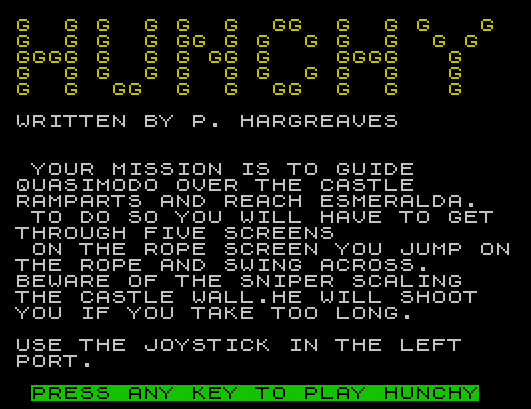
- Lines 9000–9040: Title screen and instructions.
Computed GO SUB Dispatch
Two key lines use arithmetic to select subroutines at runtime, a common memory-efficient technique in Sinclair BASIC:
160 GO SUB 400+(le*100)— dispatches to lines 500, 600, 700, 800, or 900 depending on the current level (le= 1–5), each handling a different enemy/hazard pattern.8050 GO SUB 8050+(le*50)— dispatches to lines 8100, 8150, 8200, 8250, or 8300 for per-level screen construction. Note that whenle=1, this becomesGO SUB 8100, but line 8055 interceptsle=1to run the intro animation instead via a GO TO, so the dispatch effectively starts at level 2 for the normal path.
Joystick Input and Movement
Player input is read exclusively via the STICK keyword (TS2068 extension), polling port 2 for fire (STICK (2,1)=1) and port 1 for direction. Direction values follow standard Kempston-style encoding:
| STICK value | Direction | UDGs assigned |
|---|---|---|
| 8 | Right | \a, \b |
| 4 | Left | \c, \d |
| 0 | None (skip to line 130) | — |
The variable m$ holds the top-half character and n$ the bottom-half character for the player sprite, chosen to reflect the facing direction. This two-row sprite approach is standard for UDG-based character rendering on this platform.
ATTR-Based Collision Detection
The game uses ATTR to read cell color attributes as a proxy for tile type, avoiding any separate collision map array. Two sentinel attribute values appear throughout:
86— encodes BRIGHT 1 + PAPER 2 + INK 6, representing solid wall/floor tiles. Checked at lines 110, 115, 165, and 235.69— encodes PAPER 1 + INK 5 (rope or climbable surface). Checked at lines 170 and 230 to detect whether the player is on a valid surface.
This technique is fragile if screen colors are contaminated by other drawing operations, but it is effective and requires no additional RAM for a tile map.
Rope/Pendulum Mechanic
The rope swing on certain levels is rendered using PLOT and DRAW in subroutine 600. The rope position is tracked with variable rp (pixel column of the rope end) and rd (delta, ±8 pixels per frame). The current rope is erased with DRAW INVERSE 1 before repositioning, then redrawn. The player can jump onto the rope; variable rh flags whether the player is currently riding it. The rope’s y-coordinate maps to screen rows via INT (rp/8).
HUD and Status Display
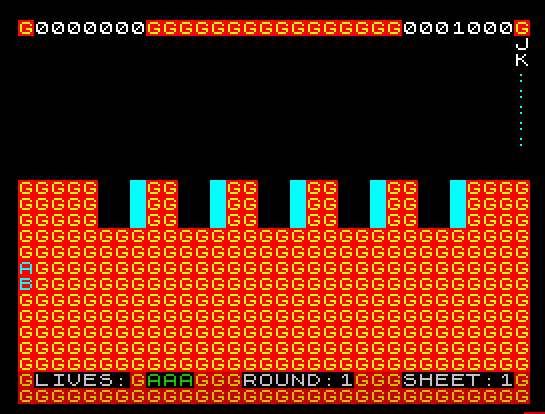
Line 8000 sets up the play-field border using a$, a 32-character string of \g UDG characters that forms a solid border row. The lower status area (print channel #0, the bottom strip) is used at lines 8010–8015 to display lives, round number, and level. Remaining lives are rendered as a row of UDG \a icons. Bonus enemies collected in the current level are displayed at line 8020 using UDGs \j and \k.
Sniper Enemy (Lines 300–350)
The sniper descends the left wall: variable mx tracks its row, decremented by ro/5 each cycle (so it speeds up with round number ro). When mx reaches row 9 it locks into a firing position and a bullet (\h) is animated across the screen toward the player. If mx drops below 0 the bullet fires and the player dies.
Intro Animation (Lines 8500–8510)
An animated sequence shows the player character climbing up the right side of the screen before the game starts. It iterates a from 31 down to 0, printing climbing-pose UDGs (\c/\d/\f) and then overwriting with wall tiles (\g). When a=0 it transitions to a second loop (lines 8505–8510) that walks the character leftward along the top, then jumps to line 8070 — which does not exist in the listing, so this GO TO targets a non-existent line as a termination technique, falling through to line 8080.
Level Complete Sequence (Lines 940–990)
On completing level 5, a congratulations message names “Esmeralda” and the player character “Quasimodo,” confirming the Hunchback of Notre-Dame theme. A hardware border color sweep is produced by FOR a=1 TO 255: OUT 254,-a: NEXT a cycling all border colors rapidly. Round counter ro increments (capped at 4 by line 986), and a super-bonus is awarded if all five bonus enemies were collected (be=4).
Notable Variables
| Variable | Purpose |
|---|---|
x, y | Player screen row and column |
m$, n$ | Top/bottom UDG chars for current player pose/direction |
le | Current level (1–5) |
ro | Round number (difficulty multiplier, 1–4) |
li | Lives remaining |
sc, hi | Current score and high score |
be | Bonus enemies collected this level |
rp, rd | Rope pixel position and delta |
rh | Flag: player on rope (1) or not (0) |
mx | Sniper row position |
ax, ad | Animated enemy column and direction delta |
jd | Jump y-direction bias (from facing direction) |
Anomalies and Points of Interest
- Line 8045 contains
LET rp=300:: LET rd=0— the double colon::is a null statement, harmless but unusual. - Line 8055 checks
IF le=1 THEN LET a=31: GO TO 8500immediately after the computed GO SUB at 8050. Since GO SUB 8050+(1*50) = GO SUB 8100 would execute first, the level-1 check at 8055 is actually unreachable via the normal path — the level-1 screen init happens at 8100 and returns before 8055 is encountered. This means the intro animation (8500) is only triggered on the very first call sequence before the RETURN at 8120 is reached, suggesting the flow is: 8050 calls 8100 (RETURN to 8055), then 8055 fires the intro for le=1. - Line 8050 itself reads
GO SUB 8050+(le*50): whenle=1this is GO SUB 8100, which returns to 8055 where the intro animation branch fires. The computed GO SUB therefore also serves as the level-1 screen builder before the animation override. - The
SAVE "hunchy" LINE 1at line 9900 stores the program with an auto-run entry point at line 1.
Image Gallery
Source Code
    1 LET hi=1000
   10 GO SUB 9000
   20 GO SUB 8900
   30 GO SUB 8000
  100 PRINT AT x,y;" ";AT x+1,y;" "
  101 IF STICK (2,1)=1 THEN GO TO 200
  105 IF STICK (1,1)=0 THEN GO TO 130
  110 IF STICK (1,1)=8 THEN LET m$="\a": LET n$="\b": IF y<31 AND ATTR (x+1,y+1)<>86 THEN LET y=y+1
  115 IF STICK (1,1)=4 THEN LET m$="\c": LET n$="\d": IF y>0 AND ATTR (x+1,y-1)<>86 THEN LET y=y-1
  130 IF y=31 THEN GO TO 1000
  150 PRINT AT x,y; INK 5;m$;AT x+1,y;n$
  155 GO SUB 300
  160 GO SUB 400+(le*100)
  165 IF ATTR (x+2,y)<>86 THEN GO TO 240
  170 IF ATTR (x,y)<>69 OR ATTR (x+1,y)<>69 THEN GO TO 2000
  190 GO TO 100
  200 IF m$="\c" THEN LET n$="\f": LET jd=-1: GO TO 215
  205 IF m$="\a" THEN LET n$="\e": LET jd=1: GO TO 215
  210 LET jd=0
  215 FOR a=-1 TO 1 STEP .5: PRINT AT x,y;" ";AT x+1,y;" ": LET x=x+a: IF y<31 AND y>0 THEN LET y=y+jd
  219 PRINT AT x,y; INK 5;m$;AT x+1,y;n$: GO SUB 400+(le*100)
  220 IF rh=0 AND y=INT (rp/8) OR y+1=INT (rp/8) THEN GO TO 270
  221 IF y=31 THEN GO TO 1000
  225 IF le=2 OR le=4 THEN GO TO 235
  230 IF ATTR (x,y)<>69 OR ATTR (x+1,y)<>69 THEN GO TO 2000
  235 BEEP .01,a: NEXT a: IF ATTR (x+2,y)=86 THEN GO TO 150
  240 GO TO 2000
  270 LET rh=1: PRINT AT x,y;" ";AT x+1,y;" ": LET y=INT (rp/8): LET x=8: LET m$="\a": LET n$="\b"
  275 PRINT AT x,y;" ";AT x+1,y;" ": LET y=(rp/8)-1
  280 PRINT AT x,y; INK 5;"\a";AT x+1,y;"\m"
  285 BEEP .005,y: GO SUB 300: GO SUB 600
  290 IF STICK (2,1)=1 THEN GO TO 200
  295 GO TO 275
  300 IF mx<=9 THEN GO TO 320
  305 LET mx=mx-(ro/5): PRINT AT mx,1; PAPER 6; INK 1;"\n";AT mx+1,1;"\p";AT mx+2,1; INK 6; PAPER 2;"\g"
  310 IF mx<=9 THEN PRINT INK 6; PAPER 2;AT 10,1;"\g";AT 11,1;"\g"
  315 RETURN
  320 PRINT AT 8,1; INK 5;"\n";AT 9,1;"\o": LET mx=mx-1: IF mx<0 THEN FOR a=2 TO y-1: PRINT AT x+1,a; INK 6;"\h": BEEP .001,-5: PRINT AT x+1,a;" ": NEXT a: GO TO 2000
  350 RETURN
  500 PRINT AT 9,ax;" ";AT 7,29-ax;" ": LET ax=ax-1: IF ax<1 THEN LET ax=29
  505 PRINT AT 9,ax; INK 6;"\q";AT 7,29-ax;"\q"
  590 RETURN
  600 PLOT 128,167: DRAW INVERSE 1;rp-128,-60
  605 LET rp=rp+rd
  610 IF rp>156 THEN LET rd=-8
  615 IF rp<100 THEN LET rd=8
  690 PLOT 128,167: DRAW rp-128,-60: RETURN
  700 FOR b=6 TO 26 STEP 5: PRINT AT ax,b; INK 4;"\r";AT ax-1,b; INK 7;"\r": NEXT b
  705 LET ax=ax+ad: IF ax=5 THEN LET ad=1
  710 IF ax=9 THEN LET ad=-1
  795 RETURN
  800 GO SUB 600: PRINT AT 10,ax; INK 6; PAPER 2;"\g";AT 10,31-ax;"\g": PRINT AT 10,ax+1;" ";AT 10,30-ax;" ": LET ax=ax+ad/2: IF ax=4 OR ax=14 THEN LET ad=-ad
  805 RETURN
  900 PRINT AT 1,ax; INK 5;" \n ";AT 2,ax;" \o ": LET ax=ax+(ax<27 AND ax<y)-(ax>2 AND ax>y)
  905 PRINT AT by,bx;" ": LET by=by+1: IF by=9 THEN LET by=4: LET bx=ax
  910 PRINT AT by,bx; INK 6;"\o"
  915 PRINT AT 9,cy; INK 6;"\i ";AT 7,29-cy;" \h";: LET cy=cy-1: IF cy=0 THEN PRINT AT 7,29;" ";AT 0,1;" ": LET cy=29
  935 RETURN
  940 PRINT AT 5,31; INK 5;"\i";AT 6,31;"\i";AT 1,ax+1;" ";AT 2,ax+1;" ": FOR a=29 TO 2 STEP -1: PRINT INK 7;AT 1,a;"\o ";AT 2,a;"\d ": BEEP .01,a: PAUSE 5: PRINT AT 2,a;"\f ": BEEP .01,-a: PAUSE 5: NEXT a
  955 LET sc=sc+(ro*1000)
  970 PRINT AT 10,2;"WELL DONE !! YOU HAVE SAVED";AT 12,11;"EZMERELDA"; FLASH 1; INK 0; PAPER 4;AT 15,5;"NOW TRY AGAIN QUASIMODO"
  975 FOR a=1 TO 255: OUT 254,-a: NEXT a
  980 LET ro=ro+1: IF be=4 THEN LET sc=sc+(ro*250): PRINT AT 17,4;"SUPER BONUS: ";RO*250
  985 FOR a=1 TO 60 STEP 2: BEEP .01,a: NEXT a
  986 IF ro>4 THEN LET ro=4
  990 LET le=1: LET be=0: GO TO 30
 1000 PRINT AT x,y;" ";AT x+1,y;" ": FOR a=7 TO 6 STEP -1: PRINT AT a,31; INK 5;"\a";AT a+1,31; INK 5;"\m": BEEP .2,30: BEEP .2,25: PRINT AT a+1,31;" ": NEXT a
 1005 IF le=5 THEN GO TO 940
 1010 LET sc=sc+100: LET le=le+1: LET be=be+1: GO TO 30
 2000 LET be=0: FOR a=255 TO 0 STEP -5: PRINT AT x,y; INK INT (RND*7); PAPER INT (RND*7);m$;AT x+1,y;n$:: NEXT a
 2010 LET li=li-1: IF li=0 THEN GO TO 2020
 2015 GO TO 30
 2020 PRINT AT 11,12; PAPER 2;"GAME OVER": FOR a=50 TO -50 STEP -5: BEEP .01,a: BEEP .01,0: BEEP .005,-5: NEXT a: PRINT AT 13,2; FLASH 1;"PRESS ANY KEY TO PLAY AGAIN"
 2025 IF sc=hi THEN LET hi=sc
 2030 IF INKEY$="" THEN GO TO 2030
 2035 GO TO 10
 8000 BORDER 0: PAPER 0: INK 7: BRIGHT 1: CLS : PRINT AT 0,0; INK 6; PAPER 2;a$: PRINT AT 0,1;"0000000";AT 0,24;"0000000"
 8005 PRINT AT 0,8-LEN STR$ sc;sc;AT 0,31-LEN STR$ hi;hi
 8010 PRINT #0;AT 0,0; INK 6; PAPER 2;a$;AT 1,0;a$: FOR a=1 TO li: PRINT #0;AT 0,a+7; INK 4;"\a": NEXT a
 8015 PRINT #0;AT 0,1;"LIVES:";AT 0,14;"ROUND:";ro;AT 0,24;"SHEET:";le
 8020 FOR a=1 TO be: PRINT AT 0,a*2+9; INK 5;"\j";AT 1,a*2+9;"\k": NEXT a
 8030 FOR a=10 TO 21: PRINT AT a,0; INK 6; PAPER 2;a$: NEXT a
 8040 PRINT AT 1,31;"\j";AT 2,31;"\k": FOR a=3 TO 7: PRINT AT a,31; INK 5;":": NEXT a
 8045 LET rp=300:: LET rd=0
 8050 GO SUB 8050+(le*50)
 8055 IF le=1 THEN LET a=31: GO TO 8500
 8080 LET rh=0: LET mx=19
 8085 LET x=8: LET y=0: LET m$="\a": LET n$="\b"
 8090 RETURN
 8100 FOR a=10 TO 12: FOR b=5 TO 25 STEP 5: PRINT AT a,b;"  "; INK 5;"\::": NEXT b: NEXT a
 8110 LET ax=29: LET ay=6
 8120 RETURN
 8150 FOR a=10 TO 19: PRINT AT a,10;"           "; INK 5;"\::": NEXT a: PRINT AT 20,10; INK 5; PAPER 2; FLASH 1;"\u\u\u\u\u\u\u\u\u\u\u\u"
 8155 LET rp=128: LET rd=8
 8160 PRINT AT 10,21; INK 5;"\l"
 8165 RETURN
 8200 GO SUB 8100: FOR a=6 TO 26 STEP 5: PRINT AT 11,a;"\n";AT 12,a;"\o": NEXT a
 8205 LET ax=10: LET ad=-1
 8210 RETURN
 8250 FOR a=10 TO 19: PRINT AT a,5;"                     "; INK 5;"\::": NEXT a: PRINT AT 20,5; INK 5; PAPER 2; FLASH 1;"\u\u\u\u\u\u\u\u\u\u\u\u\u\u\u\u\u\u\u\u\u\u": PRINT INK 5;AT 10,26;"\l"
 8255 LET ax=5: LET ad=1
 8260 LET rd=8: LET rp=128
 8295 RETURN
 8300 GO SUB 8100: PRINT AT 3,2; INK 6; PAPER 2;a$( TO 28): PRINT AT 2,1;"\s";AT 3,1;"\t"
 8305 PRINT AT 4,0; INK 6; PAPER 2;"\g\g\g";AT 4,29;"\g\g"
 8310 LET cy=29: LET ax=16: LET by=4: LET bx=ax
 8345 RETURN
 8500 RESTORE 8515
 8505 FOR b=-1 TO 1: PRINT AT 19+b,a; INK 5;"\c";AT 20+b,a;"\d": PAUSE 2: PRINT AT 20+b,a; INK 5;"\f": BEEP .05,b: PRINT AT 19+b,a; INK 6; PAPER 2;"\g";AT 20+b,a;"\g": LET a=a-1: IF a=0 THEN FOR b=21 TO 10 STEP -1: PRINT AT b,a; INK 6; PAPER 2;"\g";AT b-1,a; INK 5;"\b";AT b-2,a;"\a": BEEP .05,b: NEXT b: GO TO 8070
 8510 NEXT b: GO TO 8505
 8900 LET sc=0: LET le=1: LET li=3: LET a$="\g\g\g\g\g\g\g\g\g\g\g\g\g\g\g\g\g\g\g\g\g\g\g\g\g\g\g\g\g\g\g\g": LET be=0
 8905 LET ro=1
 8910 LET b$="                                "
 8990 RETURN
 9000 BORDER 0: PAPER 0: INK 7: CLS : PRINT AT 0,0; INK 6;"\g  \g \g  \g \g  \g  \g\g  \g  \g \g   \g  \g  \g \g  \g \g\g \g \g  \g \g  \g  \g \g   \g\g\g\g \g  \g \g \g\g \g    \g\g\g\g   \g    \g  \g \g  \g \g  \g \g  \g \g  \g   \g    \g  \g  \g\g  \g  \g  \g\g  \g  \g   \g    "
 9010 PRINT '"WRITTEN BY P. HARGREAVES"
 9015 PRINT ''" YOUR MISSION IS TO GUIDE       QUASIMODO OVER THE CASTLE       RAMPARTS AND REACH ESMERALDA.   "'" TO DO SO YOU WILL HAVE TO GET  THROUGH FIVE SCREENS"
 9020 PRINT " ON THE ROPE SCREEN YOU JUMP ON THE ROPE AND SWING ACROSS."'"BEWARE OF THE SNIPER SCALING    THE CASTLE WALL.HE WILL SHOOT   YOU IF YOU TAKE TOO LONG."
 9025 PRINT '"USE THE JOYSTICK IN THE LEFT    PORT.": PRINT #0;AT 1,1; INK 4; FLASH 1; PAPER 0;"PRESS ANY KEY TO PLAY HUNCHY"
 9030 IF INKEY$="" THEN GO TO 9030
 9040 RETURN
 9900 SAVE "hunchy" LINE 1
Note: Type-in program listings on this website use ZMAKEBAS notation for graphics characters.