
This program implements a stock inventory management system storing up to 100 items in a two-dimensional string array, with each record occupying a fixed 32-character row divided into named fields: item name (columns 1–8), part number (10–15), unit cost (17–22), items per unit (24–27), and units in stock (29–32). The main menu uses inverse-video characters for labels and an animated prompt loop at line 180 that flickers between inverse and normal text to attract attention. Field formatting is handled by subroutines at lines 8000–8230 that pad strings with leading spaces or append missing decimal places to ensure fixed-width storage. Navigation uses computed GOTO destinations (e.g. `GOTO 1000*VAL B$` and `GOTO (VAL B$*200)+2100`) to dispatch menu choices, a common ZX81/TS1000 space-saving technique. The program saves its data array to tape using a user-supplied filename and uses `RUN` at line 4020 to perform a full data clear.
Program Analysis
Program Structure
The program is organised into several functional regions, each entered via computed GOTO from a menu:
| Line Range | Function |
|---|---|
| 10–260 | Initialisation and main menu (options 1–4) |
| 1000–1540 | Enter / add inventory items |
| 2000–2820 | View data sub-menu and sub-functions (total view, change stock, view item) |
| 2900–2999 | Edit item data sub-function |
| 3000–3080 | Save data to tape |
| 4000–4020 | Clear all data (via RUN) |
| 8000–8960 | Shared formatting and editing subroutines |
| 9000–9030 | Scroll 10 lines subroutine |
| 9800–9830 | “Press ENTER to continue” pause subroutine |
| 9998–9999 | Save program with auto-run flag |
Data Storage Layout
All inventory data is stored in the array A$, dimensioned at line 10 as DIM A$(100,32). Each of the 100 rows holds exactly one item record with fields packed at fixed character positions:
| Columns | Field | Width |
|---|---|---|
| 1–8 | Item name / description | 8 |
| 10–15 | Part / stock number | 6 |
| 17–22 | Unit cost (£/$ value) | 6 |
| 24–27 | Items per unit | 4 |
| 29–32 | Units in stock | 4 |
Columns 9, 16, 23, and 28 serve as implicit spacers between fields, being left at their initialised space characters. This means a raw PRINT A$(N) produces a readable formatted line matching the column header "NAME PART NO. COST IT/UN IN/S".
The counter R1 (initialised to 0 at line 11) tracks the number of records entered. It is updated at line 1520 (LET R1=N-1) when item entry ends, and used as the loop bound whenever all records are iterated.
Menu Navigation and Computed GOTO
Both the main menu (line 260) and the data sub-menu (line 2260) use computed GOTO to dispatch on a single keypress. The main menu uses GOTO 1000*VAL B$, mapping keys 1–4 to lines 1000, 2000, 3000, and 4000. The data sub-menu uses GOTO (VAL B$*200)+2100, mapping keys 1–4 to lines 2300, 2500, 2700, and 2900. In both cases only keys with CODE values 29–32 (the digits 1–4 in ZX81 character encoding) are accepted, checked at lines 220 and 2220.
The edit sub-menu at line 2975 uses GOTO 8500+(100*VAL B$), dispatching to the four field-edit routines at 8600, 8700, 8800, and 8900.
Formatting Subroutines
Three subroutines handle string padding and decimal normalisation to keep field widths exact:
- Line 8000 – Currency format fix: if the last character before the final digit is
"."(one decimal place), appends"0"; if the last three characters contain no"."at position −2, appends".00". This ensures cost strings always carry two decimal places. - Line 8100 – Left-pads
B$with spaces to a total width of 6 (for the cost field). - Line 8200 – Left-pads
B$with spaces to a total width of 4 (for items-per-unit and units-in-stock fields).
The separator line Z$ is pre-built at line 12 as a 64-character string of alternating inverse and normal hyphens and spaces, used as a visual rule under column headers.
Screen Layout Technique
The background fill at lines 40–60 (main menu) and 2030–2050 (data menu) prints alternating inverse-space and normal-space characters by looping PRINT "% % % % % % % % "; (using % as the zmakebas escape for inverse space) to produce a chequerboard pattern across the entire screen. This is done in FAST mode before switching to SLOW for interactive use.
The flicker prompt at line 180 (and 2180) prints the same screen position three times in succession: first inverse, then normal, then inverse again, creating a brief visual flash to draw attention to the prompt area without requiring a timing loop.
POKE 16418,0 (lines 30 and 2020) sets the system variable FRAMES low byte, and POKE 16418,2 (lines 240 and 2240) restores it; this is used here to control display timing rather than machine code.
Stock Search Logic
Part-number searches (lines 2520–2540, 2730–2740, 2930–2940) use a partial-match technique: IF A$(N,10 TO 9+LEN B$)=B$. This compares only as many characters as the user typed, allowing prefix searches. The loop exits on the first match; if no match is found, the program falls through to an error message.
At line 2560 the search loop jumps to line 2560 on a match, but that line does not exist in the listing — the execution will fall through to line 2660 instead, which is the intended display-and-confirm block. This is the well-known technique of targeting a non-existent line to land on the next available line.
Stock Adjustment (Lines 8400–8540)
The change-inventory routine uses a variable named AT for both the menu choice (add=1, take=2) and subsequently for the quantity to add or subtract, reusing the same variable for two different purposes within the same routine. After the operation, the numeric result is converted back to a string via STR$, padded to 4 characters if necessary, and written directly back into A$(N,29 TO 32).
Notable Bugs and Anomalies
- At line 8010, the decimal-format check
IF B$(LEN B$-2)<>"."will cause a subscript error ifB$has fewer than three characters (e.g. a single-digit cost like"5"), becauseLEN B$-2would be zero or negative. This could crash the program on very short cost strings. - Line 2560 does not exist; the search GOSUBs jump there but execution continues at line 2660. This is intentional (a non-existent target line trick) and works correctly.
- At line 1145, after a part number is entered that is too long, the program GOTOs line 1135 (the
SLOWstatement before the INPUT), which is correct but relies on the SLOW/INPUT pair being adjacent. - The
SAVE C$at line 3050 saves only the program, not theA$data array. To preserve inventory data across sessions, the user would need to rely on the auto-run save at line 9998 (SAVE "INVENTOR%Y") which also only saves the program; the array data would be lost on reload. There is noSAVE DATAor equivalent for the array. - The edit sub-menu at line 2965 only offers four options (name, stock no., cost, items/unit) — there is no option to edit units in stock via this path; that is only accessible through the change-inventory flow.
Image Gallery
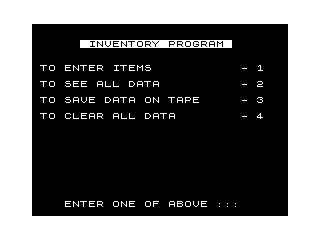
Source Code
  10 DIM A$(100,32)
  11 LET R1=0
  12 LET Z$="%-%-%-%-%-%-%-%-%-%-%-%-%-%-%-%-%-%-%-%-%-%-%-%-%-%-%-%-%-%-%-%-"
  20 FAST
  25 CLS
  30 POKE 16418,0
  40 FOR N=1 TO 96
  50 PRINT "% % % % % % % % ";
  60 NEXT N
  70 PRINT AT 2,6;" INVENTORY PROGRAM "
  80 PRINT AT 5,1;"%T%O% %E%N%T%E%R% %I%T%E%M%S";TAB 26;"%-% %1"
  90 PRINT AT 7,1;"%T%O% %S%E%E% %A%L%L% %D%A%T%A";TAB 26;"%-% %2"
 100 PRINT AT 9,1;"%T%O% %S%A%V%E% %D%A%T%A% %O%N% %T%A%P%E";TAB 26;"%-% %3"
 110 PRINT AT 11,1;"%T%O% %C%L%E%A%R% %A%L%L% %D%A%T%A";AT 11,26;"%-% %4"
 180 PRINT AT 22,4;"%E%N%T%E%R% %O%N%E% %O%F% %A%B%O%V%E% %:%:%:";AT 22,4;"ENTER ONE OF ABOVE :::";AT 22,4;"%E%N%T%E%R% %O%N%E% %O%F% %A%B%O%V%E% %:%:%:"
 190 SLOW
 200 LET B$=INKEY$
 210 IF B$="" THEN GOTO 180
 220 IF CODE B$<29 OR CODE B$>32 THEN GOTO 180
 230 FAST
 240 POKE 16418,2
 250 CLS
 260 GOTO 1000*VAL B$
 1000 FOR N=R1+1 TO 100
 1010 GOSUB 9000
 1020 PRINT "WHAT IS THE NAME OR DESCRIPTION"
 1030 SCROLL
 1040 PRINT "OF ITEM NO. ";N;" (8 CHAR. MAX.)"
 1050 SCROLL
 1055 SLOW
 1060 INPUT B$
 1065 FAST
 1070 IF B$="" THEN GOTO 1500
 1080 LET A$(N, TO 8)=B$
 1090 PRINT A$(N)
 1100 GOSUB 9000
 1110 SCROLL
 1120 PRINT "WHAT IS THE PART NO. (6 CHAR MAX"
 1130 SCROLL
 1135 SLOW
 1140 INPUT B$
 1142 FAST
 1145 IF LEN B$>6 THEN GOTO 1135
 1150 LET A$(N,10 TO 15)=B$
 1160 PRINT A$(N)
 1170 GOSUB 9000
 1190 PRINT "COST PER UNIT?"
 1200 SCROLL
 1205 SLOW
 1210 INPUT B$
 1212 FAST
 1214 IF VAL B$>999.99 THEN GOTO 8300
 1216 GOSUB 8000
 1218 IF LEN B$<6 THEN GOSUB 8100
 1220 SCROLL
 1230 LET A$(N,17 TO 22)=B$
 1240 PRINT A$(N)
 1250 GOSUB 9000
 1260 PRINT "ITEMS PER UNIT?"
 1270 SCROLL
 1275 SLOW
 1280 INPUT B$
 1285 FAST
 1290 IF LEN B$>4 THEN GOTO 1275
 1300 SCROLL
 1310 IF LEN B$<4 THEN GOSUB 8200
 1320 LET A$(N,24 TO 27)=B$
 1330 PRINT A$(N)
 1340 GOSUB 9000
 1350 PRINT "UNITS IN STOCK?"
 1355 SLOW
 1360 INPUT B$
 1365 FAST
 1370 IF LEN B$>4 THEN GOTO 1355
 1374 IF LEN B$=4 THEN GOTO 1390
 1376 FOR I=1 TO 4-LEN B$
 1380 LET B$=" "+B$
 1385 NEXT I
 1390 SCROLL
 1400 LET A$(N,29 TO 32)=B$
 1410 PRINT A$(N)
 1420 NEXT N
 1500 FAST
 1510 CLS
 1520 LET R1=N-1
 1530 SLOW
 1540 GOTO 20
 1999 STOP
 2000 FAST
 2010 CLS
 2020 POKE 16418,0
 2030 FOR N=1 TO 192
 2040 PRINT "% % % % ";
 2050 NEXT N
 2060 PRINT AT 2,7;" INVENTORY DATA "
 2070 PRINT AT 5,1;"%T%O% %S%E%E% %T%O%T%A%L% %I%N%V%E%N%T%O%R%Y";TAB 28;"%-% %1"
 2080 PRINT AT 7,1;"%T%O% %C%H%A%N%G%E% %I%N%V%E%N%T%O%R%Y";TAB 28;"%-% %2"
 2090 PRINT AT 9,1;"%T%O% %S%E%E% %I%T%E%M% %D%A%T%A";TAB 28;"%-% %3"
 2100 PRINT AT 11,1;"%T%O% %E%D%I%T% %D%A%T%A% %I%T%E%M%S";TAB 28;"%-% %4"
 2180 PRINT AT 22,4;"%E%N%T%E%R% %O%N%E% %O%F% %A%B%O%V%E% %:%:%:";AT 22,4;"ENTER ONE OF ABOVE :::";AT 22,4;"%E%N%T%E%R% %O%N%E% %O%F% %A%B%O%V%E% %:%:%:"
 2190 SLOW
 2200 LET B$=INKEY$
 2210 IF B$="" THEN GOTO 2180
 2220 IF CODE B$<29 OR CODE B$>32 THEN GOTO 2180
 2230 FAST
 2240 POKE 16418,2
 2250 CLS
 2260 GOTO (VAL B$*200)+2100
 2300 SLOW
 2310 FOR N=1 TO R1
 2320 SCROLL
 2340 SCROLL
 2350 PRINT "NAME    PART NO. COST IT/UN IN/S"
 2360 SCROLL
 2365 PRINT Z$
 2370 SCROLL
 2380 PRINT A$(N)
 2382 SCROLL
 2384 SCROLL
 2386 SCROLL
 2388 NEXT N
 2390 PRINT "PRESS ENTER TO CONTINUE :::"
 2392 INPUT B$
 2395 GOTO 20
 2500 PRINT AT 10,0;"WHAT IS THE STOCK NO. OF ITEM?"
 2505 SLOW
 2510 INPUT B$
 2515 FAST
 2520 FOR N=1 TO R1
 2525 FAST
 2530 IF A$(N,10 TO 9+LEN B$)=B$ THEN GOTO 2560
 2540 NEXT N
 2542 CLS
 2544 GOSUB 9000
 2546 PRINT "STOCK NO. NOT IN FILE :::"
 2547 GOSUB 9000
 2548 GOSUB 9800
 2550 GOTO 20
 2660 FAST
 2662 CLS
 2664 GOSUB 9000
 2666 PRINT "NAME    PART NO. COST IT/UN IN/S"
 2668 SCROLL
 2670 PRINT Z$
 2672 SCROLL
 2674 PRINT A$(N)
 2676 GOSUB 9000
 2678 PRINT AT 21,0;"IS THIS THE CORRECT STOCK NO.?"
 2679 SLOW
 2680 INPUT Y$
 2682 FAST
 2683 IF Y$(1)="N" THEN GOTO 2540
 2684 SCROLL
 2685 SCROLL
 2686 PRINT "ADD TO (1) OR TAKE FROM (2)?"
 2687 SLOW
 2688 INPUT AT
 2689 FAST
 2690 IF AT>2 OR AT<1 THEN GOTO 2687
 2695 GOTO 8400
 2700 CLS
 2705 PRINT AT 10,1;"WHAT IS THE STOCK NO.?"
 2710 SLOW
 2715 INPUT B$
 2720 FAST
 2725 IF LEN B$>6 THEN GOTO 2710
 2730 FOR N=1 TO R1
 2735 IF A$(N,10 TO 9+LEN B$)=B$ THEN GOTO 2760
 2740 NEXT N
 2745 SCROLL
 2750 PRINT TAB 16-((LEN B$)/2);B$
 2755 GOTO 2544
 2760 CLS
 2765 PRINT ,,"STOCK NAME -";TAB 24;A$(N, TO 8)
 2770 PRINT ,,"STOCK NO. -";TAB 26;A$(N,10 TO 15)
 2775 PRINT ,,"UNIT COST -";TAB 26;A$(N,17 TO 22)
 2780 PRINT ,,"ITEMS/UNIT -";TAB 28;A$(N,24 TO 27)
 2785 PRINT ,,"UNITS IN STOCK -";TAB 28;A$(N,29 TO 32)
 2790 PRINT ,,"COST OF TOTAL UNITS - $";
 2795 LET B=(VAL A$(N,17 TO 22)*VAL A$(N,29 TO 32))
 2800 LET B$=STR$ B
 2805 GOSUB 8000
 2810 PRINT B$
 2815 GOSUB 9800
 2820 GOTO 20
 2900 CLS
 2905 PRINT AT 10,1;"WHAT IS THE STOCK NO.?"
 2910 SLOW
 2915 INPUT B$
 2920 FAST
 2925 IF LEN B$>6 THEN GOTO 2910
 2930 FOR N=1 TO R1
 2935 IF A$(N,10 TO 9+LEN B$)=B$ THEN GOTO 2950
 2940 NEXT N
 2945 GOTO 2745
 2950 CLS
 2955 PRINT ,,"NAME    PART NO. COST IT/UN IN/S"
 2960 PRINT Z$;A$(N)
 2965 PRINT ,,,,"<1> NAME","<3> COST","<2> STK. NO.","<4> ITEMS/UNIT",,,,"CHOOSE ONE?"
 2967 SLOW
 2970 INPUT B$
 2972 FAST
 2974 IF CODE B$<29 OR CODE B$>32 THEN GOTO 2967
 2975 GOTO 8500+(100*VAL B$)
 2999 GOTO 2999
 3000 FAST
 3002 CLS
 3006 PRINT AT 10,10;"FILE NAME?"
 3010 SLOW
 3020 INPUT C$
 3030 PRINT AT 12,0;"PREPARE THE RECORDER AND THEN   PRESS ENTER :::"
 3040 INPUT B$
 3050 SAVE C$
 3060 FAST
 3070 CLS
 3080 GOTO 20
 4000 FAST
 4010 CLS
 4020 RUN
 8000 IF B$(LEN B$-1)="." THEN LET B$=B$+"0"
 8010 IF B$(LEN B$-2)<>"." THEN LET B$=B$+".00"
 8020 RETURN
 8100 FOR I=1 TO 6-LEN B$
 8110 LET B$=" "+B$
 8120 NEXT I
 8130 RETURN
 8200 FOR I=1 TO 4-LEN B$
 8210 LET B$=" "+B$
 8220 NEXT I
 8230 RETURN
 8300 SCROLL
 8310 SCROLL
 8320 PRINT "COST CANNOT EXCEED 999.00"
 8340 SCROLL
 8350 GOTO 1170
 8400 SCROLL
 8410 SCROLL
 8420 IF AT=1 THEN GOTO 8500
 8430 PRINT "HOW MANY TO BE TAKEN AWAY?"
 8435 SLOW
 8440 INPUT AT
 8445 FAST
 8450 LET TA=VAL A$(N,29 TO 32)
 8455 LET TA=TA-AT
 8460 LET B$=STR$ TA
 8470 IF LEN B$<4 THEN GOSUB 8200
 8472 LET A$(N,29 TO 32)=B$
 8475 SCROLL
 8480 SCROLL
 8481 PRINT "NAME    PART NO. COST IT/UN IN/S"
 8482 SCROLL
 8483 PRINT Z$
 8484 SCROLL
 8485 PRINT A$(N)
 8486 GOSUB 9000
 8487 GOTO 2390
 8500 PRINT "HOW MANY TO BE ADDED?"
 8510 SLOW
 8520 INPUT AT
 8525 FAST
 8530 LET TA=VAL A$(N,29 TO 32)
 8535 LET TA=TA+AT
 8540 GOTO 8460
 8600 PRINT ,,"WHAT IS THE NEW NAME?"
 8610 SLOW
 8620 INPUT B$
 8630 FAST
 8640 IF LEN B$>8 THEN GOTO 8610
 8650 LET A$(N, TO 8)=B$
 8660 PRINT ,,"NAME    PART NO. COST IT/UN IN/S";Z$;A$(N)
 8670 GOSUB 9800
 8680 GOTO 20
 8700 PRINT ,,"WHAT IS THE NEW STOCK NO.?"
 8710 SLOW
 8720 INPUT B$
 8730 FAST
 8740 IF LEN B$>6 THEN GOTO 8710
 8750 LET A$(N,10 TO 15)=B$
 8760 GOTO 8660
 8800 PRINT ,,"WHAT IS THE NEW COST?"
 8810 SLOW
 8820 INPUT B$
 8830 FAST
 8840 IF LEN B$>6 THEN GOTO 8810
 8842 GOSUB 8000
 8844 IF LEN B$<6 THEN GOSUB 8100
 8850 LET A$(N,17 TO 22)=B$
 8860 GOTO 8660
 8900 PRINT ,,"WHAT IS THE NEW AMOUNT OF ITEMS PER UNIT?"
 8910 SLOW
 8920 INPUT B$
 8930 FAST
 8940 IF LEN B$>4 THEN GOTO 8910
 8945 IF LEN B$<4 THEN GOSUB 8200
 8950 LET A$(N,24 TO 27)=B$
 8960 GOTO 8660
 9000 FOR I=1 TO 10
 9010 SCROLL
 9020 NEXT I
 9030 RETURN
 9800 PRINT AT 21,0;"PRESS ENTER TO CONTINUE :::"
 9810 INPUT B$
 9820 CLS
 9830 RETURN
 9998 SAVE "INVENTOR%Y"
 9999 RUN
Note: Type-in program listings on this website use ZMAKEBAS notation for graphics characters.