
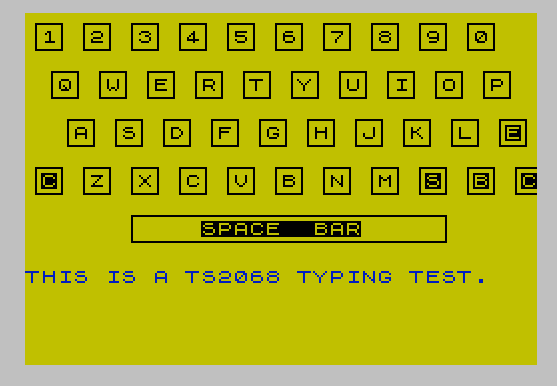
This program is a typing tutor that displays an on-screen keyboard graphic built from user-defined graphics (UDGs) and tests the user’s typing accuracy against a fixed set of practice phrases. Eight UDG characters (a–h) are defined at startup by poking 64 bytes read from DATA statements, forming a decorative keyboard border rendered with block-graphic characters. The program cycles through DATA phrases (lines 260–280), highlights correct keystrokes in BRIGHT and marks errors with a PAPER 5 flash, then computes and displays a running accuracy percentage. At the end of a session the user is prompted to continue or stop; the program can be saved with autostart at line 9 (which does not exist, so it will autostart at line 10).
Program Structure
The program is organised into three logical phases:
- Initialisation (lines 10, 190–250): Sets ink/paper colours, dimensions a dummy string array, calls the UDG-setup subroutine, and returns with the keyboard banner string stored in
P$. - Display (lines 20–60): Draws the decorative keyboard graphic using
P$and UDG sequences, then overlays alphabetic key labels withPRINT OVER. - Typing-test loop (lines 70–180): Reads a phrase from DATA, displays it, iterates character-by-character waiting for correct keystrokes, accumulates totals, prints accuracy, and prompts for another round.
UDG Setup
The subroutine at line 190 reads 64 bytes from the DATA statements (lines 210–240) and POKEs them into the UDG area starting at USR "a", defining eight custom characters \a–\h. These form the corners and edges of the on-screen keyboard frame. The assembled keyboard banner string is stored in P$ and reused across three PRINT calls in line 20 to draw a three-row header.
Key Variables
| Variable | Role |
|---|---|
O0 | Always 0 (NOT PI = 0); used as a readable zero literal throughout |
P$ | Pre-built UDG keyboard banner string (one row) |
TOT | Total keystrokes attempted |
RI | Correct (“right”) keystrokes |
A$ | Current practice phrase read from DATA |
T$ | Key currently pressed via INKEY$ |
O$ | A 32-space string used to clear the display line before printing a phrase |
Notable BASIC Idioms
NOT PIevaluates to 0 (since PI is non-zero), assigned toO0and used wherever 0 is needed, saving a few bytes over the literal0.SGN PIevaluates to 1 and is used for ink colour 1 (blue) and loop start values, again saving bytes.INT PIevaluates to 3 and is used as a column offset in line 50.- The keyboard-input loop (lines 110–120) is a busy-wait on
INKEY$;PAUSE 0is not used here, so the CPU spins. - Line 90 uses
TAB O0(i.e.TAB 0) after printing the phrase to reset the print position to column 0 ready for character-by-character overlay.
Typing Test Logic
For each phrase, the program erases the line using two 32-character blank strings (O$;O$), reprints the phrase in dim ink, then re-reads it one character at a time. Each keypress is compared against A$(I); a wrong key is echoed in PAPER 5 (cyan background), then immediately erased with CHR$ 8 (backspace), and the loop retries. A correct key is printed BRIGHT 1. Every keypress — correct or not — increments TOT, while only correct ones increment RI; accuracy is INT(RI/TOT*100).
DATA Organisation and Sentinel
Practice phrases occupy lines 260–280 and are terminated by the sentinel string "STOP". When the READ in line 80 encounters "STOP", a RESTORE 260 rewinds the DATA pointer to the phrases and immediately reads the first one again, creating a seamless loop. The UDG byte data (lines 210–240) is read only once during initialisation via a separate RESTORE (line 200 issues RESTORE with no argument, rewinding to line 210).
Image Gallery
Source Code
   10 LET O0=NOT PI: INK O0: PAPER 6: CLS : DIM O$(32): GO SUB 190
   20 CLS : PRINT P$'" ";P$'"  ";P$
   30 PRINT "\a\b\c\a\b\c\a\b\c\a\b\c\a\b\c\a\b\c\a\b\c\a\b\c\a\b\c\a\b\c\a\b\d \e\d \e\d \e\d \e\d \e\d \e\d \e\d \e\d \e\d \e\d \f\g\h\f\g\h\f\g\h\f\g\h\f\g\h\f\g\h\f\g\h\f\g\h\f\g\h\f\g\h\f\g"
   40 PRINT OVER SGN PI;AT SGN PI,O0;" 1  2  3  4  5  6  7  8  9  0";AT 4,2;"Q  W  E  R  T  Y  U  I  O  P"
   50 PRINT OVER SGN PI;AT 7,INT PI;"A  S  D  F  G  H  J  K  L  E";AT 10,1;"C  Z  X  C  V  B  N  M  S  B  C"
   60 PRINT AT 12,6;"\a\b\b\b\b\b\b\b\b\b\b\b\b\b\b\b\b\b\b\b\c           \d    SPACE  BAR     \e           \f\g\g\g\g\g\g\g\g\g\g\g\g\g\g\g\g\g\g\g\h"
   70 LET TOT=O0: LET RI=O0
   80 READ A$: IF A$="STOP" THEN RESTORE 260: READ A$
   90 PRINT INK SGN PI;AT 16,O0;O$;O$;AT 16,O0;A$;TAB O0;
  100 FOR I=SGN PI TO LEN A$
  110 LET T$=INKEY$: IF T$<>"" THEN GO TO 130
  120 GO TO 110
  130 LET TOT=TOT+1: BEEP .15,30: IF T$<>A$(I) THEN PRINT PAPER 5;T$;CHR$ 8;: GO TO 110
  140 LET RI=RI+1
  150 PRINT BRIGHT 1;T$;
  160 NEXT I: PRINT AT 21,25;INT (RI/TOT*100);"%  "
  170 INPUT "MORE? (Y/N) ";Q$: IF Q$<>"N" THEN PAUSE 25: GO TO 80
  180 STOP
  190 REM USR charactors
  200 RESTORE : FOR i=O0 TO 63: READ byte: POKE USR "a"+i,byte: NEXT i: LET P$="\a\b\c\a\b\c\a\b\c\a\b\c\a\b\c\a\b\c\a\b\c\a\b\c\a\b\c\a\b\c  \d \e\d \e\d \e\d \e\d \e\d \e\d \e\d \e\d \e\d \e  \f\g\h\f\g\h\f\g\h\f\g\h\f\g\h\f\g\h\f\g\h\f\g\h\f\g\h\f\g\h": RETURN
  210 DATA O0,O0,O0,O0,O0,7,4,4,O0,O0,O0,O0,O0,255,O0,O0
  220 DATA O0,O0,O0,O0,O0,224,32,32,4,4,4,4,4,4,4,4
  230 DATA 32,32,32,32,32,32,32,32,4,4,7,O0,O0,O0,O0,O0
  240 DATA O0,O0,255,O0,O0,O0,O0,O0,32,32,224,O0,O0,O0,O0,O0
  250 RETURN
  260 DATA "THIS IS A TS2068 TYPING TEST.","THE QUICK BROWN FOX JUMPED OVER"
  270 DATA "THE LAZY DOG.","JUST TYPE WHAT YOU SEE;"
  280 DATA "DO NOT LOOK AT THE KEYBOARD","STOP"
  290 SAVE "TUTOR" LINE 9
Note: Type-in program listings on this website use ZMAKEBAS notation for graphics characters.