
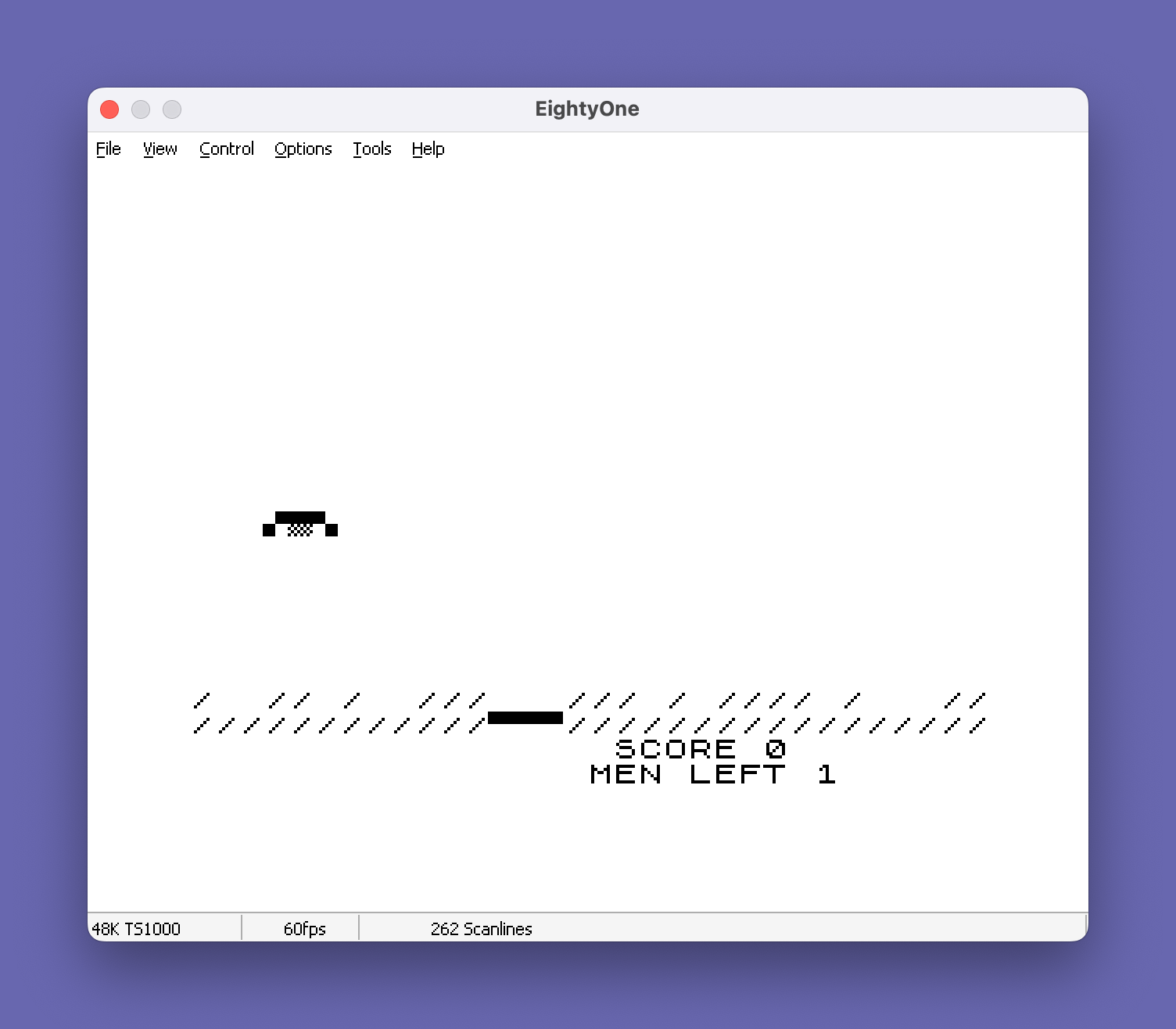
This program implements a lunar lander game where the player must pilot a spacecraft to a safe landing on a surface. The lander is drawn using block graphic characters to form a small ship sprite, and the terrain is rendered with slash and backslash characters to create a rugged landscape with a flat landing pad at column 12. Physics are simulated through a velocity variable L that increases with gravity each iteration and can be reduced by firing the thruster with key “0”, while keys “5” and “8” move the craft horizontally. Scoring rewards gentle landings and fuel conservation, with bonuses for lower touchdown speed and remaining fuel (tracked by thruster presses K). The program uses SLOW mode for display timing and handles three distinct end states: successful landing, crash, and fuel exhaustion.
Program Analysis
Program Structure
The program flows through a clear set of phases: initialisation, main flight loop, landing detection, and outcome handling. Line 20–40 set up score and lives; lines 50–110 draw the play field; lines 120–240 form the main game loop; and lines 250–300 handle thruster firing. Outcomes branch to landing success (310), crash (380), fuel exhaustion (510), or game over (480).
Variables
| Variable | Role |
|---|---|
S | Player score |
M | Lives remaining (starts at 2) |
A | Lander row position (vertical) |
B | Lander column position (horizontal) |
L | Downward velocity (gravity accumulator) |
K | Thruster presses used (fuel counter) |
Z | Flag: 1 = crash reached via fuel-out path |
Physics and Game Loop
Gravity is implemented by incrementing L by 0.5 each iteration at line 180, then adding L to the row coordinate A at line 200. This gives a simple parabolic fall. Firing the thruster (key "0") reduces velocity by 2.3 (line 260), but only if L>0, capping deceleration so the craft cannot gain upward momentum. Horizontal movement at line 230 uses the boolean arithmetic idiom: INKEY$="8" evaluates to 1 or 0, making left/right movement a single expression rather than branching IF statements. Fuel is limited to 20 thruster burns (K=20 triggers the fuel-out routine at line 510).
Sprite and Terrain Rendering
The lander sprite at line 150 uses ZX81 block graphics: \.'\ and \'.\ produce a small two-character-wide graphic resembling a lander body with legs. The terrain at lines 100–110 is drawn once per life using slash characters for craggy ground and a row of block graphic characters for the surface. The flat landing pad is implicitly at column 12, enforced by the check B<>12 at line 310.
Landing and Crash Detection
A successful landing requires three simultaneous conditions checked at lines 310–320: the lander must be at row 18, at column 12, and arriving at speed L<=1.5. The score bonus at line 350 is 1500 + (K*100), rewarding fuel efficiency. A further 1500-point bonus is granted if the lander arrives at the minimum possible speed (L=.1, set by line 330 as a floor). The crash animation at lines 390–410 prints asterisks in a cross pattern to simulate an explosion.
Fuel Exhaustion Path
When fuel runs out (K=20), execution jumps to line 510, which displays a message then falls through a FOR loop (lines 530–550) that drops the lander to the surface row by row. The flag Z is then set to 1 at line 560, and the crash routine is entered at line 390. Inside the crash handler, line 420 checks Z=1 to skip the speed-display message, since the fuel-out scenario already printed its own outcome text.
Notable Techniques and Anomalies
- Boolean arithmetic for horizontal movement (
line 230) is a compact ZX81 BASIC idiom avoiding two separate IF branches. SLOWmode at line70is used deliberately to introduce display timing delay, serving as a frame-rate limiter without a PAUSE loop.- The
INT(A)>=18guard at line220prevents floating-point accumulation from pushingApast the screen boundary before the landing check at line170. - At line
330, the conditionL*10<0is always false sinceL>=0throughout normal play; this line effectively never fires, meaning the minimum speed floor of 0.1 is never applied. This appears to be a latent bug — the intended condition was likelyL*10<=0or simplyL<=0. - Similarly, line
430usesL*17<0to conditionally add toLbefore displaying crash speed; sinceLcannot be negative here, this condition is also always false, meaning the speed display is always the raw accumulated velocity. - The lander starting column equals the starting row (
B=A=3, line140), meaning each new life always begins at the same position.
Image Gallery
Source Code
  10 REM
  20 LET S=0
  30 LET M=2
  40 PAUSE 60
  50 CLS
  60 PRINT AT 20,17;"SCORE ";S
  70 SLOW
  80 PRINT ,"MEN LEFT ";M
  90 LET L=0
 100 PRINT AT 18,0;"/  // /  ///   /// / //// /   //"
 110 PRINT "////////////\''\''\''/////////////////"
 120 LET K=0
 130 LET A=3
 140 LET B=A
 150 PRINT AT A,B;"\.'\;;\'."
 160 IF INKEY$="0" THEN GOTO 250
 170 IF A=18 THEN GOTO 310
 180 LET L=L+.5
 190 PRINT AT A,B;"   "
 200 LET A=A+L
 210 IF A<0 THEN LET A=0
 220 IF INT (A)>=18 THEN LET A=18
 230 LET B=B+(INKEY$="8" AND B<29)-(INKEY$="5" AND B>0)
 240 GOTO 150
 250 PRINT TAB B;"VVV"
 260 LET L=L-(2.3 AND L>0)
 270 LET K=K+1
 280 IF K=20 THEN GOTO 510
 290 PRINT AT A+1,B;"   "
 300 GOTO 170
 310 IF B<>12 THEN GOTO 380
 320 IF L>1.5 THEN GOTO 380
 330 IF L*10<0 THEN LET L=.1
 340 PRINT AT 20,0;"YOU LANDED","GOING ";INT (L*10);" MPH."
 350 LET S=S+1500+(K*100)
 360 IF L=.1 THEN LET S=S+1500
 370 GOTO 40
 380 LET Z=0
 390 PRINT AT A-1,B+1;"*"
 400 PRINT TAB B;"***"
 410 PRINT TAB B+1;"*"
 420 IF Z=1 THEN GOTO 450
 430 IF L*17<0 THEN LET L=L+2
 440 PRINT AT 20,0;"YOU CRASHED",,"GOING ";INT (L*17);" MPH."
 450 LET M=M-1
 460 IF M=-1 THEN GOTO 480
 470 GOTO 40
 480 PRINT AT 11,12;"GAME OVER"
 490 PAUSE 500
 500 RUN
 510 PRINT AT 20,0;"YOU RAN OUT",,"OF FUEL"
 520 PAUSE 60
 530 FOR A=A TO 18
 540 PRINT AT A,B;"   ";TAB B;"\.'\;;\'."
 550 NEXT A
 560 LET Z=1
 570 GOTO 390
Note: Type-in program listings on this website use ZMAKEBAS notation for graphics characters.