
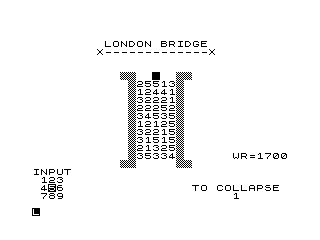
London Bridge is a single-player puzzle/strategy game in which the player navigates a piece across a 5-column grid of numbered cells, trying to reach the far side of a simulated bridge before falling into the water. The board is stored in a 66-element array A(), with cells 11–60 holding random values 1–5 (mapped to characters via CHR$(28+value)), and movement is controlled by a 1–9 numeric keypad-style direction input. The subroutine at line 500 uses integer/fractional decomposition of a cell index to calculate screen AT coordinates in a compact 5×10 grid layout, and the scoring system at line 900 rewards diagonal moves and colour-matched cell pairs. FAST/SLOW mode switching is used to speed up the initial board draw before returning to interactive pace.
Program Analysis
Program Structure
The program is organised into a clear sequence of phases:
- Initialisation (lines 1–90): Screen setup, array allocation, bridge art drawn with block graphics, WR value displayed.
- Board population (lines 90–135): Cells 11–60 in array
A()are filled with random integers 1–5; each is rendered on screen viaGOSUB 500. - Game loop (lines 140–440): Player starts at cell N=8, chooses a direction 1–9, move validity is checked, score is updated, and the loop repeats.
- Outcome handlers (lines 600–819): Falling into water (line 600) or crossing the bridge (line 800) both offer a replay prompt.
- Subroutines: Display cell (500), update score (900), short delay (7000), end screen (6000).
Array Layout
Array A(66) serves multiple purposes. Index 1 accumulates the total score. Indices 11–60 represent the 5-column × 10-row bridge grid. Indices beyond 60 represent the far bank. A cell value ≤ 0 indicates an already-vacated or occupied cell; -28 is used as a sentinel for the player’s current position (chosen so that CHR$(28 + A(N)) would produce CHR$(0), effectively a null/invisible character).
Cell-to-Screen Coordinate Mapping (line 500)
The subroutine at line 500 is the most technically interesting part of the program. Given a cell index stored in M, it decomposes the index into row and column using integer and fractional parts:
LET M=(N-1)/5— divides index into a mixed number whereINT Mis the row (0-based) andM-INT Mis a fractional column selector (0, 0.2, 0.4, 0.6, 0.8 for columns 0–4).PRINT AT 5+INT M, 13+5*(M-INT M); A$— maps row to screen row 5–14 and column fraction × 5 to screen columns 13, 14, 15, 16, 17.
This single-subroutine approach avoids separate row/column variables and is a compact ZX81 idiom for two-dimensional array display.
Movement Direction Encoding (lines 200–230)
The direction input DIR is a digit 1–9 mimicking a numeric keypad layout. The decoding is:
LET I=(INT DIR-1)/3— produces a mixed number whereINT Iencodes the row delta (0=up, 1=same, 2=down) andI-INT Iencodes the column delta.LET J=M-INT M+I-INT I— the fractional parts are summed; the bounds checkJ<0.1 OR J>1.4catches moves off the left or right edges.LET N1=N+5*(INT I-1)+3*(I-INT I)-1— computes the target cell index from the direction deltas.
Direction 5 (centre key, no movement) is implicitly rejected by the N1<6 guard or the A(N1)<=0 check since it would land back on the player’s own cell.
Scoring System (lines 390–410)
Score for a valid move is calculated at line 390:
10*(3-INT I)rewards upward moves (INT I=0 gives 30, same row gives 20, downward gives 10).10*(2-INT I)*(1-INT I)adds a bonus of 20 only for upward moves (both factors non-zero only when INT I=0).- If the destination cell’s value matches the randomly chosen drop-target cell (
A(N1)=A(DROP)), the score is tripled (line 400).
Drop Target Mechanic
Each turn, DROP is a randomly selected occupied cell (lines 160–170). Its numeric value is displayed (line 180) as a hint. If the player moves onto the DROP cell, they fall into the water (line 370 → 600). This creates a risk/reward dynamic: the matching-value bonus encourages targeting cells that may be the trap.
Display Techniques
Inverse video characters (e.g. %A%N%O%T%H%E%R%) are used for the replay prompt, a common ZX81 technique for highlighted text without any attribute system. Block graphic characters (\##) form the bridge towers in the static art drawn at lines 35–80. The FAST/SLOW pair (lines 5/145) speeds up the initial board render.
Delay Subroutine
The subroutine at line 7000 is a simple FOR Z=1 TO 30: NEXT Z busy-wait loop used for pacing at the end-game message screens. The WR=1700 variable displayed on screen (line 50) appears to be a high-score or world record placeholder; it is printed but never updated by game logic.
Anomalies and Notes
- Line 140 sets
N=8as the starting cell, but cells 1–10 are never populated in the board-fill loop (lines 90–135 fill indices 11–60), so the player starts in an unpopulated region — this is intentional as the entry row of the bridge. - Lines 7500–7530 form a save/restart block that is never reached during normal play.
- The
RAND 0at line 10 seeds the random number generator with the system clock value, ensuring a different board each game. - The replay logic at lines 650–680 and 811–819 is duplicated almost identically, which could have been refactored into a subroutine.
- Variable
WRis set to 1700 and displayed but never compared againstA(1), so no actual high-score tracking occurs.
Image Gallery
Source Code
   1 REM "LONDON BRIDGE"
   3 CLS
   5 FAST
  10 RAND 0
  20 DIM A(66)
  30 PRINT AT 2,9;"LONDON BRIDGE"
  35 PRINT AT 3,8;"X-------------X"
  40 LET WR=1700
  50 PRINT AT 16,25;"WR=";WR;TAB 11;"##       ##";TAB 0;"INPUT";TAB 1;"123";TAB 1;"4%56";TAB 1;"789"
  55 PRINT AT 6,11;"####  %   ####"
  60 FOR I=1 TO 11
  70 PRINT TAB 12;"##     ##"
  80 NEXT I
  90 FOR N=11 TO 60
 100 LET A(N)=INT (RND*5+1)
 110 LET A$=CHR$ (28+A(N))
 120 LET M=(N-1)/5
 130 GOSUB 500
 135 NEXT N
 140 LET N=8
 145 SLOW
 150 LET A(N)=-28
 155 PRINT AT 20,20;"TO COLLAPSE"
 160 LET DROP=INT (RND*(67-N)+N-6)
 170 IF A(DROP)<=0 THEN GOTO 160
 180 PRINT TAB 25;A(DROP)
 190 INPUT DIR
 200 LET I=(INT DIR-1)/3
 205 LET M=(N-1)/5
 210 LET J=M-INT M+I-INT I
 220 LET N1=N+5*(INT I-1)+3*(I-INT I)-1
 230 IF DIR<1 OR DIR>9 OR J<0.1 OR J>1.4 OR N1<6 THEN GOTO 190
 235 IF A(N1)<=0 AND N1<=60 THEN GOTO 190
 240 IF N1>60 THEN LET A(N1)=-28
 250 LET A$=CHR$ (28+A(N))
 260 GOSUB 500
 270 LET M=(N1-1)/5
 280 LET A$=CHR$ (156+A(N1))
 290 GOSUB 500
 300 PRINT AT 20,20;"           ";TAB 25;" "
 310 FOR J=1 TO 70
 320 NEXT J
 330 LET M=(DROP-1)/5
 350 LET A$=" "
 360 GOSUB 500
 370 IF N1=DROP THEN GOTO 600
 380 IF N1>60 THEN GOTO 800
 390 LET SCORE=10*(3-INT I)+10*(2-INT I)*(1-INT I)
 400 IF A(N1)=A(DROP) THEN LET SCORE=SCORE*3
 410 GOSUB 900
 420 LET A(DROP)=0
 430 LET N=N1
 440 GOTO 155
 500 PRINT AT 5+INT M,13+5*(M-INT M);A$
 510 RETURN
 600 PRINT AT 20,16;"YOU HAVE FALLEN";TAB 18;"IN THE WATER"
 650 PRINT AT 0,0;"%A%N%O%T%H%E%R% %T%R%Y%?%? (1=YES/0=NO)"
 655 INPUT CHO
 657 GOSUB 7000
 660 IF CHO<0 OR CHO>1 THEN GOTO 655
 668 IF CHO=1 THEN CLS
 670 IF CHO=1 THEN RUN
 680 IF CHO=0 THEN GOSUB 6000
 800 LET SCORE=1000
 810 GOSUB 900
 811 PRINT AT 0,0;"%A%N%O%T%H%E%R% %T%R%Y%?%? (1=YES/0=NO)"
 813 INPUT CHO
 814 GOSUB 7000
 815 IF CHO<0 OR CHO>1 THEN GOTO 813
 817 IF CHO=1 THEN CLS
 818 IF CHO=1 THEN RUN
 819 IF CHO=0 THEN GOSUB 6000
 900 LET A(1)=A(1)+SCORE
 910 PRINT AT 11,22;"SCORE ";SCORE;" "
 920 PRINT AT 13,22;"TOTAL ";A(1)
 930 RETURN
 6000 GOSUB 7000
 6020 CLS
 6030 PRINT AT 11,10;"%T%H%A%N%K% %Y%O%U"
 6050 GOSUB 7000
 6060 PRINT AT 11,9;"%C%O%M%E% %A%G%A%I%N"
 6070 GOSUB 7000
 6090 CLS
 6100 STOP
 7000 FOR Z=1 TO 30
 7003 NEXT Z
 7005 RETURN
 7500 STOP
 7510 CLEAR
 7520 SAVE "1019%2"
 7530 RUN
Note: Type-in program listings on this website use ZMAKEBAS notation for graphics characters.