
This program implements a machine code monitor for examining, entering, saving, and running memory contents. It operates in either decimal or hexadecimal mode (toggled via Mode 5), and uses BASIC subroutines at lines 20–70 to format one- or two-byte values as fixed-width strings in either base. At initialisation, 69 bytes of Z80 machine code are POKEd into the printer buffer area starting at address 23296; these routines handle scroll-up (called via RANDOMIZE USR 23335) and scroll-down (RANDOMIZE USR 23350) operations within the examine display, as well as a character conversion helper. The examine mode (Mode 1) displays 20 memory locations simultaneously, allows cursor movement with keys 6 and 7, and supports in-place byte editing.
Program Analysis
Program Structure
The program is organized into clearly delimited subroutine blocks, each introduced by a REM section. Execution begins at line 10 with a GO TO 9000 that bypasses all subroutines and jumps to the initialization block.
| Lines | Purpose |
|---|---|
| 20–40 | Format 1 byte as decimal or hex string in a$ |
| 60–70 | Format 2 bytes (address) as decimal or hex string |
| 110–180 | Input and validate a number in current base; result in n |
| 200–220 | Get a 1- or 2-byte value with range check |
| 1000–1210 | Mode 1: Examine/alter memory |
| 2000–2040 | Mode 2: Enter machine code bytes sequentially |
| 3000–3060 | Mode 3: Save a code block to tape with verify |
| 4000–4060 | Mode 4: Run machine code via PRINT USR n |
| 5000–5040 | Mode 5: Toggle hex/decimal mode (flag h) |
| 6000–6120 | Mode 6: Convert between hex and decimal |
| 8000–8060 | Main menu with READ-driven option list |
| 9000–9230 | Initialisation: set colours, POKEd machine code, jump to menu |
Initialisation and Machine Code Installation
Lines 9010–9030 set up the display environment (blue paper, white ink, border) and disable the cursor via POKE 23658,8. Sixty-nine bytes of Z80 code are then READ from DATA statements at lines 9200–9230 and POKEd into the printer buffer area starting at address 23296.
The three installed routines serve specific roles within the monitor:
- 23296 — Character/nibble conversion helper (18 bytes); converts a byte value into two printable hex digit characters.
- 23314 — Scroll the examine display up by one line (21 bytes); called via
RANDOMIZE USR 23335at line 1150 (23335 = 23314 + 21, pointing into the next routine — note the entry point used is actually within the block; 23335 is the address of the scroll-down entry). - 23335 — Scroll display down; called via
RANDOMIZE USR 23350at line 1180.
Using the printer buffer (nominally 23296–23366) as scratch RAM for machine code is a common technique, as this region is not used during normal screen operations.
Hex/Decimal Formatting Subroutines
The flag variable h governs all number formatting and input throughout the program. When h=0 (decimal mode), line 20 uses STR$ and string slicing to right-justify a value in a fixed-width field. When h=1 (hex mode), lines 30–40 perform a manual base-16 conversion using repeated INT (a/16) and modulo arithmetic, placing characters into a pre-allocated string a$. The expression CHR$ (b+48+7*(b>9)) is the standard Sinclair idiom for mapping a nibble 0–15 to '0'–'9' or 'A'–'F'.
Number Input and Validation
The input subroutine at lines 110–180 reads a LINE input into b$ and manually parses each character. In decimal mode (lines 140–160), it checks that each digit is in range 0–9, then accumulates n using positional powers of 10: b*10^(LEN b$-x). In hex mode (lines 170–180), it validates against the hex character range and uses powers of 16 instead. The condition on line 170 — b<0 OR b>9 AND b<17 OR b>22 — relies on BASIC operator precedence: AND binds tighter than OR, so this correctly accepts digits 0–9 (codes 0–9) and letters A–F (codes 17–22, i.e. CODE - 48 for ‘A’–’F’).
Examine Memory Mode (Mode 1)
The examine display shows 20 memory locations simultaneously, starting at base address l, with the current cursor position tracked in c (0–19). Navigation uses keys 6 (forward) and 7 (backward), mirroring the conventional Spectrum cursor key assignments. Scrolling is achieved by calling the POKEd machine code rather than redrawing the full screen, keeping display updates fast. The PRINT AT statements use two fixed columns — column 0 for the address label and column 22 for the contents label — with the address and byte value printed at column 9.
Line 1200 is a cursor-clearing helper that uses a multi-argument AT form: PRINT AT c+2,0;TAB 9;AT c+2,22,: — the trailing comma and colon suppress output after clearing those positions.
Menu Dispatch
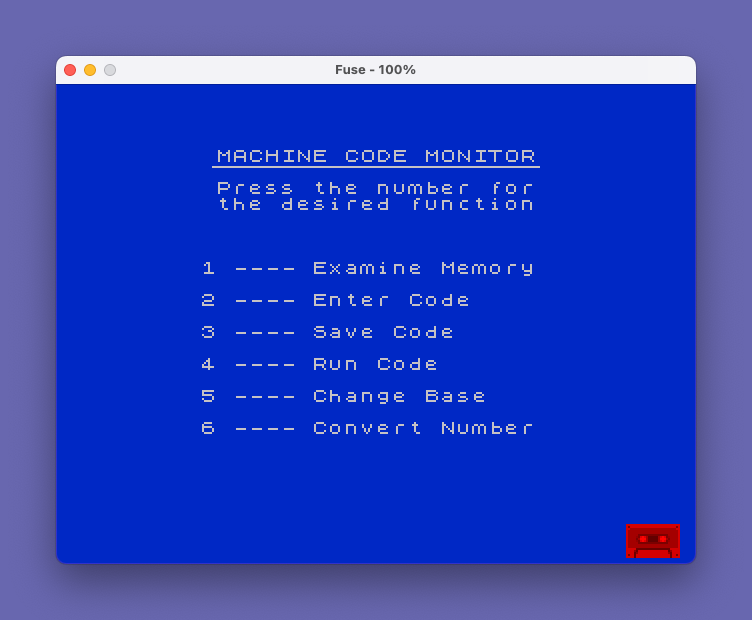
The menu at lines 8000–8060 uses a compact dispatch technique: after reading a keypress and converting it to a digit a, line 8050 executes GO SUB A*1000, where the multiplication directly computes the target line number (1000–6000) for each mode. The menu text is held in a DATA block at line 8060 and re-READ each time the menu is displayed via RESTORE.
Notable Techniques and Idioms
- Shared error prompt variable:
a$doubles as both the input prompt and the error message. On invalid input,a$is set to an error string and the subroutine loops back to line 130, displaying the error as the next prompt. - Global string constants:
z$holds"Start Address"andy$holds"Out of range; try again", set at line 9020. These are used as default prompts throughout to avoid repeating long literals. - Mode 4 return value:
PRINT USR nat line 4060 executes the machine code and displays whatever integer the Z80 routine returns in the BC register pair. This is a convenient way to invoke code while remaining in BASIC. - Hex conversion preserving state: Mode 6 saves and restores the global
hflag in a temporary variablet, allowing conversions to be performed independently of the current display mode. - Boundary guard in Mode 2: Line 2040 uses
LET l=l+1*(l<65535)to increment the address pointer without wrapping past 65535, avoiding an out-of-range POKE.
Potential Bugs and Anomalies
- Line 60 formats a 2-byte (address) value but falls through to line 40 via
GO TO 40, which uses a 2-character stringa$=" "initialised at line 30 — however line 70 setsa$=" "(4 characters) before branching to line 40, so the 2-byte path is correct. The 1-byte path (line 30) initialises a 2-character field, which is correct for values 0–255 in hex. - The input parser on lines 160 and 180 use
LET n=INT n+...: theINTis applied only to the existing value ofn, not to the full accumulated result, which may produce rounding artefacts for large values due to floating-point arithmetic. This is a known limitation of pure-BASIC number parsing on this platform. - Line 210 calls
GO SUB 120rather thanGO SUB 110, meaning the first prompt shown is alwaysa$as set by the caller rather than the default “Invalid number” message — this is intentional, allowing the caller to supply a custom prompt.
Image Gallery
Source Code
    1 REM MONITOR PROGRAM
    2 REM
   10 GO TO 9000
   11 REM
   12 REM Format 1 byte
   13 REM
   20 IF NOT h THEN LET a$="  "+STR$ a: LET a$=a$(LEN a$-2 TO ): RETURN
   30 LET a$="  "
   40 FOR x=LEN a$ TO 1 STEP -1: LET b=a-INT (a/16)*16: LET a$(x)=CHR$ (b+48+7*(b>9)): LET a=INT (a/16): NEXT x: RETURN
   50 REM
   51 REM Format 2 bytes
   52 REM
   60 IF NOT h THEN LET a$="    "+STR$ a: LET a$=a$(LEN a$-4 TO ): RETURN
   70 LET a$="    ": GO TO 40
  100 REM
  101 REM Input n
  102 REM
  110 LET a$="Invalid number; try again"
  120 REM
  121 REM Start here
  122 REM
  130 LET n=0: INPUT (a$+" "); LINE b$
  140 FOR x=1 TO LEN b$: LET b=CODE b$(x)-48: IF h THEN GO TO 170
  150 IF b<0 OR b>9 THEN GO TO 110
  160 LET n=INT n+b*10^(LEN b$-x): NEXT x: RETURN
  170 IF b<0 OR b>9 AND b<17 OR b>22 THEN GO TO 110
  180 LET b=b-7*(b>9): LET n=INT n+b*16^(LEN b$-x): NEXT x: RETURN
  200 REM
  201 REM Get 1
  202 REM
  210 GO SUB 120: IF n<0 OR n>65535 THEN LET a$=y$: GO TO 210
  220 RETURN
 1000 REM
 1001 REM EXAMINE
 1002 REM
 1010 CLS : PRINT INVERSE 1;"M"; INVERSE 0;"enu,"; INVERSE 1;"N"; INVERSE 0;"ewaddress,"; INVERSE 1;"A"; INVERSE 0;"lter,"; INVERSE 1;"6&7"; INVERSE 0;" scroll": LET a$=z$
 1020 GO SUB 200: IF n>65516 THEN LET a$="Too high; re-enter": GO TO 1020
 1030 LET c=0: LET l=n: PRINT AT 2,0;: FOR y=0 TO 19: LET p=y: GO SUB 1210: NEXT y: GO SUB 1190
 1040 LET a$=INKEY$: IF a$="A" OR a$="a" THEN GO TO 1100
 1050 IF a$="6" THEN GO TO 1130
 1060 IF a$="7" THEN GO TO 1160
 1070 IF a$="M" THEN CLS : RETURN
 1080 IF a$="N" THEN GO SUB 1200: LET a$=z$: GO TO 1020
 1090 GO TO 1040
 1100 LET a$="New value"
 1110 GO SUB 120: IF n>255 THEN LET a$=y$: GO TO 1110
 1120 POKE l+c,n: LET p=c: GO SUB 1210
 1130 IF c<>19 THEN GO SUB 1200: LET c=c+1: GO SUB 1190: GO TO 1040
 1140 IF l>65515 THEN GO TO 1040
 1150 LET l=l+1: RANDOMIZE USR 23335: GO SUB 1190: LET p=c: GO SUB 1210: GO TO 1040
 1160 IF c<>0 THEN GO SUB 1200: LET c=c-1: GO SUB 1190: GO TO 1040
 1170 IF NOT l THEN GO TO 1040
 1180 LET l=l-1: RANDOMIZE USR 23350: LET p=c: GO SUB 1210: GO TO 1040
 1190 PRINT AT c+2,0;"Address>>";AT c+2,22;"<<Contents": RETURN
 1200 PRINT AT c+2,0;TAB 9;AT c+2,22,: RETURN
 1210 LET a=l+p: GO SUB 50: PRINT AT p+2,9;a$;"     ";: LET a=PEEK (l+p): GO SUB 20: PRINT a$: RETURN
 2000 REM
 2001 REM ENTER CODE
 2002 REM
 2010 CLS : PRINT "Mode 2 allows you to enter code";AT 4,2;"ENTER A VALUE OUT OF RANGE TO"'TAB 7;"RETURN TO THE MENU";AT 10,2;"Current address = "
 2020 LET a$=z$: GO SUB 200: LET l=n
 2030 LET a=l: GO SUB 50: PRINT AT 10,20;a$: LET a$="Code": GO SUB 120: IF n<0 OR n>255 THEN RETURN
 2040 POKE l,n: LET l=l+1*(l<65535): GO TO 2030
 3000 REM
 3001 REM SAVE CODE
 3002 REM
 3010 CLS : PRINT "Mode 3 will save code on tape"
 3020 LET a$=z$: GO SUB 200: LET l=n: LET a=n: GO SUB 50: PRINT AT 6,4;z$;" = ";a$
 3030 LET a$="Number of bytes": GO SUB 200: LET s=n: LET a=n: GO SUB 50: PRINT AT 8,2;"Length of block = ";a$
 3040 INPUT "Name of file ";a$: SAVE a$CODE l,s
 3050 PRINT AT 12,3;"REWIND TAPE AND CHECK "'TAB 6;a$;'': VERIFY a$CODE l,s
 3060 INPUT "O.K. --- Press enter for menu";a$: RETURN
 4000 REM
 4001 REM RUN CODE
 4002 REM
 4010 CLS : PRINT "Mode 4 will run machine code"
 4020 LET a$=z$: GO SUB 200: LET a=n: GO SUB 50: PRINT AT 6,3;"The code will be run from";8,12;a$;AT 12,3;"Press :- R to run code";AT 14,13;"N to change address";AT 16,13;"M for the menu"
 4030 LET a$=INKEY$: IF a$="M" THEN RETURN
 4040 IF a$="N" THEN GO TO 4010
 4050 IF a$<>"R" THEN GO TO 4030
 4060 CLS : PRINT USR n: INPUT "Code has run; press ENTER";a$: RETURN
 5000 REM
 5001 REM CHANGE BASE
 5002 REM
 5010 CLS : PRINT AT 3,2;"The Monitor program now works";AT 5,4;"with numbers to the base": IF h THEN GO TO 5030
 5020 LET h=1: PRINT AT 8,12;"SIXTEEN": GO TO 5040
 5030 LET h=0: PRINT AT 8,14;"TEN":
 5040 INPUT "Press ENTER for the menu";a$: RETURN
 6000 REM
 6001 REM CONVERT NUMBER
 6002 REM
 6010 LET t=h: CLS : PRINT AT 4,6;"TO CONVERT:-";AT 8,5;"Hex to decimal press H";AT 10,5;"Decimal to hex press D";AT 15,7;"For the menu press M"
 6020 LET a$=INKEY$: IF a$="" THEN GO TO 6020
 6030 IF a$="M" THEN LET h=t: RETURN
 6040 IF a$="D" THEN GO TO 6070
 6050 IF a$="H" THEN GO TO 6100
 6060 GO TO 6020
 6070 LET a$="Decimal": LET h=0
 6080 GO SUB 200
 6090 LET a=n: LET h=1: GO SUB 60: PRINT #1;"Hex = ";a$: GO TO 6020
 6100 LET a$="Hex": LET h=1
 6110 GO SUB 200
 6120 PRINT #1;"Decimal = ";n: GO TO 6020
 8000 REM
 8001 REM MENU
 8002 REM
 8010 CLS : PRINT AT 1,6;"MACHINE CODE MONITOR": PLOT 46,158: DRAW 163,0
 8020 PRINT AT 3,6;"Press the number for";AT 4,6;"the desired function"
 8030 RESTORE : FOR x=1 TO 6: READ a$: PRINT AT x*2+6,5;x;" ---- ";a$: NEXT x
 8040 LET a=CODE INKEY$-48: IF a<1 OR a>6 THEN GO TO 8040
 8050 GO SUB A*1000: GO TO 8000
 8060 DATA "Examine Memory","Enter Code","Save Code","Run Code","Change Base","Convert Number"
 9000 REM
 9001 REM Set up
 9002 REM
 9010 INK 7: PAPER 1: BORDER 1: POKE 23658,8
 9020 LET h=0: LET z$="Start Address": LET y$="Out of range; try again"
 9030 RESTORE 9200: FOR x=23296 TO 23364: READ a: POKE x,a: NEXT x
 9100 GO TO 8000
 9200 DATA 245,230,24,246,64,103,241,245,230,7,15,15,15,198,9,11,241,201
 9210 DATA 205,0,91,6,8,197,1,13,0,213,229,237,176,225,209,36,20,193,16,241,201
 9220 DATA 62,2,205,0,91,235,60,205,18,91,254,21,32,244,201
 9230 DATA 62,21,205,0,91,235,61,205,18,91,254,2,32,244,201
Note: Type-in program listings on this website use ZMAKEBAS notation for graphics characters.