
This program is a multiplication flash-card drill that generates two random single-digit integers (0–9) and prompts the user to enter their product. It uses ZX81/TS1000 inverse-video characters to display “WRONG” or “CORRECT” as feedback, then immediately reveals the correct answer before looping back to present a new problem. The decorative header of asterisks is redrawn on every iteration via a FOR–NEXT loop at lines 20–40. Random numbers are produced with INT(10*RND), giving values in the range 0–9 inclusive.
Program Analysis
Program Structure
The program is organized into loosely grouped line-number blocks, each handling a distinct phase of execution:
- Lines 5–60 – Title and decorative header (printed on every loop iteration).
- Lines 100–110 – Random operand generation.
- Lines 200–210 – Problem display and answer input.
- Lines 300–410 – Answer checking and result display.
- Lines 500–520 – Spacing and unconditional loop-back to line 10.
- Lines 600–700 – SAVE and RUN (utility lines, never reached during normal execution).
Operand Generation
Lines 100 and 110 use INT(10*RND) to produce integers in the range 0–9 inclusive, stored in variables P and Q. Because 0 is a possible value, trivially easy problems (anything multiplied by 0) can occur. There is no guard against either operand being zero.
Answer Checking and Feedback
Line 300 tests R=P*Q with a conditional GOTO 400, skipping the “WRONG” branch. If the answer is incorrect, line 310 prints WRONG in inverse video and falls through to line 410. If correct, line 400 prints CORRECT in inverse video and also falls through to line 410. Line 410 always prints the full equation with the correct answer, providing immediate reinforcement regardless of whether the user was right or wrong.
Key BASIC Idioms
- Inverse-video feedback –
WRONGandCORRECTare rendered using inverse-video characters (lines 310 and 400), making them visually prominent on the display. - Asterisk header loop – Lines 20–40 print 14 asterisks with a trailing semicolon to keep them on one line, then line 50 issues a bare
PRINTto terminate the row. - Unconditional loop – Line 520 jumps back to line 10 rather than line 100, causing the header to be reprinted on every question, effectively clearing context between rounds without using
CLS.
Program Flow Table
| Lines | Purpose |
|---|---|
| 5–60 | Print title banner and asterisk separator |
| 100–110 | Generate random operands P and Q (0–9) |
| 200–210 | Display problem; accept user input into R |
| 300–410 | Evaluate answer; print WRONG or CORRECT; show solution |
| 500–520 | Print blank lines; loop back to line 10 |
| 600–700 | SAVE and RUN (unreachable in normal use) |
Notable Techniques and Anomalies
- The program never terminates; it is an infinite drill loop. The only way to exit is to break execution manually.
- There is no score-keeping — correct and incorrect answers are treated identically after the feedback message, with no running tally presented to the user.
- The title in the
REMat line 5 reads MATH FLASHER 3 MULT in inverse video, suggesting this is the third in a series of arithmetic flash-card programs. - Lines 600 and 700 are dead code during normal execution; they exist solely as a save-and-autorun mechanism.
Image Gallery
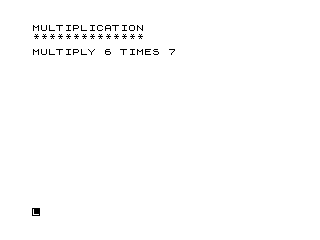
Source Code
   5 REM %M%A%T%H% %F%L%A%S%H%E%R% %3% %M%U%L%T
  10 PRINT "MULTIPLICATION"
  20 FOR L=1 TO 14
  30 PRINT "*";
  40 NEXT L
  50 PRINT
  60 PRINT
 100 LET P=INT (10*RND)
 110 LET Q=INT (10*RND)
 200 PRINT "MULTIPLY ";P;" TIMES ";Q
 210 INPUT R
 300 IF R=P*Q THEN GOTO 400
 310 PRINT "%W%R%O%N%G"
 320 GOTO 410
 400 PRINT "%C%O%R%R%E%C%T"
 410 PRINT P;" TIMES ";Q;" = ";P*Q
 500 PRINT
 510 PRINT
 520 GOTO 10
 600 SAVE "1006%0"
 700 RUN
Note: Type-in program listings on this website use ZMAKEBAS notation for graphics characters.