
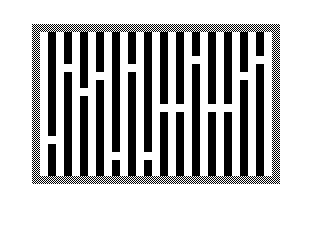
Maze Dash is a single-player maze navigation game in which the player steers a character (represented by the dollar sign) rightward through a randomly generated vertical-barrier maze, trying to exit through the right side while colliding with as few walls as possible. The maze is built using a loop that prints inverse-video space characters every two columns across the screen, then punches random gaps in each barrier using a RND-positioned blank print. Collision detection is performed via a direct PEEK of the display file, calculated from the system variables at addresses 16396–16397 to find the base of the screen memory, then checking whether the character at the player’s new position equals 128 (inverse space). The score starts at 20000, decreasing by 50 each move and by 673 per wall hit, with a penalty of dividing by three for going out of bounds; the high score is preserved across multiple rounds. The FAST/SLOW mode toggle is offered before maze generation, and key-repeat is implemented by remembering the last pressed key in variable A$.
Program Analysis
Program Structure
The program is organised into several logical blocks spread across line ranges:
- Lines 0–3: Title REM and immediate jump to the introduction routine at line 6000.
- Lines 4–125: Maze initialisation — speed selection, maze drawing, player start-up via
GOSUB 9000. - Lines 150–165: Wall-hit subroutine — decrements score by 673 and displays it.
- Lines 167–500: Main game loop — reads keyboard, moves player, checks collisions, handles out-of-bounds.
- Lines 510–580: End-of-round summary, high-score flash animation, and play-again prompt.
- Lines 6000–6090: Introduction screen with inverse-video title, instructions, and a software delay loop.
- Lines 9000–9500: Player initialisation subroutine — sets starting position, score, and switches to SLOW mode.
- Lines 9888–9993: Housekeeping — STOP, RND seed helper, CLEAR, SAVE.
The entry point is line 6000 (via GOTO 6000 at line 3), which eventually jumps to line 7 — a non-existent line that falls through to line 9, the speed-selection prompt. This is a deliberate “fall-through” idiom common in Sinclair BASIC.
Maze Generation
The maze is constructed in two phases. First, vertical barriers are drawn every two columns (FOR B=2 TO 28 STEP 2) by printing inverse spaces ("% ") from row 0 to row 19. Then a random gap is cut in each barrier with:
PRINT AT RND*14+3,B;" "
This places a one-cell opening somewhere between rows 3 and 17, ensuring no gap appears at the very top or bottom rows (which are covered by the horizontal borders drawn in lines 60–110). The borders themselves use the block graphic \## (a solid block character) printed along rows 0 and 19 (top/bottom) and column 0 and 30 (left/right).
Display-File Collision Detection
Rather than maintaining an array of wall positions, the game reads directly from the ZX81 display file to detect collisions. Line 233 performs:
IF PEEK (PEEK 16396+256*PEEK 16397+33*A+B+1)=128 THEN GOSUB 150
System variables at addresses 16396 and 16397 hold the low and high bytes of the display file base address (D_FILE). Each screen row occupies 33 bytes (32 character positions plus a NEWLINE at the start of each line in the ZX81 format), so the offset 33*A+B+1 locates the character at row A, column B. The value 128 is an inverse space, confirming the player has entered a barrier cell.
Player Movement and Key Repeat
Movement uses a concise BASIC idiom at lines 220–230:
LET A=A+(Z$="Z")-(Z$="Q")— moves down (Z) or up (Q) by evaluating boolean expressions as 1 or 0.LET B=B+(Z$="L")— moves right only; there is no leftward movement, which is intentional given the objective.
Key repeat is implemented by storing the last pressed key in A$ (line 490) and substituting it when INKEY$ returns an empty string (line 170). This gives the player continuous motion without re-pressing a key.
Scoring
| Event | Score change |
|---|---|
| Each move (always) | −50 |
| Wall collision | −673 |
| Out-of-bounds (top/bottom/left) | Score divided by 3 (INT) |
| Exiting right side | Round ends |
The starting score is 20000 (set at line 9020). The high score (U) is preserved across rounds but resets on a fresh program start via line 6002.
End-of-Round Animation
Lines 530–552 produce a flashing effect by alternating inverse and normal renderings of the player character and the “HIGH SCORE” label six times in a tight FOR loop with no delay other than the PRINT overhead, creating a visible flicker on real hardware.
FAST/SLOW Mode Handling
Before maze generation, the player is offered the option to watch the maze being drawn. Choosing option 2 invokes FAST (line 12) so drawing is invisible; choosing option 1 skips to line 15 leaving the display active so the barriers appear incrementally. In either case, SLOW is restored inside the initialisation subroutine at line 9490 before returning to the game loop.
Bugs and Anomalies
- Line 580 performs
GOTO 5, but line 5 does not exist. The interpreter falls through to line 9 (the speed-selection prompt), which is the intended replay entry point — this is intentional fall-through behaviour. - The out-of-bounds check at line 255 applies the score penalty but does not prevent the player from actually occupying the out-of-bounds cell; the terminal check at line 260 ends the round. A single step out of bounds therefore triggers both the divide-by-three penalty and immediate round termination.
- There is no leftward movement key, so a player who overshoots a gap cannot backtrack — this is a design constraint, not a bug.
- Line 9975 (
LET R=RND*RND*RND) and line 9991 (CLEAR) are unreachable dead code; they appear to be development remnants. - The
INPUT ANSat line 562 expects a numeric value; entering a non-numeric response will cause a BASIC error rather than being handled gracefully.
Image Gallery
Source Code
   0 REM  "MAZE DASH"                     TIM HARTNELL
   3 GOTO 6000
   4 LET U=0
   9 PRINT AT 3,0;"DO YOU WANT TO SEE THE MAZE     DRAWN? (1=YES/2=NO)"
  10 INPUT WW
  11 IF WW=1 THEN GOTO 15
  12 IF WW=2 THEN FAST
  13 IF WW>2 OR WW<1 THEN GOTO 10
  15 CLS
  16 FOR B=2 TO 28 STEP 2
  20 FOR A=0 TO 19
  30 PRINT AT A,B;"% "
  40 NEXT A
  45 PRINT AT RND*14+3,B;" "
  50 NEXT B
  60 FOR A=0 TO 30
  70 PRINT AT 0,A;"##";AT 19,A;"##"
  80 NEXT A
  90 FOR B=1 TO 18
 100 PRINT AT B,0;"##";AT B,30;"##"
 110 NEXT B
 120 GOSUB 9000
 125 GOTO 167
 150 PRINT AT A,B;"%$"
 155 LET Z=Z-673
 160 PRINT AT 20,0;"SCORE: ";Z;"    "
 165 RETURN
 167 LET Z$=INKEY$
 170 IF Z$="" THEN LET Z$=A$
 180 LET Z=Z-50
 200 LET Y=A
 210 LET X=B
 220 LET A=A+(Z$="Z")-(Z$="Q")
 230 LET B=B+(Z$="L")
 232 PRINT AT Y,X;" "
 233 IF PEEK (PEEK 16396+256*PEEK 16397+33*A+B+1)=128 THEN GOSUB 150
 235 PRINT AT A,B;"$"
 255 IF A>18 OR A<2 OR B<1 THEN LET Z=INT (Z/3)
 260 IF A>18 OR A<2 OR B<1 OR B>29 THEN GOTO 510
 490 LET A$=Z$
 500 GOTO 167
 510 PRINT AT 20,0;"END OF ROUND--SCORE: ";Z
 520 IF Z>U THEN LET U=Z
 530 FOR G=1 TO 6
 540 PRINT AT 21,3;"HIGH SCORE : ";U
 545 PRINT AT A,B;"%$";AT A,B;"$";AT A,B;"%$"
 550 PRINT AT 21,3;"%H%I%G%H% %S%C%O%R%E "
 552 NEXT G
 558 LET ANS=0
 559 PRINT AT 0,0;"                          "
 560 PRINT AT 1,0;"%T%R%Y% %A%G%A%I%N%?%-%-%(%<%1%=%Y%/%2%=%N%>%)   "
 561 PRINT AT 2,0;"                          "
 562 INPUT ANS
 563 IF ANS<1 OR ANS>2 THEN GOTO 560
 565 IF ANS=2 THEN GOTO 9888
 567 IF ANS=1 THEN GOTO 570
 570 CLS
 580 GOTO 5
 6000 CLS
 6001 LET ANS=0
 6002 LET U=0
 6003 PRINT "%M%A%Z%E% %D%A%S%H"
 6010 PRINT AT 1,0;"----------"
 6020 PRINT AT 5,0;"YOU ARE THE ""$"""
 6030 PRINT AT 8,0;"%P%R%E%S%S ""Q"" TO MOVE %U%P"
 6040 PRINT AT 15,0;"%P%R%E%S%S ""Z"" TO MOVE %D%O%W%N"
 6050 PRINT AT 11,9;"%P%R%E%S%S ""L"" TO MOVE %R%I%G%H%T"
 6060 PRINT AT 18,0;"%O%B%J%E%C%T: GET TO THE RIGHT SIDE,  HITTING AS FEW BARRIERS AS      POSSIBLE"
 6070 FOR P=1 TO 160
 6080 NEXT P
 6085 CLS
 6090 GOTO 7
 9000 LET A=10
 9010 LET B=1
 9020 LET Z=20000
 9030 LET Y=A
 9040 LET X=B
 9050 LET A$="Z"
 9490 SLOW
 9500 RETURN
 9888 STOP
 9975 LET R=RND*RND*RND
 9990 STOP
 9991 CLEAR
 9992 SAVE "1019%4"
 9993 RUN
Note: Type-in program listings on this website use ZMAKEBAS notation for graphics characters.