
Tower of Hanoi puzzle game for five discs across three pegs. The player must move all five discs from peg 1 to peg 3 without placing a larger disc on a smaller one, within a 100-move limit. Disc graphics are built from block-graphic strings stored in a DIM’d string array d$(5,10), with each disc rendered in a different INK color using INK (6-P(N,O)). The game supports both keyboard input (keys 1–3) and joystick input via the STICK function, reading directional values 1, 4, and 8. A high-score tracker persists across replays, and completed move sequences can be printed via LPRINT and COPY.
Program Analysis
Program Structure
The program is organized into clearly labeled subroutines and sections separated by REM statements. Execution begins at line 1110 (initialization), which is reached via GO TO 1110 at line 20. After initialization, control flows to 140 (instructions/input setup), then into the main game loop starting at line 210.
- Lines 1100–1270: Initialization — POKE keyboard repeat, set high score, define disc strings, populate peg array, draw screen.
- Lines 30–130: Display subroutines — draw pegs (
GO SUB 40) and draw all discs (GO SUB 60). - Lines 140–190: Pre-game setup — instructions, joystick/keyboard selection, border drawing.
- Lines 200–530: Main game loop — move input, validation, array update, win check.
- Lines 540–680: Move validation subroutines — “FROM” check (
GO SUB 550) and “TO” check (entered viaGO TO 620). - Lines 690–780: Joystick input handlers for source and destination peg selection.
- Lines 800–930: Win routine, move printing via LPRINT.
- Lines 940–1000: Lose/quit routine and restart prompt.
- Lines 1010–1090: Instructions and joystick briefing subroutines.
Data Representation
The three pegs and five disc positions are stored in a two-dimensional array P(3,5), declared as DIM p(PI,5) — an interesting idiom that uses PI (≈3.14159) as the first dimension, which is truncated to 3 by BASIC’s integer conversion. Each cell holds the disc number (1–5) occupying that slot, or 0 for empty. At initialization, all five discs are placed on peg 1: FOR N=SGN PI TO 5: LET P(1,N)=N: NEXT N.
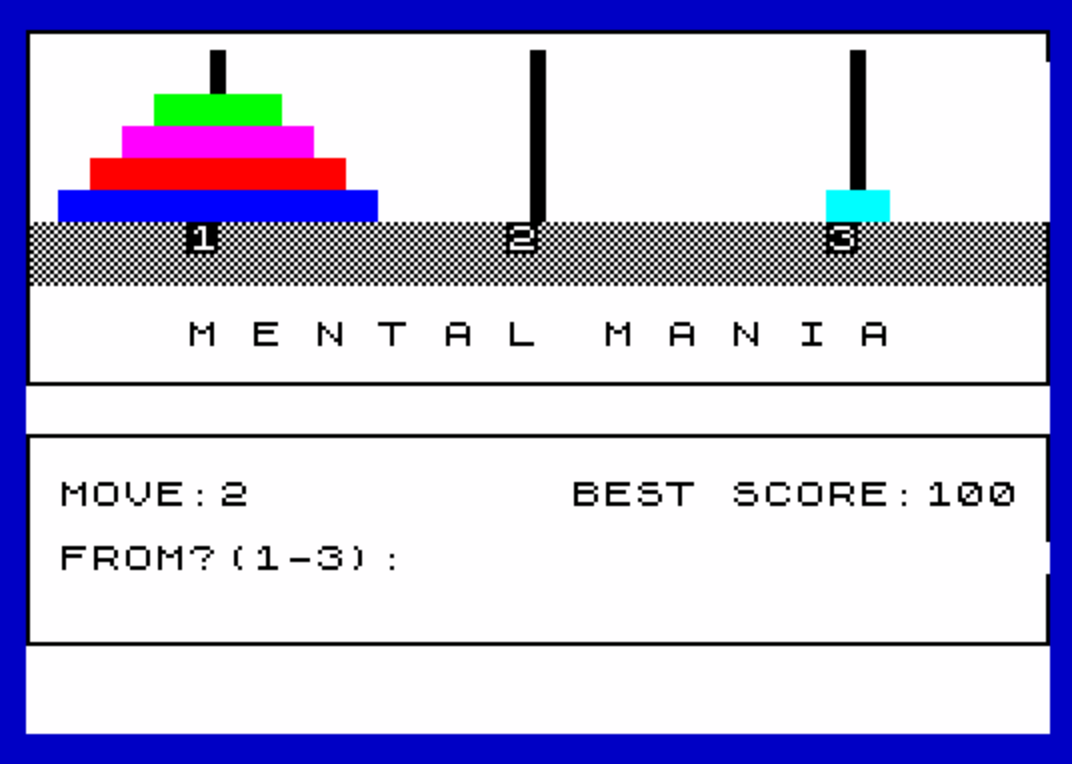
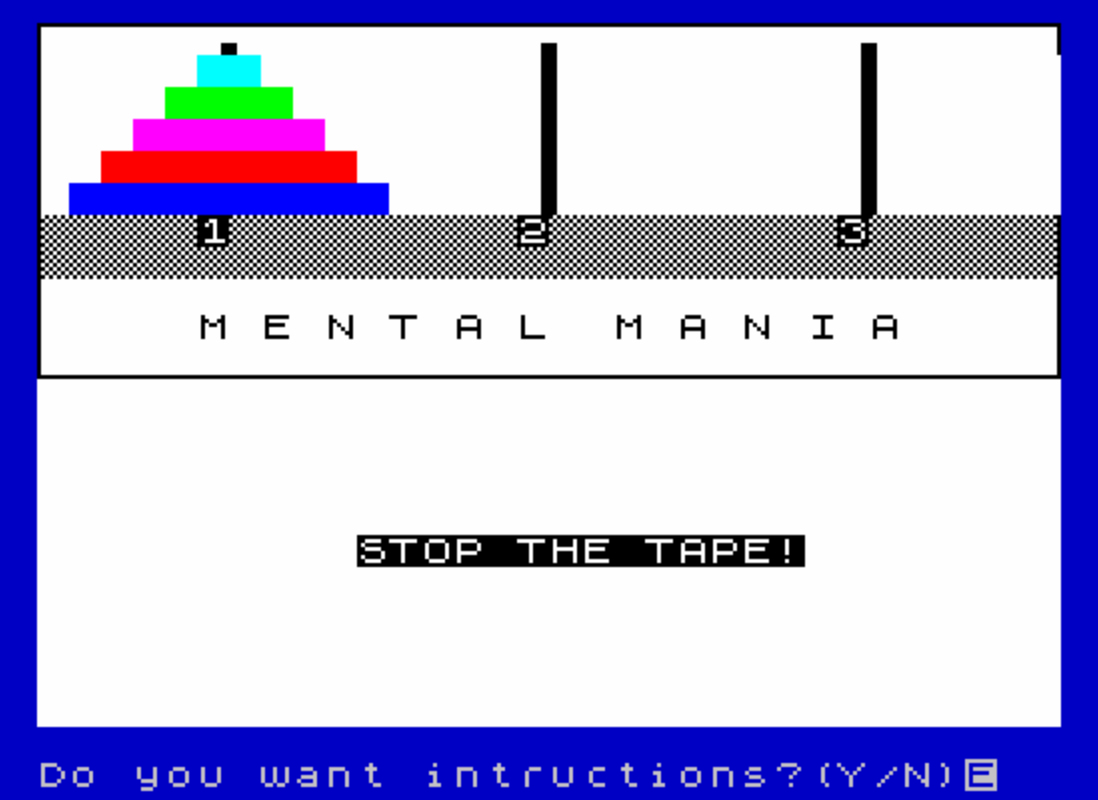
Disc graphics are stored in d$(5,10), a string array where each element is a 10-character string composed of block graphics (\:: = █ and \ = space). Disc 1 is the narrowest (2 block pairs wide) and disc 5 the widest (5 block pairs), creating a visual taper. They are rendered with INK (6-P(N,O)), giving each disc a distinct color based on its disc number.
Key BASIC Idioms
SGN PIis used as a constant for1throughout allFORloops (e.g.,FOR N=SGN PI TO 5), saving a byte over the literal1.DIM p(PI,5)exploits the fact that BASIC truncates the floating-point value of PI to the integer 3 for array dimensions.POKE 23609,25at line1110sets the keyboard repeat speed (system variable REPDEL), reducing key-repeat delay for more responsive input.- The “TO” error-check subroutine is entered via
GO TO 620rather thanGO SUB, meaning it falls through directly toGO TO 430(store moves) — a structured-fall-through technique avoiding an explicitRETURN. - Move history is accumulated in the string variable
M$by concatenation:LET M$=M$+A$+"-"+B$+":", building a human-readable log for printing.
Joystick Support
Joystick input is handled via the STICK function (|), called as |(1,1) to read joystick port 1. Direction values used are:
| STICK value | Direction | Mapped peg |
|---|---|---|
| 4 | Left | 1 |
| 1 | Up | 2 |
| 8 | Right | 3 |
When joystick mode is active (LET st=1), lines 690–730 and 740–780 handle “FROM” and “TO” peg selection respectively, branching back into the keyboard-input flow at lines 290 and 380 once a valid direction is detected. The X key remains the quit key in joystick mode.
Screen Layout and Graphics
The three pegs are drawn using PLOT/DRAW commands in the subroutine at line 40, with each peg consisting of a 4-pixel-wide, 42-pixel-tall vertical bar. The UDG character \a is programmed at line 1140 with the alternating byte pattern 170,85,170,85,170,85,170,85 (binary 10101010/01010101), producing a checkerboard or hatched fill used in the peg labels row at line 1240. An outer border rectangle is drawn at line 1260 and a second inner rectangle is added on win at line 800 using OVER 1 to erase the outer border cleanly.
Win and Lose Conditions
The win check at lines 480–520 iterates over peg 3 slots, incrementing S each time P(3,G)=G (i.e., disc G is in slot G of peg 3, meaning discs are stacked in correct order 1–5). If S=5, all five discs are correctly placed and the win routine fires. The 100-move limit is enforced at line 240; exceeding it redirects to the lose routine at line 950. The high-score variable hs is initialized to 100 and updated only when the player wins in fewer moves than the previous best.
Bugs and Anomalies
- At line
70, the loop variable is written as lowercasen(FOR n=SGN PI TO 5) but the body references uppercaseN(PRINT AT N,1,,). Sinclair BASIC treats variable names case-insensitively for numeric variables, so this works correctly. - Line
130closes two nested loops withNEXT O: NEXT n— again mixing case forn/N, which is harmless. - The instructions text at line
1030contains a grammatical error: “move all 5 of the discs one at a time” is split mid-word as “at a” on separate print lines due to fixed-width layout packing, but this is purely cosmetic. - At line
450, the conditionIF N=1usesN, butNat this point in the flow holds whatever value it last had in the display loop (line80–130). The intent appears to be checking whether the destination slot is position 1 (top of peg), but the variable being tested is the loop counter rather than the insertion index. The correct placement logic relies on the “TO” subroutine’s loop variableNfrom lines630–670, which exits withNset to the first empty slot — making this effectively check if slot 1 is empty (first position on peg), which works correctly in practice but is fragile. - The
COPYcommand at line880performs a screen dump to printer before theLPRINTstatements at lines890–910, meaning the printed output shows a screen snapshot followed by the text move log.
Image Gallery
Source Code
   10 REM "MEN MAN" by J.G.DuPuy 11/23/84
   20 GO TO 1110
   30 REM DRAW PEGS
   40 FOR B=0 TO 3: PLOT PL+B,128: DRAW 0,42: NEXT B: RETURN
   50 REM DRAW DISCS
   60 LET PL=-34
   70 FOR n=SGN PI TO 5: PRINT AT N,1,,: NEXT n
   80 FOR N=SGN PI TO 3: LET PL=PL+80: GO SUB 40
   90 FOR O=SGN PI TO 5
  100 IF P(N,O)=0 THEN GO TO 130
  110 PRINT AT O,1+((N-1)*10); INK (6-P(N,O));D$(P(N,O))
  120 BEEP .05,P(N,O)+10
  130 NEXT O: NEXT n: RETURN
  140 PRINT AT 16,10; FLASH 1;" STOP THE TAPE!": BEEP .5,0: BEEP .5,10: INPUT "Do you want intructions?(Y/N)"; LINE z$: IF z$="y" THEN GO SUB 1010
  150 PRINT AT 16,10;"                "
  160 INPUT "Enter:J-Joy stick,K-keys(1-3)"; LINE z$: LET st=0: IF z$="j" THEN LET st=1: GO SUB 1080
  170 PLOT 0,22: DRAW 255,0: DRAW 0,52: DRAW -255,0: DRAW 0,-52
  180 PRINT AT 14,17;"BEST SCORE:";hs
  190 IF st THEN PRINT AT 18,6;"LEFT=1, UP=2, RIGHT=3"
  200 REM MAIN PROGRAM
  210 LET M=M+1
  220 PRINT AT 16,1,,
  230 PRINT AT 14,1;"MOVE:";M
  240 IF m>100 THEN PRINT AT 16,1;"You have gone over you limit!": BEEP 1,-10: PAUSE 30: GO TO 950
  250 PRINT AT 16,1;"FROM?(1-3):";
  260 IF st THEN GO TO 690
  270 LET A$=INKEY$: IF A$="x" THEN GO TO 950
  280 IF A$>"3" OR A$<"1" THEN GO TO 270
  290 IF INKEY$<>"" THEN GO TO 290
  300 PRINT A$;: BEEP .1,27
  310 IF st AND |(1,1) THEN GO TO 310
  320 LET D=VAL A$: GO SUB 550
  330 IF Z THEN PRINT AT 16,1;"NOTHING THERE TO TAKE!": BEEP .5,-20: PAUSE 30: GO TO 220
  340 PRINT " / TO?(1-3):";
  350 IF st THEN GO TO 740
  360 LET B$=INKEY$: IF B$="x" THEN GO TO 950
  370 IF B$>"3" OR B$<"1" THEN GO TO 360
  380 IF INKEY$<>"" THEN GO TO 380
  390 PRINT B$: BEEP .1,30
  400 IF b$=a$ THEN PRINT AT 16,1;"A RATHER STUPID MOVE!!!   ": BEEP .5,-20: PAUSE 30: GO TO 220
  410 LET E=VAL B$: GO TO 620
  420 REM STORE MOVES
  430 LET M$=M$+A$+"-"+B$+":"
  440 REM UPDATE POSITION ARRAY
  450 LET P(D,I)=0: IF N=1 THEN LET P(E,N)=FR: GO SUB 60: GO TO 480
  460 LET P(E,N-1)=FR: GO SUB 60
  470 REM CHECK PEG#3 FOR WIN
  480 LET S=0
  490 FOR G=SGN PI TO 5
  500 IF P(3,G)=G THEN LET S=S+1
  510 NEXT G
  520 IF S=5 THEN GO TO 800
  530 GO TO 210
  540 REM "FROM"SETUP&ERROR CHECK
  550 DIM F(5)
  560 FOR I=SGN PI TO 5
  570 IF P(D,I)=0 THEN GO TO 590
  580 LET F(I)=P(D,I): LET Z=0: LET FR=F(I): RETURN
  590 NEXT I
  600 LET Z=1: RETURN
  610 REM "TO"SETUP & ERROR CHECK
  620 DIM T(5)
  630 FOR N=SGN PI TO 5
  640 IF P(E,N)=0 THEN GO TO 670
  650 LET T(N)=P(E,N): IF T(N)<FR THEN PRINT AT 16,1;"YOUR DISC IS TOO BIG! GO AGAIN": BEEP .5,-20: PAUSE 30: GO TO 210
  660 IF T(N)>0 THEN GO TO 430
  670 NEXT N
  680 GO TO 430
  690 IF |(1,1)=4 THEN LET a$="1": GO TO 290
  700 IF |(1,1)=1 THEN LET a$="2": GO TO 290
  710 IF |(1,1)=8 THEN LET a$="3": GO TO 290
  720 IF INKEY$="x" THEN GO TO 950
  730 GO TO 690
  740 IF |(1,1)=4 THEN LET b$="1": GO TO 380
  750 IF |(1,1)=1 THEN LET b$="2": GO TO 380
  760 IF |(1,1)=8 THEN LET b$="3": GO TO 380
  770 IF INKEY$="x" THEN GO TO 950
  780 GO TO 740
  790 REM WIN ROUTINE
  800 PLOT OVER 1;0,22: DRAW OVER 1;255,0: PLOT OVER 0;0,24: DRAW 0,-20: DRAW 255,0: DRAW 0,20: PRINT AT 18,1;"GOOD GOING! YOU GOT IT!",AT 19,1;"IT TOOK YOU : ";M-1;" MOVES.     "
  810 IF m-1<hs THEN LET hs=m-1: PRINT AT 14,17;"BEST SCORE:";hs;" "
  820 FOR N=SGN PI TO 20: BEEP .1,N+20: NEXT N
  830 GO SUB 860
  840 GO TO 990
  850 REM PRINT STORED MOVES
  860 INPUT "Want you moves printed?(Y/N):"; LINE z$: IF z$<>"y" THEN RETURN
  870 INPUT "Turn printer on, press ENT "; LINE z$
  880 COPY
  890 LPRINT "NUMBER of MOVES: ";M-1
  900 LPRINT '
  910 LPRINT M$
  920 LPRINT '
  930 RETURN
  940 REM LOSE ROUTINE
  950 PRINT AT 20,1;"I guess I wiped your mind!!";AT 21,1;"Ha! Ha! Ha!"
  960 FOR n=SGN PI TO 20: BEEP .1,0-n: NEXT n
  970 GO SUB 860
  980 REM RESTART GAME
  990 INPUT "Want to play again?(Y/N):";z$: IF z$<>"n" THEN GO TO 30
 1000 STOP
 1010 REM INSTRUCTIONS
 1020 PRINT AT 16,0,,
 1030 PRINT AT 12,0;"The object of the game is to    move all 5 of the discs one at atime so that you end up with all5 at 3 in the same order as 1 isnow in the least number of movesbut You can't put a larger disc on top of a smaller disc! Enter an ""X"" if you want to quit."
 1040 PRINT "BEWARE, You only have 100 moves!"
 1050 INPUT "Press enter to start.  "; LINE z$
 1060 FOR x=12 TO 20
 1070 PRINT AT x,0,,: NEXT x: RETURN
 1080 PRINT AT 12,0;"You have elected to use the     JOY STICK. To move, LEFT=1, UP=2and RIGHT=3. X key to stop."
 1090 INPUT "Press enter to start   ";z$: FOR v=12 TO 16: PRINT AT v,0,,: NEXT v: RETURN
 1100 REM INITIALIZE
 1110 POKE 23609,25
 1120 LET hs=100
 1130 BORDER 1: PAPER 7: LET m=0: INK m: BRIGHT 1: CLS
 1140 FOR n=m TO 7: READ a: POKE USR "\a"+n,a: NEXT n
 1150 DATA 170,85,170,85,170,85,170,85
 1160 CLS : DIM p(PI,5): LET m$="": DIM d$(5,10)
 1170 LET d$(1)="\  \  \  \  \::\::"
 1180 LET d$(2)="\  \  \  \::\::\::\::"
 1190 LET d$(PI)="\  \  \::\::\::\::\::\::"
 1200 LET d$(4)="\  \::\::\::\::\::\::\::\::"
 1210 LET d$(5)="\::\::\::\::\::\::\::\::\::\::"
 1220 FOR N=SGN PI TO 5: LET P(1,N)=N: NEXT N
 1230 REM SET UP SCREEN
 1240 PRINT AT 6,m;"\a\a\a\a\a1\a\a\a\a\a\a\a\a\a2\a\a\a\a\a\a\a\a\a3\a\a\a\a\a\a\a\a\a\a\a\a\a\a\a\a\a\a\a\a\a\a\a\a\a\a\a\a\a\a\a\a\a\a\a\a\a\a"
 1250 PRINT ' INK m;"     M E N T A L  M A N I A"
 1260 PLOT m,87: DRAW 255,m: DRAW m,88: DRAW -255,m: DRAW m,-88
 1270 GO SUB 60: GO TO 140
 1280 CLEAR : SAVE "MEN MAN" LINE 10
Note: Type-in program listings on this website use ZMAKEBAS notation for graphics characters.