
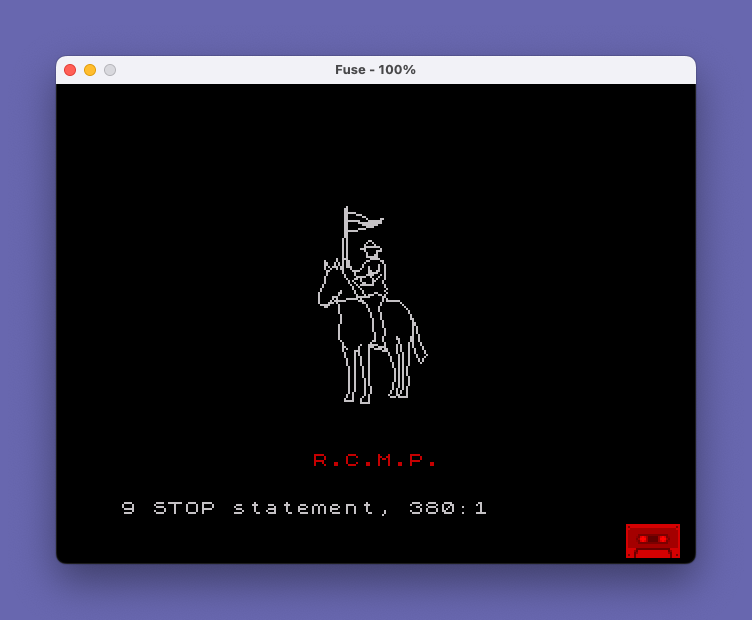
This program draws a detailed illustration of a Royal Canadian Mounted Police officer on horseback using a compact run-length encoded DRAW command sequence. The image data is stored as strings of digit pairs in lines 40–90, where each pair encodes X and Y delta values for successive DRAW calls; a value of 10 signals a negative (two-digit) coordinate, decoded in the subroutine at lines 160–200. After rendering the horse and rider, the program animates the text “R.C.M.P.” scrolling from column 30 leftward across row 20 using INK 2 (red). The technique, credited to D.J. Currie in line 400, is described as a “map making method” — essentially a custom vector graphics encoder that compresses complex artwork into printable ASCII digit strings for compact BASIC storage.
Program Analysis
Program Structure
The program divides into three logical phases:
- Initialization (lines 10–30): Sets black border/paper with white ink, defines global variables
w=10,q=10,e=0, and positions the initial PLOT point at (121,91). - Vector drawing (lines 40–150): Loads encoded path data into
l$in labeled segments (horse’s neck/head, forelegs, tail, hat, neck, mountie body), calls the decode subroutine at line 160, then draws additional details with explicit PLOT/DRAW calls. - Animation (lines 210–380): Scrolls the characters
R,.,C,.,M,.,P,.rightward-to-leftward across row 20 in red (INK 2), each character in its own FOR loop ending one column further left than the last.
Encoding Scheme — The “Map Making Method”
The core technique, attributed to D.J. Currie in line 400, encodes a sequence of DRAW delta pairs as a string of decimal digits. The decode subroutine (lines 160–200) walks through l$ two characters at a time, reading an X delta and a Y delta for each DRAW call.
Because DRAW accepts signed values but individual digits are only 0–9, a sentinel value of 10 (the digit w, since w=10 at initialization) signals that the next digit should be negated. This allows negative offsets to be encoded using just two characters instead of a minus sign, keeping the string compact.
The variables w, q, and e are pre-assigned as:
| Variable | Value | Role in encoding |
|---|---|---|
w | 10 | Sentinel for negation (also a coordinate value of 10) |
q | 10 | Same sentinel value — appears to be an alias; both w and q equal 10 |
e | 0 | Zero delta (used for purely horizontal or vertical steps) |
Since VAL is applied character-by-character via VAL l$(n), each single character is interpreted as its numeric digit value (0–9). The variable names w, q, and e do not appear literally in the string — they are used only in the subroutine comparison IF x=10 and assignment logic, while the string data itself contains the raw digit characters 0–9.
Decode Subroutine (Lines 160–200)
The subroutine operates as a simple two-pointer loop:
- Line 170 checks termination: if
n >= LEN l$, return. Note this uses>=rather than>, so a string of odd length would skip the final character rather than cause an error. - Lines 180–190 read
xandyfrom consecutive characters, applying negation if the digit is 10 (consuming an extra character in that case). - Line 200 advances
npast the Y character and issuesDRAW x,y, then loops back.
A subtle issue: line 180 increments n by 1 when a negation sentinel is found, but the subsequent LET n=n+1 at the start of line 190 advances n again. This means the pointer correctly lands on the Y digit after consuming either a 1-digit or 2-digit X value. The same pattern repeats in line 190 for the Y value, with n advanced once more at the start of line 200.
Coordinate System and PLOT Usage
The program uses multiple anchor PLOT calls to reposition the drawing cursor between segments — line 30 sets (121,91) for the main horse/rider body, line 110 draws the reins explicitly, and line 140 draws the ground line. Line 120 re-anchors at (104,90) and loads a new string for what appears to be the rifle or lance detail. This segmented approach lets each l$ string describe relative offsets from a known starting point.
Animation Loop
Lines 210–370 animate “R.C.M.P.” by printing each character with a trailing space across progressively shorter column ranges (from column 30 down to 12, 13, 14, … 19 respectively), creating a left-scrolling marquee effect at screen row 20 using INK 2 (red on black paper). The trailing space effectively erases the previous character position as each loop advances.
Notable Techniques
- String concatenation across multiple lines (40–90) to build a long path while keeping individual line lengths manageable.
- Single-character
VALextraction (VAL l$(n)) as an efficient way to convert ASCII digit characters to integers without a lookup table. - Use of pre-assigned single-letter variables (
w,q,e) as named constants embedded within the data string interpretation logic, improving readability of the encoded data. SAVE "Mountie" LINE 10at line 420 saves the program with an auto-run directive.
Potential Anomalies
- Both
wandqare initialized to 10 (lines 20). Since the subroutine only testsIF x=10andIF y=10, both variable names produce identical behavior. The dual naming likely reflects the author usingqas a visually distinct glyph in the string data for readability, while both resolve to the same sentinel value. - Line 390 is a blank REM-less line, serving only as a visual separator in the listing.
- The
STOPat line 380 halts the program after animation; there is no loop back or prompt, making the program a one-shot display.
Image Gallery
Source Code
   10 BORDER 0: PAPER 0: INK 7: CLS
   20 LET w=10: LET q=w: LET e=0
   30 PLOT 121,91
   40 LET l$="w33w35w58w13w12w1q31q2w11w1ew1q1w34eq42q1w2q3eq3w3q6eq41q13ew2e1q11e11242e1112w1q2w1q11q71q4w1q6eq44q5": REM horses neck and head
   50 LET l$=l$+"w22eq22q61q6eq5eq5w2q3eq14ee412e8e6e52ee211w1q1eq21q51q51q7eq5w2q2eq24ee412w16e9e8eq1412q11e2q1": REM forelegs
   60 LET l$=l$+"2q52q6eq4w1q3eq2w2q32q11e11e312e8e4w1713w121q21q41q4eq6eq5eq5w2q3eq14ee413w1714e81314e4w14": REM tail
   70 LET l$=l$+"3q71q62q42q3w3q4w35w16e5e4w14w23w44w6ew1311w1111w2313e6w12w41e111e2": REM mountie's hat
   80 LET l$=l$+"2ee1w21w6e5ee1w22w1ew2q2eq1w2q12e1q43e11w1q12ew4e2q1w3q1w4q5w3ew22e3w11w1e": REM neck
   90 LET l$=l$+"6q93e31e41q43111e3eq3w3q1w1e1q6e144w4q4eq1w5ew141ew1ew3q1w1q13q332w3q24q5522q11q2w2q51q31q51q4w1q31q3eq3w31w1ew31e221w19w15w24w21w32": REM mountie
  100 GO SUB 160
  110 PLOT 113,108: DRAW 0,30: DRAW -1,-1: DRAW -1,-30
  120 PLOT 113,135: LET l$="3e4q13q22q14e21w1q2w8ew51w4e4e5q26ew7q2w5q1w4e"
  130 GO SUB 160
  140 PLOT 104,90: DRAW 22,4
  150 GO TO 210
  160 LET n=1
  170 IF n>=LEN l$ THEN RETURN
  180 LET x=VAL l$(n): IF x=10 THEN LET x=-(VAL l$(n+1)): LET n=n+1
  190 LET n=n+1: LET y=VAL l$(n): IF y=10 THEN LET y=-(VAL l$(n+1)): LET n=n+1
  200 LET n=n+1: DRAW x,y: GO TO 170
  210 FOR f=30 TO 12 STEP -1
  220 INK 2
  230 PRINT AT 20,f;"R ": NEXT f
  240 FOR f=30 TO 13 STEP -1
  250 PRINT AT 20,f;". ": NEXT f
  260 FOR f=30 TO 14 STEP -1
  270 PRINT AT 20,f;"C ": NEXT f
  280 FOR f=30 TO 15 STEP -1
  290 PRINT AT 20,f;". ": NEXT f
  300 FOR f=30 TO 16 STEP -1
  310 PRINT AT 20,f;"M ": NEXT f
  320 FOR f=30 TO 17 STEP -1
  330 PRINT AT 20,f;". ": NEXT f
  340 FOR f=30 TO 18 STEP -1
  350 PRINT AT 20,f;"P ": NEXT f
  360 FOR f=30 TO 19 STEP -1
  370 PRINT AT 20,f;". ": NEXT f
  380 STOP
  390
  400 REM Demonstration of        artwork using map making method    by D.J. Currie
  410
  420 SAVE "Mountie" LINE 10
Note: Type-in program listings on this website use ZMAKEBAS notation for graphics characters.