
MULTIFILE+ is a multi-field string database manager that stores records in a three-dimensional string array, supporting initialization, data entry, browsing, searching, editing, deletion, sorting, and tape save/verify operations. Records are organized as variable-length fields packed into a single 3D array `a$(1,x,fieldstart TO fieldend)`, with cumulative field offsets tracked in the numeric array `n()`. The program implements an in-place Quicksort (lines 1880–2130) using explicit stack arrays `l()` and `h()` to avoid recursion, which BASIC does not support. A decorated menu screen is built using block graphic strings and INVERSE attributes, and an optional printer channel (channel 2) can be toggled on from the menu for printed output. The program saves itself back to tape with `SAVE y$ LINE 1180` so the title and current data are preserved together.
Based on the original MULTIFILE written for the ZX81 and marketed by BUG-BYTE. Modified to handle strings and has been enhanced to provide additional routines.
Program Analysis
Program Structure
The program is divided into functional regions separated by GO TO jumps from a central menu dispatcher at lines 1180–1410. Line 110 immediately jumps to 1180, which renders the initialization code at line 120 unreachable on first load — it is only entered via menu option 1. The overall flow is:
- Lines 1–2: Credit REMs.
- Line 110: Bootstrap jump to menu.
- Lines 120–400: Initialization — prompts for field headings, dimensions arrays, computes capacity.
- Lines 410–630: Record creation (data entry loop).
- Lines 640–860: Step/browse records, optional printer output.
- Lines 870–1110: Search — selects a heading, then scans all records for a matching field value.
- Lines 1120–1170: Change (modify) a record.
- Lines 1180–1410: Main menu display and dispatcher.
- Lines 1420–1560: Date entry and tape save/verify.
- Lines 1570–1580: Full reset and re-save of bare program.
- Lines 1600–1810: Record deletion with compaction.
- Lines 1820–1870: Sort setup — field selection and parameter computation.
- Lines 1880–2130: Quicksort implementation.
- Lines 2140, 2150, 9998: Diagnostic print loop, attribution REM, and final
SAVE.
Data Storage Model
All record data is stored in the three-dimensional string array a$(1, recordIndex, characterPosition). The first dimension is fixed at 1, making a$ effectively a 2D structure: rows are records and columns are concatenated field characters. Field boundaries are tracked cumulatively in n(z): after initialization, n(z) holds the last character position of field z, so field z‘s data occupies a$(1, x, n(z-1)+1 TO n(z)). This packing avoids a separate array per field at the cost of fixed-width field allocation.
Capacity Calculation
Line 300 computes the maximum number of records as x = INT(FREE - 1000) / tot, where tot is the total characters per record and FREE is the available memory keyword. The 1000-byte safety margin is intended to leave headroom for program variables. The result is stored in both x (later used as a loop counter) and w (the permanent capacity ceiling checked throughout the program).
Quicksort Implementation
The sort routine (lines 1880–2130) is a non-recursive Quicksort using explicit stack arrays l(20) and h(20) for partition boundaries, since BASIC has no call stack for recursion. The stack pointer is ii, initialized to 2 at line 1910 (with l(1)=1 and h(1)=n as the first partition). The pivot is chosen as the last element of each partition (il=j=h(ii)). Swaps are performed via the temporary string k$, operating on entire record rows a$(1,i) and a$(1,j). Comparisons use the field slice a$(1,i,a TO b) where a and b are set by lines 1840–1850 depending on which field was selected for sorting.
Menu Screen Construction
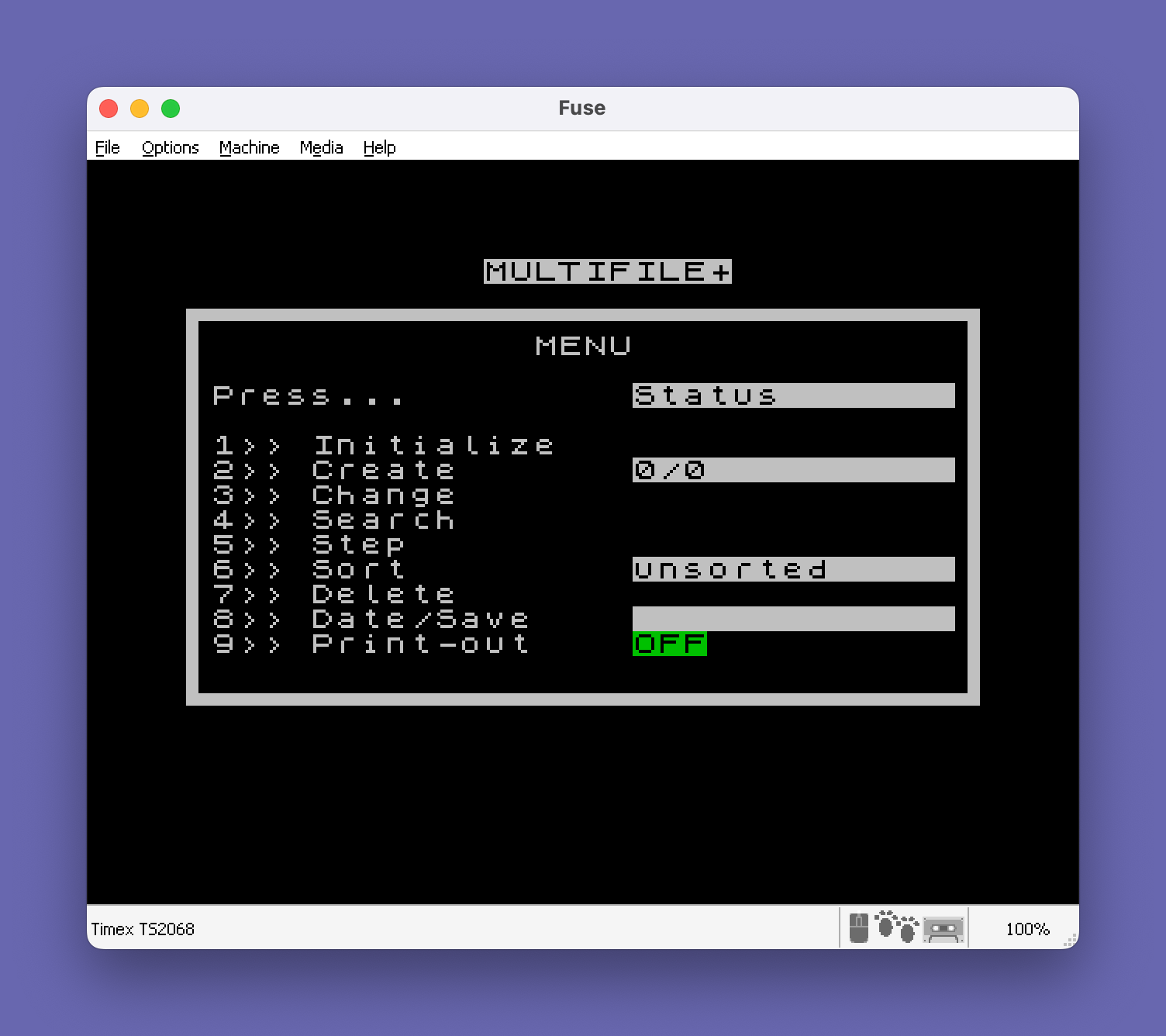
The menu (lines 1220–1290) is drawn using pre-built block-graphic border strings x$, v$, and w$ defined at lines 150–170. The title y$ is displayed with INVERSE 1. Status fields show record count n/w, sort state p$, date d$, and printer state with conditional PAPER coloring (PAPER 2 for ON, PAPER 4 for OFF). The right and left borders are drawn by a FOR loop at line 1270 printing block-graphic characters at columns 0 and 31.
Printer Channel Handling
Menu option 9 sets chan=1 and returns to the menu display. When chan is set, browse (line 670) and search (line 940) open channel 2 to "p" (the printer) before outputting records. Line 750 closes the channel after each record display. This allows selective printer output without restructuring the display logic.
Tape Save Strategy
The program saves itself back to tape at line 1550 with SAVE y$ LINE 1180, where y$ is the user-supplied title (up to 10 characters). Because the array a$ containing the database records is part of the program’s variable area, this single SAVE preserves both the program code and all entered data. Line 1570 performs a full reset (CLEAR) and re-saves the bare program shell for distribution or reuse.
Title Storage via POKE
Lines 350–370 store the title string y$ into memory starting at address 26715 using POKE 26715+z-1, CODE y$(z). This address falls within the program area and is used to persist the title across saves — the value is read back by the SAVE y$ statement because y$ is updated from those POKEd bytes by line 1580 on restore. POKE 23658,8 at line 360 enables caps lock for the title input.
Record Deletion and Compaction
Delete (lines 1600–1810) shifts all records above the deleted index down by one position using LET a$(1,i)=a$(1,i+1) in a FOR loop (line 1740), then decrements n. If the deleted record is the last one, it simply clears that row (line 1730). The mo flag (modify mode) is set to 1 before calling the display subroutine at line 1660 so the record’s contents are shown before confirmation.
Notable Techniques and Idioms
PAUSE 0followed by anINKEY$poll loop is used as an efficient keypress wait at lines 590–630, 1300–1410, 1680–1720, 1770–1810.- Conditional string concatenation with
ANDis used in the menu (e.g.,"ON " AND chan=1) to display status text conditionally withoutIFstatements. - The
mo(modify mode) flag is shared between the change and delete routines to reuse the data-entry loop at line 440 and the display subroutine at line 680. VAL "number"is not present; allGO TOtargets are literal line numbers.- Line 1820 uses a conditional string expression in the
INPUTprompt:"not " AND p$<>"unsorted"appends “not” only when the data has already been sorted.
Bugs and Anomalies
- Line 1910 initializes
ii=2but the Quicksort loop condition at line 1920 checksii<=1to return — sinceiistarts at 2, the first iteration always proceeds, which is the intended behavior. However, the stack is never explicitly cleared between sorts, so stale values inl()andh()from a previous sort could cause incorrect behavior on a second sort of a smaller dataset. In practice this is mitigated becausel(1)andh(1)are always reset at lines 1890–1900. - Line 620 checks
INKEY$<>"y"after line 610 has already matched"y"; since INKEY$ is sampled again, there is a race: if the key is released between lines 610 and 620, line 620’s condition is true and control falls through to 630, which re-polls. This is a common INKEY$ debounce pitfall. - Line 1410 is a dead fallthrough: after the cascading
IF INKEY$=...checks at 1320–1400 cover all digits 1–9, line 1410GO TO 1320is unreachable in normal operation. - The
CLOSE #2at line 750 is called unconditionally even whenchan=0and no channel was opened; closing an unopened channel is harmless on this platform but is technically unnecessary.
Image Gallery
Source Code
    1 REM THIS PROGRAM WAS                DONATED BY TORONTO              TIMEX SINCLAIR USER'S           GROUP
    2 REM MODIFIED AND COPIED BY          ALGIS E. GEDRIS                 DECEMBER 20, 1986
  100 REM MULTIFILE+
  110 GO TO 1180
  120 LET free=~-1000: LET save=0: CLS
  130 INPUT "How many string headings ?"'s
  140 LET t=0: LET g=1180
  150 LET x$="\:'\''\''\''\''\''\''\''\''\''\''\''\''\''\''\''\''\''\''\''\''\''\''\''\''\''\''\''\''\''\''\':"
  160 LET v$="\:.\..\..\..\..\..\..\..\..\..\..\..\..\..\..\..\..\..\..\..\..\..\..\..\..\..\..\..\..\..\..\.:"
  170 LET w$="\:                               \ :"
  180 IF save THEN RETURN
  190 IF s<1 THEN GO TO 220
  200 DIM n$(s,12)
  210 DIM n(s)
  220 DIM l(20): DIM h(20)
  230 CLS
  240 FOR z=1 TO s
  250 INPUT ("Name of string heading ";z)' LINE n$(z)
  260 INPUT "Maximum number of characters ?"'n(z)
  270 CLS
  280 LET t=t+n(z): LET n(z)=t
  290 NEXT z
  300 LET tot=t: LET x=INT (free/tot): LET w=x
  310 PRINT #1;"There is room for ";x'"records."
  320 PAUSE 120
  330 IF s>0 THEN DIM a$(1,x,t)
  340 REM titling
  350 LET y$="          ": FOR z=1 TO LEN y$: POKE 26715+z-1,CODE y$(z): NEXT z
  360 POKE 23658,8: INPUT "Title ? (Max: 10 characters)"' LINE y$: POKE 23658,0
  370 FOR z=1 TO LEN y$: POKE 26715+z-1,CODE y$(z): NEXT z
  380 IF save THEN RETURN
  390 LET d$="": LET n=0
  400 GO TO 1180
  410 CLS
  420 LET n=n+1: LET x=n
  430 IF n>w THEN GO TO 1520
  440 IF mo THEN PRINT ;"Enter new data for each heading or press ENTER to leave as is.  "
  450 FOR z=1 TO s
  460 PRINT INVERSE 1;n$(z);"?  "
  470 IF mo AND z=1 THEN PRINT a$(z,x, TO n(1))
  480 IF mo AND z>1 THEN PRINT a$(1,x,n(z-1)+1 TO n(z))
  490 INPUT LINE z$
  500 IF z$="" THEN GO TO 550
  510 IF LEN z$>n(z) THEN LET z$=z$( TO n(z))
  520 IF z=1 THEN LET a$(z,x, TO n(1))=z$
  530 IF z>1 THEN LET a$(1,x,n(z-1)+1 TO n(z))=z$
  540 PRINT PAPER 2;"Changed to " AND mo;z$
  550 NEXT z
  560 PRINT #0;AT 0,0;"Record # ";x
  570 IF mo THEN PAUSE 120: RETURN
  580 PRINT #0;AT 1,0; FLASH 1;" Another record ? Y/N"
  590 PAUSE 0
  600 IF INKEY$="" THEN GO TO 600
  610 IF INKEY$="y" THEN GO TO 410
  620 IF INKEY$<>"y" THEN GO TO 1180
  630 GO TO 590
  640 CLS
  650 INPUT "Starting from what record # ?"'x
  660 CLS
  670 IF chan THEN OPEN #2,"p"
  680 FOR z=1 TO s
  690 IF x=n+1 THEN CLS : PRINT AT 10,10;"Nothing found": PAUSE 120: GO TO 1180
  700 PRINT INVERSE 1;n$(z)
  710 IF z=1 THEN PRINT a$(1,x, TO n(1))
  720 IF z>1 THEN PRINT a$(1,x,n(z-1)+1 TO n(z))
  730 NEXT z
  740 PRINT #0;AT 0,0;"Record # ";x
  750 CLOSE #2
  760 IF mo THEN RETURN
  770 PRINT #1;AT 1,0;"1=Continue; 2=Menu"
  780 LET u$=INKEY$
  790 IF u$="2" THEN GO TO 1180
  800 IF u$="1" AND j=1 THEN GO TO 860
  810 IF u$="1" THEN GO TO 830
  820 GO TO 780
  830 LET x=x+1
  840 IF x>w THEN GO TO 1180
  850 GO TO 660
  860 RETURN
  870 CLS
  880 LET j=1
  890 LET h$="Enter heading."
  900 LET e$="Enter search item."
  910 PRINT "Headings:"'': FOR z=1 TO s: PRINT TAB 3;n$(z): PRINT : NEXT z
  920 INPUT (h$)' LINE z$
  930 IF z$="" THEN GO TO 1180
  940 IF chan THEN OPEN #2,"p"
  950 LET y=1
  960 IF z$=n$(y, TO LEN z$) THEN GO TO 1030
  970 IF y=s THEN GO TO 1000
  980 LET y=y+1
  990 GO TO 960
 1000 PRINT #0;AT 0,5; FLASH 1;i$
 1010 PAUSE 120
 1020 GO TO 920
 1030 INPUT (e$)' LINE g$
 1040 LET g1=LEN g$
 1050 IF y=1 THEN GO TO 1460
 1060 LET x=1
 1070 IF g$=a$(1,x,n(y-1)+1 TO n(y-1)+g1) THEN GO SUB 660
 1080 IF x=n THEN CLS : PRINT AT 10,10;"Nothing found": PAUSE 120: GO TO 1180
 1090 IF x=w THEN GO TO 1180
 1100 LET x=x+1
 1110 GO TO 1070
 1120 CLS : REM change
 1130 INPUT "Enter record # to be changed"'x
 1140 LET mo=1
 1150 GO SUB 440
 1160 PRINT #0;AT 0,0; FLASH 1;" Changes complete "
 1170 PAUSE 120
 1180 LET chan=0: CLOSE #2: BORDER 0: PAPER 0: INK 9: CLS : LET g=1180
 1190 LET i$=" INVALID HEADING ! "
 1200 LET mo=0
 1210 POKE 23658,0
 1220 PRINT AT 1,12; INVERSE 1;y$
 1230 PRINT 'x$;w$;AT 4,13;" MENU "'w$;w$;AT 6,1;"Press...";AT 6,18; INVERSE 1;"Status";TAB 31
 1240 PRINT AT 8,0;" 1>> Initialize"'AT 9,0;" 2>> Create";AT 9,18; INVERSE 1;n;"/";w;TAB 31; INVERSE 0;AT 10,0;" 3>> Change";AT 11,0;" 4>> Search"
 1250 PRINT AT 12,0;" 5>> Step";AT 13,0;" 6>> Sort";AT 13,18; INVERSE 1;p$;TAB 31; INVERSE 0;AT 14,0;" 7>> Delete";AT 15,0;" 8>> Date/Save";AT 15,18; INVERSE 1;d$;TAB 31
 1260 PRINT " 9>> Print-out";AT 16,18; INVERSE 0; PAPER 2;"ON " AND chan=1; PAPER 4;"OFF" AND NOT chan
 1270 FOR i=7 TO 17: PRINT AT i,0;"\: ";AT i,31;"\ :": NEXT i: PRINT v$
 1280 PRINT
 1290 LET j=0
 1300 PAUSE 0
 1310 IF INKEY$<"1" OR INKEY$>"9" THEN GO TO 1300
 1320 IF INKEY$="1" THEN GO TO 120
 1330 IF INKEY$="9" THEN LET chan=1: GO TO 1220
 1340 IF INKEY$="2" THEN GO TO 410
 1350 IF INKEY$="5" THEN GO TO 640
 1360 IF INKEY$="7" THEN GO TO 1600
 1370 IF INKEY$="4" THEN GO TO 870
 1380 IF INKEY$="6" THEN GO TO 1820
 1390 IF INKEY$="8" THEN GO TO 1420
 1400 IF INKEY$="3" THEN GO TO 1120
 1410 GO TO 1320
 1420 CLS
 1430 DIM d$(6)
 1440 INPUT "Enter date (YYMMDD)"; LINE d$
 1450 GO TO 1550
 1460 LET x=1
 1470 IF g$=a$(1,x, TO g1) THEN GO SUB 660
 1480 IF x=n THEN CLS : PRINT AT 10,10;"Nothing found": PAUSE 120: GO TO 1180
 1490 IF x=w THEN GO TO 1180
 1500 LET x=x+1
 1510 GO TO 1470
 1520 CLS
 1530 PRINT AT 10,10;"No room left !"
 1540 PAUSE 120
 1550 SAVE y$ LINE 1180: PRINT FLASH 1;"rewind for verify": VERIFY ""
 1560 GO TO 1180
 1570 CLEAR : LET p$="unsorted": LET save=1: GO SUB 150: GO SUB 350: LET g=1180: LET w=0: LET n=0: LET d$="": SAVE y$ LINE 1180: VERIFY "": LIST
 1580 FOR z=1 TO LEN y$: POKE 26715+z-1,CODE y$(z): NEXT z: RETURN
 1590 REM delete
 1600 CLS
 1610 LET mo=1
 1620 INPUT "Record # ? (0=menu)"'x
 1630 IF x=0 THEN GO TO 1180
 1640 IF x>n THEN PRINT #0;" Invalid input ": PAUSE 60: GO TO 1620
 1650 PRINT "Record # ";x;" is:"''
 1660 GO SUB 680
 1670 PRINT #0;AT 0,0;"1=delete;2=menu"
 1680 PAUSE 0
 1690 IF INKEY$="" THEN GO TO 1690
 1700 IF INKEY$<>"1" THEN GO TO 1180
 1710 IF INKEY$="1" THEN PRINT #0;AT 0,0;"Deleting: Stand by....": GO TO 1730
 1720 GO TO 1680
 1730 IF x>n-1 THEN LET a$(1,x)="": GO TO 1745
 1740 FOR i=x TO n-1: LET a$(1,i)=a$(1,i+1): NEXT i
 1745 LET n=n-1
 1750 PAUSE 120
 1760 CLS : PRINT #1;"Record # ";x;" has been deleted": PRINT #0;"1=more deletions;2=menu"
 1770 PAUSE 0
 1780 IF INKEY$="" THEN GO TO 1780
 1790 IF INKEY$<>"1" THEN GO TO 1180
 1800 IF INKEY$="1" THEN GO TO 1600
 1810 GO TO 1770
 1820 CLS : FOR i=1 TO s: PRINT i,n$(i): NEXT i: INPUT ("choose sort type"'"not " AND p$<>"unsorted";p$ AND p$<>"unsorted")'st
 1830 IF st>s THEN CLS : PRINT "invalid input": PAUSE 60: CLS : GO TO 1820
 1840 IF st=1 THEN LET a=1: LET b=n(st)
 1850 IF st>1 THEN LET a=1+n(st-1): LET b=n(st)
 1860 CLS : PRINT FLASH 1;"Sorting..."'"by ";n$(st): LET p$=n$(st): GO SUB 1880
 1870 GO TO 1180
 1880 REM quicksort
 1890 LET l(1)=1
 1900 LET h(1)=n
 1910 LET ii=2
 1920 IF ii<=1 THEN RETURN
 1930 IF l(ii)>=h(ii) THEN LET ii=ii-1
 1940 IF l(ii)>=h(ii) THEN GO TO 1920
 1950 LET i=l(ii)-1
 1960 LET j=h(ii)
 1970 LET il=j
 1980 IF i>=j THEN GO TO 2070
 1990 LET i=i+1
 2000 IF a$(1,i,a TO b)<a$(1,il,a TO b) THEN GO TO 1990
 2010 LET j=j-1
 2020 IF j>1 THEN IF a$(1,j,a TO b)>a$(1,il,a TO b) THEN GO TO 2010
 2030 IF i<j THEN LET k$=a$(1,i)
 2040 IF i<j THEN LET a$(1,i)=a$(1,j)
 2050 IF i<j THEN LET a$(1,j)=k$
 2060 GO TO 1980
 2070 LET j=h(ii): LET k$=a$(1,i): LET a$(1,i)=a$(1,j): LET a$(1,j)=k$
 2080 IF i-l(ii)<h(ii)-1 THEN LET l(ii+1)=l(ii): LET h(ii+1)=i-1: LET l(ii)=i+1: GO TO 2120
 2090 LET l(ii+1)=i+1
 2100 LET h(ii+1)=h(ii)
 2110 LET h(ii)=i-1
 2120 LET ii=ii+1
 2130 GO TO 1920
 2140 FOR i=1 TO n: PRINT a$(1,i): NEXT i
 2150 REM This program is based       on the original MULTIFILE       written for the ZX81 and        marketed by BUG-BYTE. It        has been modified to deal       only with strings and has       been enhanced to provide        additional routines:-           Delete, Sort, Printout.
 9998 SAVE "MULTIFILE" LINE 1
Note: Type-in program listings on this website use ZMAKEBAS notation for graphics characters.