
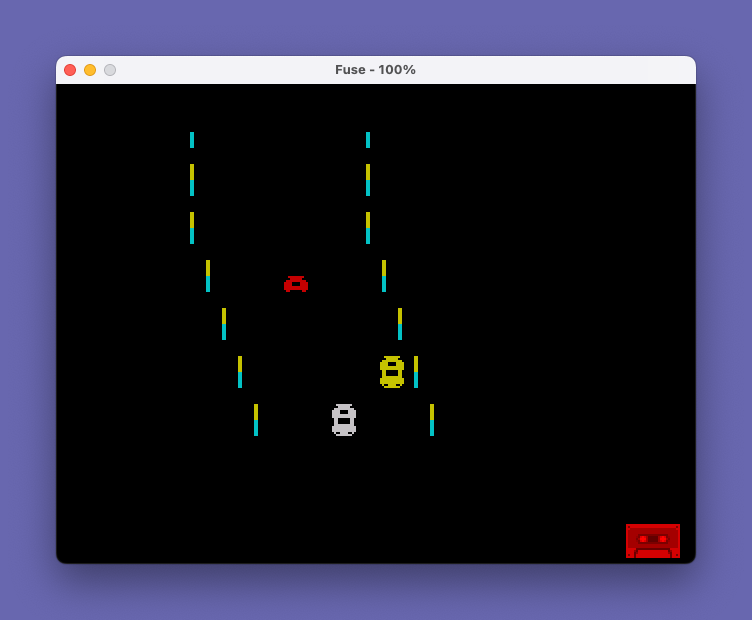
Night Race is a scrolling driving game in which the player steers a car sprite down a winding road, dodging oncoming traffic while the road continuously shifts direction. The player’s car is built from four user-defined graphics characters (UDGs \a through \d), each an 8×8 pixel tile that together form a 2×2 character vehicle; oncoming cars use the same four UDGs displayed in different arrangements. Collision detection is handled by reading screen character data with SCREEN$ at row 11, triggering a crash sequence with descending BEEP tones when the road edge overlaps the player’s column. The road scrolls by printing a 10-character-wide colored strip that oscillates left and right using a simple direction flag, and game speed increases implicitly as the score grows because the BEEP pitch formula references the score variable. A high score table of one entry is maintained in memory across rounds, prompting for the winner’s name via INPUT.
Program Analysis
Program Structure
The program is organized into a main initialization block, a primary game loop, a crash/scoring handler, and two subroutines:
- Lines 1–9: REM header and global variable initialization.
- Lines 9–30: Per-game setup — screen attributes, road center
c, player columnb, score reset, and initial road drawing. - Lines 101–200: Main game loop. Draws road strip, checks for collision via
SCREEN$, optionally draws oncoming car, increments score, draws player car, handles input, scrolls road. - Lines 1000–1050: Crash handler — plays crash sound, displays score, handles high score entry, then restarts.
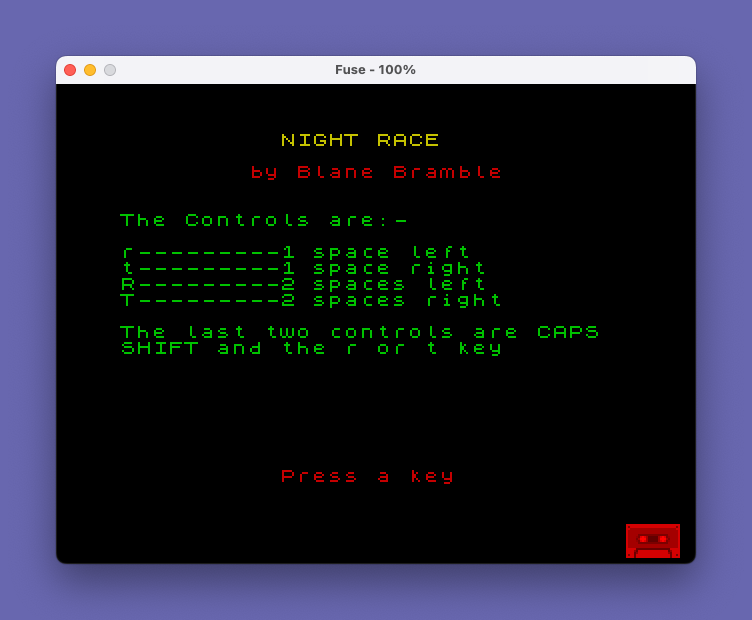
- Lines 8000–8080: Title/instructions screen subroutine.
- Lines 9000–9500: UDG definition subroutine using
POKE USRwithBINliterals. - Lines 9998–9999: Save/verify block.
User-Defined Graphics
Five UDGs are defined in the subroutine at line 9000. UDGs \a through \d form the two-character-wide, two-character-tall car sprite. UDG \e is a simple vertical stripe (all rows BIN 00011000), used as a road-edge marker in the road strip printed at lines 101–102. The four car tiles are carefully mirrored: \a/\b are the top-left/top-right halves and \c/\d are the bottom-left/bottom-right halves, with \b and \d being the bitwise horizontal mirrors of \a and \c respectively.
Collision Detection
Collision is detected by sampling the screen character at row 11, columns b and b+1 using SCREEN$ (lines 103–108). An empty string from SCREEN$ indicates a blank cell — i.e., outside the road strip — so a non-empty result in the road-edge zone triggers a branch to the crash handler at line 1000. The check is performed both before and after the oncoming car is drawn (lines 103–104 and 107–108), providing a slightly asymmetric but functional hit test. Line 1000 uses the pattern of which screen cell was empty to select a scrambled car sprite as a visual crash effect.
Road Scrolling and Direction Logic
The road is represented as a 10-character-wide colored strip (INK 6 row 20, INK 5 row 21) printed starting at column c. The road position oscillates using direction flag y (0 or 1): if y=1 and c<19 then c increments; if y=0 and c>1 then c decrements. The direction reverses at the boundary values (c=1 or c=19) or randomly when RND>0.9 (line 197). This produces a winding road effect on the scrolling display.
Oncoming Traffic
An oncoming car is drawn at line 105 with a probability that increases as the score rises: RND > 50/(score+80). At score 0 the probability is about 37.5%; as score grows, the threshold approaches 1 and cars appear more frequently. The oncoming car is placed at column c+x where x is a random value 1–8 (line 145), keeping it within the road strip. The oncoming car uses the same four UDGs as the player car but in a different arrangement (\a\b top row, \c\d bottom row) with a random ink color m chosen from INK 3–7.
Input Handling
Four movement keys are supported, tested sequentially with INKEY$ at lines 150–158:
| Key | Action |
|---|---|
r | Move left 1 column |
t | Move right 1 column |
R (CAPS+r) | Move left 2 columns |
T (CAPS+t) | Move right 2 columns |
Line 159 checks for h or H and issues PAUSE 9999 as a pause function. Because INKEY$ is polled without waiting, steering is responsive only when the loop executes fast enough.
Score and Sound
The score increments by 5 each main loop iteration (line 115). The BEEP at line 135 uses the score in both duration and pitch calculations: 10/(score+40) makes beeps shorter as the score grows, and (1-100/(score+100))*50-50 raises pitch over time, providing audio feedback of increasing speed. The crash sound (lines 1005–1010) plays 30 short low-pitch beeps followed by a descending tone sweep.
High Score Persistence
The high score (hi) and holder name (c$) persist in variables across game rounds within the same session. On a new high score, the program re-displays the score table (via GO TO 1020), then prompts for the player’s name with INPUT "Your name? ";c$ and updates hi. The initial value of c$ is "__________" (10 underscores), set at line 9.
Notable Techniques and Anomalies
POKE 23692,5at line 110 resets the “scroll?” counter (system variable SCRCT), suppressing the “scroll?” prompt that would otherwise appear after 22 printed lines.- Line 200 reads
GO TO 100but the main loop begins printing at line 101. Line 100 itself does not exist, so execution falls through to line 101 — a deliberate technique to skip any hypothetical line 100 code. - The
PRINT '''at line 120 prints three blank lines, which combined with the road strip PRINTs and the AT-addressed car, drives the screen scrolling that creates the forward-motion illusion. - Variable
cis reused: it is initially set as an ink color constant (LET c=4at line 9) but is reassigned as the road column at line 18 (LET c=4again). The ink usage at line 9 precedes the road-column usage, so this does not cause a conflict. - The
LET x=RND*8+1at line 145 is placed after the player movement and before the loop restarts —xcontrols oncoming car lateral position and is randomized every cycle. - The title screen subroutine (line 8000) is called after the UDG subroutine (line 9000) in line 9, ensuring UDGs are ready before any game graphics are displayed.
Image Gallery
Source Code
    1 REM -----------------------
    2 REM
    3 REM        Night Race
    4 REM
    5 REM       Blane Bramble                       1982
    6 REM
    7 REM -----------------------
    8 LET k=0
    9 INK 4: PAPER 0: BORDER 0: CLS : LET x=10: LET c=4: LET score=0: LET hi=0: LET c$="__________": GO SUB 9000: GO SUB 8000
   10 PRINT : FOR i=1 TO 6: PRINT '"    \e          \e"'"    \e          \e": NEXT i
   18 LET a=9: LET b=10: LET c=4
   20 LET y=1
   30 LET m=RND*4+3
  101 PRINT INK 6;AT 20,c;"\e          \e"
  102 PRINT INK 5;AT 21,c;"\e          \e"
  103 LET b$=SCREEN$ (11,b): IF b$="" THEN GO TO 1000
  104 LET a$=SCREEN$ (11,b+1): IF a$="" THEN GO TO 1000
  105 IF RND>50/(score+80) THEN PRINT INK m;AT 20,c+x;"\a\b";AT 21,c+x;"\c\d"
  107 LET a$=SCREEN$ (11,b+1): IF a$="" THEN GO TO 1000
  108 LET b$=SCREEN$ (11,b): IF b$="" THEN GO TO 1000
  110 POKE 23692,5
  115 LET score=score+5
  120 PRINT '''
  130 PRINT INK 2;AT a,b;"\a\b";AT a+1,b;"\c\d"
  133 LET m=RND*5+3
  135 BEEP 10/(score+40),(1-100/(score+100))*50-50
  140 PRINT AT a,b;"  ";AT a+1,b;"  "
  145 LET x=RND*8+1
  150 IF INKEY$="T" AND b<29 THEN LET b=b+2
  153 IF INKEY$="R" AND b>0 THEN LET b=b-2
  156 IF INKEY$="t" AND b<29 THEN LET b=b+1
  158 IF INKEY$="r" AND b>0 THEN LET b=b-1
  159 IF INKEY$="h" OR INKEY$="H" THEN PAUSE 9999
  160 PRINT AT 20,0;""
  190 IF y=1 AND c<19 THEN LET c=c+1
  195 IF y=0 AND c>1 THEN LET c=c-1
  197 IF c=1 OR c=19 OR RND>.9 THEN LET y=1-y
  200 GO TO 100
 1000 IF a$="" AND b$<>"" THEN PRINT INK 2;AT a,b;"\a\d";AT a+1,b;"\c\b"
 1003 IF b$="" AND a$<>"" THEN PRINT INK 2;AT a,b;"\c\b";AT a+1,b;"\a\d"
 1005 FOR a=1 TO 30: BEEP 0.1,-30: NEXT a
 1010 FOR a=30 TO 0 STEP -1: BEEP 0.01,a: NEXT a
 1020 CLS
 1030 PRINT "Score ";score;';"High score is ";hi;';"By ";c$
 1031 IF hi<score THEN PRINT "You have the new high score"
 1032 IF hi<score THEN INPUT "Your name? ";c$
 1033 IF hi<score THEN LET hi=score: GO TO 1020
 1034 LET score=0
 1037 PAUSE 50
 1040 PRINT AT 21,3;"PRESS ANY KEY TO CONTINUE"
 1043 BEEP 0.01,RND*40: IF INKEY$="" THEN GO TO 1043
 1045 CLS
 1050 GO TO 10
 8000 PRINT AT 0,10; INK 6;"NIGHT RACE"
 8010 PRINT AT 2,8; INK 2;"by Blane Bramble"
 8020 PRINT ''"The Controls are:-"
 8030 PRINT '"r---------1 space left"
 8040 PRINT "t---------1 space right"
 8050 PRINT "R---------2 spaces left"
 8060 PRINT "T---------2 spaces right"
 8070 PRINT '"The last two controls are CAPS  SHIFT and the r or t key"
 8072 PRINT FLASH 1; INK 2;AT 21,10;"Press a key"
 8074 PAUSE 0
 8076 CLS
 8080 RETURN
 9000 POKE USR "a"+0,BIN 00001111
 9010 POKE USR "a"+1,BIN 00000111
 9020 POKE USR "a"+2,BIN 00011111
 9030 POKE USR "a"+3,BIN 00111100
 9040 POKE USR "a"+4,BIN 00111100
 9050 POKE USR "a"+5,BIN 00111111
 9060 POKE USR "a"+6,BIN 00111111
 9070 POKE USR "a"+7,BIN 00011000
 9100 POKE USR "c"+0,BIN 00011000
 9110 POKE USR "c"+1,BIN 00011000
 9120 POKE USR "c"+2,BIN 00011111
 9130 POKE USR "c"+3,BIN 00111111
 9140 POKE USR "c"+4,BIN 00111111
 9150 POKE USR "c"+5,BIN 00111111
 9160 POKE USR "c"+6,BIN 00010011
 9170 POKE USR "c"+7,BIN 00001111
 9200 POKE USR "b"+0,BIN 11110000
 9210 POKE USR "b"+1,BIN 11100000
 9220 POKE USR "b"+2,BIN 11111000
 9230 POKE USR "b"+3,BIN 00111100
 9240 POKE USR "b"+4,BIN 00111100
 9250 POKE USR "b"+5,BIN 11111100
 9260 POKE USR "b"+6,BIN 11111100
 9270 POKE USR "b"+7,BIN 00011000
 9300 POKE USR "d"+0,BIN 00011000
 9310 POKE USR "d"+1,BIN 00011000
 9320 POKE USR "d"+2,BIN 11111000
 9330 POKE USR "d"+3,BIN 11111100
 9340 POKE USR "d"+4,BIN 11111100
 9350 POKE USR "d"+5,BIN 11111100
 9360 POKE USR "d"+6,BIN 11001000
 9370 POKE USR "d"+7,BIN 11110000
 9400 POKE USR "e"+0,BIN 00011000
 9410 POKE USR "e"+1,BIN 00011000
 9420 POKE USR "e"+2,BIN 00011000
 9430 POKE USR "e"+3,BIN 00011000
 9440 POKE USR "e"+4,BIN 00011000
 9450 POKE USR "e"+5,BIN 00011000
 9460 POKE USR "e"+6,BIN 00011000
 9470 POKE USR "e"+7,BIN 00011000
 9500 RETURN
 9998 SAVE "Night Race" LINE 1: BEEP .4,15
 9999 VERIFY ""
Note: Type-in program listings on this website use ZMAKEBAS notation for graphics characters.