
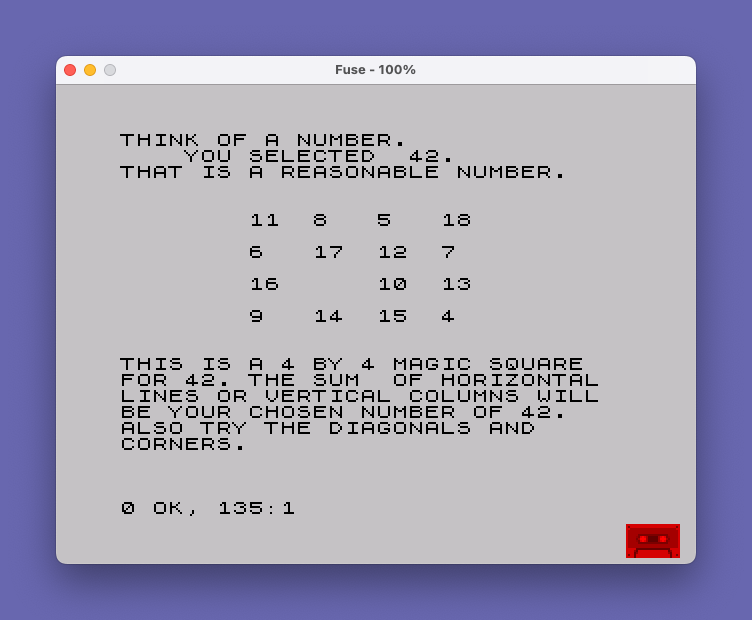
This program generates a 4×4 magic square whose rows, columns, and diagonals all sum to a user-supplied number. The user enters any positive integer, and the program first validates the input with range-based feedback, recommending values between 31 and 54 as most suitable. The magic square values are computed from the chosen number using the formula B = INT((A-30)/4), with the 16 cell values distributed across the grid via PRINT AT statements. Four conditional branches (lines 62–95) handle the fractional remainders of (A-30)/4 — specifically .0, .25, .5, and .75 — to correctly adjust a diagonal column of values when the input is not evenly divisible by 4. The grid is printed in a fixed-position layout using PRINT AT with row/column coordinates, displaying the 16 numbers in a 4×4 arrangement.
Program Analysis
Program Structure
The program is divided into three logical phases:
- Input and validation (lines 10–50): prompts the user for a number, echoes it, and prints a qualitative message based on five range bands.
- Magic square computation and display (lines 55–95): computes cell values from the input and places them on screen with
PRINT AT. - Explanation (lines 100–135): prints blank lines then a description of the magic square’s properties.
Input Validation
Five mutually exclusive (or near-exclusive) range checks produce advisory messages:
| Lines | Condition | Message |
|---|---|---|
| 30 | A < 15 | Too small, but will be used |
| 35 | 15 ≤ A ≤ 30 | Accepted, but larger preferred |
| 40 | 31 ≤ A ≤ 54 | Reasonable |
| 45 | 55 ≤ A ≤ 99 | Accepted, but smaller preferred |
| 50 | A ≥ 100 | Too large, but will be used |
Note that A = 30 falls into the “15–30” band (line 35), and A = 31 falls into the “31–54” band (line 40), so the boundary is inclusive on the lower side. The program does not guard against non-integer or negative inputs.
Magic Square Algorithm
The base value B is computed at line 55 as B = INT((A-30)/4). The 16 cells of the 4×4 grid are then assigned values relative to B, ranging from B to B+18 depending on the remainder of (A-30)/4. The fractional part of that quotient determines which of four “variants” of the square is used:
- Remainder 0 (line 95): diagonal column uses B+15, B+14, B+13, B+12
- Remainder 0.25 (line 65): diagonal column uses B+16, B+15, B+14, B+13
- Remainder 0.5 (line 75): diagonal column uses B+17, B+16, B+15, B+14
- Remainder 0.75 (line 85): diagonal column uses B+18, B+17, B+16, B+15
The remaining 12 cells are printed unconditionally at lines 60, 70, 80, and 90, with fixed offsets from B. Only the fourth column (screen column 20) changes between variants.
Screen Layout
The grid occupies rows 5, 7, 9, and 11 of the display, at columns 8, 12, 16, and 20 — effectively a 4×4 table with columns spaced 4 characters apart. Values are printed with bare numbers rather than formatted strings, so multi-digit numbers may displace subsequent output; this is a minor cosmetic issue for large values of A.
Notable Techniques and Anomalies
- Lines 62 and 63 are special-case overrides for
A=31andA=32. These values produce a remainder of 0.25 and 0.5 respectively via the general formula, but the printed values differ from what lines 65 and 75 would produce, suggesting these lines were added as corrections or alternate arrangements for the smallest “reasonable” inputs. - Line 63 begins with a bare
PRINT 11,16;14,...without anATkeyword for the first coordinate pair; this is likely a syntax artifact or typo — on a ZX81/TS1000,PRINT 11,16;...would print the number 11, then a comma (tab), then 16, then the rest, rather than positioning the cursor. This is a genuine bug: theATkeyword is missing from the first argument of line 63. - The fractional comparisons in lines 65, 75, 85, and 95 rely on exact floating-point equality (e.g.,
(A-30)/4 = B+.25). For integer inputs this is reliable, but for non-integerAthe comparisons could fail silently, leaving parts of the fourth column unprinted. - The program uses chained
PRINT ATarguments (multipleAT row,col;valuein a singlePRINTstatement), a common ZX81 idiom for efficient screen positioning without separate statements.
Image Gallery
Source Code
    5 REM "NUMBER"
   10 PRINT "THINK OF A NUMBER."
   20 INPUT A
   25 PRINT "    YOU SELECTED  ";A;"."
   30 IF A<15 THEN PRINT "YOUR NUMBER WILL BE USED BUT IT IS TO SMALL."
   35 IF A<31 AND A>14 THEN PRINT "WE WILL ACCEPT YOUR NUMBER BUT WOULD PREFER A LARGER NUMBER."
   40 IF A>30 AND A<55 THEN PRINT "THAT IS A REASONABLE NUMBER."
   45 IF A>54 AND A<100 THEN PRINT "WE WILL ACCEPT YOUR NUMBER BUT WOULD PREFER A SMALLER NUMBER."
   50 IF A>99 THEN PRINT "YOUR NUMBER IS TOO LARGE BUT IT WILL BE USED ."
   55 LET B=INT ((A-30)/4)
   60 PRINT AT 5,8;B+8,AT 5,12;B+5, AT 5,16;B+2
   62 IF A=31 THEN PRINT AT 5,20;16,AT 7,12;15,AT 9,8;14,AT 11,16;13
   63 IF A=32 THEN PRINT 11,16;14,AT 9,8;15,AT 5,20;17,AT 7,12;16
   65 IF (A-30)/4=B+.25 THEN PRINT AT 5,20;B+16,AT 7,12;B+15,AT 9,8;B+14,AT 11,16;B+13
   70 PRINT AT 7,8;B+3,AT   7,16;B+9,AT  7,20;B+4
   75 IF (A-30)/4=B+.5 THEN PRINT AT 5,20;B+17,AT 7,12;B+16,AT 9,8;B+15,AT 11,16;B+14
   80 PRINT AT 9,12;B,AT 9,16;B+7,AT 9,20;B+10
   85 IF (A-30)/4=B+.75 THEN PRINT AT 5,20;B+18,AT 7,12;B+17,AT 9,8;B+16,AT 11,16;B+15
   90 PRINT AT 11,8;B+6,AT 11,12;B+11,AT 11,20;B+1
   95 IF (A-30)/4=B THEN PRINT AT 5,20;B+15,AT 7,12;B+14,AT 9,8;B+13,AT 11,16;B+12
  100 PRINT
  105 PRINT
  110 PRINT "THIS IS A 4 BY 4 MAGIC SQUARE"
  115 PRINT "FOR ";A;". THE SUM  OF HORIZONTAL"
  120 PRINT "LINES OR VERTICAL COLUMNS WILL"
  125 PRINT "BE YOUR CHOSEN NUMBER OF ";A;"."
  130 PRINT "ALSO TRY THE DIAGONALS AND"
  135 PRINT "CORNERS."
Note: Type-in program listings on this website use ZMAKEBAS notation for graphics characters.