
Keeps three small text files in one string array: a phone book, a report file and a memo file. A twelve-item menu opens, views, searches, extends and prints each file, and option 11 saves the program with all its data to tape so the files reload with it. Records are fixed 31-character lines; the phone book holds 150 entries, the report file 150 and the memo file 20. Typing END closes a file, and the marker stays in the array so later additions can find where the file stops.
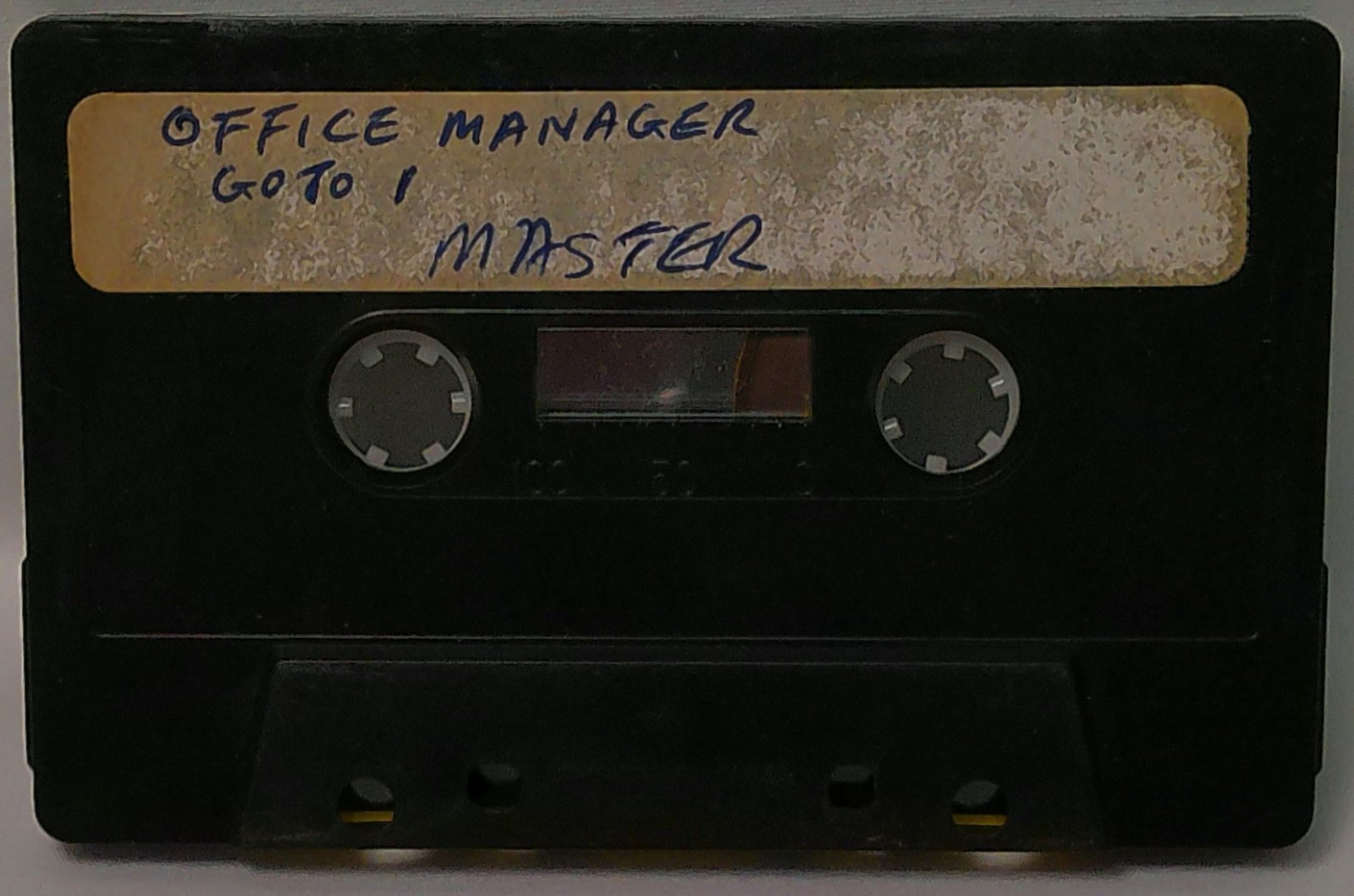
A REM at line 3000 reads “OFFICE MANAGER WAS WRITTEN BY JOSEPH GLASS. ALL RIGHTS RESERVED. (C)1983”. The program was published as a type-in in Syntax, April 1983. The handwritten cassette label reads “OFFICE MANAGER / GOTO 1 / MASTER”. The tape holds two recordings: OMA, a short save that breaks off partway through the print routine, and OMB, the complete program with its data array, about 13K.
Program Analysis
Program Structure
Line 1 is a REM warning that the array F$ (321 by 31) has to be created by direct command, because there is no DIM in the program; running it with RUN or CLEAR would wipe the data, which is why the label says GOTO 1. Lines 10–110 draw the menu and read a choice. Lines 150–191 set the starting slot L through tiny subroutines at 2100 (slot 1, phone), 2200 (slot 151, report) and 2300 (slot 301, memo), then dispatch. The shared loop at 200–235 either inputs new lines (options 1, 4, 7) or just prints them (options 5, 8), stopping at the file’s upper bound or an END line.
- 2400–2445: print slots
StoFwithLPRINT. - 2500–2520:
SAVE "FILES", thenGOTO 1so the reloaded program restarts without clearing variables. - 2700–2735: search the phone book for lines that begin with the entered text and show the slot number.
- 2800–2865: alter/add: skip forward to the
ENDmarker, then accept new lines from there. - 2900–2915: list all 320 slots.
Notable Techniques
- One 321×31 array is partitioned by slot ranges (1–150, 151–300, 301–320) instead of using three arrays.
- The search uses a slice of the stored line,
F$(L, TO D), against the input’s lengthD, giving a prefix match. - Saving from inside the program keeps the data with the code; on reload execution continues at line 2520, which jumps to line 1.
- Program title on line 20 uses inverse letters inside a bar of solid blocks.
FASTmode throughout.
Potential Issues
- The print loop at 2435–2443 tests
L=Fafter incrementing, so the finish slot itself is never printed. - Option 12 lists all slots and then runs off the end of the program at line 3000 instead of returning to the menu.
- The alter routine at 2805 scans for
ENDwith no upper limit; if a file was filled to capacity without anENDline, it runs into the next file’s slots or past the array. - Menu line 75 in
OMBreads “VIEW MEMO FINE”. - In the incomplete
OMArecording, option 5 never sets a starting slot and line 110 loops back to reprint the prompt;OMBcorrects both.
Image Gallery
Source Code
   1 REM OFFICE MANAGER USES AN ARRAY(F$)321 BY 31. THIS MUST BE EN[T]ERED BY DIRECT COMMAND.
   5 FAST
  10 CLS
  15 PRINT
  20 PRINT "█████████[O][F][F][I][C][E]█[M][A][N][A][G][E][R]█████████"
  25 PRINT
  30 PRINT TAB 5;"1 OPEN PHONE BOOK"
  35 PRINT TAB 5;"2 SEARCH PHONE BOOK"
  40 PRINT TAB 5;"3 ALTER PHONE BOOK"
  45 PRINT
  50 PRINT TAB 5;"4 OPEN REPORT FILE"
  55 PRINT TAB 5;"5 VIEW REPORT FILE"
  60 PRINT TAB 5;"6 ADD TO REPORT FILE"
  65 PRINT
  70 PRINT TAB 5;"7 OPEN MEMO FILE"
  75 PRINT TAB 5;"8 VIEW MEMO FINE"
  80 PRINT TAB 5;"9 ALTER MEMO FILE"
  85 PRINT
  90 PRINT TAB 4;"10 PRINT FILE"
  95 PRINT TAB 4;"11 SAVE ALL FILES";TAB 4;"12 VIEW ALL FILES"
 100 PRINT AT 21,0;"ENTER CHOICE"
 105 INPUT C
 110 IF C<1 OR C>12 THEN GOTO 105
 150 GOSUB 2000
 160 IF C=1 OR C=3 THEN GOSUB 2100
 165 IF C=4 OR C=5 OR C=6 THEN GOSUB 2200
 170 IF C=7 OR C=8 OR C=9 THEN GOSUB 2300
 175 IF C=10 THEN GOTO 2400
 180 IF C=11 THEN GOTO 2500
 185 IF C=2 THEN GOTO 2700
 190 IF C=3 OR C=6 OR C=9 THEN GOTO 2800
 191 IF C=12 THEN GOTO 2900
 195 PRINT "TYPE""END"" TO EXIT"
 200 IF C=1 OR C=4 OR C=7 THEN INPUT F$(L)
 205 IF F$(L,1 TO 3)="END" THEN GOTO 2600
 210 PRINT F$(L)
 215 LET L=L+1
 220 IF C=1 AND L>150 OR C=3 AND L>150 THEN GOTO 2600
 225 IF C=4 AND L>300 OR C=5 AND L>300 OR C=6 AND L>300 THEN GOTO 2600
 230 IF C=7 AND L>320 OR C=8 AND L>320 OR C=9 AND L>320 THEN GOTO 2600
 235 GOTO 200
 250 STOP
 300 REM SUBROUTINES FOLLOW
2000 CLS
2005 PRINT
2010 RETURN
2100 LET L=1
2105 RETURN
2200 LET L=151
2205 RETURN
2300 LET L=301
2305 RETURN
2400 GOSUB 2000
2401 PRINT "PARAMETERS: "
2402 PRINT "▀▀▀▀▀▀▀▀▀▀▀"
2403 PRINT "PHONE=1 TO 150";TAB 0;"REPORT=151 TO 300";TAB 0;"MEMO=301 TO 320"
2404 PRINT
2405 PRINT "STARTING LINE?"
2410 INPUT S
2415 PRINT "FINISH LINE?"
2420 INPUT F
2425 PRINT AT 10,0;"PRINTING FILE SLOTS: ";TAB 0;S;" TO ";F
2430 LET L=S
2435 LPRINT F$(L,1 TO 31)
2440 LET L=L+1
2443 IF L=F THEN GOTO 2600
2445 GOTO 2435
2500 GOSUB 2000
2505 PRINT "ALL FILES WILL BE SAVED IN THE  STANDARD SINCLAIR FORMAT."
2510 PRINT
2515 PRINT "SIMPLY PRESS ENTER..."
2516 INPUT Z$
2518 SAVE "FILE[S]"
2520 GOTO 1
2600 PRINT AT 21,0;"KEY ENTER TO CONTINUE"
2605 INPUT Z$
2610 GOTO 10
2700 GOSUB 2000
2705 PRINT "ENTER SEARCH DATA"
2709 PRINT "▀▀▀▀▀▀▀▀▀▀▀▀▀▀▀▀▀"
2710 INPUT Z$
2711 LET D=LEN Z$
2715 LET L=1
2720 IF F$(L, TO D)=Z$ THEN PRINT "[F][I][L][E]█[S][L][O][T]██";L;TAB 0;F$(L)
2725 LET L=L+1
2730 IF L>150 THEN GOTO 2600
2735 GOTO 2720
2800 GOSUB 2000
2805 IF F$(L,1 TO 3)="END" THEN GOTO 2820
2810 LET L=L+1
2815 GOTO 2805
2820 PRINT "FILE ENDS AT SLOT: ";L
2825 PRINT "ENTER DATA--END TO EXIT"
2830 INPUT F$(L)
2835 IF F$(L,1 TO 3)="END" THEN GOTO 2600
2840 PRINT F$(L)
2845 LET L=L+1
2850 IF C=3 AND L>150 THEN GOTO 10
2855 IF C=6 AND L>300 THEN GOTO 10
2860 IF C=9 AND L>320 THEN GOTO 10
2865 GOTO 2830
2900 GOSUB 2000
2905 FOR L=1 TO 320
2910 PRINT F$(L)
2915 NEXT L
3000 REM OFFICE MANAGER WAS WRITTEN BY JOSEPH GLASS. ALL RIGHTS RESERVED. (C)1983
Note: Type-in program listings on this website use ZMAKEBAS notation for graphics characters.