
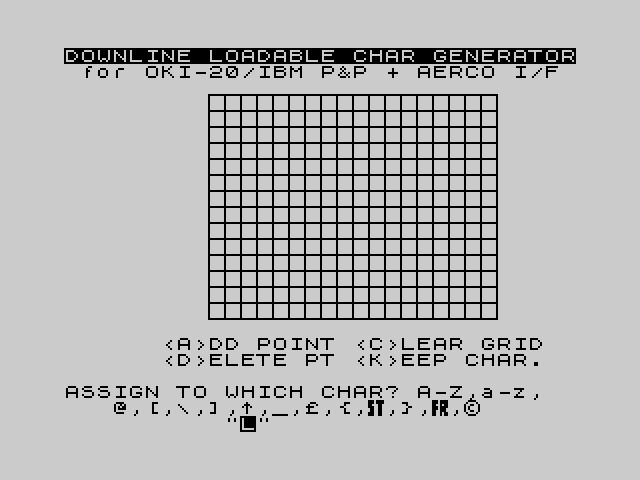
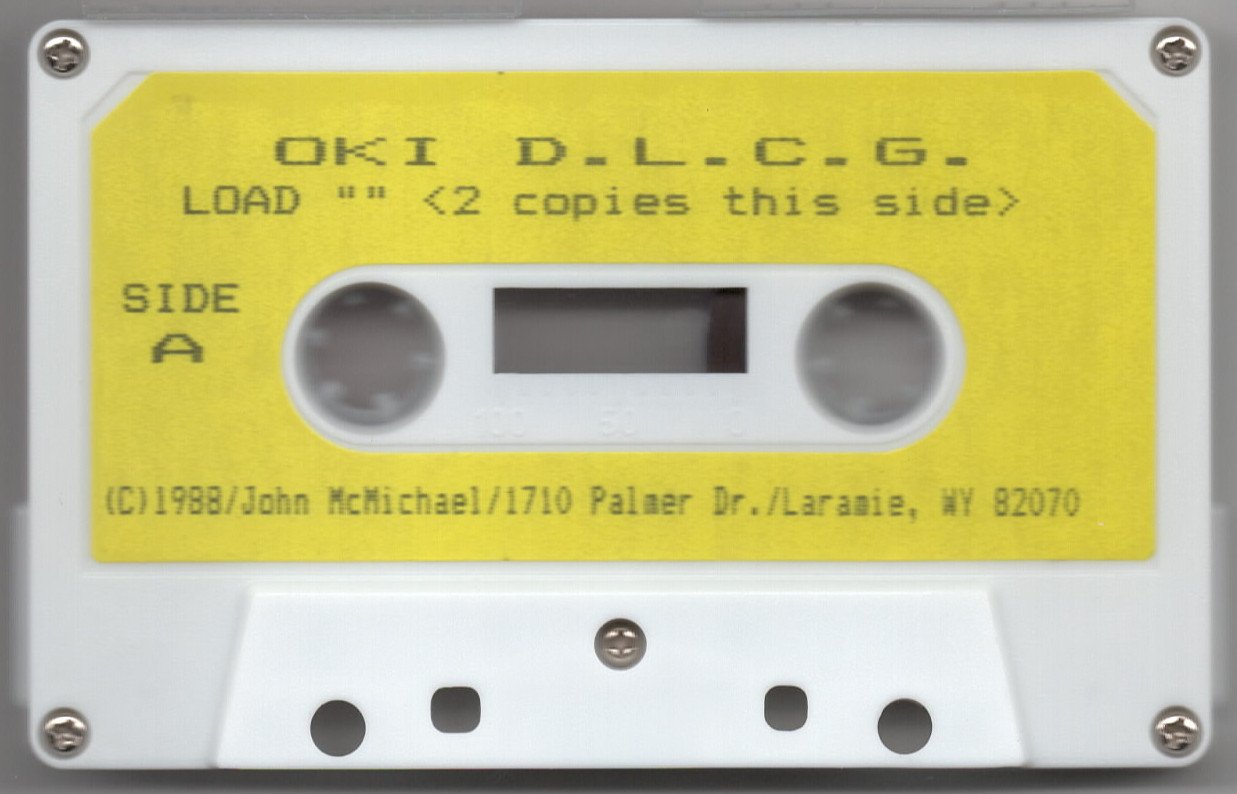
This program is a Downline Loadable Character Generator (DLCG) for the Okimate 20 color printer, allowing users to design custom bitmap characters and transfer them to the printer via an AERCO interface. Characters are assigned to ASCII codes in the range 64–127 (A–Z, a–z, and symbols) and stored in a binary block starting at address 62868. The editor uses a STICK-controlled crosshair cursor on an 18×14 pixel grid, with keyboard commands for adding points (A), deleting points (D), clearing the grid (C), and keeping the finished character (K). Machine code routines loaded from tape handle low-level data encoding and transfer operations, with entry points at addresses 61626, 61988, and 62307. The quit routine at line 930 prints the exact SAVE command needed to preserve the custom character block to tape, along with OUT port 127 sequences for activating and deactivating custom character mode on the printer.
Program Analysis
Program Structure
The program is divided into several logical phases managed by GO TO flow control rather than a structured subroutine model. The main phases are:
- Initialization (lines 10–30): Clears memory, loads a machine code block from tape, sets up system variables and POKEs key addresses.
- File load option (lines 40–80): Optionally loads a previously saved custom character CODE block by name.
- Post-load menu (lines 90–150): Offers display, quit, or continue options after loading a file.
- Character display (line 160): Calls machine code at 61988 to render the current character set; offers copy to printer or quit.
- Character editor (lines 220–830): The main interactive drawing loop — assigns a character code, sets ascender/descender, and enters the STICK-driven pixel editor.
- Utility subroutines (lines 840–920): Grid drawing (840–870), beep/prompt (880–900), machine code DATA loader (910–920).
- Quit and instructions (lines 930–980): Prints SAVE command, OUT sequences for printer control, and restart instructions before STOPping.
Machine Code Usage
Three machine code entry points are used, all loaded from tape as a CODE block in line 10, with a small 32-byte routine POKEd from DATA at lines 910–920 into addresses 65368–65399:
| Address | Called from | Purpose |
|---|---|---|
| 61626 | Line 520 | Encodes the completed character data into the storage block (36 bytes per character) |
| 61988 | Line 160 | Renders/displays the current custom character set on screen |
| 62307 | Line 300 | Decodes an existing character from the storage block back into the grid for editing |
The machine code block is loaded with LOAD ""CODE at line 10. Address pointers are maintained in memory at 62762/62763 (low/high byte of a 16-bit pointer) and 62758/62760, which are updated before each machine code call to direct the routine to the correct storage offset.
Character Storage Format
Each custom character occupies 38 bytes in the storage block starting at address 62868. The layout per entry is:
- Byte 0: Ascender/Descender flag (65 = ‘A’, 68 = ‘D’)
- Byte 1: ASCII code of the assigned character (64–127)
- Bytes 2–37: 36 bytes of encoded pixel data (handled by machine code)
- A sentinel value of 255 in byte 0 marks the end of the character list
The variable stmx tracks the end-of-data address, reconstructed as 256*PEEK 62763+PEEK 62762 at line 160. The SAVE command printed at line 930 uses stmx-62779 to calculate the exact byte length needed.
The Pixel Editor Loop
The editor operates on the screen attribute grid, using POKE to directly write attribute values to the display file. The grid spans columns 9–26 and rows 3–16, mapping to a 18×14 character cell. Screen address calculation uses the standard formula q = x + 22528 + (32*y). Set pixels use attribute value 10 (INK 2, PAPER 1 — red on blue) and cleared pixels use 56 (white on black). The crosshair cursor is drawn using PLOT INVERSE 1 and DRAW INVERSE 1, which XOR the cursor onto the display without destroying pixel data underneath.
The preview dot in the side panel is maintained at PLOT xo+31, 155-yo (line 760) and PLOT INVERSE 1; xo+31, 155-yo (line 820), giving a single-pixel preview of each edit in a small 18×14 preview area.
STICK-Based Navigation
Joystick input is read with STICK (1,1) at line 450. The four cardinal directions are handled with standard bitmask values: 4 = left, 2 = down, 1 = up, 8 = right. Keyboard commands are read simultaneously via INKEY$ at line 440 and stored in kk as a character code, allowing both input methods to coexist in the same polling loop without blocking.
Key BASIC Idioms
- Low/high byte address splitting: Used extensively, e.g.,
POKE 62762,(s-256*INT(s/256)): POKE 62763,INT(s/256)to store a 16-bit pointer across two bytes. - Sentinel-terminated list: The character store uses a 255 byte as an end-of-list marker, walked by the loop at lines 270–290.
- POKE 23658,8 / POKE 23658,0: Toggles the caps lock / input mode flag to control INPUT prompt behavior.
- INPUT #0;AT …: Used throughout for styled prompts in the lower screen area.
- PAUSE 0 followed by INKEY$ check: Used at line 880/890 as an efficient keypress wait.
- VAL “number” in GO TO/GO SUB: Not used; all GO TO targets are literal line numbers.
Grid Drawing Subroutine
The subroutine at lines 850–860 draws the character editor grid using nested FOR loops with PLOT/DRAW. Horizontal lines are drawn at 8-pixel intervals from y=40 to y=152 (DRAW 144,0), and vertical lines from x=72 to x=216 (DRAW 0,112), creating an 18-column by 14-row pixel grid aligned to the 8×8 character cell boundaries.
Printer Control Information
Line 930–970 print complete operating instructions including the dynamically calculated SAVE command. The OUT sequences printed in lines 940–950 use port 127 to send Okimate 20 escape codes directly: OUT 127,27: OUT 127,37: OUT 127,90 enters custom character mode, while OUT 127,27: OUT 127,73: OUT 127,2 or ...73,1 exits to NLQ or draft mode respectively. These codes are printed in INK 2 (red) to visually distinguish them as control values.
Anomalies and Notes
- Lines 120–140 read INKEY$ three more times after the debounce loop at 100–110, but each call is a fresh read with no inter-call delay; rapid key release between lines 120 and 130 could cause the ‘D’ or ‘Q’ check to miss the key. This is a minor timing sensitivity rather than a logic error.
- Line 730 checks
PEEK(q)=10before setting a pixel, acting as a no-redraw guard for already-set cells. Similarly line 790 checks for 56 before clearing. This prevents unnecessary screen writes but does not affect the preview dot logic, which always plots regardless. - The variable
pis set to 0 at line 750 and 1 at line 810 but is never read elsewhere in the listing — it appears to be an unused state variable, possibly a remnant of a prior version. - Line 300 decodes an existing character for re-editing, but the grid clear at lines 530 only fills with attribute 56; it does not reset the pixel graphics layer, relying on the attribute color alone to represent the cleared state.
Image Gallery
Source Code
   10 CLEAR 61625: PRINT AT 10,6; FLASH 1;"-LEAVE RECORDER ON-": LOAD ""CODE : CLS : GO SUB 880
   20 IF INKEY$<>"" THEN GO TO 20
   30 BORDER 7: PAPER 7: CLS : INK 0: LET stor=62868: POKE stor,255: POKE 62762,148: POKE 62763,245: POKE 23658,8: RESTORE : GO SUB 910
   40 INPUT "LOAD A CHAR. FILE? (Y/N) ";a$
   50 IF a$="N" THEN GO TO 220
   60 IF a$<>"Y" THEN GO TO 40
   70 POKE 23658,0: INPUT #0;AT 0,1;"WHAT NAME DO YOU WISH TO LOAD?          ";n$: IF LEN n$>10 THEN GO TO 70
   80 PRINT AT 10,8;"LOAD CUSTOM CHAR.";AT 11,8;"FILE: """;n$;""""; FLASH 1;AT 13,14;"-NOW-": LOAD n$CODE : CLS : PRINT AT 8,3;"FILE """;n$;""" IS LOADED.": GO SUB 880: POKE 23658,8: GO TO 160
   90 POKE 23658,8: CLS : PRINT #0;AT 0,5;"<D>ISPLAY FILE  <Q>UIT     PRESS ANY OTHER KEY TO CONTINUE"
  100 IF INKEY$<>"" THEN GO TO 100
  110 IF INKEY$="" THEN GO TO 110
  120 IF INKEY$="D" THEN GO TO 160
  130 IF INKEY$="Q" THEN GO TO 930
  140 IF INKEY$<>"" THEN GO TO 140
  150 GO TO 220
  160 CLS : RANDOMIZE USR 61988: LET stmx=256*PEEK 62763+PEEK 62762: PRINT #0;AT 0,5;"<C>OPY TO 2040  <Q>UIT     PRESS ANY OTHER KEY TO CONTINUE"
  170 IF INKEY$<>"" THEN GO TO 170
  180 IF INKEY$="" THEN GO TO 180
  190 IF INKEY$="C" THEN COPY : GO TO 170
  200 IF INKEY$="Q" THEN GO TO 930
  210 IF INKEY$<>"" THEN GO TO 210
  220 CLS : GO SUB 840
  230 IF INKEY$<>"" THEN GO TO 230
  240 POKE 23658,0: INPUT #0;AT 0,0;"ASSIGN TO WHICH CHAR? A-Z,a-z,     @,[,\\,],^,_,`,{,\a,},\b,\*                ";a$: LET ch=CODE a$: IF LEN a$<>1 OR ch<64 OR ch>127 THEN GO TO 240
  250 POKE 23658,8: PRINT AT 8,0;"ASSIGN TO";AT 9,0;"""";CHR$ ch;""""
  260 LET stor=62868
  270 IF PEEK stor=255 THEN LET stmx=stor+38: POKE stmx,255: GO TO 360
  280 IF PEEK (stor+1)=ch THEN GO TO 300
  290 LET stor=stor+38: GO TO 270
  300 POKE 62758,40: POKE 62760,146: LET s=stor+2: POKE 62762,(s-256*INT (s/256)): POKE 62763,INT (s/256): RANDOMIZE USR 62307
  310 LET at=22601
  320 FOR y=152 TO 139 STEP -1: LET at=at+32
  330 FOR x=0 TO 17
  340 IF POINT (x+40,y) THEN POKE at+x,8
  350 NEXT x: NEXT y
  360 INPUT #0;AT 0,0;" ASCENDER/DESCENDER CHAR? (A/D) ";a$
  370 IF a$="A" THEN LET ad=65: PRINT AT 14,0;"(ASCEND) ";AT 16,0;"PRINTLINE": PLOT 0,39: GO TO 400
  380 IF a$<>"D" THEN GO TO 360
  390 LET ad=68: PRINT AT 14,0;"(DESCEND)";AT 12,0;"PRINTLINE": PLOT 0,71
  400 DRAW 224,0
  410 POKE stor,ad: POKE (stor+1),ch: LET stor=stor+2: LET x=9: LET y=3
  420 LET kk=0: GO TO 640
  430 LET xo=x: LET yo=y
  440 LET kk=CODE INKEY$
  450 LET k= STICK (1,1)
  460 IF k=4 THEN LET x=x-1: GO TO 550
  470 IF k=2 THEN LET y=y+1: GO TO 580
  480 IF k=1 THEN LET y=y-1: GO TO 570
  490 IF k=8 THEN LET x=x+1: GO TO 560
  500 IF kk=65 THEN GO TO 720
  510 IF kk=68 THEN GO TO 780
  520 IF kk=75 THEN POKE 62762,(stor-256*INT (stor/256)): POKE 62763,INT (stor/256): RANDOMIZE USR 61626: LET stor=stor+36: GO TO 90
  530 IF kk=67 THEN PRINT AT 2,5;"   ";AT 3,5;"   ";AT 4,5;"   ": LET at=22601: FOR l=13 TO 0 STEP -1: LET at=at+32: FOR c=0 TO 17: POKE at+c,56: NEXT c: NEXT l: GO TO 430
  540 GO TO 600
  550 IF x<9 THEN LET x=9: GO TO 590
  560 IF x>26 THEN LET x=26: GO TO 590
  570 IF y<3 THEN LET y=3: GO TO 590
  580 IF y>16 THEN LET y=16
  590 LET xc=xo*8: LET yc=(21-yo)*8
  600 PLOT INVERSE 1;xc+2,yc+4
  610 DRAW INVERSE 1;4,0
  620 PLOT INVERSE 1;xc+4,yc+2
  630 DRAW INVERSE 1;0,4
  640 LET xc=x*8: LET yc=(21-y)*8
  650 PLOT xc+2,yc+4
  660 DRAW 4,0
  670 PLOT xc+4,yc+2
  680 DRAW 0,4
  690 IF kk=65 THEN LET xo=x: LET yo=y: GO TO 720
  700 IF kk=68 THEN LET xo=x: LET yo=y: GO TO 780
  710 GO TO 430
  720 LET q=x+22528+(32*y)
  730 IF PEEK (q)=10 THEN GO TO 430
  740 POKE q,10
  750 LET p=0
  760 PLOT xo+31,155-yo
  770 GO TO 430
  780 LET q=x+22528+(32*y)
  790 IF PEEK (q)=56 THEN GO TO 430
  800 POKE q,56
  810 LET p=1
  820 PLOT INVERSE 1;xo+31,155-yo
  830 GO TO 430
  840 PRINT INVERSE 1;AT 0,0;"DOWNLINE LOADABLE CHAR GENERATOR"; INVERSE 0;" for OKI-20/IBM P&P + AERCO I/F ";AT 18,6;"<A>DD POINT <C>LEAR GRID";AT 19,6;"<D>ELETE PT <K>EEP CHAR."
  850 FOR g=40 TO 152 STEP 8: PLOT 72,g: DRAW 144,0: NEXT g
  860 FOR g=72 TO 216 STEP 8: PLOT g,40: DRAW 0,112: NEXT g
  870 RETURN
  880 BEEP .03,20: BEEP .03,20: BEEP .03,20: PRINT AT 10,6; INK 2; FLASH 1;"-TURN RECORDER OFF-";AT 12,3;"PRESS ANY KEY TO CONTINUE:": PAUSE 0
  890 IF INKEY$<>"" THEN GO TO 890
  900 RETURN
  910 FOR n=65368 TO 65399: READ d: POKE n,d: NEXT n: RETURN
  920 DATA 239,239,198,230,102,102,230,230,239,239,203,239,238,206,203,203,71,164,231,161,167,0,255,0,199,164,166,164,199,0,255,0
  930 CLS : PRINT AT 0,0;"TO SAVE CUSTOM CHAR CODE BLOCK:     ";"SAVE ""name"" CODE 62780,";stmx-62779;'';"TO TRANSFER CUSTOM CHARS TO OKI:    TURN OKI ON & RAND USR 62780";''
  940 PRINT "BEFORE PRINTING CUSTOM CHARS:      OUT127,"; INK 2;"27"; INK 0;":OUT127,"; INK 2;"37"; INK 0;":OUT127,"; INK 2;"90";''
  950 PRINT "EXIT CUSTOM CHARS TO NLQ CHARS:    OUT127,"; INK 2;"27"; INK 0;":OUT127,"; INK 2;"73"; INK 0;":OUT 127,"; INK 2;"2"; INK 0;"EXIT CUST. CHARS TO DRAFT CHARS:   OUT127,"; INK 2;"27"; INK 0;":OUT127,"; INK 2;"73"; INK 0;":OUT127,"; INK 2;"1";''
  960 PRINT "TO RE-ENTER THE DLCG PROGRAM:       GO TO 90 (WARM START)           RUN 20   (COLD START)";''
  970 PRINT "NOTE: The red nos. are control   codes & may be used w/word pro- cessors. Transfer cust. chars & then LOAD your word processor."
  980 POKE 23658,0: STOP
Note: Type-in program listings on this website use ZMAKEBAS notation for graphics characters.