
This program demonstrates the OVER 1 print attribute by overlaying two user-supplied characters on the same screen position using a CHR$ 8 (backspace/cursor-left) control code to reposition the cursor. The user enters any two characters; the first is printed, the cursor backs up one space, OVER 1 is engaged, and the second character is XOR-composited on top of the first. The result and the individual characters are then displayed as a labeled equation. Input validation checks both for a space (stop condition) and for exactly two characters before proceeding.
From page 70 of Roger Valentine’s The Timex Sinclair 2068.
Program Analysis
Program Structure
The program is a short interactive loop with a title display, input, validation, and a single output line before cycling back. There is no initialization beyond the title print at line 10.
| Line | Purpose |
|---|---|
10 | Print title banner (uses literal embedded quotes) |
20 | Prompt user for a two-character string |
30 | Stop if input is a space (CHR$ 32) |
40 | Validate input length; re-prompt if not exactly 2 |
50 | Demonstrate OVER 1 overlay and print labeled result |
60 | Loop back to prompt |
The OVER 1 Demonstration Technique
Line 50 is the heart of the program. It performs the following sequence in a single PRINT statement:
- Print
q$(1)— the first character, advancing the cursor one cell right. - Print
CHR$ 8— move the cursor one cell left, back over the printed character. - Activate
OVER 1— switch to XOR pixel-compositing mode. - Print
q$(2)— the second character is XOR-overlaid onto the first in the same cell. - Print the remainder of the line as a plain-text label showing the two source characters.
CHR$ 8 is used instead of TAB or AT so the overlay demo fits naturally within a streaming PRINT statement without needing to know the current cursor column. OVER 1 remains in effect only for the immediately following item (q$(2)); subsequent items in the same statement revert to normal because no explicit OVER 0 is needed — the attribute is item-scoped within a PRINT statement.
Input Validation
Two guard conditions protect the main display line. Line 30 treats a lone space as a sentinel exit value via CHR$ 32, which avoids the user needing to type a command to quit. Line 40 rejects any input whose length differs from 2, looping back to the prompt with GO TO 20. Together, these ensure q$(1) and q$(2) are always safe to subscript at line 50.
Notable BASIC Idioms
- Embedded double-quotes in the title string at line
10are represented by doubled""pairs inside the string literal, which is standard Sinclair BASIC string quoting. - The
INPUTprompt at line20uses the inline string form, combining the prompt and the variable assignment in one statement. - The program relies on the fact that
OVER(and other print attributes likeINK,PAPER) placed inline in aPRINTstatement act as temporary modifiers scoped to the next printable item only.
Bugs and Anomalies
There are no functional bugs. One minor behavioral note: if the user enters exactly one character followed by pressing Enter, the LEN check at line 40 correctly rejects it. However, if INPUT is given an empty string (just Enter), q$ will be empty, the CHR$ 32 check will fail, and the LEN check will also catch it, so the loop still handles this gracefully.
Image Gallery
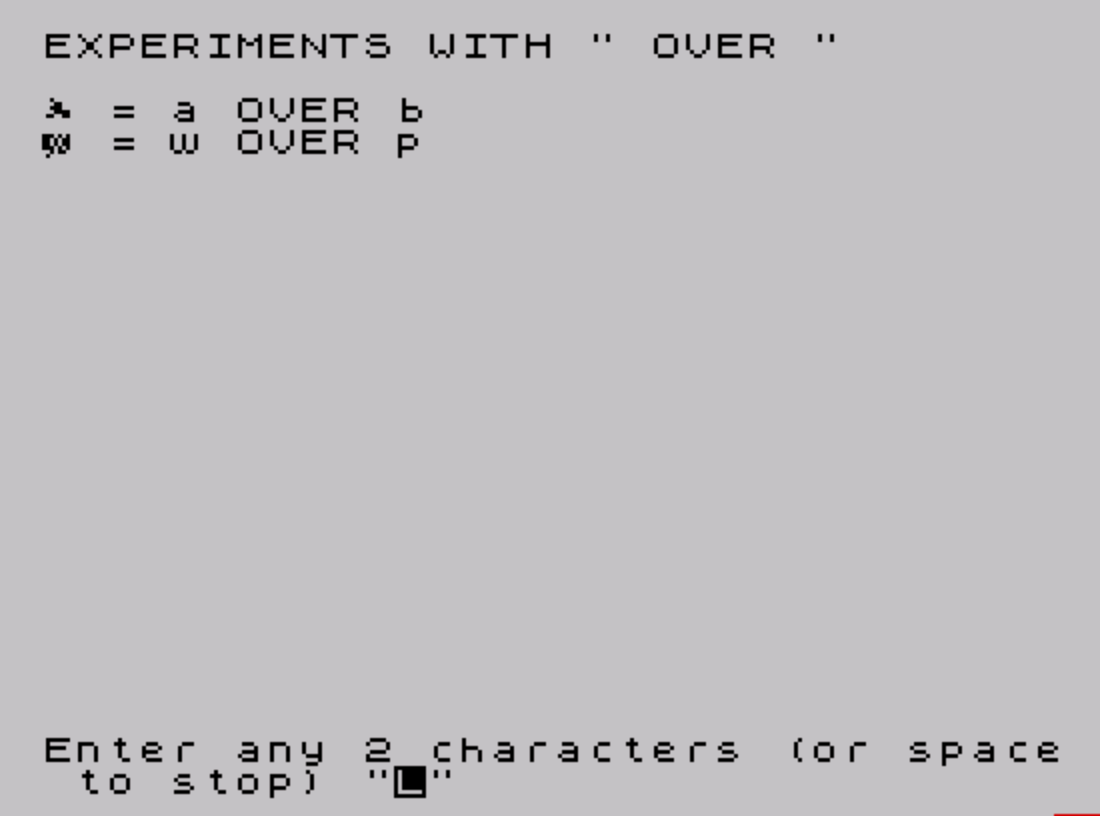
Source Code
   10 PRINT "EXPERIMENTS WITH "" OVER """''
   20 INPUT "Enter any 2 characters (or space to stop) ";q$
   30 IF q$=CHR$ 32 THEN STOP
   40 IF LEN q$<>2 THEN GO TO 20
   50 PRINT q$(1);CHR$ 8; OVER 1;q$(2);" = ";q$(1);" OVER ";q$(2)
   60 GO TO 20
 9998 SAVE "OVERS 1" LINE 0
Note: Type-in program listings on this website use ZMAKEBAS notation for graphics characters.