
Pablo Pixel-O is a user-defined graphics (UDG) character designer and display utility that lets users draw 8×8 pixel characters on a grid, store them in memory, and compose pictures by assembling those characters into multi-character layouts. The program uses direct POKEs into the UDG area and system variables—particularly the UDG pointer at addresses 23606–23607 and character count storage at 23728–23729—to manage a dynamically allocated character set below the BASIC program. A CLEAR command is calculated at runtime to reserve space for the custom character bitmaps, and binary pixel values are converted to byte data using a VAL/CHR$ idiom at line 315 that parses a binary string with CHR$ 196 (the “BIN” token). A machine code routine is embedded via a hex string in variable a$ at lines 9000–9135, self-verified by checksum against expected value 7488, and used for the “Big-Bits” display feature; the author notes in the REM at line 7 that this MC routine crashes. The program also supports LPRINT hardcopy, SCREEN$ saving, and a paper/ink override mode for each character cell in the picture layout.
Program Analysis
Program Structure
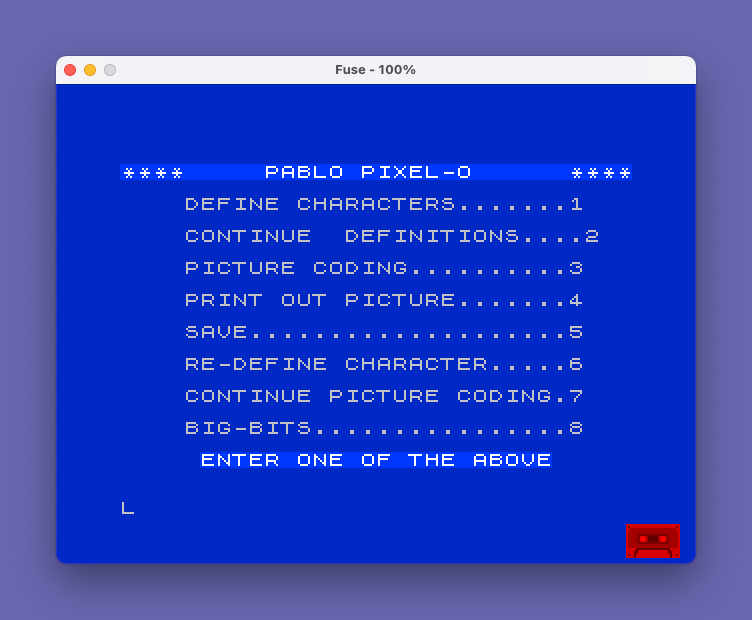
Pablo Pixel-O is organized as a menu-driven application centered on a main menu at line 600. Navigation is handled by a single computed GO TO at line 670 that dispatches to one of eight program sections based on the digit entered. The main functional sections are:
- Lines 100–330: Character definition — draw 8×8 characters one row at a time using block graphics input.
- Lines 400–595: Picture coding and display — assemble a grid of custom characters into a full picture with optional per-cell paper/ink colors.
- Lines 700–740: Re-define a single character (edit mode).
- Lines 800–995: “Big-Bits” feature — displays characters at double (or larger) size using a machine code routine.
- Lines 1000–1050: Save routines for SCREEN$ and full program + character data.
- Lines 2000–2010: Loader stub.
- Lines 9000–9135: Machine code poke-in and verification.
Menu Dispatch Technique
The dispatch at line 670 is a single arithmetic GO TO expression:
GO TO 650-(550 AND z$="1")-(450 AND z$="2")- ... +(150 AND z$="8")Each menu option subtracts or adds a fixed offset from 650 to land on the correct target line. This is a compact Spectrum BASIC idiom that avoids a chain of IF statements, though it is somewhat fragile if line numbers shift. Note that option “7” (Continue Picture Coding) has a dual offset: a base -(230 AND z$="7") landing on line 420, and an additional -(20 AND (z$="7" AND l=0)) that subtracts a further 20 (landing on line 400) when no picture has been defined yet (l=0).
UDG Memory Management
The program manages UDG memory manually rather than relying on the fixed UDG area. Key system variables used:
| Address | System Variable | Purpose |
|---|---|---|
| 23606–23607 | UDG pointer (CHARS+1) | Points to the custom character set base minus 256 |
| 23728–23729 | Used to store c (char count) | 16-bit persistence of character count across operations |
| 23617 | FLAGS | Bit 1 controls graphics cursor mode for block-graphic input |
| 23689 | ATTR_T | Checked to detect current attribute state during display |
| 23692 | MASK_T | Set to 23 to control transparency masking |
At line 125, a CLEAR is issued to allocate memory below BASIC for the character bitmaps: CLEAR 65367-(8*c)-384. The base address ch is then calculated at line 145 as 65367-8*c-384. The UDG pointer at 23606–23607 is updated per-character during display (lines 525–543) to point the font rendering engine at the custom character data.
Binary-to-Byte Conversion Idiom
Line 315 uses a well-known Spectrum BASIC trick to convert an 8-character binary string (composed of “0” and “1” characters) into a byte value:POKE ch+..., VAL (CHR$ 196+b$(p,1 TO 8))
CHR$ 196 is the token for BIN. Concatenating it with the 8-character binary string and passing the result to VAL causes the interpreter to evaluate it as a BIN literal, yielding the numeric byte value. This avoids any explicit bit-shifting loop.
Character Input and Validation
Characters are entered row by row using block graphics. POKE 23617,2 at line 220 sets the graphics cursor mode so the user can type block graphic characters directly. Each cell of i$(a,b) is validated at lines 235–245: only CHR$ 128 (space block), CHR$ 143 (solid block), or CHR$ 32 (space) are accepted; any other character forces a re-entry. The pixel array b$ is then built at line 295 by mapping solid blocks to “1” and spaces/empty blocks to “0”.
Picture Display and Attribute Handling
Lines 520–555 render the assembled picture. For each character cell, the UDG pointer is updated so that printing CHR$ 32 (space, which uses the font) actually renders the custom glyph. Lines 542–543 handle a special case: if PEEK 23689 < 4 (indicating certain attribute states), the code backs up one position with CHR$ 8 and redraws to ensure correct attribute application, with separate paths for the op (per-cell paper/ink) mode.
Machine Code Routine (Big-Bits)
Lines 9000–9135 poke a 63-byte machine code routine into address 26715. The hex string in a$ is decoded two nibbles at a time using arithmetic on character codes (lines 9110–9120). A checksum is verified: the sum of all 63 bytes must equal 7488. The routine at 26731 is called via RANDOMIZE USR 26731 (line 965), and a copy routine at 26771 via RANDOMIZE USR 26771 (line 985). As noted in the REM at line 7, the author acknowledges this machine code crashes — the Big-Bits section at lines 905–930 also contains a likely bug: c1 is referenced but c2 was assigned at line 905, meaning c1 retains its last value from the picture display section rather than the current character address.
Bugs and Anomalies
- Line 585:
IF INKEY$<>"m" OR INKEY$<>"M" THEN GO TO 575— this condition is always true (a key cannot simultaneously equal both “m” and “M”), so the menu is never reached from this loop. It should useANDinstead ofOR. - Lines 905–930 (Big-Bits): Variable
c2is assigned at line 905 butc1is used in lines 915 and 925 for POKEing character data. This is almost certainly a copy-paste error causing the wrong character bytes to be poked, contributing to the crash noted by the author. - Line 435:
IF q>1 AND r>w THEN GO TO 600— the condition requires bothq>1andr>w, which would only trigger mid-loop if somehow both were true simultaneously; the intent was likely to allow early exit whenp(q,r)=0, which is handled separately at line 472. - Line 670 (option “8”): The offset
+(150 AND z$="8")targets line 800 (650+150), correctly reaching the Big-Bits section. - Line 670 (option “5”): The offset
+(380 AND z$="5")targets line 1030, which handles the full program save — but line 1020 is the SCREEN$ save. The save menu option goes to 1030 directly, bypassing the SCREEN$ save path (which is reached only from line 575).
Save and Load Architecture
The program saves in three parts (lines 1040–1045): the BASIC program itself with LINE 2000 autostart, then the character bitmap data as a CODE block starting at ch with length c*8. The loader stub at line 2000 loads the CODE block back and returns to the menu. A note at line 1030 warns the user to issue CLEAR to the correct address before reloading, since the character data lives in RAM below BASIC.
Image Gallery

Source Code
    1 REM aaaaaaaaaaaaaaaaaaaaaaaaaaaaaaaabbbbbbbbbbbbbbbbbbbbbbbbbbbbbbbb
    5 REM THIS PROGRAM BY Michael E. Carver taken from Time Designs magazine for Sept/Oct '85
    6 REM Entered for LIST by John Leary 10/85
    7 REM Debugging: I added line 126 and made a correction to line 670. The MC routine in Big Bits crashes. Good luck! J.Leary
   10 LET l=0: LET h=0
   60 GO TO 600
  100 CLS
  105 PRINT AT 2,0;"Do you wish to set up a blank   file?"
  110 INPUT a$
  115 IF CODE a$<>89 AND CODE a$<>121 THEN GO TO 600
  120 PRINT AT 2,0;"How many characters do you wish to define?"
  125 INPUT c: POKE 23728,c-INT (c/256)*256: POKE 23729,c/256: CLEAR 65367-(8*c)-384: LET c=PEEK 23728+256*PEEK 23729
  126 LET l=0: LET h=0
  130 DIM i$(8,8): DIM b$(8,8): LET h=1: LET ed=0: DIM a$(10)
  135 DIM d$(32): LET hc=0: LET op=0
  145 LET ch=65367-8*c-384
  200 FOR f=1 TO c
  202 PAPER 7: INK 0: BORDER 7: CLS : DIM i$(8,8)
  205 PRINT AT 0,0;"Plot out character ";(f AND NOT ed)+(h AND ed)
  210 PRINT AT 20,0;d$;d$;AT 5,6;"1";AT 21,1;"12345678";AT 4,7;" 12345678"
  215 FOR a=1 TO 8
  220 POKE 23617,2: INPUT i$(a,1 TO 8)
  225 FOR b=1 TO 8
  227 PRINT AT 20,0;d$;" 12345678"
  230 IF i$(a,1)="m" OR i$(a,1)="M" OR CODE i$(a,1)=156 THEN GO TO 600
  235 IF i$(a,b)=CHR$ 128 OR i$(a,b)=CHR$ 143 OR i$(a,b)=CHR$ 32 THEN GO TO 250
  240 PRINT AT a+4,7;"RE-ENTER"
  245 GO TO 220
  250 NEXT b
  255 PRINT AT a+4,7;i$(a,1 TO 8);: IF a<8 THEN PRINT TAB 6;a+1
  260 NEXT a
  265 PRINT AT 20,0;d$;d$;AT 20,0;"Are you satisfied?"
  270 POKE 23617,0: INPUT a$
  275 IF CODE a$<>89 AND CODE a$<>121 THEN GO TO 335
  280 FOR a=1 TO 8
  290 FOR b=1 TO 8
  295 LET b$(a,b)=("1" AND i$(a,b)=CHR$ 143)+("0" AND (i$(a,b)=CHR$ 128 OR i$(a,b)=CHR$ 32))
  300 NEXT b
  305 NEXT a
  310 FOR p=1 TO 8
  315 POKE ch+((f-1 AND NOT ed)+(h-1 AND ed))*8+(p-1),VAL (CHR$ 196+b$(p,1 TO 8))
  320 NEXT p
  322 IF ed THEN GO TO 600
  325 NEXT f
  330 GO TO 600
  335 PRINT AT 20,0;d$;d$;AT 20,0;"Do you wish to change individuallines?"
  340 INPUT a$
  345 IF CODE a$<>89 AND CODE a$<>121 THEN GO TO 202
  350 PRINT AT 20,0;d$;d$;AT 20,0;"What line do you wish to change?"
  355 INPUT a
  360 PRINT AT 20,0;d$;d$;AT 20,0;"working on line ";a;AT 21,0;"  12345678"
  365 POKE 23617,2: INPUT i$(a,1 TO 8)
  370 PRINT AT a+4,7;i$(a,1 TO 8)
  375 GO TO 265
  400 LET re=0: LET op=0: CLS : INPUT "How many characters across will your picture be?";w: IF w>32 THEN GO TO 400
  405 INPUT "How many lines will be in your  picture?";l
  410 INPUT "Do you wish to input paper and  ink for each character?"; LINE z$: IF CODE z$=CODE "y" OR CODE z$=CODE "Y" THEN LET op=1
  415 LET re=1: DIM p(1,w): IF op THEN DIM a(2,1,w)
  420 CLS : PRINT AT 2,0;"Enter code numbers for new","character  set in the order you  wish them to be displayed": IF z$="7" AND re THEN GO TO 435
  425 FOR q=1 TO l
  430 FOR r=1 TO w
  435 IF q>1 AND r>w THEN GO TO 600
  440 PRINT AT 19,0;d$;d$;AT 20,0;"Line ";q;" / Space ";r: INPUT p(q,r)
  445 IF p(q,r)>=0 AND p(q,r)<=c THEN GO TO 465
  455 PRINT AT 19,0;"Invalid input, re-enter!"
  460 GO TO 440
  465 IF op THEN INPUT "Paper? #";a(1,q,r): IF a(1,q,r)>9 OR a(1,q,r)<0 THEN GO TO 465
  470 IF op THEN INPUT "Ink? #";a(2,q,r): IF a(2,q,r)>9 OR a(2,q,r)<0 THEN GO TO 470
  472 IF p(q,r)=0 THEN GO TO 600
  475 NEXT r: NEXT q
  480 INPUT "Paper color? #";pa: IF pa>9 OR pa<0 THEN GO TO 480
  485 INPUT "Border color? #";bo: IF bo>7 OR bo<0 THEN GO TO 485
  490 INPUT "Ink color? #";in: IF in>7 OR in<0 THEN GO TO 490
  500 BORDER bo: PAPER pa: INK in: CLS
  510 INPUT "Do you wish a hardcopy? "; LINE z$: IF CODE z$=CODE "y" OR CODE z$=CODE "Y" THEN LET hc=1
  520 FOR a=1 TO l: FOR b=1 TO w
  525 LET c1=ch+(p(a,b)-1)*8: POKE 23606,c1-INT (c1/256)*256: POKE 23607,INT (c1/256)-1
  530 IF PEEK 23689<3 THEN POKE 23606,0: POKE 23607,60
  535 IF op THEN PRINT PAPER a(1,a,b); INK a(2,a,b);CHR$ 32;
  540 IF NOT op THEN PRINT CHR$ 32;: IF hc THEN LPRINT CHR$ 32;
  542 IF NOT op AND PEEK 23689<4 THEN PRINT CHR$ 8;: POKE 23606,c1-INT (c1/256)*256: POKE 23607,INT (c1/256)-1: PRINT CHR$ 32
  543 IF op AND PEEK 23689<4 THEN PRINT CHR$ 8;: POKE 23606,c1-INT (c1/256)*256: POKE 23607,INT (c1/256)-1: PRINT PAPER a(1,a,b); INK a(2,a,b);CHR$ 32;
  545 NEXT b: PRINT
  550 IF hc THEN LPRINT
  555 NEXT a
  560 POKE 23606,0: POKE 23607,60: POKE 23692,23
  565 PRINT #1;"Z=COPY  M=MENU  S=SCREEN$ SAVE"
  570 IF INKEY$<>"" THEN GO TO 560
  575 IF INKEY$="s" OR INKEY$="S" THEN GO TO 1000
  580 IF INKEY$="z" OR INKEY$="Z" THEN COPY
  585 IF INKEY$<>"m" OR INKEY$<>"M" THEN GO TO 575
  590 LET hc=0
  600 BORDER 1: PAPER 1: INK 9: CLS : LET ed=0
  605 POKE 23617,0
  610 PRINT AT 2,0; BRIGHT 1;"****     PABLO PIXEL-O      ****"
  620 PRINT AT 4,4;"DEFINE CHARACTERS.......1";AT 6,4;"CONTINUE  DEFINITIONS....2";AT 8,4;"PICTURE CODING..........3";AT 10,4;"PRINT OUT PICTURE.......4";AT 12,4;"SAVE....................5";AT 14,4;"RE-DEFINE CHARACTER.....6";AT 16,4;"CONTINUE PICTURE CODING.7";AT 18,4;"BIG-BITS................8"
  630 PRINT BRIGHT 1;AT 20,5;"ENTER ONE OF THE ABOVE"
  650 INPUT LINE Z$
  660 IF CODE Z$<49 OR CODE Z$>56 THEN GO TO 650
  670 GO TO 650-(550 AND z$="1")-(450 AND z$="2")-(250 AND z$="3")-(150 AND z$="4")+(380 AND z$="5")+(50 AND z$="6")-(230 AND z$="7")-(20 AND (z$="7" AND l=0))+(150 AND z$="8")
  700 LET ed=1
  710 CLS
  720 PRINT AT 2,0;"Which character do you wish to  re-define? (enter #)"
  730 INPUT h
  740 GO TO 202
  800 CLS : DIM b(6,8)
  805 INPUT "How many lines? (6 max.) ";j
  810 IF j<1 OR j>6 THEN GO TO 810
  815 INPUT "How many across? (8 max.) ";k
  820 IF k<1 OR k>8 THEN GO TO 820
  830 PRINT AT 2,0;"Enter code numbers in the order you wish them displayed."
  835 FOR a=1 TO j
  840 FOR b=1 TO k
  845 PRINT AT 19,0;d$;d$;AT 20,0;"Line ";a;" / Space ";b
  850 INPUT b(a,b)
  855 IF b(a,b)>=1 AND b(a,b)<=c THEN GO TO 870
  860 PRINT FLASH 1;AT 19,0;"Invalid input.  Re-enter."
  865 GO TO 850
  870 NEXT b
  875 NEXT a
  900 PAPER 7: BORDER 7: INK 0: CLS : PRINT #1;"Note pad is being loaded.       Z=COPY    M=MENU"
  902 LET no=64983: POKE 23659,0
  905 FOR a=1 TO 6: FOR b=0 TO 7 STEP 2: FOR d=1 TO 8: LET c2=ch+(b(a,d)-1)*8
  910 IF NOT b(a,d) THEN POKE no,0
  915 IF b(a,d) THEN POKE no,PEEK (c1+b)
  920 IF NOT b(a,d) THEN POKE no+1,0
  925 IF b(a,d) THEN POKE no+1,PEEK (c1+b+1)
  930 LET no=no+2
  960 NEXT d: NEXT b: NEXT a
  965 PRINT AT 0,0;: RANDOMIZE USR 26731
  970 POKE 23659,2: POKE 26773,j*32
  980 IF INKEY$<>"" THEN GO TO 980
  985 IF INKEY$="z" OR INKEY$="Z" THEN RANDOMIZE USR 26771
  990 IF INKEY$<>"m" AND INKEY$<>"M" THEN GO TO 985
  995 GO TO 600
 1000 REM save screen$
 1010 INPUT "Picture title:  ";a$
 1020 SAVE a$SCREEN$ : GO TO 600
 1030 CLS : PRINT AT 10,0; FLASH 1;"please note that you will have  to enter CLEAR ";PEEK 23730+256*PEEK 23731;" before    loading this program after       saving!                          "
 1035 INPUT "What is the title? ";a$
 1040 SAVE a$ LINE 2000
 1045 SAVE a$CODE ch,c*8
 1050 GO TO 600
 2000 LOAD a$CODE
 2010 GO TO 600
 9000 LET ad=26715
 9100 LET a$="8084888c8185898d82868a8e83878b8f21d7fd06c0c5060456235e23e5afcb1217cb1217cb1317cb1317215b68856f7ed710eae1c110dec9f306c0cd050ac9"
 9105 IF LEN a$<>126 THEN PRINT "Error in a$ please correct.": STOP
 9110 FOR x=1 TO LEN a$-1 STEP 2
 9115 POKE ad+INT ((x-1)/2),(CODE a$(x)-(48 AND CODE a$(x)<58)-(55 AND CODE a$(x)>64))*16+CODE a$(x+1)-(48 AND CODE a$(x+1)<58)-(55 AND CODE a$(x+1)>64)
 9120 NEXT x
 9125 LET ck=0: FOR x=0 TO 62: LET ck=ck+PEEK (26715+x): NEXT x
 9130 IF ck<>7488 THEN PRINT "Look for errors in a$.": STOP
 9135 IF ck=7488 THEN PRINT "Machine code checks out."
 9899 VERIFY "PIXEL-O"
 9999 SAVE "PIXEL-O" LINE 1
Note: Type-in program listings on this website use ZMAKEBAS notation for graphics characters.