
This program is a full-featured pixel art and drawing application offering modes including Draw, Line, Ray, Arc, Box, Circle, Brush, Fill, and Copy. It uses STICK for joystick input alongside keyboard controls, with keys 5–8 mapped to directional movement and a fire-button equivalent. The fill routine (lines 1000–1210) implements a scanline flood-fill algorithm supporting solid, 50%-dither, and striped patterns. The COPY mode (lines 900–3120) can scale a boxed region up or down using a multiplier derived from the arc variable. Attribute-level color operations (PAPER, INK, OVER, INVERSE) are managed through a status-line display at row 22, and ON ERR is used extensively as a bounds-checking mechanism throughout the drawing routines.
Copied from the “Hacker” TSUG of Las Vegas, NV March 1986. Copied by P. Hill, SINCUS.
MODES
- DRAW “d” Use joy stick or arrow keys, fire button draws-“z” causes skip space-“x” causes two space skip
- ERASE “e”to enter or exit erase mode. Can enter from other modes.
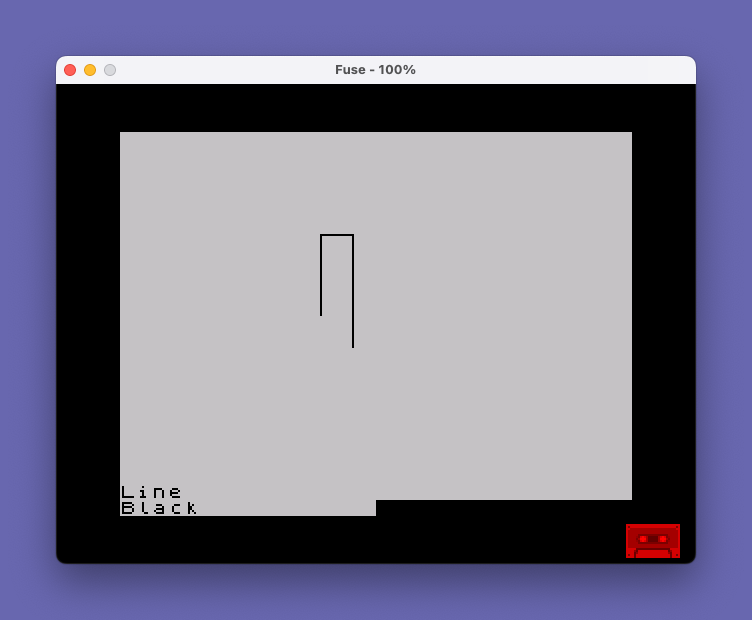
- LINE “l” flashing line drawn to cursor from last point drawn. “z” or”x” will ink inline.
- ARC “a” arc value shown at bottom and flashing line will curve. More “a” increases arc, “s” decreases arc. “l” resets arc to zero.
- RAY “r” works like line: lines radiate from common pt to follow cursor. “z” and “x” work with ray to space lines. arc modes work with ray.
- BOX “q” move cursor diagonally to stretch a box to size. Fire button, cursor keys, “z”, “x”, “e” work similar as with line mode.
- BRUSH draw. Enter”l” mode, form brush size by length of brush, then “b”. if line is vertical to start, length of brush is only that wide in horizont sweeps, vertical sweeps will be one pixel wide. Can enter “e” from brush, erase wide sweeps.
- FILL works in any mode, “f”=solid fill, “g”= 50% fill, “h”=stripes. Must be inside area to be filled. Must be a right side. Tone sounds on complete.
- COPY to copy an object on screen, “q” to form flashing box around object. While still flashing, and around object hit “w” for copy. Move box with arrow or joystick to increase or decrease size with “a” or”s” , fire bottun places object, takes awhile to work, wait 30 secs or so. “d” to get out of copy mode.
KEYS USED
- “1”-INK SELECT
- “2”-Border Select
- “3”-SAVE page
- “4”-LOAD page
- “5”-left arrow
- “6”-down arrow
- “7”-up arrow
- “8”-right arrow
- “0”-CLS with caps shift
- “q”-Box mode
- “w”-copy mode
- “e”-Erase mode
- “r”-Ray mode
- “t”-paper select
- “y”-Global paper
- “u”-ink change
- “i”-Global Ink
- “o”-Print page-2040
- “p”-Modify paper
- “a”-increase arc/copy
- “s”-decrease arc/copy
- “d”-DRAW mode
- “f”-FILL mode
- “g”-50% Fill mode
- “h”-fill striped
- “l”-LINE mode-arc reset
- “z”-1 space skip
- “x”-2 space skip
- “c”-Circle mode
- “b”-BRUSH mode
- “m”-ink modify
Program Analysis
Program Structure
The program is organized into functional blocks by line-number range. Startup and initialization live at lines 8000–8190, the main event loop at lines 30–100, drawing mode subroutines at lines 300–1210 and 2000–3120, color/wash utilities at lines 4000–4095, keyboard dispatch at lines 5000–5620, the status-line printer at lines 8200–8230, and documentation REMs at lines 6000–6240. The DATA statements at lines 9500–9520 supply movement vectors and color name strings. Lines 2 and 3 offer an optional documentation listing before the program starts.
Initialization (lines 8000–8190)
Line 8010 sets border, ink, paper, and attribute flags to their initial values, using NOT PI (which evaluates to 0) as a readable zero constant throughout. Lines 8020–8030 populate two 14×3 arrays x() and y() from DATA with delta-movement vectors for each of the 14 possible joystick/key directions and three speed steps. Line 8050 loads an 8-entry string array c$() with the color names “Black” through “White”. Line 8190 fakes a “d” keypress to drop into Draw mode before entering the main loop.
Main Event Loop (lines 30–100)
The loop begins at line 30 (joystick branch) or line 40 (main entry). Line 40 reads the joystick fire axis via STICK(2,1) into s, and direction via STICK(1,1) into a. Line 45 checks INKEY$ and dispatches to the keyboard handler at 5000 if a key is pressed. If movement direction a is non-zero, lines 60–70 update x and y by the appropriate vector from the arrays, then clamp negative results with ABS. Line 100 PLOTs the cursor and calls the current mode subroutine via the variable mode, which holds a line number.
Drawing Modes
| Key | Mode name | Subroutine | Variable mode |
|---|---|---|---|
| d | Draw | 300 | 310 |
| l | Line | 400 | 410 |
| r | Ray | 400 | 410 (r=1) |
| b | Brush | 500 | 510 |
| q | Box | 600 | 610 |
| c | Circle | 800 | 810 |
| w | Copy | 900 | 910 |
| f/g/h | Fill | 1000 | — |
Line and Ray share the same subroutine; the r flag distinguishes them — Ray keeps x1,y1 fixed while Line advances the anchor after each stroke. Brush mode reuses the Line subroutine (line 415) via a relay at line 500, wrapping it in an ON ERR guard.
Flood Fill Algorithm (lines 1000–1210)
The fill is a scanline-style algorithm. Starting at the cursor pixel, it scans left to find the leftmost unfilled pixel (xmin), then right to find xmax, fills that horizontal span, and steps one row in the current fill direction fm (initially +1, then −1 for the second pass upward). The algorithm handles re-entry into already-bounded regions via lines 1080–1090 and 1120–1130. Three fill styles are selected by g: 0 = solid, 1 = 50% dither, 2 = stripes. The dither and stripe logic at line 1200 uses (x*g+y)/2 parity to decide whether to plot each pixel.
Copy and Scale (lines 900–3120)
Copy mode lets the user define a bounding box, then place a scaled copy elsewhere. The scale factor fm=1+ABS arc is derived from the current arc value. A positive arc enlarges the copy (coordinates multiplied by fm); a negative arc shrinks it (divided by fm). The pixel-transfer subroutine at lines 3000–3120 iterates over every pixel in the source box with nested FOR loops, tests POINT, and PLOTs the corresponding destination pixel. Pressing Space during the copy loop (line 3040) aborts early.
Arc Drawing (lines 450–470)
When arc1 is non-zero, DRAW is called with a third argument (the arc angle) via DRAW x2,y2,arc at line 450. A cascade of ON ERR GO TO handlers at lines 450, 455, and 460 gracefully degrades: if the full arc DRAW fails, it retries with a PLOT first; if that also fails, it falls through to cleanup. This defensive layering is the program’s primary error-management strategy.
ON ERR Usage
ON ERR is used pervasively as a bounds-checking substitute — rather than testing coordinates before drawing, the program attempts the operation and redirects to a safe recovery point on error. Common recovery targets include line 200 (return to main loop), line 2050 (draw fallback), and line 8200 (status refresh). This keeps the main drawing logic concise at the cost of making control flow harder to trace statically.
Status Line (lines 8200–8230)
The status line is printed at row 22 using PRINT AT 22,0. It displays the current mode name m$, the string "(erase)" conditioned on e being non-zero (using the AND string-masking idiom), the color name from c$(ink+1), and the arc value string a$ when an arc-capable mode is active. POKE 23659,0 and POKE 23659,2 bracket the PRINT to suppress the lower scroll guard, preventing the display from scrolling.
Color Wash Utilities (lines 4000–4095)
Four wash routines recolor the attribute grid. Lines 4000 and 4020 flood all 22 rows with a uniform PAPER or INK color respectively. Lines 4050–4070 perform a global PAPER swap: any cell whose current paper matches bord is reprinted with PAPER ink. Lines 4080–4090 do the same for INK, using ATTR(i,g)-8*INT(ATTR(i,g)/8) to extract the ink nibble from the attribute byte.
Key Dispatch (lines 5000–5190)
The keyboard handler reads INKEY$ into i$ and uses a chain of IF comparisons. Keys 5–8 are handled by a range test at line 5010 (i$>"4" AND i$<"9"), mapping them to direction indices 11–14 in the movement array. Mode-switching keys set mode to a line number, update m$, and jump to line 250 which resets e and refreshes the status display before returning to the main loop. The STOP key combination is detected at line 5180 by the literal string " STOP " — this relies on how INKEY$ reports that keypress in the tokenized environment.
Notable Techniques
NOT PIused as a zero literal throughout, exploiting the fact thatNOTof any non-zero value is 0.- Mode dispatch via a variable line number stored in
mode—GO SUB modeat line 100 acts as a computed GOSUB. - String masking with
AND:("(erase)" AND e)returns the string wheneis true, empty string otherwise. POKE 23659manipulates the scroll counter to prevent the lower screen from scrolling during status updates.- The DATA at line 9500 encodes all 14 directional vectors (8 cardinal/diagonal directions × 3 speeds, plus 4 extras) in a flat sequence read into a 2D array.
ON ERR RESETat lines 3000 and 5180 resets the error handler to the default, preventing stale error redirects from earlier in the same routine.
Bugs and Anomalies
- Line 460 contains
DRAW OVER 0; INVERSE e; INK ink,x2,y2,arc— the INK attribute modifier uses a comma beforex2rather than a semicolon, which may cause a syntax issue depending on interpreter tokenization. - Line 1025 tests
POINT (x,y)=eand STOPs if true (cursor is already on a filled pixel), but the STOP is inside a subroutine-like block; theON ERR GO TO 1150set at line 1010 should catch any resulting error and redirect to cleanup, making the STOP function as an abort rather than a program termination. - Line 70 clamps both
xandywithABSto prevent negative coordinates, but this also reflects any movement that would go below 0 back to a positive value rather than clamping to 0, potentially causing unexpected cursor jumps. - Line 1150 ends with
GO TO 200: RETURN— the RETURN is unreachable after the GO TO, but harmless.
Image Gallery
Source Code
    2 CLS : INPUT "DOCUMENTATION  Y/N ";A$
    3 IF A$="Y" THEN LIST 6000
   10 REM "Paint"\*Rheesware 1984  LIST 6000 for documentation
   20 POKE 23658,0: GO TO 8000
   30 REM :{ GO TO 200: REM -joystick
   40 LET a=|(1,1): IF s<>|(2,1) THEN LET s=|(2,1)
   45 LET b=1: IF INKEY$<>"" THEN GO SUB 5000
   50 IF NOT a THEN GO TO 100
   60 LET x=x+x(a,b): LET y=y+y(a,b)
   70 LET x=ABS x: LET y=ABS y
  100 PLOT x,y: GO SUB mode: GO TO 40
  200 IF NOT a THEN GO TO 40
  210 LET x=x-x(a,b): LET y=y-y(a,b): GO TO 30
  250 LET e=0: GO TO 8200
  300 REM DRAW
  310 PLOT x,y: IF s THEN PLOT OVER 0; INVERSE e; INK ink;x,y
  390 RETURN
  400 REM -line/ray-
  410 LET x2=x1-x: LET y2=y1-y: IF arc THEN GO TO 450
  415 DRAW x2,y2: PLOT x,y: DRAW x2,y2
  420 IF s THEN PLOT OVER 0; INVERSE e; INK ink;x,y: DRAW OVER 0; INVERSE e; INK ink;x2,y2:: IF NOT r THEN LET x1=x: LET y1=y
  430 RETURN
  450 ON ERR GO TO 455: DRAW x2,y2,arc
  455 ON ERR GO TO 460: PLOT x,y: DRAW x2,y2,arc
  460 ON ERR GO TO 470: IF s THEN PLOT OVER 0; INVERSE e; INK ink;x,y: DRAW OVER 0; INVERSE e; INK ink,x2,y2,arc: IF NOT r THEN LET x1=x: LET y1=y: LET arc=0: GO TO 8200
  470 ON ERR GO TO 200: RETURN
  500 REM -brush-
  510 ON ERR GO TO 2000: GO SUB 415: ON ERR GO TO 200: RETURN
  600 REM -box-
  610 LET x2=x1-x: LET y2=y1-y
  615 DRAW x2,0: DRAW 0,y2: DRAW -x2,0: DRAW 0,-y2
  620 PLOT x,y: DRAW x2,0: DRAW 0,y2: DRAW -x2,0: DRAW 0,-y2
  630 IF s THEN OVER 0: LET x1=x: LET y1=y: DRAW x2,0: DRAW 0,y2: DRAW -x2,0: DRAW 0,-y2
  640 INVERSE 0: INK 8: OVER 1: RETURN
  800 REM CIRCLE
  810 ON ERR GO TO 815: PLOT x,y: CIRCLE x,y,ABS x2
  815 ON ERR GO TO 820: CIRCLE x,y,ABS x2
  820 ON ERR GO TO 890: IF NOT s THEN STOP
  830 CIRCLE INK ink; INVERSE e; OVER 0;x,y,ABS x2
  890 ON ERR GO TO 200: RETURN
  900 REM COPY
  910 LET fm=1+ABS arc
  915 IF SGN arc=-1 THEN GO TO 930
  920 ON ERR GO TO 922: DRAW x2*fm,0: DRAW 0,y2*fm: DRAW -x2*fm,0: DRAW 0,-y2*fm
  922 GO SUB 980
  925 GO TO 970
  930 ON ERR GO TO 940: DRAW x2/fm,0: DRAW 0,y2/fm: DRAW -x2/fm,0: DRAW 0,-y2/fm
  940 GO SUB 980
  950 ON ERR GO TO 960: PLOT x,y: DRAW x2/fm,0: DRAW 0,y2/fm: DRAW -x2/fm,0: DRAW 0,-y2/fm
  960 GO TO 975
  970 ON ERR GO TO 975: PLOT x,y: DRAW x2*fm,0: DRAW 0,y2*fm: DRAW -x2*fm,0: DRAW 0,-y2*fm
  975 GO SUB 980: IF s THEN GO SUB 3000
  977 ON ERR GO TO 200: RETURN
  980 PLOT x1,y1
  985 ON ERR GO TO 990: DRAW x2,0: DRAW 0,y2: DRAW -x2,0: DRAW 0,-y2
  990 ON ERR GO TO 200: RETURN
 1000 REM -fill-
 1010 INVERSE e: LET e=NOT e: INK ink: ON ERR GO TO 1150: LET fm=1: OVER 0
 1020 LET xmin=x: LET xp=x: LET yp=y
 1025 IF POINT (x,y)=e THEN STOP
 1030 GO TO 1100
 1040 IF g THEN GO TO 1200
 1042 PLOT x,y: LET x=x-1
 1050 IF POINT (x,y)=e THEN LET xmin=x+1: LET x=xmax: GO TO 1070
 1060 GO TO 1040
 1070 LET y=y+fm: IF POINT (x,y)=NOT e THEN GO TO 1100
 1080 LET x=x-1: IF POINT (x,y)=e THEN GO TO 1120
 1090 LET xmax=x: GO TO 1040
 1100 LET x=x+1: IF  POINT (x,y)=e THEN LET xmax=x-1: GO TO 1040
 1110 GO TO 1100
 1120 IF x=xmin THEN GO TO 1140
 1125 FOR x=x TO xmin STEP -1: IF NOT POINT (x,y)=e THEN LET xmax=x: GO TO 1040
 1130 NEXT x
 1140 IF fm=1 THEN LET fm=-1: LET x=xp: LET y=yp-1: GO TO 1100
 1150 INVERSE 0: LET e=NOT e: INK 8: LET x=xp: LET y=yp: OVER 1: BEEP .4,-10: GO TO 200: RETURN
 1200 LET i=(x*g+y)/2: IF i=INT i THEN PLOT x,y
 1210 LET x=x-1: GO TO 1050
 2000 ON ERR GO TO 2020: PLOT x,y: DRAW x2,y2
 2020 IF NOT s THEN GO TO 2050
 2030 ON ERR GO TO 2050: GO TO 420
 2050 ON ERR GO TO 200: RETURN
 3000 ON ERR RESET : IF y2=0 OR x2=0 THEN RETURN : REM -copy2-
 3010 INK ink: OVER 0: INVERSE e: LET x3=x: LET y3=y: IF SGN arc=-1 THEN GO TO 3100
 3020 FOR y=0 TO fm*y2 STEP SGN y2: FOR x=0 TO fm*x2 STEP SGN x2
 3030 ON ERR GO TO 3040: IF POINT (x1+x/fm,y1+y/fm) THEN PLOT x3+x,y3+y
 3040 IF INKEY$=" " THEN GO TO 3050
 3045 NEXT x: NEXT y
 3050 BEEP .4,-10: LET y=y3: LET x=x3: INK 8: INVERSE 0: OVER 1: RETURN
 3100 FOR y=0 TO y2 STEP SGN y2: FOR x=0 TO x2 STEP SGN x2
 3110 ON ERR GO TO 3120: IF POINT (x+x1,y+y1) THEN PLOT x3+x+fm,y3+y/fm
 3120 GO TO 3040
 4000 REM -wash-
 4010 PRINT AT NOT PI,NOT PI;: FOR i=NOT PI TO 21: PRINT PAPER bord;,,: NEXT i: RETURN
 4020 PRINT AT NOT PI,NOT PI;: FOR i=NOT PI TO 21: PRINT INK ink;,,: NEXT i: RETURN
 4050 ON ERR GO TO 4095: FOR i=NOT PI TO 21: FOR g=NOT PI TO 31
 4060 IF INT (ATTR (i,g)/8)=bord THEN PRINT AT i,g; PAPER ink;" "
 4070 NEXT g: NEXT i: GO TO 4095
 4080 ON ERR GO TO 4095: FOR i=NOT PI TO 21: FOR g=NOT PI TO 31
 4085 IF ATTR (i,g)-8*INT (ATTR (i,g)/8)=bord THEN PRINT AT i,g; INK ink;" "
 4090 NEXT g: NEXT i
 4095 BEEP .4,-10: ON ERR GO TO 200: RETURN
 5000 REM READ key
 5010 LET i$=INKEY$: IF i$>"4" AND i$<"9" THEN LET a=VAL i$+6: RETURN
 5020 IF i$="z" THEN LET s=1: LET b=2: RETURN
 5030 IF i$="x" THEN LET s=1: LET b=3: RETURN
 5040 IF i$="1" THEN GO TO 5200
 5045 IF i$="2" THEN GO TO 5220
 5050 IF i$="m" THEN PLOT INK ink;x,y: PLOT x,y: LET b=3: RETURN
 5055 IF i$="p" THEN PLOT PAPER bord;x,y: PLOT x,y: LET b=3: RETURN
 5060 IF i$="3" THEN ON ERR GO TO 5230: GO TO 5600
 5065 IF i$="o" THEN ON ERR GO TO 5230: COPY : STOP
 5070 IF i$=CHR$ 12 THEN PAPER bord: INK 9: CLS : PAPER 8: INK 8: GO TO 8200
 5080 IF i$="e" THEN LET e=NOT e: GO TO 8200
 5090 IF i$="d" THEN LET m$="Draw": LET arc1=0: LET mode=310: GO TO 250
 5100 IF i$="l" THEN LET x1=x: LET r=0: LET arc1=.2: LET arc=0: LET y1=y: LET m$="Line": LET mode=410: GO TO 250
 5105 IF i$="r" THEN LET x1=x: LET arc=0: LET arc1=.2: LET r=1: LET y1=y: LET m$="Ray": LET mode=410: GO TO 250
 5110 IF i$="b" THEN IF m$="Line" THEN LET m$="Brush": LET r=1: LET arc1=0:: LET mode=510: GO TO 250
 5120 IF arc1 THEN IF i$="a" OR i$="s" THEN LET arc=arc+(arc1 AND i$="a")-(arc1 AND i$="s"): LET a$="Arc/Size="+STR$ (INT (arc*10)/10)+" ": GO TO 8200
 5125 IF i$="q" THEN LET x1=x: LET y1=y: LET m$="Box": LET mode=610: LET arc1=0: GO TO 250
 5130 IF i$="f" THEN LET g=0: GO TO 1000
 5135 IF i$="g" THEN LET g=1: GO TO 1000
 5140 IF i$="h" THEN LET g=2: GO TO 1000
 5145 IF i$="4" THEN GO TO 5500
 5150 IF i$="c" THEN IF m$="Line" THEN LET m$="Circle": LET mode=810: LET arc1=0: GO TO 250
 5155 IF i$="w" THEN IF m$="Box" THEN GO TO 5300
 5160 IF i$="t" THEN GO TO 4000
 5165 IF i$="y" THEN GO TO 4050
 5170 IF i$="u" THEN GO TO 4020
 5175 IF i$="i" THEN GO TO 4080
 5180 IF i$=" STOP " THEN ON ERR RESET : STOP : GO TO 8200
 5190 RETURN
 5200 LET ink=ink+1: IF ink>7 THEN LET ink=0
 5210 GO SUB 8200: RETURN
 5220 LET bord=bord+1: IF bord>7 THEN LET bord=0
 5225 BORDER bord: RETURN
 5230 POKE 23658,0: BEEP .5,-10: GO TO 8200
 5300 LET arc1=1: LET arc=0: LET mode=910: LET m$="Copy"
 5320 LET x1=x: LET y1=y: GO TO 250
 5500 LET i$=m$: LET m$="Start tape": GO SUB 8200: ON ERR GO TO 5520: OVER 0: PRINT AT 0,0; INK 9: LOAD ""SCREEN$
 5520 INK 8: OVER 1: LET m$=i$: GO TO 5230
 5600 INPUT "NAME? "; LINE i$
 5610 IF i$="" THEN LET i$="paint"
 5620 SAVE i$SCREEN$ : STOP
 6000 REM instructions delete when done-copy to 2040-
 6005 REM Copied from the "Hacker"TSUG of Las Vegas, NV March 1986
 6010 REM 2405 Howard Dr.,Las Vegas, NV 89104-copied by P. Hill, SINCUS, 1229 Rhodes Rd. Johnson Cty, NY13790
 6011 REM -the Modify Paper+Ink modify modes are copied exact-but with mono color monitor, it is hard to tell if they work.
 6015 REM copyrighted-given to public domain-you are free to copybut not to profit from.
 6020 REM to SAVE run 9998                STOP to break into prg          Need joystick left side
 6025 REM small cursor need               monitor to see
 6030 REM MODES-DRAW-"d"-use joy stick or arrow keys, fire button draws-"z" causes skip space-"x" causes two space skip
 6035 REM MODES-ERASE-"e"to enteror exit erase mode. Can enter from other modes.
 6040 REM MODES-LINE-"l"flashing line drawn to cursor from last point drawn."z" or"x" will ink inline.
 6050 REM MODES-ARC-"a"arc value shown at bottom and flashing line will curve.More "a" increases arc,"s" dereases arc. "l" resets arc to zero.
 6055 REM MODES-RAY-"r" works like line-lines radiate from common pt to follow cursor."z" and "x"work with ray to space lines. arc modes work with ray.
 6060 REM MODES-BOX-"q" move cursor diagonally to strech a box to size.fire button,cursor keys, "z","x","e" work similiar as with line mode.
 6065 REM MODES-BRUSH-draw. Enter"l"mode,form brush size by length of brush, then "b". if line isvertical to start, length of brush is only that wide in horizontsweeps, vertical sweeps will be one pixel wide.
 6070 REM BRUSH cont-can enter "e" from brush, erase wide sweeps
 6075 REM MODES-FILL-works in anymode, "f"=solid fill, "g"= 50% fill,"h"=stripes. must be inside area to be filled. Must be a right side. tone sounds on complete.
 6080 REM MODES-COPY- to copy an object on screen,"q" to form flashing box around object. while still flashing, and around objecthit "w" for copy-move box with arrow or jystck-increase or decrease size with "a"or"s", firebotton places object, takes awhile towork, wait 30 secs or so."d" to get out of copy mode.
 6085 REM KEYS USED
 6090 REM "1"-INK SELECT
 6095 REM "2"-Border Select
 6100 REM "3"-SAVE page
 6105 REM "4"-LOAD page
 6110 REM "5"-left arrow
 6115 REM "6"-down arrow
 6120 REM "7"-up arrow
 6125 REM "8"-right arrow
 6130 REM "0"-CLS with caps shift
 6135 REM "q"-Box mode
 6140 REM "w"-copy mode
 6145 REM "e"-Erase mode
 6150 REM "r"-Ray mode
 6155 REM "t"-paper select
 6160 REM "y"-Global paper
 6165 REM "u"-ink change
 6170 REM "i"-Global Ink
 6175 REM "o"-Print page-2040
 6180 REM "p"-Modify paper
 6185 REM "a"-increase arc/copy
 6190 REM "s"-decrease arc/copy
 6195 REM "d"-DRAW mode
 6200 REM "f"-FILL mode
 6205 REM "g"-50% Fill mode
 6210 REM "h"-fill striped
 6215 REM "l"-LINE mode-arc reset
 6220 REM "z"-1 space skip
 6225 REM "x"-2 space skip
 6230 REM "c"-Circle mode
 6235 REM "b"-BRUSH mode
 6240 REM "m"-ink modify
 8000 REM -startup-
 8010 BORDER NOT PI: LET bord=NOT PI: LET ink=NOT PI: PAPER 7: INK 9: OVER 1: INVERSE NOT PI: BRIGHT NOT PI: CLS : INK 8: PAPER 8
 8020 DIM x(14,PI): DIM y(14,PI): FOR i=1 TO 10: FOR a=1 TO 3: READ x(i,a),y(i,a): NEXT a: NEXT i
 8030 FOR i=11 TO 14: READ x(i,1),y(i,1): NEXT i
 8040 LET e=0: LET x=100: LET y=x: LET s=0
 8050 DIM c$(8,7): FOR i=1 TO 8: READ c$(i): NEXT i
 8060 LET arc=0
 8190 LET i$="d": GO SUB 5020: GO TO 30
 8200 REM -modeprint-
 8210 ON ERR GO TO 8230: POKE 23659,0: PRINT AT 22,0; OVER 0; INK 0; PAPER 7;m$,("(erase)" AND e),c$(ink+1),(a$ AND (arc1 AND arc))
 8230 POKE 23659,2: ON ERR GO TO 200: RETURN
 9500 DATA NOT PI,1,NOT PI,2,NOT PI,3,NOT PI,-1,NOT PI,-2,NOT PI,-3,NOT PI,NOT PI,NOT PI,NOT PI,NOT PI,NOT PI,-1,NOT PI,-2,NOT PI,-3,NOT PI,-1,1,-2,2,-3,3,-1,-1,-2,-2,-3,-3,NOT PI,NOT PI,NOT PI,NOT PI,NOT PI,NOT PI,1,NOT PI,2,NOT PI,3,NOT PI,1,1,2,2,3,3,1,-1,2,-2,3,-3
 9510 DATA -8,0,0,-8,0,8,8,0
 9520 DATA "Black","Blue","Red","Magenta","Green","Cyan","Yellow","White"
 9998 SAVE "PAINTsinc" LINE 0: BEEP .01,.1: VERIFY "": BEEP 1,2: BEEP .2,.5
Note: Type-in program listings on this website use ZMAKEBAS notation for graphics characters.