
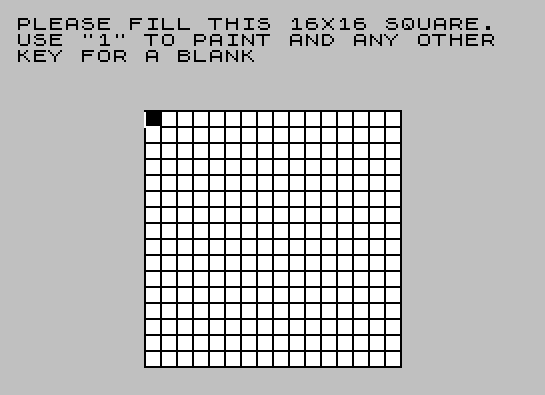
This program lets the user draw a 16×16 binary pixel pattern on screen, then animates it by repeatedly rotating the pattern 90 degrees and encoding each row into UDG (User Defined Graphics) characters. The 16×16 grid is entered cell by cell using key “1” for a filled pixel or any other key for blank, with FLASH and BRIGHT attributes highlighting the current cell. The encoded pattern is displayed as a 2×2 block of UDGs that can be scrolled around the screen using keys 5, 6, 7, and 8. The rotation is performed in BASIC by transposing the matrix into a second string array B$ and copying back into A$, repeating four times to cycle through all orientations. SAVE at line 440 uses the expression `PI` (≈3.14159, truncated to 3) as the auto-start line number, which is a known memory-optimisation trick.
Program Structure
The program is organised into several logical phases controlled by GO SUB calls:
- Initialisation (line 280 → 360–430): Clears the screen, prints instructions, draws a 16×16 grid with
PLOT/DRAW, and sets up variables includingN1=1,DIM A$(16,16), andDIM B$(16,16). - Pattern entry (lines 300–350): Iterates over every cell of the 16×16 grid, flashes the cursor, waits for a keypress with
PAUSE 0, records “1” or space, and prints a block character if “1” was pressed. - UDG encoding and rotation loop (lines 20–120): Iterates four times (B = 144, 148, 152, 156), encodes eight rows of A$ into four UDGs per iteration using
FN C, then rotates the grid 90° using B$ as a buffer. - Playback / movement (lines 130–230): Plays a brief ascending/descending beep sequence, then enters an event loop reading keys 5/6/7/8 to move and redisplay the 2×2 UDG block.
UDG Encoding — FN C
The function defined at line 380 converts an 8-character substring of A$ into a single UDG byte:DEF FN C(L$) = (128 AND L$(1)="1") + (64 AND L$(2)="1") + ... + (1 AND L$(8)="1")
Each of the eight characters in the substring contributes its positional bit-weight if and only if it equals "1". This exploits the Spectrum BASIC convention that boolean AND returns the left operand if the condition is true, or 0 otherwise, producing a clean bitmap byte without any explicit branching.
90-Degree Rotation
Lines 90–120 perform an in-place 90° clockwise rotation of the 16×16 string matrix. The algorithm uses B$ as a scratch buffer:
LET B$(I,J) = A$(J, 17-I)— reads the transposed and column-reversed element (equivalent to a 90° clockwise rotation).LET A$(I) = B$(I)— copies each row of B$ back into A$ immediately after computing it.
This rotation is applied inside the outer FOR B=144 TO 159 STEP 4 loop, so all four 90° rotations (0°, 90°, 180°, 270°) are encoded into UDG slots 144–159 successively before the display phase begins.
UDG Layout
Each orientation of the pattern occupies four consecutive UDGs covering a 2×2 character cell (16×16 pixels):
| B value | UDGs used | Orientation |
|---|---|---|
| 144 | \a \b / \c \d (144–147) | 0° |
| 148 | 148–151 | 90° |
| 152 | 152–155 | 180° |
| 156 | 156–159 | 270° |
The encoding fills the top-left quadrant (rows 0–7, cols 0–7) into the first UDG, top-right into the second, bottom-left into the third, and bottom-right into the fourth, using the 9 TO string slice to select the right half of each row.
Movement Dispatch — Computed GO SUB
Lines 180–200 implement a four-way keypress dispatcher without an IF chain:LET B=(10 AND T$="5")+(20 AND T$="6")+(30 AND T$="7")+(40 AND T$="8")
Only one term is non-zero at a time, giving B a value of 10, 20, 30, or 40. GO SUB 230+B then jumps to line 240, 250, 260, or 270 respectively — each subroutine sets the active UDG base (CH) and adjusts the screen position (R, C) with clamped arithmetic before returning.
Notable Idioms and Techniques
NOT PIevaluates toNOT 3.14159… = 0, used as a zero literal inFOR I=NOT PI TO 7and elsewhere. This saves bytes over typing0in some tokenised forms.N1=1is set once at line 370 and reused throughout as a numeric constant, saving tokenised space compared to repeated literal1s, particularly inside the longDEF FNat line 380.- Boundary clamping uses boolean arithmetic: e.g.
C=C-2*(C>2)subtracts 2 only when C is already greater than 2, avoidingIFstatements. SAVE "PATTERNS" LINE PIat line 440 saves with auto-start line 3 (INT of PI), which does not correspond to a program line and will simply run from line 10 — a harmless quirk.- The grid-drawing routine (lines 390–420) uses
PLOT/DRAWfor the border lines andPRINT … OVER 1for the horizontal interior lines, mixing pixel and character graphics.
Image Gallery
Source Code
   10 GO SUB 280
   20 FOR B=144 TO 159 STEP 4
   30 FOR I=NOT PI TO 7
   40 POKE USR CHR$ (B)+I,FN C(A$(I+N1))
   50 POKE USR CHR$ (B+N1)+I,FN C(A$(I+N1,9 TO ))
   60 POKE USR CHR$ (B+2)+I,FN C(A$(I+9))
   70 POKE USR CHR$ (B+3)+I,FN C(A$(I+9,9 TO ))
   80 NEXT I
   90 FOR I=N1 TO 16: FOR J=N1 TO 16
  100 LET B$(I,J)=A$(J,17-I)
  110 NEXT J: LET A$(I)=B$(I)
  120 NEXT I: NEXT B: CLS
  130 FOR I=R TO 20 STEP 2: BEEP .075,I: NEXT I
  140 FOR I=I TO R STEP -2: BEEP .075,I: NEXT I
  150 PRINT " USE 5,6,7,& 8 TO MOVE PATTERN"
  160 PRINT AT R,C;"\a\b";TAB C;"\c\d"
  170 LET T$=INKEY$
  180 LET B=(10 AND T$="5")+(20 AND T$="6")+(30 AND T$="7")+(40 AND T$="8")
  190 IF NOT B THEN GO TO 170
  200 GO SUB 230+B
  210 PRINT AT R,C;CHR$ CH;CHR$ (CH+N1)
  220 PRINT AT R+N1,C;CHR$ (CH+2);CHR$ (CH+3)
  230 GO TO 170
  240 LET CH=148: LET C=C-2*(C>2): RETURN
  250 LET CH=152: LET R=R+2*(R<19): RETURN
  260 LET CH=144: LET R=R-2*(R>2): RETURN
  270 LET CH=156: LET C=C+2*(C<29): RETURN
  280 CLS : PRINT "PLEASE FILL THIS 16X16 SQUARE.  USE ""1"" TO PAINT AND ANY OTHER  KEY FOR A BLANK"
  290 GO SUB 360
  300 FOR I=N1 TO 16
  310 FOR J=N1 TO 16: LET R=5+I: LET C=7+J
  320 PRINT AT R,C; FLASH N1; BRIGHT N1; OVER N1;" ": PAUSE 0: LET A$(I,J)=INKEY$
  330 PRINT AT R,C; FLASH 0; BRIGHT N1; OVER N1;" "
  340 IF A$(I,J)="1" THEN PRINT AT R,C;"█"
  350 NEXT J: NEXT I: LET R=10: LET C=15: RETURN
  360 PRINT AT 6,8;
  370 LET N1=1: DIM A$(16,16): DIM B$(16,16)
  380 DEF FN C(L$)=(128 AND L$(N1)="1")+(64 AND L$(2)="1")+(32 AND L$(3)="1")+(16 AND L$(4)="1")+(8 AND L$(5)="1")+(4 AND L$(6)="1")+(2 AND L$(7)="1")+(1 AND L$(8)="1")
  390 FOR I=NOT PI TO 128 STEP 8
  400 PLOT 64,128-I: DRAW 128,0
  410 PLOT 64+I,128: DRAW 0,-128
  420 IF I<128 THEN PRINT TAB 8; BRIGHT N1; OVER N1;"                "
  430 NEXT I: RETURN
  440 SAVE "PATTERNS" LINE PI
Note: Type-in program listings on this website use ZMAKEBAS notation for graphics characters.