
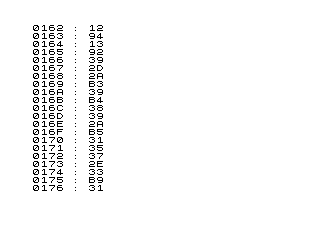
This program is a scrolling memory dump utility that continuously reads bytes from consecutive memory addresses and displays them in hexadecimal. Starting from a user-supplied address, it decodes each 16-bit address and the byte stored there into four-digit hex notation by repeatedly dividing by powers of 16, using CHR$(28+n) to map nibble values 0–15 to the ZX81 hex character set (characters 28–43 correspond to ‘0’–’9′ and ‘A’–’F’). Each line shows the address in hex, a colon separator, and the byte value in two hex digits, with TAB 31 padding the line to force a new row. The loop increments the address by one on each iteration and halts scrolling only while a key is held, then resumes automatically.
Program Analysis
Program Structure
The program is a simple loop with four logical phases:
- Initialisation (line 10): prompts the user for a starting address.
- Address decomposition (lines 21–28): breaks the 16-bit address into four hex nibbles.
- Display (lines 29–40): prints the address and byte value in hex, then advances to the next address.
- Flow control (lines 50–60): waits while any key is held, then jumps back to scroll and repeat.
Hex Encoding via CHR$(28+n)
The ZX81 character set places the digits '0'–'9' at positions 28–37 and the letters 'A'–'F' at positions 38–43. By computing a nibble value n (0–15) and printing CHR$(28+n), the program neatly maps any nibble to its correct hex character without needing a lookup string or conditional branching. This is a compact and well-known ZX81 idiom.
Address Nibble Decomposition
Lines 21–25 manually decompose the 16-bit address X into four nibbles using successive integer division and modulo arithmetic:
| Variable | Represents | Calculation |
|---|---|---|
H1 | Most significant nibble | INT(X/4096) |
H2 | Second nibble | INT((X − H1×4096)/256) |
H3 | Third nibble | INT(Y/16) where Y = X − H1×4096 − H2×256 |
H4 | Least significant nibble | Y − 16×H3 |
The combined hex address string is assembled in line 29 and stored in A$.
Byte Value Display
Line 30 reads the byte at address X using PEEK X into variable A. Line 40 then prints the pre-built address string, a colon separator, and the two hex digits of A inline, again using the CHR$(28+n) technique. The TAB 31 at the end of the PRINT statement forces the cursor past column 31, causing the ZX81’s 32-column display to wrap and begin a new screen line, effectively terminating the output row without a newline token.
Scroll and Keypress Pause
Line 20 issues a SCROLL command before each new line is printed, keeping the display continuously rolling. Lines 50–60 form a busy-wait pause: IF INKEY$<>"" loops back to itself for as long as any key is depressed, freezing the address increment. Once the key is released the program falls through to GOTO 20 and resumes scrolling. This is the inverse of the common PAUSE 0 / INKEY$ idiom — here a key being held pauses execution rather than a key press advancing it.
Notable Techniques and Observations
- No machine code is used; all arithmetic is done in BASIC floating-point, which is adequate for a display-rate memory browser.
- The address string
A$is built once per iteration (line 29) and reused in the PRINT (line 40), avoiding redundant recalculation. - There is no upper-bound check on
X; incrementing past 65535 will cause BASIC to attempt a PEEK of an out-of-range address and produce an error. - Lines 70 (
SAVE) and 80 (RUN) are never reached during normal execution; they exist solely as a program header/auto-start mechanism on tape.
Image Gallery
Source Code
  10 INPUT X
  20 SCROLL
  21 LET H1=INT (X/4096)
  22 LET H2=INT ((X-H1*4096)/256)
  23 LET Y=X-H1*4096-H2*256
  24 LET H3=INT (Y/16)
  25 LET H4=Y-16*H3
  29 LET A$=CHR$ (28+H1)+CHR$ (28+H2)+CHR$ (28+H3)+CHR$ (28+H4)
  30 LET A=PEEK X
  40 PRINT A$;" : ";CHR$ (28+INT (A/16));CHR$ (28+A-(INT (A/16)*16));TAB 31
  45 LET X=X+1
  50 IF INKEY$<>"" THEN GOTO 50
  60 GOTO 20
  70 SAVE "1010%5"
  80 RUN
Note: Type-in program listings on this website use ZMAKEBAS notation for graphics characters.