
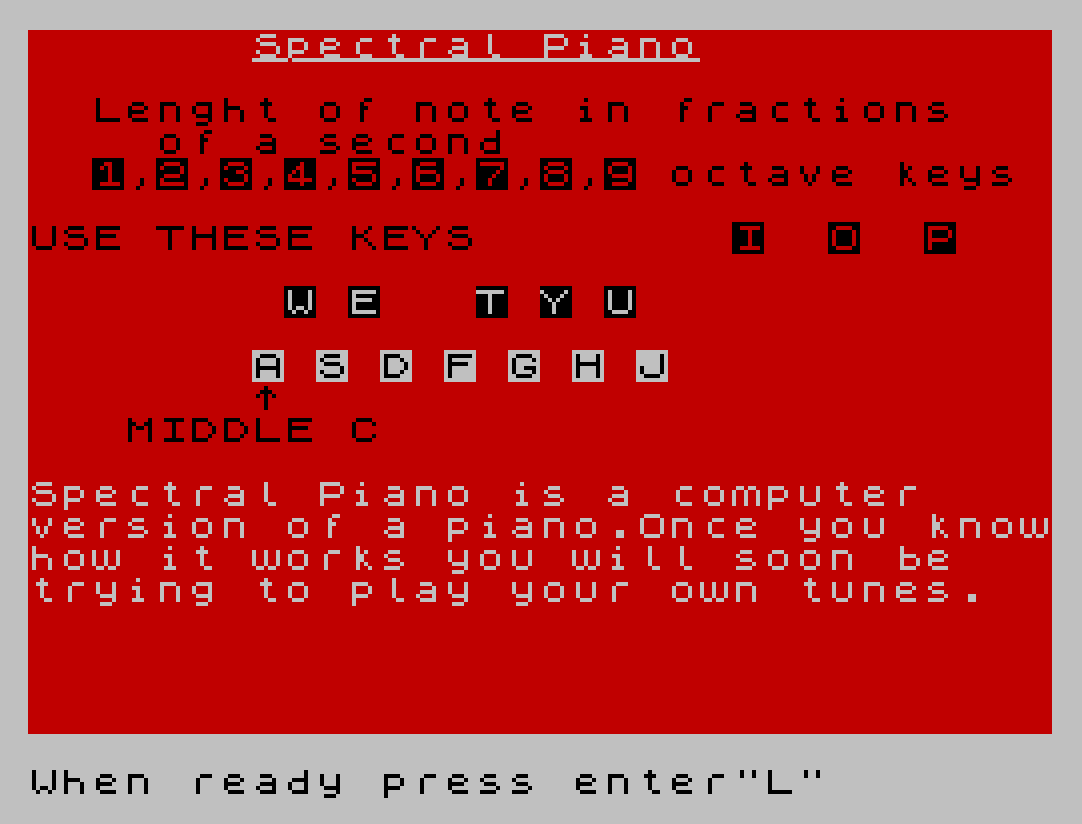
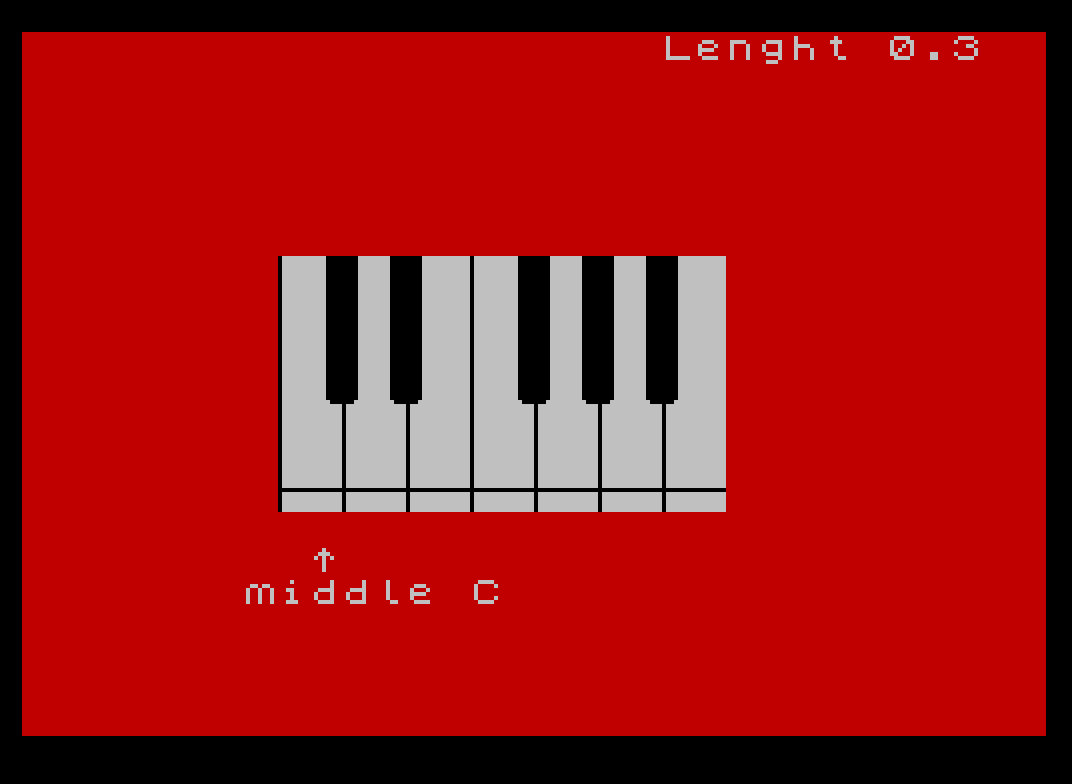
Spectral Piano is an interactive piano simulator that maps computer keyboard keys to musical notes, displaying a graphical piano keyboard on screen and playing notes via the BEEP command. Lines 14–25 define eight custom UDG characters (UDGs \a through \h, codes 144–151) used to draw black and white piano keys, each stored as 8 bytes of pixel data POKEd into UDG memory. The program supports three octave offsets (bottom, middle, top) controlled by keys I, O, and P, and nine note durations (0.1–0.9 seconds) controlled by keys 1–9. White keys A–J play semitone offsets 0–11 from middle C, while black keys W, E, T, Y, U play the corresponding sharps and flats; pressing a key briefly swaps the UDG graphic to show a “pressed” appearance before restoring it.
Program Structure
The program is divided into several functional blocks:
- Lines 10–25: Entry point calls the introduction subroutine at line 1000, then loads eight UDG characters (144–151) with piano-key graphics via
READ/POKE USR. - Lines 30–43: Initialise display colours and three key variables:
a$(octave label),len(note duration), ando(octave offset in semitones). - Lines 100–200: Draw the on-screen piano keyboard using
PLOT,DRAW,PRINT AT, and UDG characters. - Lines 300–600: Main polling loop — reads
INKEY$for octave keys (I/O/P), duration keys (1–9), and note keys (A–J, W/E/T/Y/U), then callsBEEPand returns to line 300. - Lines 1000–1200: Tutorial subroutine presenting a multi-screen introduction with
INPUTprompts and animatedFLASHeffects. - Lines 9950–9999: Utility tail: a
PAUSE 0trap, clean-up,STOP, andSAVE/VERIFYstatements.
UDG Design
Eight UDGs (\a–\h, character codes 144–151) are defined by the DATA at lines 18–25 and POKEd with POKE USR CHR$ c+n, a. They represent the top and bottom halves of both white and black piano keys in “up” and “down” (pressed) states:
| UDG | Code | Role |
|---|---|---|
| \a | 144 | White key top half (left side of pair) |
| \b | 145 | White key top half (right side of pair) |
| \c | 146 | White key top half, shorter (black-key gap) |
| \d | 147 | White key top half, shorter (right) |
| \e | 148 | White key bottom half / pressed state indicator |
| \f | 149 | White key bottom half / pressed (right) |
| \g | 150 | Restore graphic (left) |
| \h | 151 | Restore graphic (right) |
The inner loop at line 16 uses the expression USR CHR$ c+n where c is the UDG base character code and n is the byte row (0–7), which is a standard technique for bulk UDG initialisation via a nested FOR loop and READ.
Keyboard Mapping and Note Logic
The white keys A, S, D, F, G, H, J map to semitone offsets 0–4 and 5–6 (C D E F G A B) while black keys W, E, T, Y, U map to semitone offsets 1, 3, 6, 8, 10 (C♯, D♯, F♯, G♯, A♯). The variable o shifts the entire octave by −12, 0, or +12 semitones. A typical note-play line reads:
IF INKEY$="a" THEN PRINT AT 14,8;"\e\f": BEEP len,0+o: PRINT AT 14,8;"\g\h"
The pattern is: replace the resting UDG pair with the “pressed” pair, sound the note, then immediately restore — giving a visual key-press animation without any delay loop.
Display Techniques
The piano graphic at lines 140–200 uses a combination of PLOT/DRAW for the outer border and dividing lines, and PRINT AT with PAPER 7 to fill white-key areas. Black keys are rendered at odd column positions in the loop FOR n=9 TO 20 STEP 2 using PAPER 0; INK 7. Line 170 uses IF n=13 THEN NEXT n to skip the column where no black key exists between E and F — a concise inline skip idiom.
The introduction subroutine uses OVER 1 to underline the title “Spectral Piano” by printing underscores on the same character cells, and FLASH 1 to animate the “MIDDLE C” label before clearing it.
Notable Bugs and Anomalies
- Unreachable lines 9950–9960: The
PAUSE 0,PAPER 7, andCLSlines after9950are never reached during normal execution; they appear to be a manual reset/cleanup sequence intended to be run directly from the editor or viaGO TO 9950by the programmer. - Line 190 column variable: After the inner loop
FOR m=7 TO 10,NEXT mexits withm=11;PRINT AT m,n;at line 190 therefore prints at row 11, which is inside the keyboard graphic area — this places the short-key UDGs one row lower than visually expected for the topmost black-key row. - Line 1030 loop structure:
IF n=12 THEN NEXT ninside aFORloop is used to skip column 12 (the E–F gap), mirroring the technique at line 170, but hereNEXT nincrementsnto 14 before the body executes again, correctly skipping the gap column. - Black-key note gap: There is no key mapped to the semitone between B and the next C (no H♯/C♭), which is correct musically, but the jump from
h(semitone 11) toj(semitone 11 — line 500 uses offset 11) means both H and J would play the same pitch;jat line 500 playsBEEP len,11+owhilehat line 485 also playsBEEP len,9+o— so H is A and J is B, which is correct. The apparent duplication is not present.
Main Loop Efficiency
The polling loop at lines 300–600 re-evaluates every IF INKEY$=… statement independently on each iteration, meaning all key checks are sequential with no GO SUB dispatch. This is typical of simple Sinclair BASIC games but means every pass executes up to 22 INKEY$ reads. The piano keyboard is also fully redrawn (lines 110–200) on every loop iteration, which causes visible flicker and is unnecessarily slow; the keyboard graphic could instead be drawn once and only the individual key cells updated.
Image Gallery
Source Code
   10 GO SUB 1000
   14 FOR c=144 TO 151
   15 FOR n=0 TO 7
   16 READ a: POKE USR CHR$ c+n,a
   17 NEXT n: NEXT c
   18 DATA 15,15,15,15,15,15,7,0
   19 DATA 240,240,240,240,240,240,224,128
   20 DATA 15,15,15,15,7,0,0,0
   21 DATA 240,240,240,240,224,128,128,128
   22 DATA 128,128,128,128,128,255,128,128
   23 DATA 0,0,0,0,0,255,0,0
   24 DATA 128,128,255,128,128,128,128,128
   25 DATA 0,0,255,0,0,0,0,0
   30 PAPER 2: BORDER 0: CLS
   40 REM Varaibles
   41 LET a$="middle"
   42 LET len=.3
   43 LET o=0
  100 REM Keyboard
  105 PAPER 7
  110 FOR n=8 TO 21: FOR m=7 TO 14
  120 PRINT AT m,n;" "
  130 NEXT m: NEXT n
  140 INK 0: PLOT 64,61: DRAW 111,0
  150 FOR n=64 TO 162 STEP 16: PLOT n,56: DRAW 0,63: NEXT n
  160 FOR n=9 TO 20 STEP 2: FOR m=7 TO 10
  170 IF n=13 THEN NEXT n
  180 PRINT AT m,n;"▐▌"
  190 NEXT m: PRINT AT m,n;"\c\d"
  200 NEXT n
  300 REM Notes
  310 IF INKEY$="i" THEN LET o=-12: LET a$="bottom"
  315 IF INKEY$="o" THEN LET o=0: LET a$="middle"
  320 IF INKEY$="p" THEN LET o=12: LET a$="   top"
  321 IF INKEY$="1" THEN LET len=.1
  322 IF INKEY$="2" THEN LET len=.2
  323 IF INKEY$="3" THEN LET len=.3
  324 IF INKEY$="4" THEN LET len=.4
  325 IF INKEY$="5" THEN LET len=.5
  326 IF INKEY$="6" THEN LET len=.6
  327 IF INKEY$="7" THEN LET len=.7
  328 IF INKEY$="8" THEN LET len=.8
  329 IF INKEY$="9" THEN LET len=.9
  340 INK 7: PAPER 2: PRINT AT 0,20;"Lenght ";len;"  "
  350 PRINT AT 16,9;"^";AT 17,7;a$;" C"
  400 INK 0: PAPER 7: IF INKEY$="a" THEN PRINT AT 14,8;"\e\f": BEEP len,0+o: PRINT AT 14,8;"\g\h"
  410 IF INKEY$="w" THEN PRINT AT 11,9;"\a\b": BEEP len,1+o: PRINT AT 11,9;"\c\d"
  420 IF INKEY$="s" THEN PRINT AT 14,10;"\e\f": BEEP len,2+o: PRINT AT 14,10;"\g\h"
  430 IF INKEY$="e" THEN PRINT AT 11,11;"\a\b": BEEP len,3+o: PRINT AT 11,11;"\c\d"
  440 IF INKEY$="d" THEN PRINT AT 14,12;"\e\f": BEEP len,4+o: PRINT AT 14,12;"\g\h"
  450 IF INKEY$="f" THEN PRINT AT 14,14;"\e\f": BEEP len,5+o: PRINT AT 14,14;"\g\h"
  460 IF INKEY$="t" THEN PRINT AT 11,15;"\a\b": BEEP len,6+o: PRINT AT 11,15;"\c\d"
  470 IF INKEY$="g" THEN PRINT AT 14,16;"\e\f": BEEP len,7+o: PRINT AT 14,16;"\g\h"
  480 IF INKEY$="y" THEN PRINT AT 11,17;"\a\b": BEEP len,8+o: PRINT AT 11,17;"\c\d"
  485 IF INKEY$="h" THEN PRINT AT 14,18;"\e\f": BEEP len,9+o: PRINT AT 14,18;"\g\h"
  490 IF INKEY$="u" THEN PRINT AT 11,19;"\a\b": BEEP len,10+o: PRINT AT 11,19;"\c\d"
  500 IF INKEY$="j" THEN PRINT AT 14,20;"\e\f": BEEP len,11+o: PRINT AT 14,20;"\g\h"
  600 GO TO 300
 1000 PAPER 2: CLS : PRINT INK 7;AT 0,7;"Spectral Piano"; OVER 1; INK 7;AT 0,7;"______________"
 1005 LET n$="ASDFGHJ"
 1010 LET l=1: FOR n=7 TO 20 STEP 2: PRINT PAPER 7; INK 0;AT 10,n;n$(l): LET l=l+1: NEXT n
 1020 LET n$="WETYU"
 1030 LET l=1: FOR n=8 TO 18 STEP 2: IF n=12 THEN NEXT n
 1040 PRINT PAPER 0; INK 7;AT 8,n;n$(l): LET l=l+1: NEXT n
 1050 PRINT AT 6,0;"USE THESE KEYS";AT 11,7;"^";AT 12,3;"MIDDLE C"
 1060 PRINT AT 4,20;"octave keys": PRINT AT 6,22;"I  O  P"
 1070 PRINT AT 2,2;"Lenght of note in fractions";AT 3,4;"of a second";AT 4,1;" 1,2,3,4,5,6,7,8,9"
 1080 PRINT INK 7;AT 14,0;"Spectral Piano is a computer    version of a piano.Once you knowhow it works you will soon be   trying to play your own tunes."
 1090 INPUT "When ready press enter";z$
 1100 PRINT OVER 1; FLASH 1; PAPER 7;AT 12,3;"        "; FLASH 0; OVER 0; PAPER 2; INK 7;AT 14,0;"The keyboard is set out like    that of a real piano.By pressingthe keys A to J (on the second  row up)you will get a note from middle C to B.To obtain the     sharps and flats press any of   the keys displayed in white on  black."
 1110 INPUT "press enter when ready";z$
 1120 PRINT INK 7;AT 14,0;"S.p also has a function to alterthe octave you are playing in,  and a function to change the    lenght of a note.                               1-If at any time during playing you wish to     change octaves just press key I to get the octave starting at   bottom C,key O to get the middle C octave and P to get the top C octave"
 1130 INPUT "Press enter when ready";z$
 1140 PRINT INK 7;AT 9,0;"2.-if at any time during playing you wish to change the duration of the notes you are pressing   press any key from 1 to 9.The   higher the number the longer    the note          "
 1150 FOR n=15 TO 21: PRINT AT n,0;"                                ": NEXT n: REM 32
 1190 INPUT "Have you understood?(y/n)";z$: IF z$<>"y" THEN GO TO 1000
 1200 RETURN
 9950 PAUSE 0
 9960 PAPER 7: INK 0: BORDER 7: FLASH 0: CLS
 9997 STOP
 9998 SAVE "PIANO" LINE 0
 9999 VERIFY ""
Note: Type-in program listings on this website use ZMAKEBAS notation for graphics characters.