
This program is an interactive pixel drawing tool that lets the user move a cursor around the ZX81’s 64×44 low-resolution graphics display using keys 5–8 for orthogonal movement and keys 1–4 for diagonal movement. A toggle between PLOT and UNPLOT modes (keys P and U) allows drawing or erasing pixels, and keys C and D draw counterclockwise and clockwise circles respectively using trigonometric parametric equations with a radius of 10 pixels. The circle-drawing routine iterates B from 1 to 32, sampling 32 points around the circle using COS and SIN of multiples of PI/16. An optional instruction screen is displayed at startup, and the program includes a SAVE statement with an auto-run flag at line 1070.
Program Analysis
Program Structure
The program is divided into three logical sections:
- Startup/Instructions (lines 1–9): Displays an instruction prompt, optionally branches to the instructions subroutine at line 1000, then initialises variables and clears the screen.
- Main drawing loop (lines 10–560): Initialises cursor position, polls
INKEY$for all drawing commands, enforces boundary clamping, and dispatches to circle-drawing or diagonal movement subroutines. - Instructions subroutine (lines 1000–1080): Prints a multi-screen help text using
AT, waits for a keypress, then returns. Lines 1060–1080 handle saving the program with an auto-run flag.
Initialisation and Variables
| Variable | Purpose |
|---|---|
A | Plot mode flag (1 = PLOT, 0 = UNPLOT) |
X, Y | Current cursor pixel coordinates |
P | Temporary copy of A used to decide whether to PLOT the cursor pixel each frame |
B | Step counter for circle drawing (1–32) |
N, I | Saved centre coordinates for circle drawing |
The variable A is set to 1 at line 10 (PLOT mode) and modified by keys P and U at lines 180 and 170 respectively. P is copied from A at line 40 each frame and tested at line 70 to decide whether the cursor pixel should be plotted.
Main Loop and Cursor Rendering
The main loop (lines 50–260) implements a classic ZX81 “blink cursor” pattern: line 50 plots the pixel, line 60 immediately unplots it, and line 70 re-plots it only if P=A (i.e., plot mode is active). This gives a static pixel in PLOT mode and an invisible cursor in UNPLOT mode. The loop then scans INKEY$ sequentially for each possible command key — a common ZX81 idiom since there is no ON…GOSUB construct.
Movement Keys
| Key | Action |
|---|---|
| 8 | Move right (X+1) |
| 7 | Move up (Y+1) |
| 6 | Move down (Y−1) |
| 5 | Move left (X−1) |
| 4 | Diagonal: right and up |
| 3 | Diagonal: right and down |
| 2 | Diagonal: left and up |
| 1 | Diagonal: left and down |
Boundary clamping is applied at lines 240–255 and reused by the diagonal branches (lines 270–380), which all GOTO 240 rather than duplicating the clamp logic.
Circle Drawing (Lines 390–560)
Two circle routines are provided: counterclockwise (key C, lines 390–470) and clockwise (key D, lines 480–560). Both use the parametric form with a fixed radius of 10 pixels and 32 steps around the circle:
X = 10 + N - 10*COS(B/16*PI)Y = I ± 10*SIN(B/16*PI)(sign differs between C and D routines)
The centre is stored in N and I at lines 200–210 before the circle begins. The +10 offset in the X formula shifts the circle so that at B=0 (start), X equals N (COS(0)=1, so 10+N−10=N). Each iteration increments B and re-enters the same routine only if the corresponding key is still held; releasing the key causes GOTO 50, resuming normal cursor movement mid-circle.
Boundary clamping within the circle routines (e.g. lines 410–425) uses a slightly different approach: after clamping, it checks whether X or Y has actually hit the boundary and if so aborts the circle iteration with GOTO 50, preventing distorted arcs being plotted along the screen edge.
Key Polling Technique
All input is handled by sequential IF INKEY$="x" THEN tests in the main loop. This means only one key action fires per loop iteration and there is no priority mechanism beyond order of testing. Because INKEY$ is re-evaluated on every test, rapidly changing key state between tests (unlikely in SLOW mode) could in theory trigger unexpected branches, though this is a standard ZX81 limitation.
Instructions Subroutine
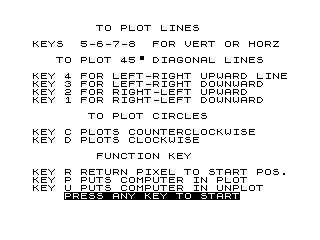
The instruction screen at lines 1000–1055 uses PRINT AT row,col; positioning extensively. Line 1010 uses the zmakebas escape 45\ ' to display a diagonal “▝” block graphic character as part of “45° diagonal lines.” Line 1040 prints the prompt “PRESS ANY KEY TO START” in inverse video using %-escaped characters. The subroutine ends with CLS and RETURN.
Notable Anomalies and Observations
- Line 3 tests
CODE INKEY$=51; character code 51 is “3”, so pressing 3 skips the instructions. The logic is correct but slightly unusual — pressing any other key (or no key) within thePAUSE 4E4timeout will show instructions. - The
SLOWkeyword at lines 5 and 8 causes the program to run in the ZX81’s slow (display-generating) mode, which is necessary for the screen to remain visible during computation.SLOWappears twice, the second time (line 8) after the optionalGOSUB 1000branch point, ensuring slow mode is always set before the main loop. - Variable
Bis set to 1 at line 190 on every pass through the main loop, which resets the circle step counter. This means the circle always begins from a fresh start each time C or D is pressed. - Lines 1060–1080 (
CLEAR,SAVE "1028\0",RUN) form a save block that is never called during normal execution — they are dead code accessible only by directly running line 1060.
Image Gallery
Source Code
   1 PRINT AT 9,6;"INSTRUCTIONS Y/N ?"
   2 PAUSE 4E4
   3 IF CODE INKEY$=51 THEN GOTO 8
   4 CLS
   5 SLOW
   6 GOSUB 1000
   8 SLOW
   9 CLS
  10 LET A=1
  20 LET X=0
  30 LET Y=0
  40 LET P=A
  50 PLOT X,Y
  60 UNPLOT X,Y
  70 IF P=A THEN PLOT X,Y
  80 IF INKEY$="R" THEN GOTO 10
  90 IF INKEY$="8" THEN LET X=X+1
 100 IF INKEY$="7" THEN LET Y=Y+1
 110 IF INKEY$="6" THEN LET Y=Y-1
 120 IF INKEY$="5" THEN LET X=X-1
 130 IF INKEY$="4" THEN GOTO 270
 140 IF INKEY$="3" THEN GOTO 300
 150 IF INKEY$="2" THEN GOTO 330
 160 IF INKEY$="1" THEN GOTO 360
 170 IF INKEY$="U" THEN LET P=0
 180 IF INKEY$="P" THEN LET P=1
 190 LET B=1
 200 LET N=X
 210 LET I=Y
 220 IF INKEY$="C" THEN GOTO 390
 230 IF INKEY$="D" THEN GOTO 480
 240 IF X>=63 THEN LET X=63
 245 IF X<=0 THEN LET X=0
 250 IF Y>=43 THEN LET Y=43
 255 IF Y<=0 THEN LET Y=0
 260 GOTO 50
 270 LET X=X+1
 280 LET Y=Y+1
 290 GOTO 240
 300 LET X=X+1
 310 LET Y=Y-1
 320 GOTO 240
 330 LET X=X-1
 340 LET Y=Y+1
 350 GOTO 240
 360 LET X=X-1
 370 LET Y=Y-1
 380 GOTO 240
 390 LET X=10+N-10*COS (B/16*PI)
 400 LET Y=I-10*SIN (B/16*PI)
 410 IF X>=63 THEN LET X=63
 413 IF Y>=43 THEN LET Y=43
 416 IF X=63 OR Y=43 THEN GOTO 50
 419 IF X<=0 THEN LET X=0
 422 IF Y<=0 THEN LET Y=0
 425 IF X=0 OR Y=0 THEN GOTO 50
 430 PLOT X,Y
 440 LET B=B+1
 450 IF B>32 THEN GOTO 50
 460 IF INKEY$="C" THEN GOTO 390
 470 GOTO 50
 480 LET X=10+N-10*COS (B/16*PI)
 490 LET Y=I+10*SIN (B/16*PI)
 500 IF X>=63 THEN LET X=63
 503 IF Y>=43 THEN LET Y=43
 506 IF X=63 OR Y=43 THEN GOTO 50
 509 IF X<=0 THEN LET X=0
 512 IF Y<=0 THEN LET Y=0
 515 IF X=0 OR Y=0 THEN GOTO 50
 520 PLOT X,Y
 530 LET B=B+1
 540 IF B>32 THEN GOTO 50
 550 IF INKEY$="D" THEN GOTO 480
 560 GOTO 50
 1000 PRINT AT 0,8;"TO PLOT LINES";AT 2,0;"KEYS  5-6-7-8  FOR VERT OR HORZ"
 1010 PRINT AT 4,3;"TO PLOT 45 ' DIAGONAL LINES"
 1015 PRINT AT 6,0;"KEY 4 FOR LEFT-RIGHT UPWARD LINEKEY 3 FOR LEFT-RIGHT DOWNWARD   KEY 2 FOR RIGHT-LEFT UPWARD     KEY 1 FOR RIGHT-LEFT DOWNWARD"
 1020 PRINT AT 11,7;"TO PLOT CIRCLES"
 1025 PRINT AT 13,0;"KEY C PLOTS COUNTERCLOCKWISE    KEY D PLOTS CLOCKWISE"
 1030 PRINT AT 16,8;"FUNCTION KEY"
 1035 PRINT AT 18,0;"KEY R RETURN PIXEL TO START POS.KEY P PUTS COMPUTER IN PLOT     KEY U PUTS COMPUTER IN UNPLOT"
 1040 PRINT AT 21,4;"%P%R%E%S%S% %A%N%Y% %K%E%Y% %T%O% %S%T%A%R%T"
 1045 PAUSE 4E4
 1050 CLS
 1055 RETURN
 1060 CLEAR
 1070 SAVE "1028%0"
 1080 RUN
Note: Type-in program listings on this website use ZMAKEBAS notation for graphics characters.