
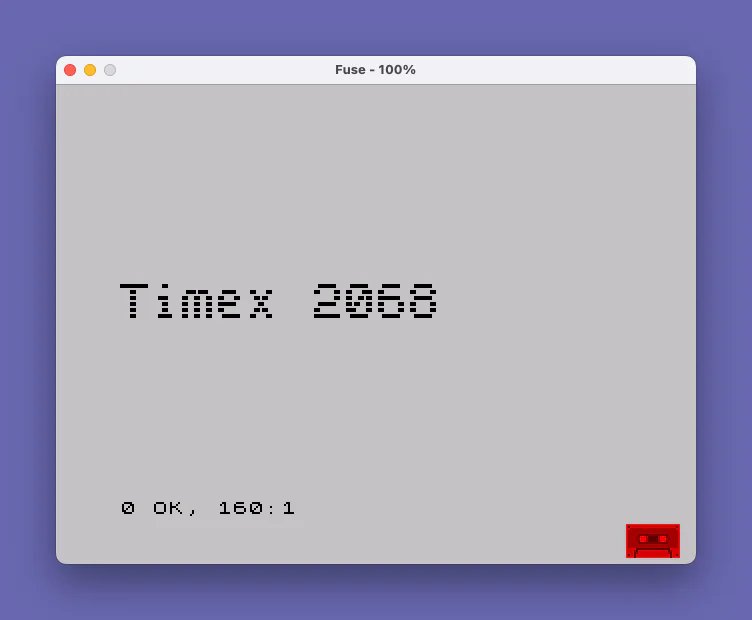
This program takes a user-supplied text string of up to 16 characters, prints it in the top-left corner of the screen, then scans the pixels of that text and redraws them enlarged on the lower portion of the display. It iterates over x coordinates from 0 to 127 in steps of 1/3, and for each column samples 8 pixel rows (y = 0 to 7) using the POINT command to detect set pixels in the character row at screen coordinate y+168. Each detected pixel is plotted twice using PLOT at scaled coordinates (2*x, 3*y+80) and (2*y+81), producing an approximately 2× horizontal and 3× vertical magnification. A short BEEP accompanies each plotted point, creating an audiovisual effect as the enlarged text is drawn.
Program Analysis
Program Structure
The program is short and linear, consisting of five logical steps:
- Clear the screen (
CLSat line10). - Accept a text string from the user, up to 16 characters (
INPUTat line50). - Print the string at the top-left of the screen in INK 7 (
PRINT AT 0,0at line60). - Scan the pixel data of the printed text using nested
FORloops andPOINT(lines 70–160). - Redraw each detected pixel enlarged, with an accompanying
BEEP(lines 100–140).
Pixel Scanning Technique
The outer loop at line 70 iterates x from 0 to 127 in steps of 1/3, giving approximately 384 column samples across the 128-pixel-wide text area. The inner loop at line 80 steps y through 0 to 7, covering the 8 pixel rows of a single character row. The POINT function at line 90 checks whether the pixel at graphics coordinate (x, y+168) is set. On the ZX Spectrum/TS2068, graphics coordinates place y=175 at the top of the screen, so y+168 maps to the first character row (rows 0–7 in pixel terms from the top).
Magnification Mapping
When a pixel is detected, it is plotted at (2*x, 3*y+80) at line 100 and again at (2*x, 3*y+81) at line 140. This produces roughly 2× horizontal magnification (since x is sampled every 1/3 pixel but plotted at 2*x) and 3× vertical magnification (each source row maps to at least two adjacent destination rows via the +80 and +81 offsets). The result is a blocky, enlarged rendition of the text rendered in the middle-to-lower portion of the display.
Notable Techniques
- Sub-pixel x stepping: Using
STEP 1/3in the outer loop oversamples the source column data three times per pixel column, reducing the chance of missing narrow features in the font — though on integer boundaries all three samples of the same column will yield the samePOINTresult. - POINT for font reading: Rather than directly accessing display file memory with
PEEK, the program uses the high-levelPOINTfunction to read pixel state, making it simple but slower. - Audio feedback:
BEEP .001,30at line130generates a very short click for each plotted pixel, giving an audible sense of drawing progress. - INK 7 enforcement: The
INK 7attribute at line60ensures the source text is in white ink, soPOINTreliably returns true for character pixels regardless of the current paper/ink context.
Bugs and Anomalies
The second PLOT at line 140 uses 3*y+81 rather than 3*y+82, meaning consecutive character rows in the destination overlap by one pixel row — each source row maps to y-offsets +80 and +81, while the next row maps to +83 and +84 (since y increments by 1). This leaves a one-pixel vertical gap between each pair of plotted rows, resulting in a slightly striped appearance rather than fully solid characters. Additionally, the INPUT prompt mentions a 16-character maximum but imposes no programmatic enforcement, so longer strings will simply overflow into a second screen line and may cause the source pixel scan to include unintended content.
Image Gallery
Source Code
    5 REM ZX-Appeal Sept. 86
   10 CLS
   50 INPUT "Enter text to be displayed. (16 characters max.) ";a$
   60 PRINT AT 0,0; INK 7;a$
   70 FOR x=0 TO 127 STEP 1/3
   80 FOR y=0 TO 7
   90 IF NOT POINT (x,y+168) THEN GO TO 150
  100 PLOT 2*x,3*y+80
  130 BEEP .001,30
  140 PLOT 2*x,3*y+81
  150 NEXT y
  160 NEXT x
Note: Type-in program listings on this website use ZMAKEBAS notation for graphics characters.