
This program is a demonstration of programming techniques for displaying and animating text and graphics on screen. It showcases multiple effects including teletype-style character-by-character text reveal from both left and right, screen fill and clear routines, a scrolling message system using string slicing, a moving sprite animation using block graphics characters, a “curtain raise/lower” effect using V-characters and solid block graphics, a countdown launch sequence, and decimal alignment formatting. The subroutine at line 9000 serves as a reusable screen blackout transition, filling all 22 rows with solid block characters (█) at BORDER 2 before resetting INK. The program uses the TS2068-specific SOUND keyword at line 1500 with multiple channel parameters for multi-voice audio output, and includes COPY and VERIFY commands for printer output and tape verification.
Program Analysis
Program Structure
The program is a sequential demonstration, running from line 50 through a series of self-contained effect segments. Transitions between segments are handled almost exclusively by the reusable blackout subroutine at line 9000. The main flow is broadly linear, with GO TO 1195 at line 845 jumping past lines 1200–1205 (which are empty) to continue at 1210. A GO TO 9070 at line 1650 targets a non-existent line, which in Sinclair BASIC causes execution to fall through to the next available line — a deliberate end-of-program technique.
Segment Map
| Lines | Effect |
|---|---|
| 50–100 | Teletype title reveal (character by character, two lines) |
| 105–175 | Screen blackout demo and partial clear routines |
| 185–220 | Selective row clearing (top and bottom halves) |
| 230–265 | Dual teletype from left and right simultaneously |
| 275–370 | Block fill then slow column-tracked erase |
| 380–495 | Column-by-column clear, left-slow and right-fast |
| 505–530 | Row-by-row quick clear with overlay message |
| 540–845 | Moving sprite, curtain raise/lower, panel open, border draw |
| 1210–1265 | Scrolling message using string slicing |
| 1270–1355 | Rocket graphic with countdown and blastoff |
| 1385–1495 | Sprite movement left (STEP -1) and right (FOR-NEXT) |
| 1500 | TS2068 SOUND multi-channel audio burst |
| 1540–1650 | Decimal alignment tutorial and partial screen clear demo |
| 9000–9060 | Blackout subroutine (fill screen with █, reset INK) |
Teletype Effect
The teletype technique at lines 75–100 and 240–265 works by printing a single character from a string at a calculated screen column each loop iteration. For the left-to-right version, PRINT AT 11,N;A$(N) prints the Nth character at column N. For the right-to-left version, PRINT AT 12,31-N;B$(31-N) counts down from column 30. The inner FOR M loops (lines 90–95 and 255–260) serve as software delay loops, replacing PAUSE with busy-waiting compatible with the BEEP timing.
Scrolling Message Technique
Lines 1215–1265 demonstrate a smooth horizontal message scroll. A 32-character blank string A$ is created via DIM A$(32), then prepended and appended to the message strings to create lead-in and lead-out padding. The loop iterates over a 28-character window into the padded string using B$(N TO N+27), advancing N by 1 each iteration to produce smooth scrolling. The loop bound is LEN B$-30, correctly accounting for the window width.
Blackout Subroutine (line 9000)
The reusable transition at lines 9000–9060 changes BORDER to red (2), sets PAPER 6 and INK 1, constructs a 32-character string of solid block characters (█, char 131), then prints it 22 times to fill the entire display. BEEP .01,12 provides a short audio tick on each line. After the loop, INK is reset to 0 and the subroutine returns. This routine is called six times throughout the program as a consistent wipe transition.
Curtain Effect
Lines 595–715 implement a raise-and-lower curtain. Raising uses a V character row that moves upward (L decremented each iteration) while blanking the row below it. Lowering reverses the process: L starts at 8 and increments, printing both the V row and a solid block row (D$ of █ characters) one row above to simulate the curtain descending.
2D Panel Clear
Lines 740–790 demonstrate opening a rectangular message space within a filled screen. The loop at 740–770 iterates 77 times, tracking row L (7–13) and column R (11 upward). Each iteration prints a single space at AT L,R. When L reaches 14, R is incremented and L resets to 7, effectively clearing one column of the panel at a time from left to right. The BEEP .01,20 gives a high-pitched tick for each cell.
Sprite Movement Techniques
Lines 1420–1455 contrast two approaches to horizontal sprite movement. The first uses FOR N=25 TO 0 STEP -1 (right to left) and appends a trailing space after the graphic to erase the previous position. The second uses FOR N=0 TO 28 (left to right) and prepends a leading space before the graphic. Comments at lines 1430 and 1460 explicitly document these as “SPACE AFTER GRAPHICS” and “SPACE BEFORE GRAPHICS,” making this a didactic demonstration of the technique.
TS2068-Specific Features
- Line 1500 uses
SOUND(the}keyword) with multiple semicolon-separated register/value pairs for the AY-3-8912 sound chip, a feature unique to the TS2068. - Line 9995 uses
MOVEfor tape-to-tape or device copy operations, also TS2068-specific. - Line 60 uses
BORDER,PAPER, andINKas standalone statements rather than insidePRINT, consistent with TS2068/Spectrum BASIC.
Bugs and Anomalies
- Lines 1200 and 1205 are empty (no statements), likely placeholders. The
GO TO 1195at line 845 jumps past them to line 1210 — line 1195 does not exist, so execution falls through to 1200, then 1205, then 1210. - Lines 1600–1635 contain a nested loop structure where
FOR LandFOR Rare used, butNEXT Lappears inside theFOR Rloop andNEXT Routside, inverting the expected nesting order. In Sinclair BASIC this causes the loops to execute in an unintended sequence, likely producing an incorrect partial-clear pattern rather than the described two-quadrant effect. - Lines 1545–1590 print a decimal-alignment tutorial but the PRINT statements use unquoted keywords (e.g., bare
.andO) within string literals — these appear to be explanatory pseudocode displayed as text rather than executable code samples, so the formatting may appear garbled on screen. - Line 1360 is referenced by
GO TO 1360at line 1320 but does not exist in the listing; execution would fall through to line 1385.
Delay Loop Pattern
Software delay loops of the form FOR N=1 TO X: NEXT N appear throughout (lines 125, 145, 160, 200, 270, 310, 370, etc.). Values range from 20 to 250, calibrated informally to produce visible pauses. These are preferred over PAUSE in some segments because they can be interleaved with per-iteration BEEP calls without interrupting the animation cadence.
Image Gallery
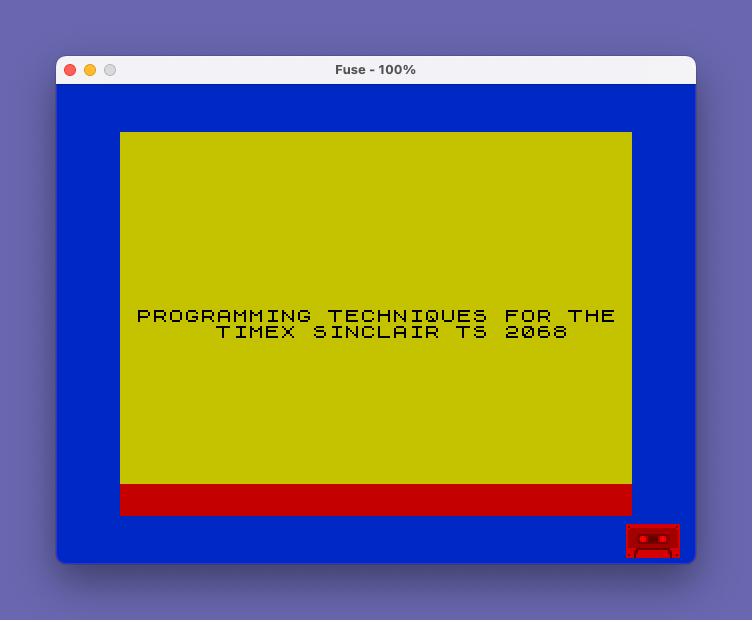
Source Code
    0 REM E`RND\.'*F7 SAVE TAN LEN \:: / PAUSE
   50 CLS
   60 BORDER 1: PAPER 6: INK 0
   65 LET B$="     TIMEX SINCLAIR TS 2068    "
   70 LET A$="PROGRAMMING TECHNIQUES FOR THE"
   75 FOR N=1 TO 30
   80 PRINT AT 11,N;A$(N): PAUSE 5: BEEP .03,9
   85 PRINT AT 12,31-N;B$(31-N)
   90 FOR M=1 TO 5
   95 NEXT M
  100 NEXT N
  105 FOR N=1 TO 21
  110 FOR M=1 TO 7
  115 NEXT M
  120 NEXT N
  125 FOR K=1 TO 100: NEXT K
  130 CLS
  135 LET A$=" TOTAL SCREEN BLACKOUT ROUTINE  "
  140 PRINT A$
  145 FOR K=1 TO 100: NEXT K
  150 GO SUB 9000
  155 PRINT AT 10,0;A$
  160 FOR K=1 TO 150: NEXT K
  165 LET A$=" CLEAR ALL OR PART OF THE SCREEN"
  170 PRINT AT 10,0;A$
  175 PAUSE 10
  180 LET C$="                                "
  185 FOR F=0 TO 9
  190 PRINT AT F,0;C$
  195 NEXT F
  200 FOR N=1 TO 100: NEXT N
  205 FOR F=11 TO 21
  210 PRINT C$
  215 NEXT F
  220 PRINT AT 21,14;"OOPS"
  225 CLS
  230 LET R$="TELETYPING IN FROM THE RIGHT  "
  235 LET L$="TELETYPING IN FROM THE LEFT   "
  240 FOR N=1 TO 30
  245 PRINT AT 5,N;L$(N): BEEP .03,5
  250 PRINT AT 15,31-N;R$(31-N): BEEP .03,8
  255 FOR M=1 TO 5
  260 NEXT M
  265 NEXT N
  270 FOR N=1 TO 125: NEXT N
  275 CLS
  280 FOR I=1 TO 256
  285 PRINT "\::";
  290 BEEP .01,9
  295 NEXT I
  300 PRINT AT 4,1;"FILLING UP PART OF THE SCREEN"
  305 PRINT AT 6,12;" SLOWLY "
  310 FOR N=1 TO 250: NEXT N
  315 PRINT AT 6,12;"\::\::\::\::\::\::\::\::"
  320 PRINT AT 4,1;"CLEARING UP THE SCREEN..SLOWLY"
  325 LET L=0
  330 LET X=7
  335 FOR A=1 TO 256
  340 PRINT AT X,L;" "
  345 BEEP .05,3
  350 LET L=L+1
  355 IF L>=32 THEN LET X=X-1
  360 IF L>=32 THEN LET L=0
  365 NEXT A
  370 FOR K=1 TO 100: NEXT K
  375 GO SUB 9000
  380 LET C$=" "
  385 LET L=0
  390 LET R=0
  395 FOR I=1 TO 88
  400 PRINT AT L,R;C$
  405 BEEP .05,4
  410 LET L=L+1
  415 IF L>=22 THEN LET R=R+1
  420 IF L>=22 THEN LET L=0
  425 NEXT I
  430 PRINT AT 10,5;"CLEAR SLOWLY FROM LEFT"
  435 PAUSE 100
  440 PRINT AT 10,5;"OR QUICKLY FROM THE RIGHT"
  445 FOR N=1 TO 125: NEXT N
  450 LET C$="    "
  455 LET L=0
  460 LET R=28
  465 FOR I=1 TO 154
  470 PRINT AT L,R;C$
  475 LET L=L+1
  480 IF L>=22 THEN LET R=R-4
  485 IF L>=22 THEN LET L=0
  490 BEEP .007,9
  495 NEXT I
  500 REM
  505 GO SUB 9000
  510 FOR I=1 TO 21
  515 PRINT AT I,0;"                                "
  520 IF I>=10 THEN PRINT AT 9,0;"  OR CLEARING IT VERY QUICKLY  "
  525 NEXT I
  530 PAUSE 60
  535 CLS
  540 PRINT AT 3,3;"MOVING ACROSS THE SCREEN"
  545 FOR N=1 TO 150: NEXT N
  550 LET A=15
  555 FOR B=0 TO 21
  560 INK 0: PRINT AT A-2,B+2;"  \':    \ :\''"
  565 PRINT AT A-1,B;"    \ : \ :\': \ : "
  570 PRINT AT A,B;"    \ :\..\.:\ :\..\.: "
  580 BEEP .05,1
  585 NEXT B
  590 GO SUB 9000
  595 LET L=14
  600 FOR I=1 TO 7
  605 LET C$="         "
  610 PAPER 6: INK 1: LET V$="VVVVVVVVV"
  615 PRINT AT L,12;V$
  620 PRINT AT L+1,12;C$
  625 LET L=L-1
  630 BEEP .01,9
  635 NEXT I
  640 PRINT AT 10,13;"RAISING"
  645 PRINT AT 12,15;"THE"
  650 PRINT AT 14,13;"CURTAIN"
  655 FOR N=1 TO 125: NEXT N
  660 PRINT AT 10,12;C$
  665 PRINT AT 10,13;" LOWER"
  670 FOR N=1 TO 125: NEXT N
  675 LET L=8
  680 FOR I=1 TO 8
  685 LET V$="VVVVVVVVV"
  690 LET D$="\::\::\::\::\::\::\::\::\::"
  695 PRINT AT L,12;V$
  700 PRINT AT L-1,12;D$
  705 LET L=L+1
  710 BEEP .03,3
  715 NEXT I
  720 REM PANEL
  725 GO SUB 9000
  730 LET R=11
  735 LET L=7
  740 FOR I=1 TO 77
  745 PRINT AT L,R;" "
  750 LET L=L+1
  755 IF L>=14 THEN LET R=R+1
  760 IF L>=14 THEN LET L=7
  765 BEEP .01,20
  770 NEXT I
  775 PRINT AT 8,12;"OPEN UP A"
  780 PRINT AT 10,12;" MESSAGE"
  785 PRINT AT 12,12;"  SPACE"
  790 FOR K=1 TO 125: NEXT K
  795 CLS
  800 REM BORDER
  805 LET B$="********************************"
  810 PRINT B$
  815 FOR I=1 TO 20
  820 PRINT AT I,0;"*                              *"
  825 BEEP .01,9
  830 NEXT I
  835 PRINT B$
  840 PRINT AT 10,8;"CREATE A BORDER"
  845 FOR N=1 TO 75: NEXT N: GO TO 1195
 1200
 1205
 1210 GO SUB 9000
 1215 DIM A$(32)
 1220 LET B$="SCROLL A MESSAGE"
 1225 LET C$="ANYWHERE YOU PLEASE"
 1230 LET B$=A$+B$+A$
 1235 LET C$=A$+C$+A$
 1240 FOR N=1 TO LEN B$-30
 1245 PRINT AT 7,2;B$(N TO N+27)
 1250 BEEP .05,3: NEXT N
 1255 FOR N=1 TO LEN C$-30
 1260 PRINT AT 16,2;C$(N TO N+27)
 1265 BEEP .05,8: NEXT N
 1270 CLS : GO SUB 1325
 1275 FOR I=16 TO 0 STEP -1
 1280 PRINT AT I,17;"\::"
 1285 PRINT ,"\ :U\: "
 1290 PRINT ,"\ :S\: "
 1295 PRINT ,"\ :A\: "
 1300 PRINT ,"\.'\::\'."
 1305 PRINT ,"/V\\": FOR N=1 TO 20: NEXT N
 1310 IF I<=15 THEN PRINT AT I+6,15;"     "
 1315 NEXT I
 1320 FOR N=1 TO 125: NEXT N: GO TO 1360
 1325 INK 1: PRINT AT 2,5;"\::\::\::"
 1330 PRINT AT 3,5;"\::": PRINT AT 3,7;"\::": PRINT AT 4,5;"\::\::\::"
 1335 FOR C=9 TO 0 STEP -1
 1340 INK 0: PRINT AT 3,6;C: FOR N=1 TO 30: NEXT N
 1345 IF C=0 THEN PRINT AT 21,0;"BLASTOFF": FOR N=1 TO 75: NEXT N
 1350 NEXT C
 1355 RETURN
 1385 FOR N=21 TO 0 STEP -1
 1390 PRINT AT N,3;"   GRAPHICS USING LOOPS    "
 1395 FOR K=1 TO 10: NEXT K
 1400 PRINT AT N,0;"                              "
 1405 BEEP .01,7: BEEP .04,8: BEEP .03,9: NEXT N
 1410 CLS : BORDER 0
 1415 INK 0: PRINT AT 3,5;"  A STEP-1 LOOP ": FOR N=1 TO 75: NEXT N
 1420 FOR N=25 TO 0 STEP -1
 1425 INK 2: PRINT AT 11,N;"\:.\..\.: ": INK 0: PRINT AT 12,N;"O O "
 1430 REM SPACE AFTER GRAPHICS
 1435 FOR K=1 TO 10: NEXT K: BEEP .01,5: BEEP .02,10: BEEP .03,15: NEXT N
 1440 PRINT AT 3,5;"OR A FOR-NEXT LOOP ": FOR N=1 TO 75: NEXT N
 1445 FOR N=0 TO 28
 1450 INK 2: PRINT AT 11,N;" \:.\..\.:": INK 0: PRINT AT 12,N;" O O"
 1455 BEEP .01,15: BEEP .01,10: BEEP .01,5: NEXT N
 1460 REM **SPACE BEFORE GRAPHICS
 1465 FOR N=0 TO 17
 1470 INK 1 : PRINT AT N,0;"     "
 1475 PRINT AT N+1,0;"  \..\. "
 1480 PRINT AT N+2,0;"  \ :  "
 1485 PRINT AT N+3,0;" \ :\::\::"
 1490 PRINT AT N+4,0;"  \ :"
 1495 FOR K=1 TO 10: NEXT K: NEXT N
 1500 SOUND 6,6;7,7;8,16;9,16;10,16;12,56;13,8: FOR N=1 TO 100: NEXT N: SOUND 8,0;9,0;10,0
 1540 CLS
 1545 PRINT "HAVING TROUBLE GETTING DECIMALS"
 1550 PRINT "TO LINE UP,OR HAVING ZEROS AFTERA DECIMAL?"
 1555 PRINT ,,"HERE IS A SHORT PROGRAM TO DO IT"
 1560 PRINT ,,"FIRST GIVE YOUR NUMBER THE VALUE A  THEN GOSUB TO THIS ROUTINE:"
 1565 PRINT ,,"9000 LET A$=STR$ A"
 1570 PRINT "9010 IF A$(1)= . THEN LET A$= O +A$"
 1575 PRINT "9020 LET B=LEN STR$ INT VAL A$"
 1580 PRINT "9030 PRINT TAB 27-B; (A$+( . AND B=LEN A$)+ 00 )( TO B+3)"
 1585 PRINT "9040 LET A=A+10"
 1590 PRINT "9050 RETURN"
 1595 INPUT "WANT A COPY Y/N ?";A$: IF A$="Y" THEN COPY
 1600 GO SUB 9000
 1605 FOR L=10 TO 0 STEP -1
 1610 FOR R=11 TO 21
 1615 LET C$="                "
 1620 PRINT AT L,0;C$
 1625 PRINT AT R,16;C$
 1630 NEXT L
 1635 NEXT R
 1640 PRINT AT 5,3;"YOU CAN";TAB 19;"CLEAR THE "
 1645 PRINT AT 15,2;" SCREEN IN ";TAB 21;"PORTIONS"
 1650 GO TO 9070
 9000 CLS
 9010 REM \::BLACKOUT\::
 9020 BORDER 2: PAPER 6: INK 1: LET B$="\::\::\::\::\::\::\::\::\::\::\::\::\::\::\::\::\::\::\::\::\::\::\::\::\::\::\::\::\::\::\::\::"
 9030 FOR I=0 TO 21
 9040 PRINT B$
 9045 BEEP .01,12
 9050 NEXT I
 9055 INK 0
 9060 RETURN
 9995 OUT 244,1: MOVE "PRO TECH.BAS",1
 9997 STOP
 9998 SAVE "PRO TECH" LINE 1
 9999 PAUSE 60: CLS : PRINT AT 10,5;"REWIND TO VERIFY": PAUSE 120: VERIFY "PRO TECH"
Note: Type-in program listings on this website use ZMAKEBAS notation for graphics characters.