
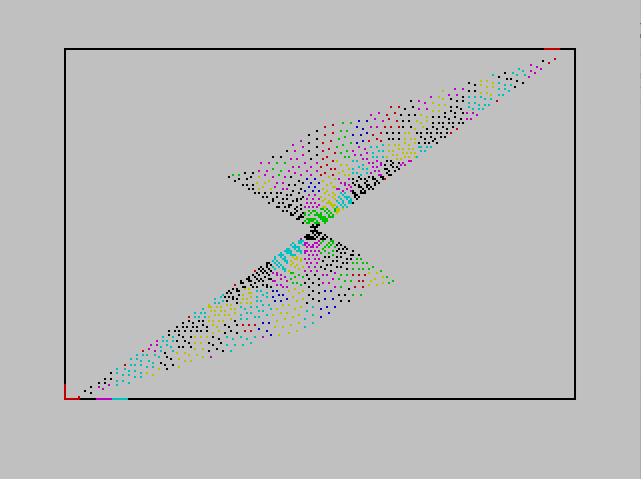
This program draws an animated rotating fan pattern on screen using line-drawing subroutines. It cycles a point around the perimeter of the screen — along the bottom, right side, top, and left side in sequence — and from each perimeter position draws a straight line to the diagonally opposite point, creating a continuously evolving geometric pattern. The line-drawing routine (lines 410–510) manually implements Bresenham-style interpolation using unit vectors and a parametric step loop rather than the built-in DRAW command, allowing lines to be drawn between arbitrary pixel coordinates. INK colour and step interval q are randomised periodically, producing colour variation in the fan effect. A border rectangle is drawn at startup via the subroutine at line 610.
Program Structure
The program is divided into four logical blocks:
- Initialisation (lines 40–130): Clears screen, sets paper colour, draws border, initialises variables.
- Perimeter loop (lines 140–220): Cycles a point around all four edges of the screen and calls the line-dispatch subroutine at line 300 for each position.
- Line-dispatch subroutine (lines 310–380, labelled at line 300 by GO SUB): Computes opposite endpoint, calls the vector line-drawing routine, and periodically randomises colour and step size.
- Vector line-drawing subroutine (lines 410–510): Draws a line between two arbitrary pixel points using unit-vector interpolation.
- Border subroutine (lines 610–660): Draws the screen border rectangle with four DRAW calls.
Perimeter Traversal
The main loop in lines 140–220 moves a point around the screen perimeter in four legs using FOR loops with a step of 4 pixels:
- Lines 140–150: bottom edge, x from 5 to 250 (y implicit at 0 via initial value)
- Lines 160–170: right edge, y from 5 to 170
- Lines 180–190: top edge, x from 250 back to 5
- Lines 200–210: left edge, y from 170 back to 5
After all four legs, GO TO 140 repeats the animation indefinitely.
Opposite-Point Calculation
The dispatch subroutine at line 310 computes the diagonally opposite perimeter point as xb = 250 - x, yb = 170 - y. This maps each perimeter position to its geometric opposite within the 255×175 screen area, which is what creates the fan/string-art effect. The start point (xe, ye) is simply set to the current (x, y) at line 320 before the line routine is called.
Vector Line-Drawing Routine (Lines 410–510)
Rather than using the built-in DRAW command (which uses relative coordinates and would require offset arithmetic), the program implements its own parametric line plotter:
aandbare the x and y spans from(xb,yb)to(xe,ye).- The Euclidean length is computed:
q = SQR(a*a + b*b). - Unit vector components
ux = a/q,uy = b/qare derived. - A
FOR l = 0 TO q STEP 4loop steps along the line, plottingPLOT xb + l*ux, yb + l*uyat each step.
Using a step of 4 in the parametric loop means only every 4th pixel is plotted, which speeds up drawing at the cost of a dotted appearance. This is consistent with the perimeter step of 4.
Colour Randomisation
The variable q serves double duty: it is used as the line length in the drawing routine but is also separately used as a countdown threshold in the dispatch subroutine (lines 340–370). Every call to the dispatch routine increments z; when z >= q, z resets and both q (a new random value 0–49) and c (a random INK colour 0–6) are chosen. This creates irregular colour-change intervals.
Variable Summary
| Variable | Role |
|---|---|
x, y | Current perimeter point coordinates |
xb, yb | Opposite endpoint (line start) |
xe, ye | Current point copy (line end) |
a, b | X and Y spans of line |
q | Dual use: colour-change interval / line length |
ux, uy | Unit vector components along line |
l | Parametric distance along line |
z | Counter for colour-change trigger |
c | Random INK colour value |
Image Gallery
Source Code
    1 REM fan
   40 CLS
   50 PAPER 7
   80 GO SUB 600
  110 LET x=0: LET y=0: LET q=25: LET z=0
  120 RANDOMIZE
  130 INK 2
  140 FOR x=5 TO 250 STEP 4
  150 GO SUB 300: NEXT x
  160 FOR y=5 TO 170 STEP 4
  170 GO SUB 300: NEXT y
  180 FOR x=250 TO 5 STEP -4
  190 GO SUB 300: NEXT x
  200 FOR y=170 TO 5 STEP -4
  210 GO SUB 300: NEXT y
  220 GO TO 140
  310 LET xb=250-x: LET yb=170-y
  320 LET xe=x: LET ye=y
  330 GO SUB 400
  340 LET z=z+1: IF z>=q THEN LET z=0
  350 LET q=INT (RND*50)
  360 LET c=INT (RND*7)
  370 INK c
  380 RETURN
  410 LET a=xe-xb
  420 LET b=ye-yb
  430 LET q=SQR (a*a+b*b)
  440 LET ux=a/q
  450 LET uy=b/q
  460 FOR l=0 TO q STEP 4
  470 LET x=xb+l*ux
  480 LET y=yb+l*uy
  490 PLOT x,y
  500 NEXT l
  510 RETURN
  610 PLOT 0,0
  620 DRAW 255,0
  630 DRAW 0,175
  640 DRAW -255,0
  650 DRAW 0,-175
  660 RETURN
Note: Type-in program listings on this website use ZMAKEBAS notation for graphics characters.