
This program is a reaction and memory test game called “REACTION” that challenges players to identify specific digits from briefly displayed five-digit numbers. The game operates across nine difficulty levels, starting at level 5, and adjusts up or down based on performance—all five correct answers advance the player, any miss drops a level, and reaching level 0 or 10 ends the game. Technically, the number display is rendered using direct character-ROM access: the program PEEKs into the ZX81 character ROM at address 7680, reads each character’s 8×8 pixel bitmap, and uses PLOT to draw it at a random vertical position on screen, creating a custom floating display effect. Timing for both the display duration and the response window is controlled by empty FOR/NEXT loops scaled by the difficulty variable H, which equals 10-G.
Program Analysis
Program Structure
The program is divided into clearly separated functional blocks:
| Line Range | Purpose |
|---|---|
| 1–9 | Title screen: prompt for instructions (Y/N) |
| 10–25 | Game start announcement and keypress wait |
| 30–520 | Main game loop: generates and displays numbers, collects input |
| 600–620 | Answer checking and score update |
| 1000–1060 | Round-end score report and level branch |
| 2000–2210 | Full instructions display (paged with GOSUB 9000) |
| 3000–3060 | Level-down handler |
| 3500–3830 | Game-over (lowest level) with play-again option |
| 4000–4040 | Level-up handler |
| 4500–4530 | Perfect-score congratulations (unreachable — see Bugs) |
| 9000–9050 | Subroutine: “Press ENTER to continue” page break |
| 9998–9999 | SAVE and auto-RUN |
Difficulty and Timing System
The game uses a single variable G (initially 5) as the difficulty level. A derived variable H = 10 - G controls two FOR/NEXT delay loops: lines 370–380 (display duration, H*3 iterations) and lines 400–500 (response window, H iterations). Higher difficulty (larger G) gives a smaller H, making both windows shorter and harder. The system supports levels 1–9; reaching 0 or 10 ends the game.
Character ROM Bitmap Rendering
The most technically interesting section is lines 200–350, which bypass the normal PRINT mechanism entirely. For each character in the display string A$, the code reads its bitmap from the ZX81 character ROM starting at address 7680. The inner triple-nested loop (over character position K, row L, and bit J) extracts each pixel by repeatedly comparing and subtracting powers of two from the byte fetched by PEEK (7680+C*8+L), then calls PLOT to draw lit pixels at a random vertical offset E.
- Line 210:
C=CODE A$(K)— gets the ZX81 character code. - Lines 220–240: handles inverse characters (code ≥ 128) by subtracting 128 and zeroing out
Ctemporarily — though settingC=0here means all inverse characters are rendered as spaces, which is likely a bug. - Line 260:
PEEK (7680+C*8+L)— directly accesses the ZX81 ROM font at the standard character bitmap base address. - Lines 270–330: bit-extraction via halving
V(128, 64, 32…1), using subtraction rather than bitwise AND, a common ZX81 idiom.
Display String Construction
Line 70 builds the display string A$ for each of the 5 rounds: STR$ Q + "-" + B$ + "*". The cycle number Q, a separator dash, the 5-digit number B$, and a terminator asterisk are concatenated. Line 600 checks the player’s input against A$(Q+2), which is the first digit of the 5-digit number (position 3 in the string: after the cycle digit and the dash). This means only the first character of the player’s response is ever evaluated.
Five-Digit Number Generation
Lines 62–66 generate a guaranteed 5-digit number by looping until LEN B$ = 5, where B$ = STR$ (INT (RND*100000)). This rejects numbers below 10000 (which would stringify to fewer than 5 characters). The approach is correct but probabilistically inefficient for very small values; in practice, only numbers 0–9999 (a 10% chance each iteration) are rejected.
Random Vertical Placement
Line 120 sets E = 8*(INT(RND*5)+1), placing the number at one of five possible vertical pixel rows (8, 16, 24, 32, or 40). This gives the display a varied vertical position each round, reinforcing the reaction-test theme.
Key Input Idioms
The game uses INKEY$ polling loops (lines 2–3, 20–21, 3550–3560) rather than INPUT for most user interaction, allowing immediate single-keypress responses. The instructions section at line 9000 uses INPUT G$ to wait for ENTER, a natural page-pause idiom.
FAST/SLOW Switching
The program switches between FAST and SLOW modes frequently. FAST mode is used during computation and PLOT-based rendering (which is very slow in SLOW mode on the ZX81), while SLOW mode is used when text must be stably displayed on screen. This is standard ZX81 practice to balance display stability against processing speed.
Image Gallery
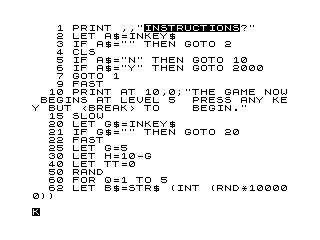
Source Code
   1 PRINT ,,"%I%N%S%T%R%U%C%T%I%O%N%S?"
   2 LET A$=INKEY$
   3 IF A$="" THEN GOTO 2
   4 CLS
   5 IF A$="N" THEN GOTO 10
   6 IF A$="Y" THEN GOTO 2000
   7 GOTO 1
   9 FAST
  10 PRINT AT 10,0;"THE GAME NOW BEGINS AT LEVEL 5  PRESS ANY KEY BUT <BREAK> TO    BEGIN."
  15 SLOW
  20 LET G$=INKEY$
  21 IF G$="" THEN GOTO 20
  22 FAST
  25 LET G=5
  30 LET H=10-G
  40 LET TT=0
  50 RAND
  60 FOR Q=1 TO 5
  62 LET B$=STR$ (INT (RND*100000))
  64 IF LEN B$=5 THEN GOTO 70
  66 GOTO 62
  70 LET A$=STR$ Q+"-"+B$+"*"
  90 FAST
 100 RAND
 120 LET E=8*(INT (RND*5)+1)
 150 LET S=0
 160 FOR N=1 TO 10
 170 CLS
 200 FOR K=1 TO LEN A$
 210 LET C=CODE A$(K)
 220 IF C<128 THEN GOTO 250
 230 LET M$=CHR$ (C-128)
 240 LET C=0
 250 FOR L=0 TO 7
 260 LET P=PEEK (7680+C*8+L)
 270 LET V=128
 280 FOR J=0 TO 7
 290 IF P<V THEN GOTO 320
 300 PLOT 8*(K-1)+J,E-L
 310 LET P=P-V
 320 LET V=V/2
 330 NEXT J
 340 NEXT L
 350 NEXT K
 360 SLOW
 370 FOR F=1 TO H*3
 380 NEXT F
 390 CLS
 400 FOR F=1 TO H
 420 LET C$=INKEY$
 430 IF C$<>"" THEN GOTO 600
 500 NEXT F
 505 PRINT AT 11,12;"%S%T%O%P";AT 11,12;"STOP";AT 11,12;"%S%T%O%P";AT 11,12;"STOP";AT 11,12;"    ";AT 11,12;"@@@@@@@@"
 510 NEXT Q
 520 GOTO 1000
 600 IF A$(Q+2)<>C$ THEN GOTO 505
 610 LET TT=TT+1
 620 GOTO 505
 1000 CLS
 1010 PRINT AT 10,0;"YOU SCORED ";TT;" OF 5 CORRECT."
 1020 FOR N=1 TO 150
 1030 NEXT N
 1040 FAST
 1050 IF TT<5 THEN GOTO 3000
 1060 IF TT=5 THEN GOTO 4000
 1999 STOP
 2000 FAST
 2010 CLS
 2020 PRINT AT 1,10;":'''''''''''''''''':";AT 2,10;": REACTION :";AT 3,10;":..................:"
 2030 PRINT ,,"   THIS IS A GAME TO TEST YOUR  MENTAL AND PHYSICAL REFLEXES.  ",,,"   IT WILL START AT THE MEDIUM  DIFFICULTY LEVEL."
 2040 PRINT "   IN A RANDOM COLUMN, A NUMBER WILL APPEAR, FOLLOWED BY A 5    DIGIT NUMBER."
 2050 PRINT "   5 OF THESE 5 DIGIT NUMBERS   IN ALL WILL APPEAR. YOU ARE     CHALLENGED TO INPUT FIRST THE   FIRST DIGIT OF THE FIRST NUMBER,THEN THE SECOND DIGIT OF THE    SECOND NUMBER AND SO ON."
 2060 GOSUB 9000
 2070 PRINT ,,,,"   IF YOU GET ALL 5 ENTRIES     CORRECT, THE GAME WILL THEN     CYCLE TO THE NEXT HIGHEST DIFF- ICULTY LEVEL."
 2080 PRINT "   IF YOU MISS A NUMBER, THE    GAME WILL THEN CYCLE TO THE NEXTLOWEST DIFFICULTY LEVEL."
 2090 PRINT "   THERE ARE 9 LEVELS IN ALL    AND YOU START AT LEVEL 5."
 2100 PRINT "   IF YOUR LEVEL REACHS 0 OR 10,THE GAME WILL BE OVER. IT IS    ENTIRELY POSSIBLE THAT YOU COULDBE PLAYING FOR A VERY LONG TIME BECAUSE LEVEL 1 IS RELATIVLY    EASY AND LEVEL 9 IS IMPOSSIBLE."
 2110 GOSUB 9000
 2120 PRINT ,,,,"   DEPENDING ON THE DIFFICULTY  LEVEL, THE AMOUNT OF TIME THE 5 DIGIT NUMBER IS DISPLAYED AND   THE AMOUNT OF TIME THAT YOU HAVEFOR YOUR REPLY, WILL INCREASE   OR DECREASE."
 2130 PRINT "   ENTER YOUR REPLY IMMEDIATLY  %A%F%T%E%R THE 5 DIGIT NUMBER DIS-   APPEARS FROM THE SCREEN."
 2140 PRINT "   WHEN THE WORD <STOP> BRIEFLY FLUTTERS ON THE SCREEN, THIS    MEANS THE GAME WILL NO LONGER   ACCEPT AN INPUTTED NUMBER AND   WILL CYCLE TO THE  NEXT 5 DIGIT NUMBER."
 2150 PRINT "   THE NUMBER THAT APPEARS AT   THE LEFT OF THE 5 DIGIT NUMBER  REPRESENTS THE CURRENT CYCLE    YOU ARE AT."
 2160 GOSUB 9000
 2170 PRINT AT 10,3;"THE GAME WILL NOW BEGIN."
 2180 GOSUB 9000
 2190 PRINT AT 10,11;"%G%O%O%D% % %L%U%C%K"
 2200 GOSUB 9000
 2210 GOTO 9
 3000 LET G=G-1
 3010 IF G=0 THEN GOTO 3500
 3020 CLS
 3030 PRINT AT 10,0;"YOU DROPPED A LEVEL FROM       ",G+1;" TO ";G
 3040 PRINT ,,"THE NEXT GAME IS READY TO BEGIN."
 3050 GOSUB 9000
 3060 GOTO 30
 3500 FAST
 3510 CLS
 3520 PRINT AT 10,0;"NICE TRY - KEEP AT IT - YOU 'RE  BOUND TO IMPROVE."
 3530 PRINT AT 21,0;"DO YOU WANT TO TRY AGAIN????????"
 3540 SLOW
 3550 LET G$=INKEY$
 3560 IF G$="" THEN GOTO 3550
 3570 IF G$="N" THEN GOTO 3700
 3580 IF G$="Y" THEN GOTO 3800
 3700 CLS
 3710 PRINT AT 10,0;"GOODBYE, THANKS FOR PLAYING."
 3720 STOP
 3800 FAST
 3810 CLS
 3820 SLOW
 3830 RUN
 4000 LET G=G+1
 4010 IF G=10 THEN GOTO 4900
 4020 CLS
 4030 PRINT AT 10,0;"YOU RAISED A LEVEL FROM       ",G-1;" TO ";G
 4040 GOTO 3040
 4500 FAST
 4510 CLS
 4520 PRINT AT 10,0;"CONGRATULATIONS, I DIDN 'T THINK ANYONE WOULD GET A PERFECT SCORE"
 4530 GOTO 3530
 8999 STOP
 9000 PRINT AT 21,0;"PRESS ENTER TO CONTINUE :::::::"
 9010 SLOW
 9020 INPUT G$
 9030 FAST
 9040 CLS
 9050 RETURN
 9998 SAVE "REACTIO%N"
 9999 RUN
Note: Type-in program listings on this website use ZMAKEBAS notation for graphics characters.