
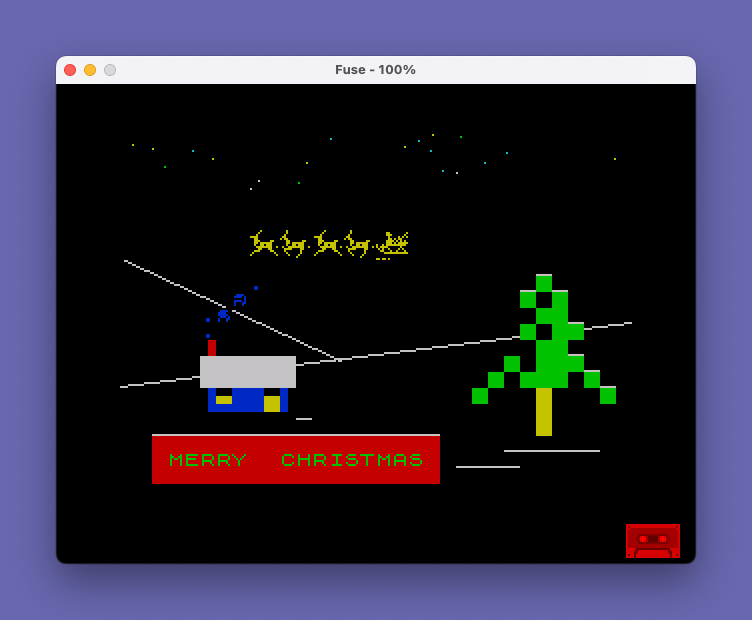
SANTA-C is an animated Christmas card program that displays a scrolling sleigh scene with a decorated tree, snow, and a flashing “MERRY CHRISTMAS” message while playing musical tunes. Eleven custom UDG characters (144–154) are poked in from DATA statements to form the sleigh and reindeer sprite, which scrolls horizontally across the screen by rotating string buffers one character at a time. The music engine encodes notes as packed three-character strings where the first character is a duration index and the next two digits encode pitch offset from –10 semitones; three separate melodic sections (a$, b$, c$) are played in sequence and then looped. The program alternates between two display subroutines at lines 2000 and 3005 to animate the reindeer legs, switching on even/odd note indices using a Boolean expression scaled by 1000. Block graphics characters are used extensively for the tree trunk, snow, and ground line elements.
Program Analysis
Program Structure
The program is divided into clearly separated functional blocks:
- Lines 2–7: Decorative REM banner using block graphics.
- Lines 10–70: Initialisation — calls UDG loader (5000) and background drawer (4000), then builds the scrolling sprite strings
f$,g$,h$. - Lines 1000–1360: Main music/animation loop — reads duration constants, then iterates over three note-string sections (
a$,b$,c$) before looping back withGO TO 1100. - Lines 2000–3500: Sprite display and string-rotation subroutines (two animation frames).
- Lines 4000–4250: Background scene drawing routine.
- Lines 5000–5130: UDG character definition loader and DATA.
UDG Sprite System
Eleven UDG characters (CHR$ 144 through CHR$ 154) are defined at lines 5010–5110, each consuming 8 bytes POKEd from USR CHR$ 144 through USR CHR$ 154+7. Together they form a multi-character sleigh-and-reindeer sprite that spans two rows. Three string variables hold the two display rows in two animation states:
f$— top row of the sprite (shared between both frames)g$— bottom row, frame 1 (legs position A)h$— bottom row, frame 2 (legs position B)
Each string is prefixed by a 32-space pad (from DIM e$(32)) so the sprite enters from off-screen right and scrolls leftward.
Horizontal Scrolling Technique
Scrolling is achieved purely in BASIC by rotating each sprite string one character at a time at line 3500:
LET f$=f$(2 TO LEN f$)+f$(1)
This appends the dropped leading character to the tail, creating a cyclic scroll. Because the strings are longer than the 32-column screen, only a 32-character window is PRINTed with f$( TO 32), giving the illusion of rightward entry and leftward motion.
Music Engine
Notes are encoded as packed three-character substrings within a$, b$, and c$. Each triplet consists of one duration-index character followed by a two-digit pitch code. The loop steps through with STEP 3:
VAL d$(n)— single character digit giving an index into the duration array read from DATA at line 5130 (values: 0.25, 0.5, 1, 2, 4, 6, 8, 12, 16, 20).VAL d$(n+1 TO n+2)-10— two-digit pitch value minus 10 to allow negative semitone offsets.BEEP duration/48, pitch— dividing by 48 scales the index-derived duration into seconds.
String d$ is the concatenation of a$ and b$, so the first pass plays the full melody; subsequent loops replay sections independently.
Animation Frame Selection
The subroutine call that updates the display alternates between line 2000 (frame 1) and line 3000 (frame 2) using a single expression:
GO SUB 2000+(1000 AND n/2=INT (n/2))
When n is even, the Boolean AND evaluates to 1000, routing to GO SUB 3000; when odd, it stays at GO SUB 2000. Both subroutines fall through to line 3500 for the shared scroll-and-return logic — frame 1 via GO TO 3500, frame 2 by falling into it directly.
Background Scene
The background is drawn once at program start (line 4000) and never redrawn. Key elements include:
- Random stars plotted with
PLOT OVER 1in INK colours 4–6 at random positions in the upper screen area. - Two
DRAWlines suggesting a horizon and a hill. - A Christmas tree built from
\::(█) block graphic characters with UDG trunk details and decorations usingS/OwithOVER 1overprinting. - A house façade at columns 5–10 built from
\::blocks with a coloured door and windows. - A flashing
FLASH 1; INK 4; PAPER 2“MERRY CHRISTMAS” banner at rows 19–21. - Underscore characters scattered to suggest snow-covered ground and roof edges.
Notable Techniques and Idioms
DIM e$(32)creates a 32-space string efficiently used as a padding prefix without typing 32 spaces in a literal.RESTORE 5130beforeREAD a,b,c,d,e,f,g,h,i,jloads the ten duration constants into simple variable names, which are then referenced symbolically (though in practice the note strings use index digits 0–9 mapped viaVAL, so the variablesa–jare read but the pitch/duration encoding is self-contained in the strings).- The sprite strings are built once and mutated in-place each animation frame — no array or re-POKE is needed.
SAVE "SANTA" LINE 1at line 9998 causes auto-run from line 1 on load.
Potential Anomalies
- Variables
athroughjare READ at line 1010 but the music strings use character literals for durations rather than these variable names, making the READ potentially redundant for playback — the values may have been used during composition to calculate the encoded digits. - Line 5090 DATA has only 7 values listed (
0,0,1,2,21,88,170) rather than the expected 8 for a UDG row, which could cause the final UDG (CHR$ 154) to be partially defined from the next DATA line. - The loop variable
jin line 5002 shadows the numeric variablejread from DATA at line 1010, though this causes no runtime problem since line 5000 runs before line 1010.
Image Gallery
Source Code
    2 REM   \..\..\..\..\..\..\..\..\..\..\..\..\..\..\..\..\..\..\..
    3 REM   \:      SANTA-C     \ :
    4 REM   \:        by        \ :
    5 REM   \:   WARREN FRICKE  \ :
    6 REM   \:      -1985-      \ :
    7 REM   \''\''\''\''\''\''\''\''\''\''\''\''\''\''\''\''\''\''\''
   10 GO SUB 5000
   20 GO SUB 4000
   40 DIM e$(32)
   50 LET f$=e$+CHR$ 144+CHR$ 145+CHR$ 146+CHR$ 145+CHR$ 144+CHR$ 145+CHR$ 146+CHR$ 145+CHR$ 151+CHR$ 152
   60 LET g$=e$+CHR$ 147+CHR$ 148+CHR$ 149+CHR$ 150+CHR$ 147+CHR$ 148+CHR$ 149+CHR$ 150+CHR$ 153+CHR$ 154
   70 LET h$=e$+CHR$ 149+CHR$ 150+CHR$ 147+CHR$ 148+CHR$ 149+CHR$ 150+CHR$ 147+CHR$ 148+CHR$ 153+CHR$ 154
 1000 RESTORE 5130
 1010 READ a,b,c,d,e,f,g,h,i,j
 1020 LET a$="d17d14d15e17f17d17d19d21e22g22d14d15e17e17e17d19d17e15g15e14e17e10e14e12g15e09i10"
 1030 LET b$="g79e79d79"
 1040 LET c$="g69e69e12e14e12e11e12e09g09e12e14e12e11e12h09e14e16e14e13e14e11e11e11d11d12e14e12e11e09e07e69f07d07d04d05e07f07d07d09d11e12g12d04d05e07e07e07d09d07e05g05e04e07e00e04e02g05e14j12h69"
 1050 LET d$=a$+b$
 1100 FOR n=1 TO LEN d$-2 STEP 3
 1135 LET duration=VAL d$(n): LET pitch=VAL d$(n+1 TO n+2)-10: BEEP duration/48,pitch: GO SUB 2000+(1000 AND n/2=INT (n/2)): NEXT n
 1200 FOR n=1 TO LEN a$-2 STEP 3
 1235 LET duration=VAL a$(n): LET pitch=VAL a$(n+1 TO n+2)-10: BEEP duration/48,pitch: GO SUB 2000+(1000 AND n/2=INT (n/2)): NEXT n
 1300 FOR n=1 TO LEN c$-2 STEP 3
 1335 LET duration=VAL c$(n): LET pitch=VAL c$(n+1 TO n+2)-10: BEEP duration/48,pitch: GO SUB 2000+(1000 AND n/2=INT (n/2)): NEXT n
 1350 PAUSE 30
 1360 GO TO 1100
 2000 REM  FIRST POSITION
 2005 PRINT AT 6,0; INK 6;f$( TO 32)' INK 6;g$( TO 32): GO TO 3500
 3000 REM  second position
 3005 PRINT AT 6,0; INK 6;f$( TO 32)' INK 6;h$( TO 32)
 3500 LET f$=f$(2 TO LEN f$)+f$(1): LET g$=g$(2 TO LEN g$)+g$(1): LET h$=h$(2 TO LEN h$)+h$(1): RETURN
 4000 REM  background
 4005 BORDER 0: PAPER 0: INK 7: CLS
 4020 FOR n=1 TO 20
 4030 PLOT OVER 1; INK (3*RND+4);255*RND,30*RND+145
 4040 NEXT n
 4050 PLOT 0,48: DRAW 255,32
 4060 PLOT 0,112: DRAW 110,-51
 4070 PRINT AT 14,5;"\::\::\::\::\::\::";AT 15,5;"\::\::\::\::\::\::"
 4080 PRINT AT 16,5; INK 1;"\ :\::\::\::\::\: ";AT 17,5;"\ '\''\''\''\''\' "
 4090 PRINT AT 16,6; INK 6;"\..";AT 16,9;"\..";AT 17,9;"\''"
 4100 PRINT AT 13,5; INK 2;"\ :"
 4120 PRINT INK 1;AT 12,5;".";AT 11,5;".";AT 9,8;"."
 4130 PRINT INK 1;AT 11,6;"S"; OVER 1;CHR$ 8;"s"
 4140 PRINT INK 1;AT 10,7;"O"; OVER 1;CHR$ 8;"s"
 4150 PRINT FLASH 1; INK 4; PAPER 2;AT 19,2;"                  ";AT 20,2;" MERRY  CHRISTMAS ";AT 21,2;"                  "
 4160 PRINT INK 4;AT 9,26;"\::";AT 10,25;"\:: \::";AT 11,26;"\::\::";AT 12,25;"\:: \::\::";AT 13,26;"\::\::";AT 14,24;"\:: \::\::\::";AT 15,23;"\:: \::\::\:: \::";AT 16,22;"\::       \::"
 4170 FOR r=16 TO 18: PRINT INK 6;AT r,26;"\::": NEXT r
 4200 PRINT AT 8,26;"_"
 4210 PRINT AT 9,25;"_";AT 9,27;"_"
 4220 PRINT AT 11,28;"_";AT 13,28;"_";AT 14,29;"_";AT 15,30;"_"
 4230 PRINT AT 17,11;"_";AT 18,2;"__________________";AT 19,24;"______";AT 20,21;"____"
 4250 RETURN
 5000 REM sleigh graphics
 5002 FOR j=USR CHR$ 144 TO USR CHR$ 154+7: READ k: POKE j,k: NEXT j
 5005 RETURN
 5010 DATA 0,2,4,8,120,24,28,27
 5020 DATA 0,0,0,0,0,0,24,240
 5030 DATA 0,16,16,32,96,176,24,27
 5040 DATA 19,15,6,28,32,64,0,0
 5050 DATA 112,242,48,24,4,2,0,0
 5060 DATA 19,79,60,32,16,8,0,0
 5070 DATA 112,242,48,32,32,64,128,0
 5080 DATA 0,0,6,7,2,3,7,7
 5090 DATA 0,0,1,2,21,88,170
 5100 DATA 95,151,188,82,49,15,0,0
 5110 DATA 218,254,8,20,34,255,0,0
 5130 DATA .25,.5,1,2,4,6,8,12,16,20
 9997 STOP
 9998 SAVE "SANTA" LINE 1
Note: Type-in program listings on this website use ZMAKEBAS notation for graphics characters.