
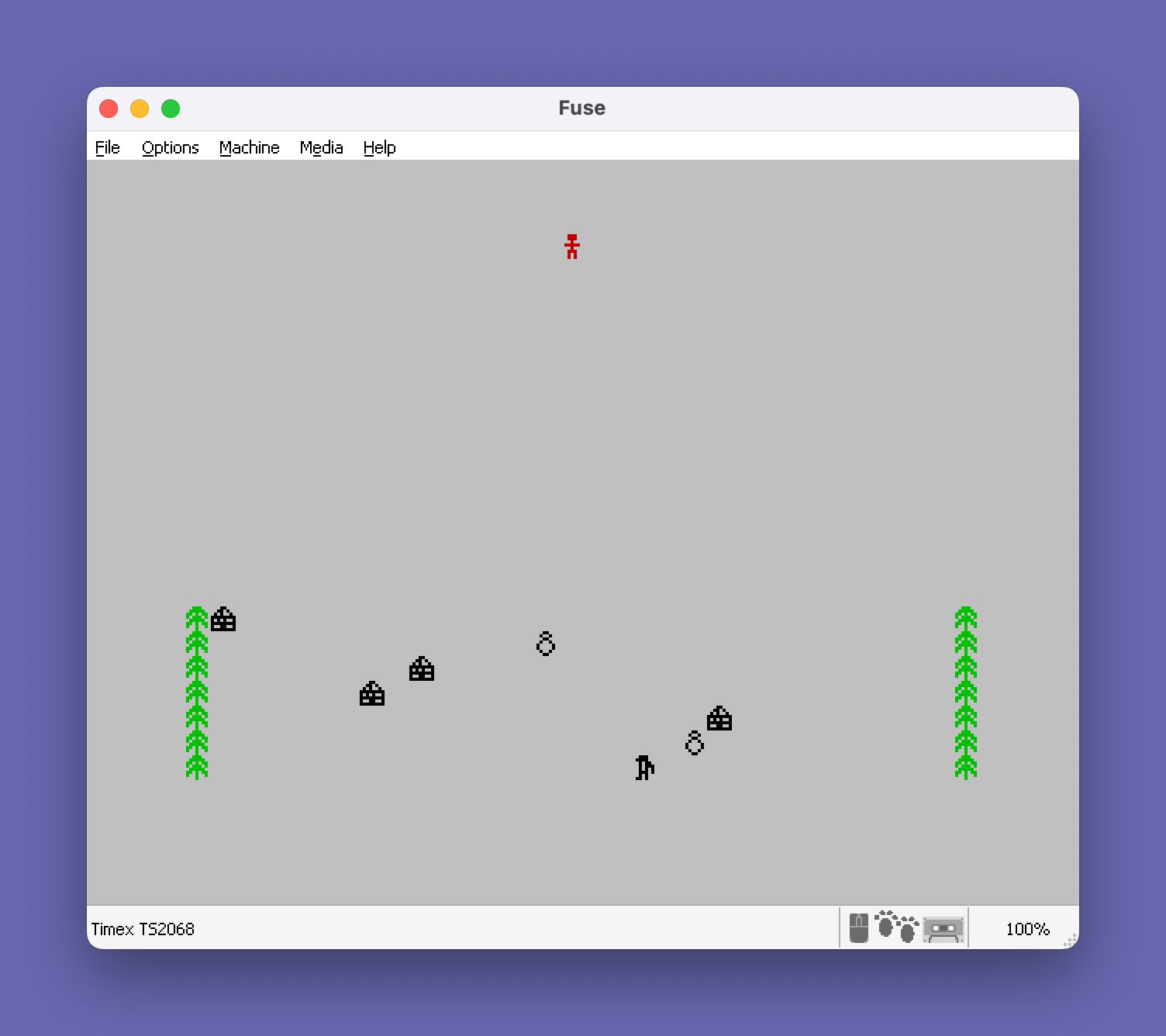
“Santa’s Christmas Nightmare” is a five-stage Christmas-themed arcade game in which the player guides Santa through a series of challenges: navigating a snowfield, parachuting onto a rooftop, descending a chimney via a lift, crossing a floor while dodging snowballs, and launching a sleigh over houses. The game uses 16 user-defined graphics (UDGs, characters 144–159) for Santa, trees, igloos, penguins, snowmen, the sleigh, and other sprites, defined via DATA statements and POKEd into memory at line 105. Player-configurable keys are validated at startup to prevent duplicate assignments, and a high-score table with name entry via INPUT LINE is maintained across playthroughs. A traffic-light countdown subroutine at line 9900 uses INK color changes to simulate red, amber, and green lights before each stage begins.
Program Analysis
Program Structure
The program is organized into clearly delineated sections marked with REM comments. The main flow is sequential through five game stages, each branching back to itself on failure or advancing to the next on success.
- Lines 1–100: Initialization, key definition, and entry point
- Line 101–199: UDG (user-defined graphics) definition subroutine
- Lines 200–210: Short general-purpose delay subroutines
- Lines 900–1999: Stage 1 – Snowfield obstacle avoidance
- Lines 2000–2499: Stage 2 – Parachute descent onto rooftop
- Lines 2500–2999: Stage 3 – Chimney lift puzzle
- Lines 3000–3499: Stage 4 – Floor crossing with snowball jumping
- Lines 3500–3999: Stage 5 – Sleigh launch over houses
- Lines 4000–4030: Year completion and difficulty progression
- Lines 9000–9030: Life-loss handler
- Lines 9100–9150: Game-over screen with high score and name entry
- Lines 9200–9730: Instructions text and per-stage reminders
- Lines 9800–9840: Stage start/end message subroutines
- Lines 9900–9910: Traffic light countdown subroutine
- Line 9998: SAVE with auto-run
User-Defined Graphics
Sixteen UDGs (characters 144–159, i.e., \a through \p) are defined at lines 101–199 using a FOR/READ/POKE USR CHR$ G+F,A loop. The DATA statements at lines 110–190 supply 8 bytes per character. The characters represent Santa, trees, igloos, penguins, snowmen, sleigh parts, chimney bricks, snowballs, and traffic-light blobs. The RESTORE 100 at line 103 ensures the DATA pointer is set correctly before reading, since line 100 contains no DATA but precedes the DATA lines.
The UDG assignments inferred from the instruction text and usage are:
| UDG | Char | Representation |
|---|---|---|
\a | 144 | Santa figure |
\b | 145 | Tree / obstacle |
\c | 146 | Igloo |
\d | 147 | Penguin |
\e | 148 | Snowman |
\f | 149 | Crash/collision graphic |
\g | 150 | Sleigh left part |
\h | 151 | Sleigh right part |
\i | 152 | Roof right edge |
\j | 153 | Roof left edge |
\k | 154 | Chimney top |
\l | 155 | Parachute |
\m | 156 | Santa falling |
\n | 157 | Chimney brick |
\o | 158 | Traffic light (unlit) |
\p | 159 | Traffic light (lit) / snowball |
Key Configuration and Validation
Lines 60–99 implement a custom key-assignment routine. The player presses four keys for LEFT, RIGHT, UP, and DOWN, stored in the string array K$(4). After entry, a nested loop at lines 97–99 checks all pairs F,G for duplicates: if K$(F)=K$(G) (line 98), the screen clears and the assignment process restarts from line 57. The key-wait idiom used is the standard two-step: line 80 waits for the previous key to be released (IF R$<>"" THEN GO TO 80), then line 90 waits for a new keypress.
A subtle anomaly exists in the duplicate-check loop: lines 97–99 use two separate NEXT statements on separate lines (97 and 99) with the duplicate check on line 98 in between. The inner NEXT G on line 97 is reached when F=G, effectively skipping self-comparison, while the outer structure falls through to line 98 for the actual comparison. The logic is functional but unconventional.
Collision Detection via ATTR
Stage 1 collision detection (lines 1920, 1940, 1960) uses the ATTR function to read the color attribute of adjacent cells. A cell with attribute value 58 (INK 2, PAPER 7, BRIGHT 0 — the background paper color) is considered safe; any other attribute indicates an obstacle. This is a common Spectrum technique that avoids maintaining a separate collision map.
Difficulty Scaling
The variable Y tracks the current year (starting at 1, displayed as Y+1984). It is used throughout to scale difficulty: the obstacle array in Stage 1 is sized Y*79 (line 910), the chimney width W in Stages 2 and 3 is computed as 10-Y clamped to a minimum of 1 (lines 2020, 2540), and Stage 3’s platform speed uses W/2. Stage 4’s obstacle speed is indirectly affected via W=10-Y/3 (line 3040). Score bonuses also incorporate L (remaining lives) as a multiplier at lines 2000 and 2300.
Score and High Score
The score S accumulates across all stages within a year and is not reset between years. At game over (line 9100), if S>H the player is prompted with INPUT LINE H$ to enter a name (up to 10 characters as dimensioned by DIM H$(10) at line 25). The high score persists for the session but is lost on restart since H is re-initialized at line 25 only on a fresh run from line 30.
Stage-Specific Reminder System
The subroutine at line 9300 uses a computed GO TO: GO TO E*50+9300, where E is the current stage number (1–5). This dispatches to lines 9350, 9400, 9450, 9500, and 9550 respectively, each printing a stage-specific control reminder before falling through to the GO TO 9700 press-any-key pause. This is an efficient dispatch table implemented entirely in BASIC.
Traffic Light Subroutine
Lines 9900–9910 simulate a traffic light countdown using UDGs \o (unlit) and \p (lit) printed in INK 2 (red), INK 6 (yellow), and INK 4 (green). The sequence shows red lit, then amber lit, then green lit, with short FOR loop delays between transitions. All three are printed at rows 1–3, column 0.
Delay Subroutines
Two reusable delay routines exist: line 200 loops Z from 1 to 40 (fixed short delay), and line 210 loops G from 1 to W*4 (variable delay scaled by the current difficulty width). Both use SGN PI (which evaluates to 1) as the loop start value, a common memory-saving idiom avoiding the literal 1.
Notable BASIC Idioms
NOT PIevaluates to 0, used extensively as a space-saving substitute for the literal0inATcoordinates and loop starts.SGN PIevaluates to 1, used as loop start values throughout.PI(≈3.14159) is used where an integer 3 is needed in someATrow positions (e.g.,AT PI,0truncates to row 3).POKE 23692,255at line 990 disables the scroll prompt by setting the scroll counter to 255.POKE 23658,8at line 40 enables CAPS LOCK, ensuring uppercase key input for key assignment.- The instruction screen uses
PRINT AT PI,0,,,,,,,,,,,,,,,,,,,,,,,,,,,,,,,,,,,,,,at line 9720 to clear a large portion of the screen by printing empty items, rather than issuing a fullCLS.
Stage 3 Logic Complexity
Stage 3 (chimney lift) is the most structurally complex section. The lift oscillates up and down the chimney shaft (lines 2600–2630). Pressing RIGHT (key 2) at line 2610/2615/2620/2627 jumps to line 2700 where Santa boards the lift. Pressing LEFT (key 1) while on the lift at lines 2650–2660 causes Santa to attempt to exit. A time countdown from 20 at line 2640/2660 gives the player a limited window to act. The variable F serves double duty as both the lift position and the loop counter, which makes the control flow difficult to trace but functional.
Potential Anomalies
- In Stage 5 (line 3650), the loop variable
Fis decremented inside aGO TO 3650re-entry while the outerFOR F=500 TO 0 STEP -1loop is still active. This effectively exits the FOR loop abnormally by runningFto 0 or below from within, which is valid in Spectrum BASIC but unconventional. - At line 97, the structure
FOR G=SGN PI TO 4: IF F=G THEN NEXT G: NEXT F: GO TO 100placesNEXT FandGO TO 100on the same line as theIFbranch, meaning they execute only whenF=G. WhenF=Gis true on the final iteration (F=4, G=4),NEXT Gwould attempt to continue the G loop past 4 (harmless), thenNEXT Fadvances F past 4, andGO TO 100exits the setup successfully. The logic works correctly due to Spectrum BASIC’s single-statementIFsemantics. - The
DIM H$(10)at line 25 allocates only 10 characters for the high-score name, butINPUT LINE H$at line 9110 will accept exactly 10 characters due to the fixed-length string array constraint.
Image Gallery

Source Code
    1 REM     ***********************    *Underlined characters*    *are entered in       *    *GRAPHICS mode.       *    ***********************"SANTA" from ZX Computing Jan 86 Typed by Wm. J. Tilley
   22 GO SUB 101
   25 LET H=0: DIM H$(10)
   30 LET Y=1: DIM K$(4): LET L=5: LET S=0
   40 BRIGHT 0: PAPER 0: BORDER 0: CLS : POKE 23658,8
   50 INK 6: PRINT AT NOT PI,2; BRIGHT 1;"SANTA'S CHRISTMAS NIGHTMARE!";TAB 2;"\''\''\''\''\''\''\''\''\''\''\''\''\''\''\''\''\''\''\''\''\''\''\''\''\''\''\''\''"
   52 GO SUB 9200
   55 REM \::\:: DEFINE KEYS
   57 INK 6: PRINT AT NOT PI,2; BRIGHT 1;"SANTA'S CHRISTMAS NIGHTMARE!";TAB 2;"\''\''\''\''\''\''\''\''\''\''\''\''\''\''\''\''\''\''\''\''\''\''\''\''\''\''\''\''"
   60 INK 5: PRINT AT 5,NOT PI;"WHICH KEYS WOULD LIKE ?"'''"LEFT:"''"RIGHT:"''"UP:"''"DOWN:"
   70 FOR F=SGN PI TO 4: PRINT AT F*2+6,10; FLASH 1;"?"
   80 LET R$=INKEY$: IF R$<>"" THEN GO TO 80
   90 LET R$=INKEY$: IF R$="" THEN GO TO 90
   95 BEEP .05,20: PRINT AT F*2+6,10;R$: LET K$(F)=R$: NEXT F
   97 FOR F=SGN PI TO 4: FOR G=SGN PI TO 4: IF F=G THEN NEXT G: NEXT F: GO TO 100
   98 IF K$(F)=K$(G) THEN CLS : GO TO 57
   99 NEXT G: NEXT F
  100 GO TO 900
  101 REM \::\:: DEFINE GRAPHICS
  103 RESTORE 100
  105 FOR G=144 TO 159: FOR F=0 TO 7: READ A: POKE USR CHR$ G+F,A: NEXT F: NEXT G
  110 DATA 28,a,8,62,8,28,20,a
  120 DATA 56,124,214,186,124,214,146,16,24,52,82,255,169,255,153,255,56,120,44,46,42,58,40,104,24,36,24,36,66,a,36,24
  130 DATA 18,63,254,252,124,62,127,118
  140 DATA 30,a,76,111,236,255,a,126,0,1,a,3,255,252,68,a
  150 DATA 1,3,7,15,31,63,127,255,128,192,224,240,248,252,254,255
  160 DATA 102,a,a,a,255,a,a,a
  170 DATA 0,a,64,96,224,255,a,126,28,62,127,a,a,73,42,28
  180 DATA 255,32,a,255,a,2,a,255
  190 DATA 60,66,129,a,a,a,66,60,a,126,255,a,a,a,126,60
  199 RETURN
  200 FOR Z=SGN PI TO 40: NEXT Z: RETURN
  210 FOR G=SGN PI TO W*4: NEXT G: RETURN
  900 REM \::\:: SCREEN 1
  902 BRIGHT 0: PAPER 7: BORDER 7: CLS
  905 INK 1: PRINT AT 11,10;"PLEASE WAIT"
  910 DIM P(Y*79,2): FOR F=SGN PI TO Y*79: LET P(F,1)=INT (RND*30)+1: LET P(F,2)=INT (RND*3)+146: NEXT F
  920 INK 1: LET N=0: LET E=1: LET X=15
  950 GO SUB 9800: INK 2: CLS
  990 POKE 23692,255
  995 GO SUB 9900
 1000 FOR F=SGN PI TO 100: LET S=S+1
 1050 PRINT AT NOT PI,X;"\a"
 1060 IF F<80 THEN FOR G=SGN PI TO Y: LET N=N+1: PRINT AT 21,P(N,1); INK 0;CHR$ P(N,2): NEXT G: PRINT AT 21,NOT PI; INK 4;"\b";AT 21,31;"\b"
 1065 GO SUB 1900
 1070 PRINT AT 21,NOT PI; INK 8; OVER 1,,,,: NEXT F: GO TO 2000
 1900 LET R$=INKEY$: FOR G=SGN PI TO 4: IF K$(G)=R$ THEN GO TO G*20+1900
 1910 NEXT G: GO TO 1960
 1920 IF ATTR (1,X-1)<>58 THEN PRINT AT 1,X-1; INK 2;"\f";AT NOT PI,X;" ": INK 1: GO SUB 9000: GO TO 900
 1930 LET X=X-1: IF X=0 THEN LET X=X+1: GO TO 1960
 1935 RETURN
 1940 IF ATTR (1,X+1)<>58 THEN PRINT AT 1,X+1; INK 2;"\f";AT NOT PI,X;" ": INK 1: GO SUB 9000: GO TO 900
 1950 LET X=X+1: IF X=31 THEN LET X=X-1: GO TO 1960
 1955 RETURN
 1960 IF ATTR (1,X)<>58 THEN PRINT AT 1,X; INK 2;"\f";AT NOT PI,X;" ": INK 1: GO SUB 9000: GO TO 900
 1980 RETURN
 2000 INK 1: LET S=S+50*L: GO SUB 9820
 2005 PAPER 0: BORDER 0: CLS
 2010 REM \::\:: STAGE 2
 2020 INK 5: LET E=2: GO SUB 9800: INK 6: LET W=10-Y: IF W<1 THEN LET W=1
 2030 LET C$="\::\::\::\::\::\::\::\::\::\::"( TO W)
 2040 PRINT AT 15,16;"\k";TAB 16;"\::"
 2100 PRINT AT 17,15-W/2;"\i";C$;"\j": FOR F=18 TO 21: PRINT AT F,15-W/2;C$;"\::\::": NEXT F
 2110 GO SUB 9900: FOR F=0 TO 29: PRINT AT NOT PI,F; INK 2;" \g"; INK 6;"\h": IF INKEY$=K$(4) THEN GO TO 2200
 2120 NEXT F: INK 5: GO SUB 9000: GO TO 2010
 2200 LET X=F+1: PRINT AT NOT PI,X; INK 2;"\l"; INK 6;"\h": INK 2: FOR F=2 TO 13: PRINT AT F-1,X;" ";AT F,X;"\m";AT F+1,X;"\a": GO SUB 200: NEXT F: IF X=16 THEN LET S=S+100: GO TO 2250
 2210 FOR F=14 TO 15: PRINT AT F-1,X;" ";AT F,X;"\m";AT F+1,X;"\a": GO SUB 200: NEXT F
 2220 IF X<16-(W/2+1) OR X>16+W/2 THEN FOR F=16 TO 20: PRINT AT F-1,X;" ";AT F,X;"\m";AT F+1,X;"\a": GO SUB 200: NEXT F: INK 5: GO SUB 9000: GO TO 2010
 2250 CLS
 2300 INK 5: LET S=S+50+20*L: GO SUB 9820
 2500 REM \::\:: STAGE 3
 2510 CLS : LET E=3: INK 5: GO SUB 9800: INK 6: FOR F=5 TO 21: PRINT AT F,12;"\n";TAB 19;"\n": NEXT F: PRINT AT 4,12;"\n\n\n\n\n\n\n\n": FOR F=0 TO 3: PRINT AT F,13;"\n\n";TAB 17;"\n\n": NEXT F
 2520 PRINT AT 21,NOT PI;"\n\n\n\n\n\n\n\n\n\n\n\n\n\n\n\n";AT 6,13;"\n\n\n";AT 20,12;"  \n"
 2530 LET X=15: PRINT AT 5,x; INK 2;"\a"
 2540 LET W=10-Y: IF W<1 THEN LET W=1
 2550 LET W=W/2
 2590 GO SUB 9900
 2600 INK 5: FOR F=21 TO 6 STEP -1: GO SUB 210: PRINT AT F,16;"\..\..\..": IF F<21 THEN PRINT AT F+1,16;"   "
 2610 LET R$=INKEY$: IF R$=K$(2) THEN GO TO 2700
 2615 GO SUB 210: PRINT AT F,16;"\''\''\''": IF INKEY$=K$(2) THEN GO TO 2700
 2620 NEXT F: FOR F=6 TO 21: GO SUB 210: PRINT AT F-1,16;"   ";AT F,16;"\''\''\''": IF INKEY$=K$(2) THEN GO TO 2700
 2625 GO SUB 210: IF F<21 THEN PRINT AT F,16;"\..\..\.."
 2627 IF INKEY$=K$(2) THEN GO TO 2700
 2630 NEXT F
 2640 PRINT AT 17,NOT PI;"TIME:": PRINT AT 20,12;"   ": FOR T=20 TO 0 STEP -1: PRINT AT 17,5;T;" ": NEXT T: GO SUB 200: INK 5: GO SUB 9000: GO TO 2500
 2650 FOR F=6 TO 21: GO SUB 210: PRINT AT F,16;"\''\''\''";AT F-1,16; INK 2;"\a": IF INKEY$=K$(SGN PI) THEN GO TO 2690
 2658 PRINT AT F-1,16; INK 2;"\a  ": GO SUB 210: IF F<21 THEN PRINT AT F,16;"\..\..\.."
 2659 IF INKEY$=K$(SGN PI) THEN GO TO 2690
 2660 PRINT AT F-1,16;"   ": NEXT F: PRINT AT F-2,16; INK 2;"\a": PRINT AT 17,NOT PI;"TIME:": PRINT AT 20,14;" ": FOR T=20 TO 0 STEP -1: PRINT AT 17,5;T;" ": IF INKEY$=K$(SGN PI) THEN GO TO 2800
 2670 NEXT T: GO SUB 200: INK 5: GO SUB 9000
 2690 PRINT AT F-1,16;"   ";AT F,16;"\''\''\''": FOR F=F-1 TO 20: PRINT AT F-1,15;" ";AT F,15; INK 2;"\a": GO SUB 200: NEXT F: PRINT AT 20,15; INK 2;"\f": GO SUB 200: INK 5: GO SUB 9000: GO TO 2500
 2700 LET X=16: PRINT AT 5,15;" ": IF F=6 THEN GO TO 2650
 2710 IF F>6 THEN FOR F=6 TO F-1: PRINT AT F-1,16;" ";AT F,16; INK 2;"\a": GO SUB 200: NEXT F: PRINT AT F-1,16; INK 2;"\f": GO SUB 200: INK 5: GO SUB 9000: GO TO 2500
 2800 FOR F=15 TO 0 STEP -1: PRINT AT 20,F; INK 2;"\a ": FOR G=SGN PI TO 20: NEXT G: NEXT F
 2900 INK 5: LET S=S+50+(T+10)*L: GO SUB 9820
 3000 REM \::\:: STAGE 4
 3010 LET E=4: INK 5: GO SUB 9800
 3020 INK 4: FOR F=101 TO 61 STEP -20: FOR G=SGN PI TO 30: PLOT 30-G/2,F-G: DRAW G,0: NEXT G: NEXT F: INK 2: FOR F=26 TO 34: PLOT F,16: DRAW 0,15: NEXT F
 3030 INK 5: FOR F=0 TO 15: PLOT 20-F/2,F: DRAW F+20,0: NEXT F
 3040 LET W=10-Y: LET W=W/3: IF W<1 THEN LET W=1
 3090 LET X=30: INK 7: GO SUB 9900
 3100 PRINT AT 21,X; INK 2;"\a "
 3110 GO SUB 210: IF INKEY$=K$(SGN PI) THEN LET X=X-1: LET S=S+1: IF X=6 THEN GO TO 3300
 3120 IF RND<.15 AND X>11 THEN LET U=0: PRINT AT 21,X; INK 2;"\a ": GO TO 3200
 3130 GO TO 3100
 3200 FOR F=7 TO 31: GO SUB 210: LET S=S+1: PRINT AT 21,F-1;" \p": IF F=X AND U=0 THEN PRINT AT 21,X; INK 2;"\f": FOR F=SGN PI TO 20: NEXT F: INK 5: GO SUB 9000: GO TO 3000
 3210 IF INKEY$=K$(PI) AND U=0 THEN LET U=1: LET T=0: PRINT AT 21,X;" "
 3220 IF U=1 THEN LET T=T+1: IF T=5 THEN LET U=0: PRINT AT 20,X;" "
 3230 PRINT AT 21-U,X; INK 2;"\a": IF F=X AND U=0 THEN PRINT AT 21,X; INK 2;"\f": FOR F=SGN PI TO 20: NEXT F: INK 5: GO SUB 9000: GO TO 3000
 3240 NEXT F: LET U=0: PRINT AT 21,31;" ";AT 21,X; INK 2;"\a";AT 20,X;" ": LET S=S+5: GO TO 3100
 3300 PRINT AT 21,7;" ": FOR F=20 TO 10 STEP -1: PRINT AT F,6; INK 2;"\a";AT F+1,6;" ": FOR G=SGN PI TO 10: NEXT G: NEXT F
 3310 PRINT AT 10,6;" ": RESTORE 3320: FOR F=SGN PI TO 5: READ A,B: PRINT AT A,B; INK 2;"\a": FOR G=SGN PI TO 10: NEXT G: PRINT AT A,B;" ": NEXT F
 3320 DATA 9,5,8,4,7,3,8,2,9,1
 3330 FOR F=10 TO 21: PRINT AT F,NOT PI; INK 2;"\a";AT F-1,NOT PI;" ": FOR G=SGN PI TO 10: NEXT G: NEXT F
 3340 FOR F=SGN PI TO 200: NEXT F: INK 5: LET S=S+50: GO SUB 9820
 3500 REM \::\:: STAGE 5
 3510 LET E=5: INK 5: GO SUB 9800
 3600 PRINT AT 20,NOT PI; PAPER 7,,,,: FOR G=0 TO 5: FOR F=6+G TO 19: PRINT AT F,G; INK 6;"\::";AT F,31-G;"\::": NEXT F: PRINT AT G+5,G; INK 6;"\j";AT G+5,31-G;"\i": NEXT G: PRINT AT 6,2; INK 6;"\k";AT 7,2;"\::";AT 6,29;"\k";AT 7,29;"\::"
 3610 PRINT AT 19,15; INK 2;"\g"; INK 6;"\h": LET T=0
 3615 GO SUB 9900: IF INKEY$=K$(PI) THEN PRINT AT 11,11;"HANDS OFF!": FOR F=SGN PI TO 100: NEXT F: PRINT AT 11,11;"          ": GO TO 3615
 3617 PRINT AT 2,2; INK 7;"TIME:500"
 3620 FOR F=500 TO 0 STEP -1
 3625 PRINT AT 2,7; INK 7;F;" "
 3630 IF INKEY$=K$(PI) THEN LET T=T+1: GO TO 3650
 3640 NEXT F: GO TO 3700
 3650 IF INKEY$<>"" THEN LET F=F-1: PRINT AT 2,7; INK 7;F;" ": IF F>0 THEN GO TO 3650
 3655 IF F<1 THEN GO TO 3700
 3660 NEXT F
 3700 LET T=T*2: LET T=T-15*Y: LET T=T-36: LET T=19-T: IF T<0 THEN LET T=0
 3710 FOR F=18 TO T STEP -1: PRINT AT F,15; INK 2;"\g"; INK 6;"\h";AT F+1,15;"  ": GO SUB 200: LET S=S+20: NEXT F
 3720 FOR F=15 TO 29: GO SUB 200: PRINT AT T,F; INK 2;" \g"; INK 6;"\h": IF ATTR (T,F+3)=6 THEN GO SUB 200: GO TO 3750
 3730 NEXT F: GO TO 3800
 3750 INK 2: PRINT AT T,F+1;" \g": GO SUB 200: PRINT AT T,F+2;"\a": GO SUB 200: PRINT AT 19,F+2;"\f": INK 5: GO SUB 9000: GO TO 3500
 3800 LET S=S+200: GO SUB 9820
 4000 REM \::\:: NEXT YEAR
 4010 LET Y=Y+1
 4020 CLS : PRINT AT 6,NOT PI;"WELL DONE - YEAR ";Y+1983;" COMPLETED!";AT 12,NOT PI;"YOU NOW PROGRESS TO YEAR ";Y+1984'"WHICH, OBVIOUSLY, IS HARDER."
 4030 FOR F=SGN PI TO 400: NEXT F: GO TO 900
 9000 REM \::\:: YOU LOSE A LIFE
 9010 LET L=L-1: FOR F=SGN PI TO 100: NEXT F: CLS : PRINT AT 6,2;"BAD LUCK ! - YOU LOSE A LIFE";AT 12,10;L;" LIVES LEFT"
 9015 FOR F=15 TO 0 STEP -1: BEEP .1,F: NEXT F
 9020 FOR F=SGN PI TO 200: NEXT F: CLS : IF L=0 THEN GO TO 9100
 9030 INK 2: RETURN
 9100 PRINT AT 4,NOT PI;"YOU REACHED YEAR ";Y+1984;" (STAGE ";E;")";AT 8,NOT PI;"YOU SCORED ";S
 9110 IF S>H THEN PRINT AT 12,NOT PI;"YOU BEAT THE HIGH SCORE         THE HIGH SCORE IS NOW ";S:: LET H=S: PRINT "PLEASE ENTER YOUR NAME": INPUT LINE H$
 9120 IF S<H THEN PRINT AT 12,NOT PI;"THE HIGH SCORE REMAINS ";H'"BY ";H$
 9130 PRINT AT 19,NOT PI;"PRESS ANY KEY TO PLAY AGAIN"
 9140 IF INKEY$="" THEN GO TO 9140
 9150 RESTORE : CLS : GO TO 30
 9210 BRIGHT 1: INK 5: PRINT '"You play the part of Santa ("; INK 2;"\a"; INK 5;")"'"delivering presents to the last house on his round."
 9220 PRINT '"STAGE 1: Use the left and right keys to guide Santa through the snow avoiding the trees ("; INK 4;"\b"; INK 5;"), theigloos ("; INK 7;"\c"; INK 5;"), the penguins ("; INK 7;"\d"; INK 5;") andthe snowmen ("; INK 7;"\e"; INK 5;")."
 9230 PRINT '"STAGE 2: Press the down key to  parachute from your  sleigh ("; INK 2;"\g"; INK 6;"\h"; INK 5;") down onto the roof. Land on the chimney ("; INK 6;"\k"; INK 5;") for a points bonus."
 9235 GO SUB 9700
 9240 PRINT AT PI,NOT PI;"STAGE 3: Now you are inside the chimney and must get to the     bottom using the lift (\''\''\'').    Press the right key to step ontothe lift and, when the brick ("; INK 6;"\n"; INK 5;")at the bottom disappears, press the left  key before your time  limit runs out."
 9250 PRINT '"STAGE 4: Cross the floor to the Christmas tree using the left   key. When a snowball ("; INK 7;"\p"; INK 5;") appearswait until it is near you and   use the up key to jump over it. Wait until the snowball leaves  the screen and then continue    towards the Christmas tree."
 9255 GO SUB 9700
 9260 PRINT AT PI,NOT PI;"STAGE 5: Press the up key as    many times as you can while the clock ticks away. The more timesyou press it the more height thesleigh ("; INK 2;"\g"; INK 6;"\h"; INK 5;") will achieve. You   must get high enough to clear   the houses otherwise you'll     crash."
 9270 PRINT '"At the beginning of each screen you will be given a brief       reminder of these instructions  and then traffic lights will    count you down to the start.    When the green light ("; INK 4;"\o"; INK 5;") lights up ("; INK 4;"\p"; INK 5;") the screen will start."
 9280 GO TO 9700
 9300 PRINT AT 8,12;"REMEMBER": PRINT AT 9,0: GO TO E*50+9300
 9350 PRINT "Use keys ";K$(SGN PI);" and ";K$(2);" to avoid the   obstacles. Be prepared for the  speed increase towards the end !": GO TO 9700
 9400 PRINT "Press key ";K$(4);" when Santa is over  the rooftop.": GO TO 9700
 9450 PRINT "Press key ";K$(2);" to step on the      lift. When the brick disappears press key ";K$(SGN PI);" to step off.": GO TO 9700
 9500 PRINT "Press key ";K$(SGN PI);" to move towards the tree and key ";K$(PI);" to jump the      snowballs.": GO TO 9700
 9550 PRINT "Press key ";K$(PI);" as fast as you can  to achieve height. Don't hold   key ";K$(PI);" down, it won't work !"
 9700 PRINT AT 21,PI;"PRESS ANY KEY TO CONTINUE"
 9710 IF INKEY$="" THEN GO TO 9710
 9720 PRINT AT PI,0,,,,,,,,,,,,,,,,,,,,,,,,,,,,,,,,,,,,,,
 9730 RETURN
 9800 REM \::\:: NEXT SCREEN MESSAGE
 9810 CLS : PRINT AT 6,11;"YEAR:";Y+1984;AT 12,12;"STAGE ";E: FOR F=SGN PI TO 80: NEXT F: CLS : GO SUB 9300: RETURN
 9820 REM END OF SCREEN MESSAGE
 9830 CLS : PRINT AT 5,11;"YEAR:";Y+1984;AT 10,NOT PI;"WELL DONE ! - STAGE ";E;" COMPLETED";AT 15,11;"SCORE:";S
 9840 FOR F=10 TO 25: BEEP .1,F: NEXT F: FOR F=SGN PI TO 200: NEXT F
 9900 REM \::\:: TRAFFIC LIGHTS
 9910 PRINT AT 1,NOT PI; INK 2;"\p";AT 2,NOT PI; INK 6;"\o";AT PI,NOT PI; INK 4;"\o": FOR F=SGN PI TO 50: NEXT F: PRINT AT 2,NOT PI; INK 6;"\p": FOR F=SGN PI TO 50: NEXT F: PRINT AT 1,NOT PI; INK 2;"\o";AT 2,NOT PI; INK 6;"\o";AT PI,NOT PI; INK 4;"\p": RETURN
 9998 SAVE "SANTA" LINE 1: BEEP .1,.33
Note: Type-in program listings on this website use ZMAKEBAS notation for graphics characters.