
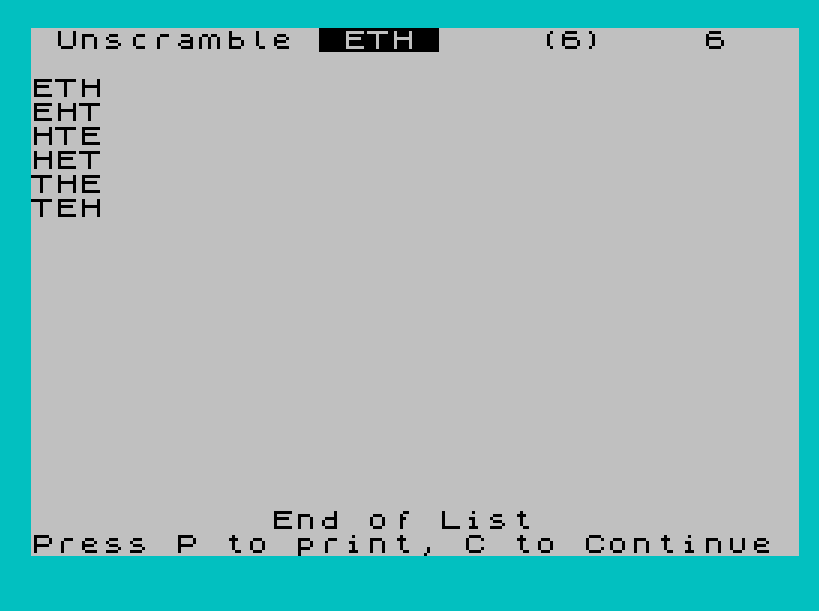
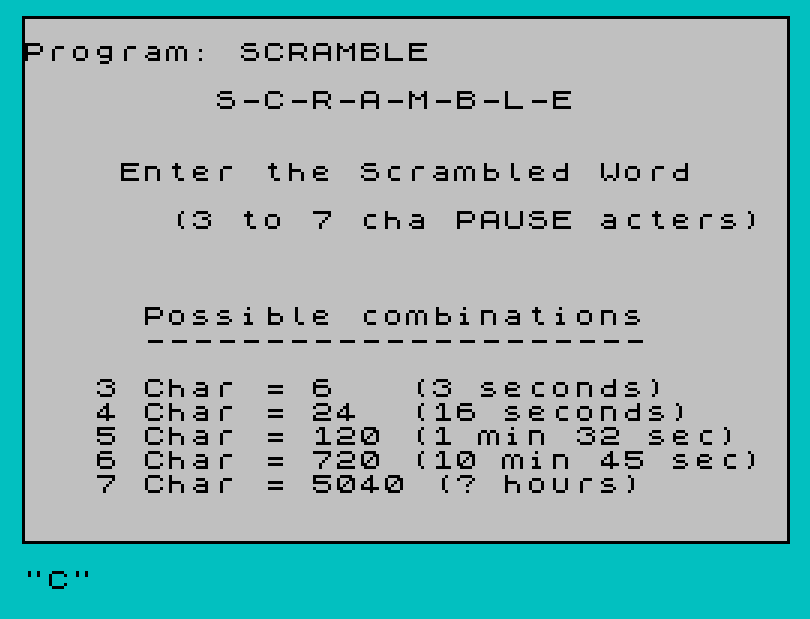
SCRAMBLE is a word-unscrambling utility that accepts a 3–7 character input word and generates every possible permutation of its letters, displaying each unique anagram on screen. It uses a random-selection deduplication technique: a working copy array W$ has used positions marked with “/” as a sentinel, and a separate C$() array (dimensioned to hold up to 200 strings of length B) tracks already-seen results to avoid duplicates. The permutation count for each word length (6, 24, 120, 720, 5040) matches n-factorial and is displayed alongside estimated runtimes. Screen layout reflows into columns via AT-coordinate arithmetic, wrapping to a new column when row 19 is reached. The program ends with a COPY/Continue prompt once all permutations for the given word length have been found.
Program Structure
The program is divided into clearly separated functional blocks:
- Lines 5–10: REM headers and
GO TO 900to skip subroutines on startup. - Lines 140–250: Main permutation loop — iterates, calls the random-picker, and repeats.
- Lines 260–445: Deduplication and display subroutine; checks new permutation against stored ones.
- Lines 450–480: “End of List” handler — offers print or continue.
- Lines 500–510: Screen-overflow handler — pauses, clears, redraws header.
- Lines 800–810: Header-printing subroutine.
- Lines 900–1000: Initialisation — border, title screen, INPUT, array dimensioning, and jump to permutation loop.
- Lines 2000–2060: Factorial lookup table — sets
Tand prints expected count. - Line 9999:
CLEAR : SAVE "SCRAMBLE" LINE 1— save-with-autorun line, never reached during normal execution.
Permutation Algorithm
Rather than a recursive or iterative algorithm, the program uses a probabilistic random-selection approach:
- Array
W$is re-initialised fromA$at the start of each permutation attempt (lines 140–150). - A random index
Ris chosen; ifW$(R)="/"it retries (line 190), acting as a used-slot sentinel. - The chosen character is appended to
R$and its slot set to"/"(lines 200–220). - Once
LEN R$ = B, a full permutation is assembled and passed to the deduplication subroutine.
This approach is not guaranteed to be efficient — it may spin on GO TO 180 many times for later characters — but it is simple to implement in BASIC. Because it is purely random, the same permutation may be generated many times before all are found, making 7-character words (“? hours”) extremely slow in practice.
Deduplication Subroutine (Lines 260–320)
The subroutine at line 260 walks array C$ linearly, comparing each stored string to the new permutation R$:
- If an empty slot (
CODE C$(E)=32, i.e. a space-filled string) is found, the new permutation is stored there (line 290). - If a match is found,
GO SUB 350handles display and scoring (line 300). - The counter
Eincrements each pass; there is no explicit upper-bound check, so ifC$‘s 200-row limit is exceeded aSubscript out of rangeerror would occur for very long runs.
Display and Layout
Words are printed at position AT X,Y. Column wrapping is managed at line 360:
Xincrements each new word; whenX=19, it resets to 2 andYadvances byB+1.- When
Y>28, the screen-overflow subroutine at line 500 fires, clearing the screen and resetting coordinates. - A brief
BEEP .03,34sounds on each column wrap (line 360).
Notable Techniques and Idioms
POKE 23658,8sets the system variable FLAGS2 to enable caps-lock (so INPUT accepts uppercase letters without SHIFT).POKE 23609,100sets REPDEL, increasing the keyboard repeat delay.SAVE "SCRAMBLE" LINE 1on line 9999 saves the program with autostart at line 1 (which hits the REM and falls through toGO TO 900). This is a common distribution idiom.- Factorial counts are hard-coded in both the title screen (line 940) and the lookup subroutine (lines 2000–2040) rather than computed, saving runtime at the cost of flexibility.
- The
FLASH 1/FLASH 0wrapping is used for attention-drawing prompts at lines 450 and 500.
Image Gallery
Source Code
    5 REM  SCRAMBLE
    8 REM  © by F. Bouldin, 8/7/85; ALL RIGHTS RESERVED
   10 GO TO 900
  140 FOR C=1 TO B
  150 LET W$(C)=A$(C): NEXT C
  170 LET R$=""
  180 LET R=INT (RND*B)+1
  190 IF W$(R)="/" THEN GO TO 180
  200 LET R$=R$+W$(R)
  210 IF LEN R$=B THEN GO TO 245
  220 LET W$(R)="/"
  225 GO TO 180
  240 LET C$(C)=R$
  245 GO SUB 260
  250 GO TO 140
  260 LET E=0
  270 LET E=E+1
  275 PRINT AT 0,28;"     ";AT 0,28;E
  280 IF R$=C$(E) THEN RETURN
  290 IF CODE C$(E)=32 THEN LET C$(E)=R$
  300 IF C$(E)=R$ THEN GO SUB 350
  310 IF C$(E)=R$ THEN RETURN
  320 GO TO 270
  340 REM
  350 IF B=6 AND X=2 AND Y=28 THEN GO SUB 500:
  355 LET S=S+1: IF B=6 AND X=2 AND Y=28 THEN GO SUB 500:
  358 PRINT AT X,Y;C$(E)
  360 LET X=X+1: IF X=19 THEN LET X=2: LET Y=Y+B+1: BEEP .03,34: IF Y>28 THEN GO SUB 500
  400 IF B=3 AND S=6 THEN GO TO 450
  410 IF B=4 AND S=24 THEN GO TO 450
  420 IF B=5 AND S=120 THEN GO TO 450
  430 IF B=6 AND S=720 THEN GO TO 450
  440 IF B=7 AND S=5040 THEN GO TO 450
  445 RETURN
  450 PRINT FLASH 1;AT 20,9;" End of List "; FLASH 0;AT 21,0;"Press P to print, C to Continue"
  455 FOR N=1 TO 10: BEEP .05,26: NEXT N
  460 IF INKEY$="P" THEN COPY
  470 IF INKEY$="C" THEN CLS : GO TO 10
  480 GO TO 460
  500 PRINT FLASH 1;AT 21,2;" Press any key to continue ": BEEP .1,23: PAUSE 0: CLS : GO SUB 800: GO SUB 2000: LET X=2: LET Y=0
  510 RETURN
  800 PRINT AT 0,1;"Unscramble "; INVERSE 1;" ";a$;" "; INVERSE 0
  810 RETURN
  900 REM  "S-C-R-A-M-B-L-E"
  902 REM  By F. Boukdin, 8-1-85
  904 REM  Adapted from program   by C. Inman in Dec '83 SYNTAX
  910 BORDER 5: PLOT 0,0: DRAW 0,175: DRAW 255,0: DRAW 0,-175: DRAW -255,0
  920 LET X=2: LET Y=0: POKE 23658,8: POKE 23609,100: LET S=0
  930 PRINT AT 3,7; FLASH 1;" S-C-R-A-M-B-L-E "; FLASH 0;AT 6,4;"Enter the Scrambled Word";AT 8,6;"(3 to 7 cha PAUSE acters)"
  940 PRINT AT 12,5;"Possible combinations";AT 13,5;"---------------------";AT 15,3;"3 Char = 6   (3 seconds)";AT 16,3;"4 Char = 24  (16 seconds)";AT 17,3;"5 Char = 120 (1 min 32 sec)";AT 18,3;"6 Char = 720 (10 min 45 sec)";AT 19,3;"7 Char = 5040 (? hours)"
  950 INPUT A$ : IF LEN A$<3 OR LEN A$>7 THEN GO TO 950
  960 CLS : GO SUB 800
  970 LET B=LEN A$: GO SUB 2000
  980 DIM C$(200,B)
  990 DIM W$(B)
 1000 GO TO 140
 2000 IF B=3 THEN LET T=6
 2010 IF B=4 THEN LET T=24
 2020 IF B=5 THEN LET T=120
 2030 IF B=6 THEN LET T=720
 2040 IF B=7 THEN LET T=5040
 2050 PRINT AT 0,21;"(";T;")"
 2060 RETURN
 9999 CLEAR : SAVE "SCRAMBLE" LINE 1
Note: Type-in program listings on this website use ZMAKEBAS notation for graphics characters.