
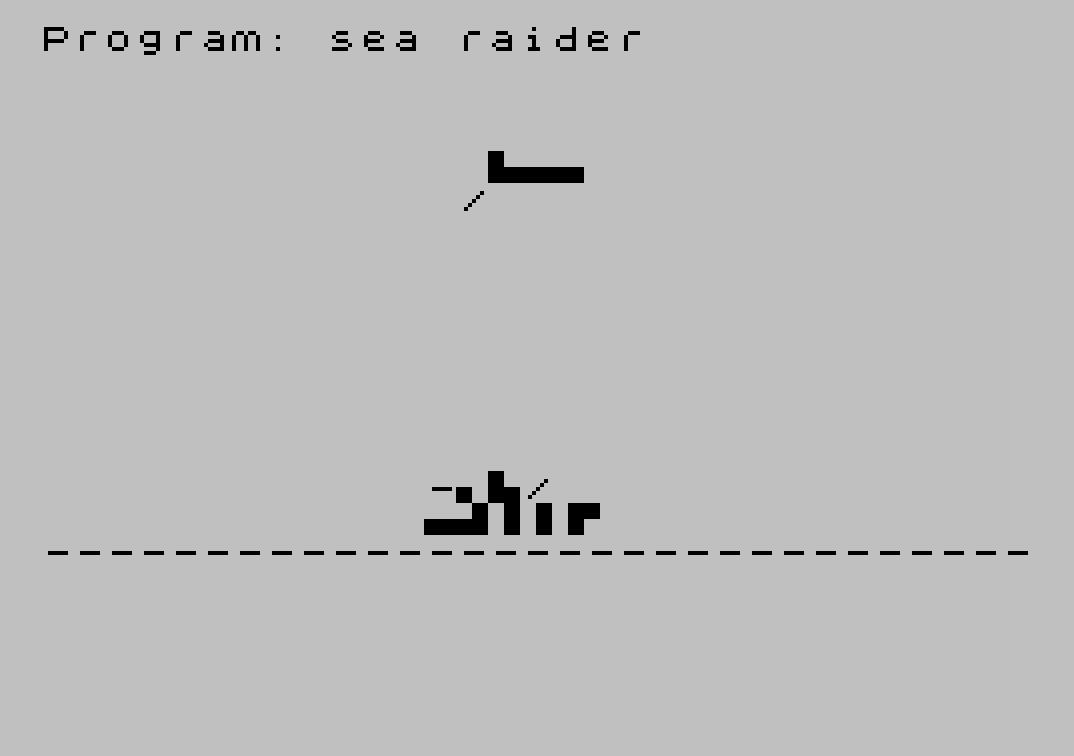
Sea Raider is a shooting gallery game in which the player must fire missiles at an enemy ship crossing the screen while a countdown timer decreases. A UDG character is defined at startup using POKEs to USR “b” to create an alternating checkerboard pattern (bytes 85, 170 repeating) representing water. The player presses “f” to fire, and a hit is registered when the absolute difference between the plane position variable and the ship position variable is 2 or less. The game tracks score, remaining missiles, and a time limit, ending when either resource is exhausted. Block graphics characters are used extensively in the PRINT statements to render the ship and explosion animations directly in BASIC without machine code routines.
Program Analysis
Program Structure
The program is divided into a straightforward sequence of phases:
- Initialization (lines 10–20): Defines a UDG character “b” with a checkerboard pattern, used for water texture.
- Game setup (lines 30–70): Draws the horizon line, sets missiles (
m=20), time (t=300), score (s=0), and the aircraft/target starting position (a=1). - Main game loop (lines 80–230): Moves the aircraft (
a) and ship (b) across the screen, handles wraparound, draws sprites, decrements the timer, and polls for the fire key. - Hit detection and scoring (lines 270–340): Tests proximity, flashes an explosion if close enough, awards points, and loops back.
- End condition (lines 250–260): Displays status and halts if missiles or time are exhausted.
UDG Definition
Lines 10–20 use a RESTORE/FOR/READ/POKE loop to load 8 bytes into the UDG slot for character “b”. The data 85,170,85,170,85,170,85,170 is the binary alternating pattern 01010101 / 10101010, producing a checkerboard tile used to represent a water surface texture throughout the display.
Sprite Movement and Wraparound
Two independent positional variables drive the animation. a represents an aircraft or gun emplacement and advances by 2 each loop iteration (line 90), with a random extra increment (line 110) when RND>0.7, giving it variable speed. b represents the enemy ship and increments by 1 each cycle (line 100), making it slower and more predictable. Both variables wrap around when they exceed column 26: the previous sprite position is erased with spaces before resetting (lines 120–150).
Hit Detection
Line 270 uses ABS (a-b)>2 to test whether the two sprites are within 2 columns of each other. This is a simple but effective proximity check that avoids the need to track actual pixel positions. If the condition is not met, the loop continues without scoring.
Explosion Animation
Lines 280–300 run a short FOR q=1 TO 5 loop that alternates two PRINT statements at the ship’s current row, using block graphics characters to simulate an explosion flash. The two patterns are printed at the same screen position in rapid succession, creating a flickering effect without any PAUSE or timing delay — the loop iterations themselves provide the timing.
Input Handling
The fire key is polled with INKEY$="f" at line 200. This is a non-blocking poll within the main loop; there is no PAUSE or wait state, so the player must time the keypress to the game loop’s natural cadence. After a successful hit, line 330 uses a busy-wait loop (IF INKEY$<>"" THEN GO TO 330) to wait for the key to be released before resuming, preventing accidental double-fires.
Scoring and Status Display
Each successful hit awards 267 points (line 310), an unusual value that may be chosen to make scores look less trivially round. The status line at row 0 is updated at line 250 and again at line 320, showing time remaining, missile count, and cumulative score.
Timer Mechanics
The timer t is decremented twice per full loop iteration — once at line 170 and again at line 210 — meaning the countdown runs faster than a single-decrement-per-loop design would suggest. When the fire key is pressed, line 210 is skipped via the GO TO 240 branch, so firing costs one fewer timer tick for that cycle.
Notable Techniques
- Block graphics characters embedded directly in PRINT string literals to draw ship and explosion sprites without any machine code.
- UDG redefinition via
POKE USRto create a custom water tile from a DATA statement. ABS-based proximity hit detection as a lightweight collision test.- Dual-decrement timer to control game pace without using PAUSE.
- Release-wait idiom at line 330 to debounce the fire key after a hit.
Potential Anomalies
The erase-before-wrap logic at lines 120 and 140 uses hardcoded offsets (a-3, b-1) that match the draw offsets in lines 160 and 190, but these could leave ghost pixels if the column arithmetic pushes a PRINT AT position off-screen near the boundary. Additionally, the missile count m is decremented at line 240 every time the fire key is pressed, regardless of whether a hit occurs — the actual hit check happens later at line 270, so missed shots still cost a missile, which is intentional game design but worth noting.
Image Gallery
Source Code
   10 RESTORE : FOR z=0 TO 7: READ a: POKE USR "b"+z,a: NEXT z
   20 DATA 85,170,85,170,85,170,85,170
   30 PRINT AT 17,0;"-------------------------------"
   40 LET m=20
   50 LET t=300
   60 LET s=0
   70 LET a=1
   80 LET b=INT (RND*15)+1
   90 LET a=a+2
  100 LET b=b+1
  110 IF RND>.7 THEN LET a=a+1
  120 IF a>26 THEN PRINT AT 5,a-3;"    ";AT 6,a-3;"      "
  130 IF a>26 THEN LET a=3
  140 IF b>26 THEN PRINT AT 15,b-1;"     ";AT 16,b-1;"      "
  150 IF b>26 THEN LET b=1
  160 PRINT AT 5,a-3;"   \:.\..\..";AT 6,a-2;"   /"
  170 LET t=t-1
  180 IF t<1 THEN GO TO 250
  190 PRINT AT 15,b-1;" -\. \:./";AT 16,b-1;" \..\.:\ :\ :\ :\' "
  200 IF INKEY$="f" THEN GO TO 240
  210 LET t=t-1
  220 IF t<1 THEN GO TO 250
  230 GO TO 90
  240 LET m=m-1
  250 PRINT AT 0,0;"TIME=";t;" MISSILES=";m;"  "
  260 IF m=0 OR t<1 THEN FOR z=1 TO 300: NEXT z: STOP
  270 IF ABS (a-b)>2 THEN GO TO 90
  280 FOR q=1 TO 5
  290 PRINT AT 15,b;"\:: \:: \::";AT 15,b;" * * ";AT 16,b;" \.'\'.\.' ";AT 16,b;"\'. \.' \'."
  300 NEXT q
  310 LET s=s+267
  320 PRINT AT 1,6;"SCORE=";s;" "
  330 IF INKEY$<>"" THEN GO TO 330
  340 GO TO 160
Note: Type-in program listings on this website use ZMAKEBAS notation for graphics characters.