
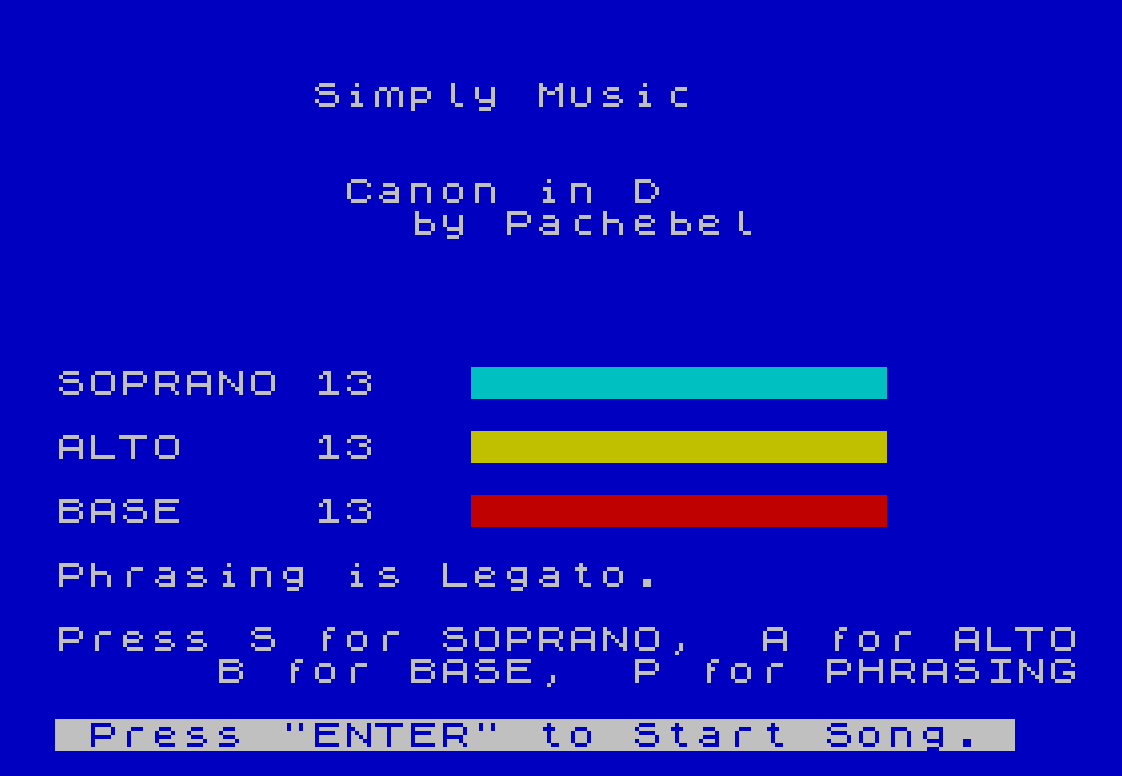
Simply Music plays a three-voice arrangement of Pachelbel’s Canon in D using the SOUND command, with independent soprano, alto, and bass channels driven by score data stored in a three-dimensional array. The program reads note data (pitch register value, envelope register value, and duration) for each voice from DATA statements into a DIM s(PI,PI,400) array — a notable trick that uses PI (≈3.14, truncated to 3) to specify the array dimensions as 3×3×400. During playback, each voice is advanced independently through its note list on a countdown timer, allowing polyphonic scheduling without interrupts. The user can adjust per-voice volume levels (0–15) with on-screen bar-graph displays, and toggle a legato phrasing mode that controls whether notes are silenced between transitions.
Program Analysis
Program Structure
The program divides into four logical phases: initialization (lines 20–50), the main playback loop (lines 60–180), the keyboard handler (lines 190–270), and setup/data-loading subroutines (lines 280–410), followed by the score DATA at lines 420–510.
- Initialization (lines 20–410): Sets display colors, allocates the score array, loads UDG graphics, and reads all three voice tracks from DATA into array
s. - Settings UI (lines 290–340): Displays the title, volume bar-graphs for all three voices, phrasing status, and waits for ENTER before starting.
- Playback loop (lines 60–180): Decrements per-voice countdown timers each iteration; when a timer expires, the next note for that voice is fetched and sent to SOUND registers.
- Key handler (lines 190–270): Called mid-loop; processes S/A/B to cycle volumes and P to toggle legato phrasing, then updates the on-screen bar displays.
- End-of-song (line 280): Silences all channels, prompts the user, then resets pointers and restarts.
The Score Array and the PI Trick
Line 350 declares the array with DIM s(PI,PI,400). Because BASIC truncates the floating-point value of PI (≈3.14159) to an integer for array dimensions, this is equivalent to DIM s(3,3,400). Using PI instead of the literal 3 saves one byte per occurrence — a compact coding idiom. The three “rows” of the first index map to soprano (1), alto (2), and bass (3); the second index selects pitch register value (1), envelope/waveform value (2), or duration (3).
Polyphonic Scheduling
Rather than using any interrupt-driven timing, the program implements a simple software scheduler. Each voice has a countdown variable (b, d, f) and a position pointer (b1, d1, f1). Each pass through the loop decrements all three counters (line 60). When a counter reaches zero or below, the next note is loaded for that voice and all six SOUND registers (pitch and envelope for each of the three voices, plus three volume registers) are written atomically in a single SOUND statement at line 180. This means all active voices are re-committed to the sound chip on every note advance of any voice.
Legato (Phrasing) Mode
The variable p acts as a Boolean phrasing flag. When p is non-zero (legato off — the display reads “Phrasing is not Legato”), lines 110, 130, and 150 silence the respective voice channel just before its note is replaced. When p is zero (legato on), those SOUND …,0 calls are skipped and notes run directly into each other. The label “not Legato” is slightly counterintuitive: pressing P toggles legato on, at which point the message changes to “Phrasing is Legato.”
Volume Controls and Bar-Graph Display
Variables vs, va, and vb hold the volume (0–15) for soprano, alto, and bass respectively. Lines 230–250 each draw a color-coded horizontal bar using repeated PRINT PAPER n;" "; characters: cyan (PAPER 5) for soprano, yellow (PAPER 6) for alto, and red (PAPER 2) for bass. The bar length equals the current volume value, with remaining cells filled in the background color to erase the old bar. Pressing the corresponding key cycles the volume upward, wrapping from 15 back to 0.
UDG Graphics
Lines 390–400 define two UDG characters (\a and \b) by POKEing eight bytes each into the UDG area. The DATA at line 390 encodes a simple animated cursor icon. Lines 80–100 alternate between printing \a and \b at a fixed screen position on every loop iteration, producing a pulsing playback indicator using the value of q as a flip-flop.
Variable Optimization
Lines 40 and later use pre-assigned variables n0, n2, and n8 (holding 0, 2, and 8 respectively) rather than literals throughout the DATA statements. Because BASIC stores variable names and their floating-point values separately from DATA, using short variable names in the DATA lines saves tokenized program space — though notably DATA items are stored as ASCII strings, so this technique actually saves bytes only in the source listing width, not in token storage. However, n0, n2, and n8 appear extensively in the DATA lines, and RESTORE/READ brings them in as numeric values correctly since the READ statement evaluates them as expressions.
SOUND Register Layout
The single SOUND statement at line 180 writes to eight registers simultaneously:
| Register | Function | Source |
|---|---|---|
0 | Soprano pitch low | s(1,1,b1) |
1 | Soprano pitch high / waveform | s(1,2,b1) |
2 | Alto pitch low | s(2,1,d1) |
3 | Alto pitch high / waveform | s(2,2,d1) |
4 | Bass pitch low | s(3,1,f1) |
5 | Bass pitch high / waveform | s(3,2,f1) |
8 | Soprano volume | sv |
9 | Alto volume | av |
10 | Bass volume | bv |
Rest notes are encoded as a zero in the pitch field of the DATA; when the program detects this, it sets the corresponding shadow volume variable (sv, av, or bv) to zero, silencing that channel while preserving the user’s chosen volume setting.
Notable Anomalies
- Line 250 displays the label “BASE” (missing the S) rather than “BASS” — a typographic error in the original listing.
- The bass array index uses
s(PI,PI,f1)at line 160 rather thans(3,3,f1)or evens(3,1,f1)/s(3,2,f1). Since PI truncates to 3,s(PI,PI,f1)=s(3,3,f1)— fetching the duration field, not the pitch field. The actual pitch and envelope for the bass voice are read correctly in the SOUND call at line 180 vias(3,1,f1)ands(3,2,f1), so this line is only checking whether the pitch stored in column 3 (which is actually the duration value) equals zero to determine if a rest should be played. This likely works by coincidence since rest durations may be encoded as zero, but it is logically inconsistent with how soprano (column 1) and alto (column 1) rests are detected. - The end-of-song condition at line 170 checks
b1>n1butd1>n2andf1>n3— using the variablen2(value 2) as the alto note count andn3as the bass note count. However, the actual note counts read from DATA are stored back inton1,n2, andn3via the READ loops — wait, actuallyn2is initialized to 2 and never overwritten, while the alto count from DATA is read into the FOR loop at line 370 but only used to control the loop, not stored inton2. This means the end-of-song test for alto (d1>n2, i.e.d1>2) will trigger after only 2 alto notes, far too early. In practice the song restarts after approximately 2 alto note advances, unless the bass voice triggers the condition first viaf1>n3— andn3is never assigned at all, defaulting to 0, makingf1>n3true immediately. This suggests the end-of-song detection relies on thef1>n3check triggering correctly only becausen3should have been set but was not, and the program may not play the full piece as intended.
Image Gallery
Source Code
   10 REM   Simply Music    \*  S. D. Lemke          Lemke Software          2144 White Oak          Wichita, KS          USA  67207 TIME DESIGNS MAG,  NOV/DEC 1986
   20 PAPER 1: BORDER 1: INK 7: CLS : PRINT AT 10,7;"PREPARING SCORE": LET n0=0: LET n2=2: LET n8=8: GO SUB 350
   30 LET p=0: LET vb=13: LET vs=vb: LET va=vb: LET q=p: GO SUB 290
   40 LET b1=n0: LET d1=b1: LET f1=b1
   50 LET b=0: LET d=b: LET f=b
   60 LET b=b-1: LET d=d-1: LET f=f-1
   70 IF INKEY$<>"" THEN GO SUB 190
   80 IF q THEN PRINT AT 10,15;"\a"
   90 IF NOT q THEN PRINT AT 10,15;"\b"
  100 LET q=NOT q
  110 IF b<=0 AND p THEN SOUND 8,0
  120 IF b<=0 THEN LET b1=b1+1: LET b=s(1,3,b1): LET sv=vs: IF s(1,1,b1)=0 THEN LET sv=0
  130 IF d<=0 AND p THEN SOUND 9,0
  140 IF d<=0 THEN LET d1=d1+1: LET d=s(2,3,d1): LET av=va: IF s(2,1,d1)=0 THEN LET av=0
  150 IF f<=0 AND p THEN SOUND 10,0
  160 IF f<=0 THEN LET f1=f1+1: LET f=s(PI,PI,f1): LET bv=vb: IF s(PI,1,f1)=0 THEN LET bv=0
  170 IF b1>n1 OR d1>n2 OR f1>n3 THEN GO TO 280
  180 SOUND 0,s(1,1,b1);1,s(1,2,b1);2,s(2,1,d1);3,s(2,2,d1);4,s(3,1,f1);5,s(3,2,f1);8,sv;9,av;10,bv: GO TO 60
  190 LET i$=INKEY$: IF i$="" THEN RETURN
  200 IF i$="B" OR i$="b" THEN LET vb=vb+1: IF vb>15 THEN LET vb=0
  210 IF i$="A" OR i$="a" THEN LET va=va+1: IF va>15 THEN LET va=0
  220 IF i$="S" OR i$="s" THEN LET vs=vs+1: IF vs>15 THEN LET vs=0
  230 IF i$="S" OR i$="s" THEN PRINT AT 12,0;"SOPRANO    ";AT 12,8;vs;AT 12,13;: FOR i=1 TO vs: PRINT PAPER 5;" ";: NEXT i: FOR i=vs TO 15: PRINT PAPER 1;" ";: NEXT i
  240 IF i$="A" OR i$="a" THEN PRINT AT 14,0;"ALTO       ";AT 14,8;va;AT 14,13;: FOR i=1 TO va: PRINT PAPER 6;" ";: NEXT i: FOR i=va TO 15: PRINT PAPER 1;" ";: NEXT i
  250 IF i$="B" OR i$="b" THEN PRINT AT 16,0;"BASE      ";AT 16,8;vb;AT 16,13;: FOR i=1 TO vb: PRINT PAPER 2;" ";: NEXT i: FOR i=vb TO 15: PRINT PAPER 1;" ";: NEXT i
  260 IF i$="P" OR i$="p" THEN LET p=NOT p: PRINT AT 18,0;"Phrasing is ";("not " AND p);"Legato.     "
  270 RETURN
  280 SOUND 8,0;9,0;10,0: PRINT #0;AT 1,2;"Press any key to continue.": PAUSE 0: GO SUB 290: GO TO 40
  290 CLS : PRINT AT PI,8;"Simply Music": PRINT AT 6,0;t$: LET i$="S": GO SUB 230: LET i$="A": GO SUB 240: LET i$="B": GO SUB 250
  300 PRINT AT 20,0;"Press S for SOPRANO,  A for ALTO     B for BASE,  P for PHRASING"
  310 PRINT AT 18,0;"Phrasing is ";("not " AND p);"Legato.     "
  320 PRINT #0; INVERSE 1;" Press ""ENTER"" to Start Song. "
  330 GO SUB 190: IF i$<>CHR$ 13 THEN GO TO 330
  340 PRINT #0;AT 0,0;TAB 31;" ";TAB 31;" ": RETURN
  350 DIM s(PI,PI,400): SOUND 0,0;1,0;2,0;3,0;7,56;8,0;9,0;10,0;11,50;12,120;13,10
  360 RESTORE 420: READ t$: READ n1: FOR i=1 TO n1: FOR j=1 TO 3: READ s(1,j,i): NEXT j: NEXT i
  370 RESTORE 450: READ n2: FOR i=1 TO n2: FOR j=1 TO 3: READ s(2,j,i): NEXT j: NEXT i
  380 RESTORE 490: READ n3: FOR i=1 TO n3: FOR j=1 TO 3: READ s(3,j,i): NEXT j: NEXT i
  390 DATA 0,192,32,16,60,60,60,255,n0,3,4,n8,60,60,60,255
  400 RESTORE 390: FOR i=0 TO 15: READ b: POKE USR "a"+i,b: NEXT i
  410 RETURN
  420 DATA "         Canon in D                        by Pachebel",56,119,1,n8,245,1,n8,190,1,n8,84,n2,n8,51,n2,n8,239,n2,n8,51,n2,n8,245,1,n8,74,n0,n8,84,n0,n8,94,n0,n8,99,n0,n8,112,n0,n8,125,n0,n8,112,n0,n8,99,n0,n8,74,n0,n8,84,n0,n8,94,n0,n8,99,n0,n8,112,n0,n8,125,n0,n8,112,n0,n8,99,n0,8
  430 DATA 74,n0,n8,84,n0,n8,94,n0,n8,99,n0,n8,112,n0,n8,125,n0,n8,112,n0,n8,99,n0,n8,74,n0,n8,84,n0,n8,94,n0,n8,99,n0,n8,112,n0,n8,125,n0,n8,112,n0,n8,99,n0,8
  440 DATA 74,n0,n8,84,n0,n8,94,n0,n8,99,n0,n8,112,n0,n8,125,n0,n8,112,n0,n8,99,n0,n8,74,n0,n8,84,n0,n8,94,n0,n8,99,n0,n8,112,n0,n8,125,n0,n8,112,n0,n8,99,n0,20
  450 DATA 128,119,1,n8,245,1,n8,190,1,n8,84,n2,n8,51,n2,n8,239,n2,n8,51,n2,n8,245,1,n8,119,1,n8,245,1,n8,190,1,n8,84,n2,n8,51,n2,n8,239,n2,n8,51,n2,n8,245,1,n8,94,n0,n8,99,n0,n8,112,n0,n8,125,n0,n8,141,n0,n8,149,n0,n8,141,n0,n8,167,n0,8
  460 DATA 94,n0,4,125,n0,4,99,n0,4,125,n0,4,112,n0,4,149,n0,4,125,n0,4,149,n0,4,141,n0,4,188,n0,4,149,n0,4,188,n0,4,141,n0,4,188,n0,4,167,n0,4,141,n0,4,74,n0,n2,125,n0,n2,94,n0,n2,125,n0,n2,99,n0,4,125,n0,4,94,n0,n2,149,n0,n2,112,n0,n2,149,n0,n2,125,n0,4,149,n0,4,112,n0,n2,188,n0,n2,141,n0,n2,188,n0,n2,149,n0,4,188,n0,4,112,n0,n2,188,n0,n2,141,n0,n2,188,n0,n2,167,n0,4,141,n0,4
  470 DATA 74,n0,n2,125,n0,n2,94,n0,n2,125,n0,n2,84,n0,n2,125,n0,n2,99,n0,n2,125,n0,n2,94,n0,n2,149,n0,n2,112,n0,n2,149,n0,n2,99,n0,n2,149,n0,n2,125,n0,n2,149,n0,n2,112,n0,n2,188,n0,n2,141,n0,n2,188,n0,n2,125,n0,n2,188,n0,n2,149,n0,n2,188,n0,n2,112,n0,n2,188,n0,n2,141,n0,n2,188,n0,n2,99,n0,n2,167,n0,n2,125,n0,n2,141,n0,2
  480 DATA 94,n0,n2,125,n0,n2,94,n0,n2,125,n0,n2,99,n0,n2,125,n0,n2,99,n0,n2,125,n0,n2,112,n0,n2,149,n0,n2,112,n0,n2,149,n0,n2,125,n0,n2,149,n0,n2,125,n0,n2,149,n0,n2,141,n0,n2,188,n0,n2,141,n0,n2,188,n0,n2,149,n0,n2,188,n0,n2,149,n0,n2,188,n0,n2,141,n0,n2,188,n0,n2,141,n0,n2,188,n0,n2,125,n0,n2,167,n0,n2,125,n0,n2,141,n0,14
  490 DATA 56,119,1,n8,245,1,n8,190,1,n8,84,n2,n8,51,n2,n8,239,n2,n8,51,n2,n8,245,1,n8,119,1,n8,245,1,n8,190,1,n8,84,n2,n8,51,n2,n8,239,n2,n8,51,n2,n8,245,1,n8,119,1,n8,245,1,n8,190,1,n8,84,n2,n8,51,n2,n8,239,n2,n8,51,n2,n8,245,1,8
  500 DATA 119,1,n8,245,1,n8,190,1,n8,84,n2,n8,51,n2,n8,239,n2,n8,51,n2,n8,245,1,n8,119,1,n8,245,1,n8,190,1,n8,84,n2,n8,51,n2,n8,239,n2,n8,51,n2,n8,245,1,n8,119,1,n8,245,1,n8,190,1,n8,84,n2,n8,51,n2,n8,239,n2,n8,51,n2,n8,245,1,8
  510 DATA 119,1,n8,245,1,n8,190,1,n8,84,n2,n8,51,n2,n8,239,n2,n8,51,n2,n8,245,1,n8,119,1,n8,245,1,n8,190,1,n8,84,n2,n8,51,n2,n8,239,n2,n8,51,n2,n8,245,1,n8,119,1,n8,245,1,n8,190,1,n8,84,n2,n8,51,n2,n8,239,n2,n8,51,n2,n8,245,1,20
  520 SAVE "Simply M" LINE 10
Note: Type-in program listings on this website use ZMAKEBAS notation for graphics characters.