
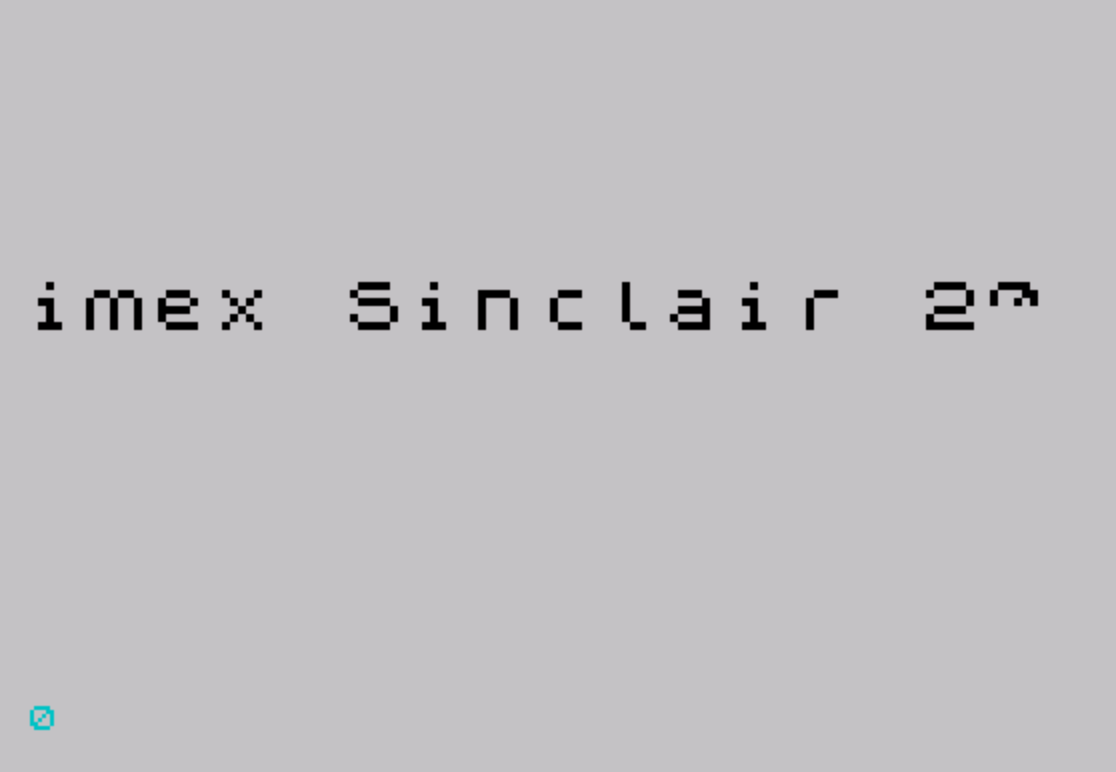
This program displays a user-entered text message as a continuously repeating scrolling marquee, rendering each character at double size on screen. The user inputs a message via INPUT, and each character is individually printed in INK 5 at the bottom of the screen (line 21), then examined pixel-by-pixel using the POINT command to reconstruct it scaled 2× in both dimensions using PLOT. Between each character display, a machine code routine at address 60000 is called 16 times to perform a smooth horizontal scroll of the double-size rendering area. The 17-byte machine code routine (loaded via READ/DATA and POKE) implements a left-shift scroll using Z80 instructions operating on the display memory starting at address 0x57FF. The message loops indefinitely by jumping back to line 80 after all characters have been processed.
Program Analysis
Program Structure
The program is organized into three logical phases: initialization (lines 10–40), user input (lines 50–70), and the main display loop (lines 80–220), with machine code data at line 230.
- Lines 10–40: Reserve memory with
CLEAR 59999, then load 17 bytes of machine code into address 60000 viaREAD/POKE. - Lines 50–70: Prompt for a message string, reject empty input, and store the message length in
n. - Lines 80–100: Outer loop iterates over each character in the message using index
q, calling the double-size print subroutine at line 110, then repeating indefinitely. - Lines 110–220: Subroutine that prints a character at screen row 21, samples its pixels with
POINT, and plots a 2× scaled version, then scrolls via machine code. - Line 230:
DATAblock containing the 17-byte Z80 machine code routine.
Double-Size Character Rendering
The subroutine at line 110 uses a clever technique to scale characters. Each character y$(q) is printed with INK 5 at position AT 21,0 — the bottom row of the screen. The nested loops over a (rows 7 down to 0) and b (columns 0 to 7) use POINT (b,a) to test each pixel of the rendered character at the bottom of the display. For each lit pixel, an additional 2×2 block is plotted at PLOT x-16+2*b+c, y+2*a-d using inner loops c and d (both 0 to 1), effectively doubling the character in both axes. The row loop runs from 7 to 0 (descending) because BASIC graphics coordinates place row 0 at the bottom.
The target position is anchored by x=255 and y=100, placing the scaled output in the upper-right region of the display. Note that x-16+2*b can reach a maximum of 255-16+14 = 253, staying within the 256-pixel-wide screen.
Machine Code Scroll Routine
The 17-byte routine stored at address 60000 performs a hardware-level left scroll of the relevant screen area. The DATA values decode as the following Z80 instructions:
| Offset | Bytes | Mnemonic | Notes |
|---|---|---|---|
| 0 | 33 FF 57 | LD HL, 0x57FF | Points near display file |
| 3 | 0E C0 | LD C, 0xC0 | Row count / mask |
| 5 | 06 20 | LD B, 32 | 32 bytes per row |
| 7 | 7B | LD A, E | Load accumulator |
| 8 | CB 16 | RL (HL) | Rotate left through carry |
| 10 | 2B | DEC HL | Move to next byte |
| 11 | 10 FB | DJNZ -5 | Loop 32 times |
| 13 | 0D | DEC C | Decrement row counter |
| 14 | 20 F5 | JR NZ, -11 | Loop over rows |
| 16 | C9 | RET | Return to BASIC |
This routine is called 16 times per character (line 210: FOR r=1 TO 16: RANDOMIZE USR 60000: NEXT r), producing a smooth 16-pixel leftward scroll for each character-width cycle, matching the 2× scaled 8-pixel character (16 pixels wide). RANDOMIZE USR is the standard idiom for calling machine code from BASIC, discarding the return value.
Key BASIC Idioms
CLEAR 59999reserves RAM above address 59999, protecting the machine code from being overwritten by BASIC string/variable storage.IF t$="" THEN GO TO 50at line 50 provides simple input validation, ensuring the message is non-empty before proceeding.- The variable
y$is assigned fromt$at line 60 but is never modified — it appears redundant;t$could be used directly throughout. PRINT AT 21,0;" "at line 220 clears the character used as a pixel source before returning, preventing leftover ink from affecting the next character’sPOINTsampling.
Notable Techniques and Observations
The use of POINT to read back pixel data from a character rendered on-screen is an elegant way to access the font bitmap without needing to know font memory addresses. By printing to a known screen location and sampling with POINT, the program is font-agnostic and will correctly scale any character the system can display, including user-defined graphics.
One minor anomaly: the variable y$ (line 60) is a direct copy of t$ and serves no functional purpose — the loop at line 90 references y$(q), which is equivalent to t$(q). This may be a leftover from an earlier version where the strings diverged.
The scroll loop calls the machine code 16 times rather than passing a loop count as a parameter, which is less efficient but simpler to implement in BASIC. Each call scrolls the display one pixel left, for a total of 16 pixels — exactly one double-width character column.
Image Gallery
Source Code
   10 REM     SLOW MESSAGE         Enter a message of any length   and leave spaces at the end     as the message will repeat.                                             by D.J. Currie
   20 CLEAR 59999
   30 FOR f=0 TO 16: READ a: POKE 60000+f,a: NEXT f
   40 LET x=255: LET y=100
   50 INPUT "Enter message - ";t$: IF t$="" THEN GO TO 50
   60 LET y$=t$
   70 LET n=LEN y$
   80 FOR q=1 TO n
   90 GO SUB 110: NEXT q
  100 GO TO 80
  110 REM Print double size
  120 PRINT INK 5;AT 21,0;y$(q)
  130 FOR a=7 TO 0 STEP -1
  140 FOR b=0 TO 7
  150 IF POINT (b,a)=0 THEN GO TO 200
  160 FOR c=0 TO 1
  170 FOR d=0 TO 1
  180 PLOT x-16+2*b+c,y+2*a-d
  190 NEXT d: NEXT c
  200 NEXT b: NEXT a
  210 FOR r=1 TO 16: RANDOMIZE USR 60000: NEXT r
  220 PRINT AT 21,0;" ": RETURN
  230 DATA 33,255,87,14,192,6,32,183,203,22,43,16,251,13,32,245,201
  240 SAVE "Message" LINE 10
Note: Type-in program listings on this website use ZMAKEBAS notation for graphics characters.