
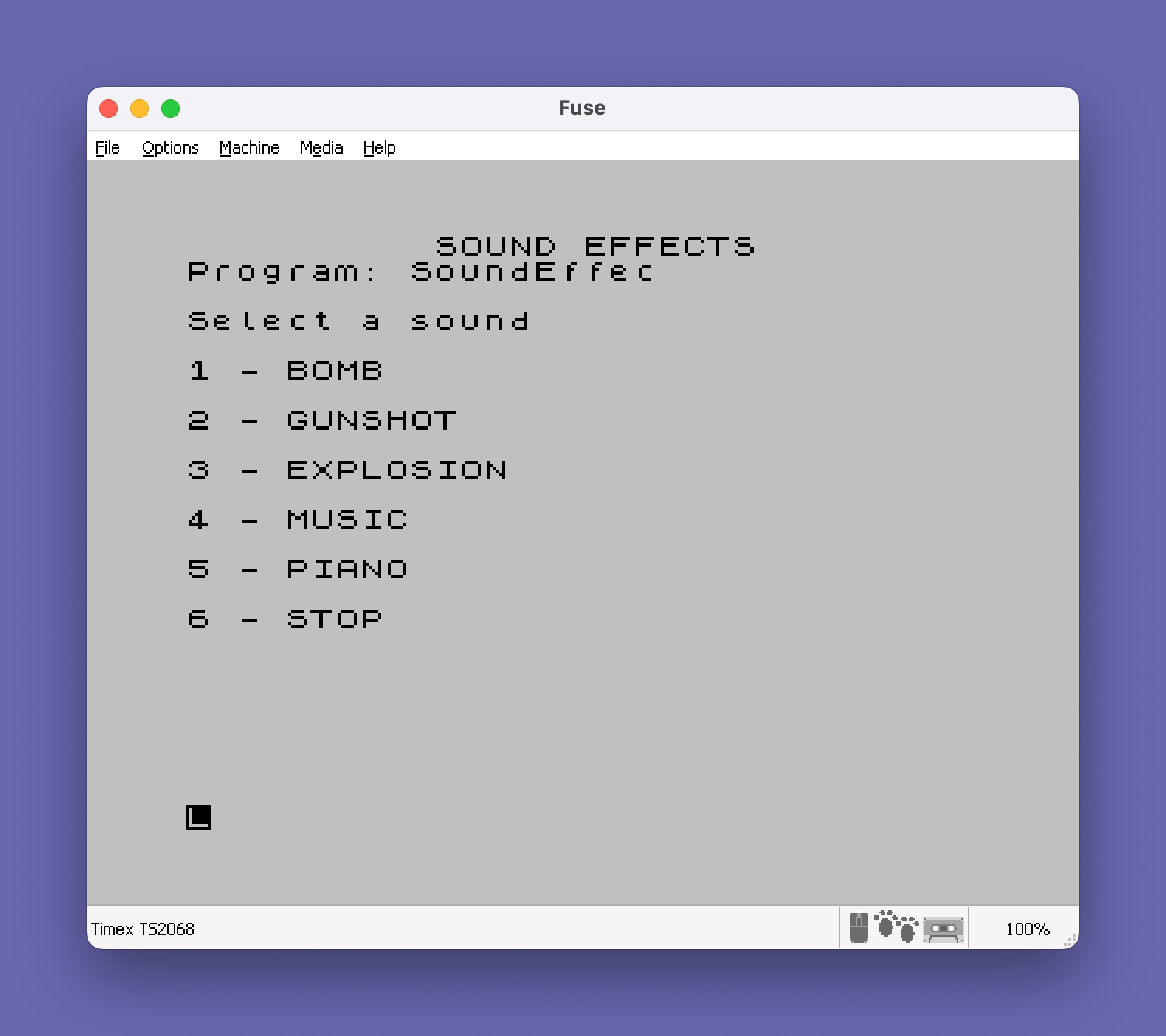
This program is a sound effects and music demonstration suite offering six selectable options from a menu: bomb, gunshot, explosion, a rendition of “America the Beautiful,” an interactive piano keyboard, and a stop option. Sound synthesis relies on the SOUND command with multiple channel/register parameters to produce noise-based effects, while melodic content uses BEEP with duration and semitone-offset data read from DATA statements. The interactive piano mode maps keyboard keys Q–P to white keys and digit keys to black keys, with octave shifting via Z/X/C and vibrato toggling via V/M. Duration values in the music DATA are divided by 16 at line 2100 before being passed to BEEP, allowing integer storage of fractional durations. The program uses a forward jump at line 15 to skip the effect subroutines and land directly on the main menu at line 3000.
Program Analysis
Program Structure
The program is organized as a collection of loosely coupled sections, each handling one sound effect or feature. A main menu at line 3000 accepts a numeric input and dispatches to the appropriate section via a chain of IF … THEN GO TO statements. Line 15 immediately jumps over the effect code to the menu, so the program enters cleanly without accidentally executing any effect on startup.
| Lines | Section |
|---|---|
| 10–15 | Title display and jump to menu |
| 20–245 | Bomb effect |
| 250–375 | Gunshot effect |
| 400–910 | Explosion effect |
| 2000–2400 | “America the Beautiful” music playback |
| 2510–2870 | Interactive piano keyboard |
| 3000–9997 | Main menu and exit sequence |
Sound Effects Implementation
The bomb, gunshot, and explosion effects all rely on SOUND with multiple register/value pairs chained in a single statement. The pattern used — channels 6, 7, 8, 9, 10, 12, 13 — configures noise generation, mixer, and amplitude/envelope registers on the sound chip. The bomb section adds a rising-pitch sweep: a FOR I=50 TO 100 loop at lines 60–80 increments the tone period passed to SOUND channel 0, with a short PAUSE 3 each iteration to slow the sweep. The explosion effect at lines 550–850 repeats the same SOUND call ten times with a user-supplied interval between bursts, gathered via INPUT "SECONDS INTERVAL = "''S.
Music Playback
The “America the Beautiful” section uses a classic READ/DATA loop. Line 2100 reads pairs of values d (duration) and p (pitch in semitones) from the DATA statements at lines 2200–2300. The duration value is divided by 16 before being passed to BEEP, allowing whole-number storage in DATA while achieving fractional-second note lengths. A sentinel value of 999 in the pitch position signals end-of-data and causes a jump to line 2400. The note pitches use BEEP’s semitone-offset convention relative to middle C.
Interactive Piano
The piano section, entered from menu option 5, displays a visual representation of a keyboard at lines 2620–2630, with white keys Q–P printed at row 10 and black keys shown in INVERSE at row 8. Key polling runs in a tight loop from line 2630 to 2860 using repeated IF INKEY$="x" THEN BEEP … tests. The variable K stores the octave offset (0, +12, or −12 semitones), adjusted by pressing Z, X, or C. Variable X holds the note duration: 0.4 seconds normally, or 0.03 seconds for vibrato effect when V is pressed. Pressing S clears the screen and returns to the menu.
Notable Techniques and Idioms
- Duration pre-scaling: storing durations as integers in DATA and dividing by 16 at read time avoids floating-point literals in DATA statements, saving memory.
- Menu dispatch via a chain of
IF N=x THEN GO TOlines is a standard BASIC idiom in the absence ofON … GO TO. - The SOUND register arguments in the effect routines are identical across bomb, gunshot, and explosion; the sonic difference comes from the loop structure and timing rather than different register settings.
- The piano loop does not use
PAUSE 0before INKEY$ polling; it relies on the BEEP call itself to provide the inter-poll delay, meaning key response is note-length-dependent.
Bugs and Anomalies
- Line 2510 is a
REMfollowed by the instruction to use CAPS mode, but line 2530 is actually the first executable line of the piano section. The menu at line 3650 jumps to 2510, meaning theREMis the jump target — harmless, as execution falls through to 2530. - Line 2710 maps key “5” to a pitch, but the on-screen keyboard display at line 2630 does not show a “5” key in INVERSE (only 2, 3, 4, 6, 7, 9, 0 are highlighted), making the “5” black key invisible to the user.
- The exit option (menu choice 6) at line 3660 performs a
CLSbut does not explicitly stop or jump; execution falls through to the farewell loop at lines 3670–3690 which prints “GREAT JOB, COMPUTER” ten times before hittingSTOPat line 9997. - The
SAVE "SoundEffec" LINE 1at line 9998 is never reached during normal execution but serves as a convenient save command when run directly.
Image Gallery
Source Code
   10 PRINT AT 0,10;"SOUND EFFECTS"
   15 GO TO 3000
   20 PRINT AT 10,12;"BOMB"
   50 SOUND 7,62;8,15
   60 FOR I=50 TO 100
   70 SOUND 0,I: PAUSE 3
   80 NEXT I
  200 SOUND 6,6;7,7;8,16;9,16;10,16;12,56;13,8
  220 PAUSE 90
  230 SOUND 8,0;9,0;10,0
  240 CLS
  245 GO TO 3000
  250 PRINT AT 10,10;"GUNSHOT"
  260 PRINT AT 21,0;"PRESS ""ENTER"""
  270 FOR C=1 TO 5
  310 SOUND 6,15;7,7;8,16;9,16;12,16;13,0
  350 PAUSE 30
  370 NEXT C
  375 CLS : GO TO 3000
  400 PRINT AT 10,10;"EXPLOSION"
  500 INPUT "SECONDS INTERVAL = "''S
  550 FOR A=1 TO 10
  600 SOUND 6,6;7,7;8,16;9,16;10,16;12,56;13,8
  700 PAUSE S
  800 SOUND 8,0;9,0;10,0
  850 NEXT A
  900 CLS
  910 GO TO 3000
 2000 PRINT AT 10,4;"AMERICA, THE BEAUTIFUL"
 2050 PAUSE 60
 2100 READ d,p: LET d=d/16
 2105 IF p=999 THEN GO TO 2400
 2110 BEEP d,p: GO TO 2100
 2200 DATA 4,7,8,7,2,4,4,4,4,7,8,7,2,2,4,2,4,4,4,5,4,7,4,9,4,11,8,7,8,69
 2210 DATA 4,7,6,7,2,4,4,4,4,7,8,7,2,2,4,2,4,14,4,13,4,14,4,16,4,9,8,14,8,69
 2220 DATA 4,7,8,16,2,16,4,14,4,12,8,12,2,11,4,11,4,12,4,14,4,11,4,9,4,7,8,12,8,69
 2230 DATA 4,12,8,12,2,9,4,9,4,12,8,12,2,7,4,7,4,7,4,9,4,12,4,7,4,14,16,12
 2300 DATA 999,999
 2400 PAUSE 60: CLS : GO TO 3000
 2450 STOP
 2510 REM USE CAPS MODE !!!
 2530 PRINT AT 5,12; FLASH 1;"PIANO"
 2540 PRINT AT 8,2;"YOUR  PIANO'S WHITE  KEYS  ARE        THOSE FROM 'Q' TO 'P'"
 2550 PRINT AT 12,0;"PRESSING 'Z' WILL GIVE A HIGHER OCTAVE,  'X' GIVES A LOWER ONE"
 2560 PRINT AT 16,0;"PRESS 'V' FOR VIBRATO AND 'M' TO         SWITCH IT OFF"
 2570 PRINT AT 19,0;"PRESSING 'C' PUTS MID C ON 'T' AGAIN"
 2580 LET K=0: LET X=0.4
 2590 PAUSE 500
 2600 REM VISUAL DISPLAY
 2610 CLS
 2620 PRINT AT 10,4;"Q";AT 10,6;"W";AT 10,8;"E";AT 10,10;"R";AT 10,12;"T";AT 10,14;"Y";AT 10,16;"U";AT 10,18;"I";AT 10,20;"O";AT 10,22;"P"
 2630 PRINT ; INVERSE 1;AT 8,5;"2";AT 8,7;"3";AT 8,9;"4";AT 8,13;"6";AT 8,15;"7";AT 8,19;"9";AT 8,21;"0"
 2635 PRINT AT 21,0;"To stop press 'S'"
 2640 IF INKEY$="Z" THEN LET K=12
 2650 IF INKEY$="X" THEN LET K=-12
 2660 IF INKEY$="C" THEN LET K=0
 2670 IF INKEY$="V" THEN LET X=0.03
 2680 IF INKEY$="M" THEN LET X=0.3
 2690 IF INKEY$="2" THEN BEEP X,-6+K
 2700 IF INKEY$="3" THEN BEEP X,-4+K
 2710 IF INKEY$="5" THEN BEEP X,-1+K
 2720 IF INKEY$="6" THEN BEEP X,1+K
 2730 IF INKEY$="7" THEN BEEP X,3+K
 2740 IF INKEY$="9" THEN BEEP X,6+K
 2750 IF INKEY$="0" THEN BEEP X,8+K
 2760 IF INKEY$="Q" THEN BEEP X,-7+K
 2770 IF INKEY$="W" THEN BEEP X,-5+K
 2780 IF INKEY$="E" THEN BEEP X,-3+K
 2790 IF INKEY$="R" THEN BEEP X,-2+K
 2800 IF INKEY$="T" THEN BEEP X,0+K
 2810 IF INKEY$="Y" THEN BEEP X,2+K
 2820 IF INKEY$="U" THEN BEEP X,4+K
 2830 IF INKEY$="I" THEN BEEP X,5+K
 2840 IF INKEY$="O" THEN BEEP X,7+K
 2850 IF INKEY$="P" THEN BEEP X,9+K
 2855 IF INKEY$="S" THEN CLS : GO TO 3000
 2860 GO TO 2630
 2870 STOP
 3000 PRINT AT 3,0;"Select a sound"
 3100 PRINT '"1 - BOMB"
 3200 PRINT '"2 - GUNSHOT"
 3300 PRINT '"3 - EXPLOSION"
 3400 PRINT '"4 - MUSIC"
 3500 PRINT '"5 - PIANO"
 3550 PRINT '"6 - STOP"
 3600 INPUT N: CLS
 3610 IF N=1 THEN GO TO 20
 3620 IF N=2 THEN GO TO 250
 3630 IF N=3 THEN GO TO 400
 3640 IF N=4 THEN GO TO 2000
 3650 IF N=5 THEN GO TO 2510
 3660 IF N=6 THEN CLS
 3670 FOR J=1 TO 10
 3680 PRINT TAB 6;"GREAT JOB, COMPUTER"
 3690 NEXT J
 9997 STOP
 9998 SAVE "SoundEffec" LINE 1
Note: Type-in program listings on this website use ZMAKEBAS notation for graphics characters.