
Sound Pro is a menu-driven AY-3-8912 sound chip programmer that lets users interactively set all 14 registers of the chip, store multi-step sound sequences in a 100-step program memory, and play them back with configurable durations. The program uses the TS2068 SOUND keyword to write directly to AY chip registers, covering tone frequency (coarse and fine tuning for channels A, B, and C), noise frequency, channel enable/disable mixing, amplitude with envelope flag, and envelope period and shape. Sound sequences are stored in a two-dimensional array p(100,15) where each row holds 14 register values plus a PAUSE duration, allowing up to 100 timed sound steps. The menu dispatch is handled by a computed GOSUB using GO SUB c*500, routing each menu selection to a subroutine at a multiple of 500. The envelope shape entry screen includes ASCII waveform illustrations for all standard AY envelope shapes (0–15).
Program Analysis
Program Structure
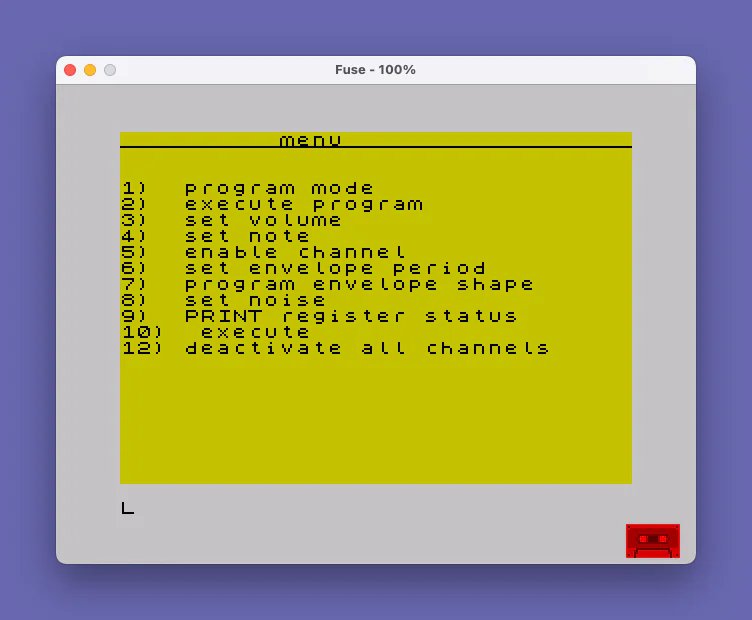
The program is organized as a main menu loop with subroutines dispatched at multiples of 500. Line 200–400 presents the menu and reads a selection c, then line 420 routes execution via GO SUB c*500. Each subroutine occupies a block starting at 500, 1000, 1500, 2000, 2500, 3000, 3500, 4000, 4500, 5000, and 6000. Line 12 carries a REM warning that the program should be entered at line 195 rather than run from line 10, because lines 20–190 initialize state that must be set up before the main menu.
Data Model
Two arrays hold all program state:
a(15)— the current “scratch” register set. Elements 1–14 map to AY registers 0–13; element 15 holds the step duration (PAUSE value).p(100,15)— the 100-step sequence store. Each row is a snapshot ofa()saved by the Program Mode subroutine.
The mapping between a() index and AY register is consistently SOUND register, a(register+1), so AY register 0 is a(1) and AY register 13 is a(14).
Menu Dispatch
The computed-GOSUB idiom at line 420 (GO SUB c*500) is an efficient and idiomatic way to dispatch a numeric menu without a chain of IF statements. The validity check at line 410 rejects values outside 1–12, though option 11 has no menu label and its subroutine at 5500 does not exist — selecting 11 would cause an error. Option 10 (execute) and option 9 (print register status) share subroutines at 5000 and 4500 respectively, with 4500 also called internally from the Program Mode subroutine at line 540.
AY Register Access via SOUND
All register writes use the TS2068 SOUND keyword. The execute subroutines (both 5000 and 1000) write registers in a deliberate order — higher-numbered registers first (7–13), then lower (0–6) — which ensures the envelope and mixer configuration is set before the tone/amplitude registers are written, following good AY programming practice.
Channel Enable Logic
The enable subroutine at line 2500 accumulates a bitmask in en by summing user-selected values (1, 2, 4 for tone A/B/C; 8, 16, 32 for noise A/B/C). It then stores 63-en into a(8), which corresponds to AY register 7 (the mixer). This correctly inverts the sense of the bits, since in the AY chip a low bit enables a channel.
Subroutine Summary
| Line | Menu Option | Function |
|---|---|---|
500 | 1 | Program mode — save current a() to p(ps,) |
1000 | 2 | Execute stored program sequence with PAUSE timing |
1500 | 3 | Set amplitude (volume) for channels A, B, or C |
2000 | 4 | Set note — coarse or fine frequency for A, B, or C |
2500 | 5 | Enable channels — build mixer byte via bitmask |
3000 | 6 | Set envelope period (coarse and fine) |
3500 | 7 | Set envelope shape with waveform selection |
4000 | 8 | Set noise frequency (0–31) |
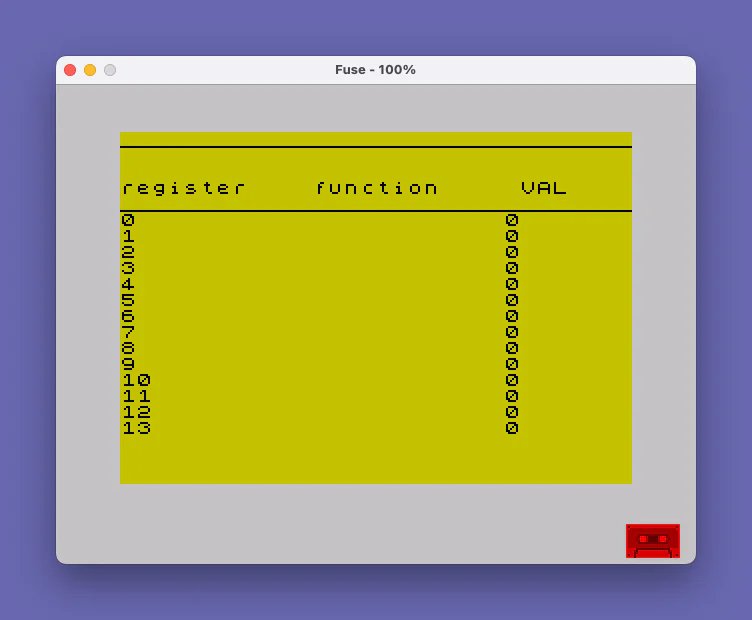
4500 | 9 | Print all 14 register values (also called internally) |
5000 | 10 | Execute current a() immediately via SOUND |
6000 | 12 | Deactivate all channels; optionally clear a() |
Notable Techniques
- The
OVER 1at line195sets XOR-mode printing, carried into the underline decoration. It is reset withOVER 0at line2030inside the note subroutine. - The step-copy feature in the Program Mode subroutine (lines
700–750) allows a stored step to be loaded back intoa()for editing before re-saving, enabling incremental composition. FLASH 1is used in the immediate execute (5000) and deactivate (6000) subroutines as a visual cue that registers are being written, then cleared withFLASH 0.- The envelope shape screen at lines
3560–3580renders ASCII art approximations of all AY waveform shapes (saw, ramp, triangle, etc.) directly in BASIC PRINT statements.
Bugs and Anomalies
- Menu option 11 has no label and its target subroutine at
5500does not exist; selecting 11 will cause aGO SUBerror. - Line
6060usesDIM a(14)when clearing memory, but the working array is declared asa(15)(element 15 stores the duration). This leaves element 15 undefined after a clear, though subsequent use resets it via INPUT. - The frequency register mapping in the note subroutine uses
a(n+v*2-1)wherenis 0 (fine) or 1 (coarse) andvis 1–3, yielding indices 0–5 fora(). Index 0 is out-of-bounds for a 1-based array, so selecting fine tuning for channel A (n=0, v=1) attempts to writea(0), which will cause an error. - Line
410on an out-of-range entry sends the user back toGO TO 310(the “9) PRINT register status” PRINT line), not to the menu prompt — a minor UI inconsistency. - The typo “dissabling” at line
6007is a cosmetic spelling error only.
Image Gallery
Source Code
   10 REM /_sound pro\\_     by   #MILL RESEARCH#
   12 REM goto 195, dont run
   20 LET ps=1
   30 LET ch=0
  170 DIM a(15)
  180 LET n=0
  185 LET l$="________________________________"
  190 DIM p(100,15)
  195 OVER 1
  200 CLS
  210 PRINT TAB (10);"menu"
  215 PRINT AT 0,0;l$
  220 PRINT : PRINT
  230 PRINT "1)  program mode"
  240 PRINT "2)  execute program"
  250 PRINT "3)  set volume"
  260 PRINT "4)  set note"
  270 PRINT "5)  enable channel"
  280 PRINT "6)  set envelope period"
  290 PRINT "7)  program envelope shape"
  300 PRINT "8)  set noise"
  310 PRINT "9)  PRINT register status"
  320 PRINT "10)  execute"
  390 PRINT "12) deactivate all channels"
  400 INPUT c
  410 IF c>12 OR c<1 THEN GO TO 310
  420 GO SUB c*500
  499 GO TO 200
  500 REM program
  510 CLS
  520 PRINT TAB 10;">Program mode<"
  530 PRINT AT 0,0;l$
  540 GO SUB 4500
  550 INPUT "is this sound ready to be saved?";x$
  560 IF x$="n" THEN GO TO 700
  570 INPUT "enter duration";a(15)
  575 PRINT ''"program step: ";ps
  580 INPUT "is this the right step?";x$
  590 IF x$="n" THEN INPUT "type step#";ps
  595 FOR i=1 TO 15
  600 LET p(ps,i)=a(i)
  610 NEXT i
  620 LET ps=ps+1
  690 RETURN
  700 INPUT "do you wish to copy another step?";x$
  710 IF x$="n" THEN RETURN
  715 INPUT "enter step to copy";n
  720 FOR i=1 TO 15
  730 LET a(i)=p(n,i)
  740 NEXT i
  750 GO TO 550
 1000 REM execprog
 1010 CLS : PRINT TAB (10);"program execution"
 1020 PRINT AT 0,0;l$
 1030 INPUT "enter steps to start and finish at";ss
 1040 INPUT fs
 1045 INPUT "do you wish to print";x$
 1050 FOR i=ss TO fs
 1052 CLS
 1055 PRINT l$;"step ";i'
 1060 FOR j=7 TO 13
 1070 IF x$="y" THEN PRINT j,p(i,(j+1))
 1080 SOUND j,p(i,(j+1))
 1090 NEXT j
 1100 FOR k=0 TO 6
 1110 IF x$="y" THEN PRINT k,p(i,(k+1))
 1120 SOUND k,p(i,(k+1))
 1130 NEXT k
 1135 PAUSE p(i,15)
 1140 FOR l=0 TO 13
 1150 SOUND l,0
 1160 NEXT l
 1170 NEXT i
 1190 RETURN
 1500 REM amplitude
 1510 CLS
 1520 PRINT "type voice to set volume for"
 1530 PRINT
 1540 PRINT "1) A, 2) B ,3) C"
 1550 INPUT V
 1560 INPUT "enter volume (0-15, 16 enables  envelope)";a(v+8)
 1570 INPUT "enter another?";x$
 1580 IF x$="y" THEN GO TO 1500
 1590 RETURN
 2000 REM note
 2005 OVER 1
 2010 CLS
 2020 PRINT TAB 12;"Tune"
 2025 PRINT AT 0,12;"____"
 2030 OVER 0
 2050 PRINT ''"coarse (0-15)","fine(0-255)"
 2060 PRINT
 2070 PRINT "channel A=1, B=2, C=3"
 2080 INPUT "0)fine or 1) coarse(2 TO RETURN )";n
 2085 IF n<>1 AND n<>0 THEN RETURN
 2090 INPUT "type channel";v
 2100 INPUT "enter tone";tn
 2120 LET a(n+v*2-1)=tn
 2150 GO TO 2080
 2500 REM enable
 2505 LET en=0
 2510 CLS
 2520 PRINT "type each number beside channel to enable and enter 0 to stop"
 2530 PRINT
 2540 PRINT "tone  A=1  B=2  C=4"''"Noise  A=8  B=16  C=32"
 2550 FOR i=1 TO 6
 2560 INPUT n: LET en=en+n
 2565 IF n=0 THEN GO TO 2580
 2570 NEXT i
 2580 LET a(8)=63-en
 2590 RETURN
 3000 REM envelope period
 3010 CLS
 3020 PRINT TAB 10;"envelope period"
 3030 PRINT AT 0,0;l$
 3040 PRINT : PRINT
 3050 PRINT "coarse and fine (0-255)"
 3060 INPUT "1) fine 2) coarse 3)menu";n
 3070 IF n>2 THEN RETURN
 3080 INPUT "period value";pr
 3090 LET a(11+n)=pr
 3095 GO TO 3060
 3500 REM envelope shape
 3505 LET ef=0
 3510 CLS : PRINT TAB 10;"envelope shape"
 3520 PRINT AT 0,0;l$
 3530 PRINT : PRINT
 3540 PRINT "Add to enable: 1) hold"'"2) alternate 4) attack 8) continue"
 3550 PRINT 'TAB 12;"wave forms"
 3560 PRINT '"0 \\________","4 /________"'"8 \\_\\_\\_\\_\\_\\_","9 \\________"
 3570 PRINT "10 \\/\\/\\/\\/\\/","11 \\-----"'"12 /_/_/_/_/_/","13 /-------"
 3580 PRINT "14 /\\/\\/\\/\\/\\","15 /________"
 3590 PRINT '"0) for menu"
 3600 INPUT "enter wave form (0-15)";w
 3605 FOR i=1 TO 4
 3610 INPUT "enter any above effects (1-8)   (0 to quit)";n
 3620 IF n>8 OR n<1 THEN GO TO 3650
 3630 LET ef=ef+n
 3640 NEXT i
 3650 LET a(14)=w+ef
 3690 RETURN
 4000 REM noise
 4005 CLS
 4010 PRINT TAB 14;"noise"
 4020 PRINT AT 0,0;l$
 4030 PRINT ''"noise frequency (0-31)"''"higher value= lower frequency"
 4040 INPUT "noise rate";n
 4050 IF n>31 OR n<0 THEN GO TO 4040
 4060 LET a(7)=n
 4090 RETURN
 4500 REM status
 4502 CLS
 4505 OVER 0
 4510 PRINT TAB 9;"register status"
 4515 PRINT AT 0,0;l$
 4520 PRINT ''"register    function     VAL "
 4530 PRINT AT 4,0;l$
 4540 FOR i=0 TO 13
 4550 PRINT i;TAB 24;a(i+1)
 4560 NEXT i
 4570 PAUSE 1000
 4590 RETURN
 5000 REM execute
 5010 FOR i=7 TO 13
 5015 REM IF a(i+1)=0 THEN NEXT i
 5017 IF i=14 THEN GO TO 5040
 5020 SOUND i,a(i+1)
 5025 PRINT i,a(i+1)
 5030 NEXT i
 5040 FLASH 1
 5050 REM v
 5060 FOR i=0 TO 6
 5075 IF i=7 THEN GO TO 5095
 5080 SOUND i,a(i+1)
 5082 PRINT i,a(i+1)
 5085 PAUSE 100
 5090 NEXT i
 5095 FLASH 0
 5099 RETURN
 6000 REM deactivate
 6002 CLS
 6005 FLASH 1
 6007 PRINT "dissabling channels"
 6010 FOR i=0 TO 13
 6020 SOUND i,0
 6030 NEXT i
 6040 FLASH 0
 6050 INPUT "erase memory?";x$
 6060 IF x$="y" THEN DIM a(14)
 6070 RETURN
 9998 SAVE "Sound Pro": BEEP .4,15: GO TO 1
Note: Type-in program listings on this website use ZMAKEBAS notation for graphics characters.